
惯性聚合 高效追踪和阅读你感兴趣的博客、新闻、科技资讯
阅读原文 在惯性聚合中打开

推荐订阅源

MongoDB | Blog
MongoDB | Blog
B
Blog RSS Feed
MyScale Blog
MyScale Blog
M
MIT News - Artificial intelligence
H
Hackread – Cybersecurity News, Data Breaches, AI and More
J
Java Code Geeks
U
Unit 42
Blog — PlanetScale
Blog — PlanetScale
L
LangChain Blog
C
Check Point Blog
WordPress大学
WordPress大学
Last Week in AI
Last Week in AI
人人都是产品经理
人人都是产品经理
T
Tailwind CSS Blog
Vercel News
Vercel News
腾讯CDC
GbyAI
GbyAI
有赞技术团队
有赞技术团队
S
SegmentFault 最新的问题
H
Help Net Security
博客园 - 三生石上(FineUI控件)
D
DataBreaches.Net
Microsoft Security Blog
小众软件
小众软件

博客园 - 飞天舞者

微服务学习之旅 - 构建一个helloworld的Micro service. Windows Azure上的大数据服务: HDInsight的介绍 介绍Windows Azure HDInsight服务的Hadoop Storm的视频 Windows Azure Service Bus Topics实现系统松散耦合 Windows Azure Service Bus Notification Hub推送通知 使用Microsoft Azure云平台中的Service Bus 中继 Intanet环境下的WCF服务。 SharePoint 2013的REST编程基础 什么是SharePoint? Windows的SEH机理简要介绍 如何调试由于heap corruption导致的程序崩溃的简单示例 利用定制行为扩展WCF之-利用MessageInsepctor behaviourExtension扩展WCF行为(自定义消息头) (转载)如何在WCF实现impersonnate客户端的功能 关于COM的Reg-Free(免注册)技术简介及实例讲解。 COM中的error handling机制及示例(ISupportEfforInfo,ICreateErrorInfo,IErrorInfo) 转载推荐:COM中不同字符类型相互转换,例如char*, BSTR, CString等等 一种强行指定dll assembly读取其相应*.dll.config配置文件的方法(又名:如何创建.net 的DCOM) [软件调试学习笔记]防止栈缓冲区溢出的基于Cookie的安全检查机制 [软件调试学习笔记]WinDbg演示IA-32 CPU下的Windows 分页机制下的地址转换过程 Debug入门之旅-StackoverFlow exception的调试
如何实现DCOM或者COM+的远程调用
飞天舞者 · 2009-06-04 · via 博客园 - 飞天舞者

      当DCOM/COM+在本机调用时,往往问题比较简单。如果需要远程调用,往往会发生很多问题,比如80070005(Acess is denied),80040155( Interface not registered)等等问题,因为涉及到跨机器,所以会涉及到权限,注册表配置等等的问题。同时,不同类型的客户端(指C++类型等编译型客户,或者是vbscript等解释型客户)远程调用DCOM 时,客户端所要求的配置不尽相同。本文介绍的正对编译型客户远程调用DCOM的示例。

      首先,在客户端调用远程调用的时候,需要在客户端进行的配置有如下几种选择:

      选择1. 通过nmake -f <dcomservice>.mk生成相应的proxy dll,然后将该proxy dll(一般为<dcomservice>ps.dll)部署在客户段,并通过regsvr32 <dcomservice>ps.dll进行注册,即可实现在客户端进行远程调用
      选择2. 将<dcomservice>.tlb文件发布到客户端,然后运行regtlib (regtlibv12) <dcomservice>.tlb进行注册,也可实现在客户端的远程调用。

下面给出客户端调用代码(VC6.0):
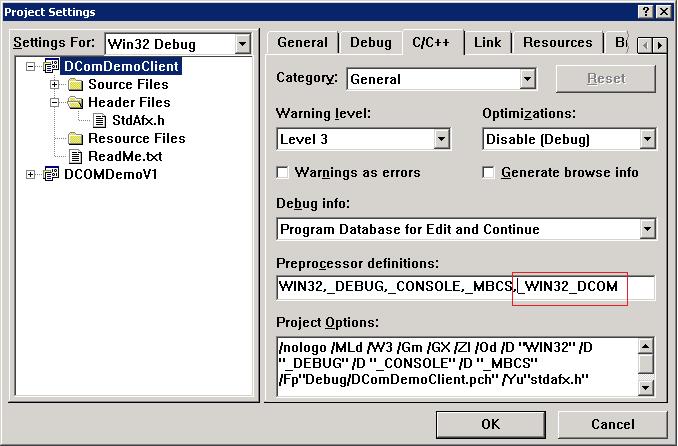
注意:如果调用CoCreateInstanceEx API,必须开启一个_WIN32_DCOM Switch.我们可以在stdafx.h里面加入

#define _WIN32_DCOM  

或者在preprocess里面加入该值,如下所示:
// DComServiceClient.cpp : Defines the entry point for the console application.
//

#include 
"stdafx.h"
#include 
"..\DComDemoV1.h"
#include 
"..\DComDemoV1_i.c"
#include 
<atlbase.h>
#include 
<comdef.h>
#include 
<comutil.h>int main(int argc, char* argv[])
{
    
/* CreateInstance Locally via SmartPointer;
    CComPtr<ISimpleClass> spSimpleClass;
    CoInitialize(NULL);
    HRESULT hr;
    hr=spSimpleClass.CoCreateInstance(__uuidof(SimpleClass));
    if(FAILED(hr))  {printf("Error code:%x",hr);return hr;}

    BSTR result;
    hr=spSimpleClass->HelloWorld(&result);
    if(FAILED(hr))  {printf("Error code:%x",hr);return hr;}

    char* p=::_com_util::ConvertBSTRToString(result);
    printf("%s\n",p);

    ::SysFreeString(result);
    CoUninitialize();
    return 0;

*/
//====================================================
    /*CreateInstance locally via primitive pointer;
    ISimpleClass* pSimpleClass;
    CoInitialize(NULL);
    HRESULT hr;
    hr=CoCreateInstance(CLSID_SimpleClass,0,CLSCTX_LOCAL_SERVER,IID_ISimpleClass,(void**)&pSimpleClass);
    if(FAILED(hr)) return hr;

    BSTR result;
    hr=pSimpleClass->HelloWorld(&result);
    char* p=::_com_util::ConvertBSTRToString(result);
    printf("%s\n",p);

    pSimpleClass->Release();
    CoUninitialize();
    return 0;

*///call remotely
    
    HRESULT hr;
    ISimpleClass 
*pI=NULL;

    
    COSERVERINFO sin,

*sinptr;

    MULTI_QI mqi;
    mqi.pIID

=&IID_ISimpleClass;
    mqi.hr
=0;
    mqi.pItf
=0;

    COAUTHINFO    authInfo;
    authInfo.dwAuthnSvc 

= RPC_C_AUTHN_WINNT;//RPC_C_AUTHN_NONE;
    
    authInfo.dwAuthzSvc 
= RPC_C_AUTHZ_NONE;
    authInfo.pwszServerPrincName 
= NULL;
    authInfo.dwAuthnLevel 
= RPC_C_AUTHN_LEVEL_PKT ;//RPC_C_AUTHN_LEVEL_NONE;
    
    authInfo.dwImpersonationLevel 
=RPC_C_IMP_LEVEL_IMPERSONATE;// RPC_C_IMP_LEVEL_ANONYMOUS;
    
    authInfo.pAuthIdentityData 
= NULL;
    authInfo.dwCapabilities 
= NULL;
    

    sin.dwReserved1

=0;
    sin.dwReserved2
=0;
    sin.pwszName
=L"azalea-desk";//define the remote server name here
    sin.pAuthInfo=&authInfo;
    sinptr
=&sin;
    
    hr
=CoInitialize(0);
    
if(SUCCEEDED(hr))
    {
        
        hr
=CoCreateInstanceEx(CLSID_SimpleClass,
                            NULL,
                            CLSCTX_REMOTE_SERVER,
                            sinptr,
                            
1,
                            
&mqi
                            );                            
    
if(SUCCEEDED(hr))
        {
        pI
=(ISimpleClass*)mqi.pItf;
        printf(
"Dcom server connect\n");
        BSTR bsReturnValue;
    
        pI
->HelloWorld(&bsReturnValue);
        pI
->Release();
        
char* pValue=_com_util::ConvertBSTRToString(bsReturnValue);
        printf(
"%s\n",pValue);    
        delete pValue;
    
        }
        
else
        {
            printf(
"CreateInstance Error!Error Code:%x\n",hr);
        }
    }
    
else
    {
        printf(
"CoInitialize Error!Error Code:%x\n",hr);
    }

    CoUninitialize();

return 0;
}

该DCOM Service只定义了一个HelloWorld()返回字符串的method.客户端调用成功后的screenshot如下:

点击此处下载源代码