惯性聚合 高效追踪和阅读你感兴趣的博客、新闻、科技资讯
阅读原文 在惯性聚合中打开

推荐订阅源

G
GRAHAM CLULEY
V
V2EX
WordPress大学
WordPress大学
博客园 - Franky
Last Week in AI
Last Week in AI
博客园 - 司徒正美
有赞技术团队
有赞技术团队
freeCodeCamp Programming Tutorials: Python, JavaScript, Git & More
博客园 - 【当耐特】
V
Visual Studio Blog
C
CERT Recently Published Vulnerability Notes
OSCHINA 社区最新新闻
OSCHINA 社区最新新闻
cs.CL updates on arXiv.org
Jina AI
Jina AI
Attack and Defense Labs
腾讯CDC
The Hacker News
The Hacker News
Hugging Face - Blog
Hugging Face - Blog
K
KPMG report finds enterprise disconnect between AI and its ROI | CIO
J
Java Code Geeks
人人都是产品经理
人人都是产品经理
阮一峰的网络日志
阮一峰的网络日志
T
Tailwind CSS Blog
S
SegmentFault 最新的问题
大猫的无限游戏
大猫的无限游戏
小众软件
小众软件
A
Arctic Wolf
量子位
博客园 - 聂微东
奇客Solidot–传递最新科技情报
奇客Solidot–传递最新科技情报
N
News and Events Feed by Topic
雷峰网
雷峰网
博客园_首页
Google Online Security Blog
Spread Privacy
Spread Privacy
罗磊的独立博客
H
Hacker News: Front Page
让小产品的独立变现更简单 - ezindie.com
月光博客
月光博客
TaoSecurity Blog
TaoSecurity Blog
Exploit-DB.com RSS Feed
博客园 - 三生石上(FineUI控件)
宝玉的分享
宝玉的分享
IT之家
IT之家
The Cloudflare Blog
爱范儿
爱范儿
博客园 - 叶小钗
Threat Intelligence Blog | Flashpoint
Apple Machine Learning Research
酷 壳 – CoolShell
酷 壳 – CoolShell

阁子

小工具(三) 相机小述 四元数与旋转矩阵 小工具(二) 私有办公服务搭建 小工具(一) 图床搭建 Git基本用法 Telegram接管聊天消息 Hashcat密码破解 Docker博客环境封装及自动化部署 小聊乐理 LXD搭设服务器 Time Machine 不满就折腾小记 GStreamer笔记五: Media Formats and Pad Capabilities GSreamer笔记四: GUI Toolkit Integration GStreamer笔记三: Time Management GStreamer笔记二: Dynamic Pipeline
GStreamer笔记一: GStreamer Concepts
本文作者: dfine · 2017-12-01 · via 阁子

发表于 | 分类于 TX1入坑 | 阅读次数

笔记主要参照GStreamer官方tutorial,之前的一篇文章里最后一个例子写的是一个通过uri自动建立Pipeline的代码。这里主要内容是关于实例化每个元素并连接起来来手动建立Pipeline。

手动建立Pipeline

基本代码如下:

1

2

3

4

5

6

7

8

9

10

11

12

13

14

15

16

17

18

19

20

21

22

23

24

25

26

27

28

29

30

31

32

33

34

35

36

37

38

39

40

41

42

43

44

45

46

47

48

49

50

51

52

53

54

55

56

57

58

59

60

61

62

63

64

65

66

67

68

69

70

71

72

73

74

75

76

#include <gst/gst.h>

int main(int argc, char *argv[]) {

GstElement *pipeline, *source, *sink;

GstBus *bus;

GstMessage *msg;

GstStateChangeReturn ret;

/* Initialize GStreamer */

gst_init (&argc, &argv);

/* Create the elements */

source = gst_element_factory_make ("videotestsrc", "source");

sink = gst_element_factory_make ("autovideosink", "sink");

/* Create the empty pipeline */

pipeline = gst_pipeline_new ("test-pipeline");

if (!pipeline || !source || !sink) {

g_printerr ("Not all elements could be created.\n");

return -1;

}

/* Build the pipeline */

gst_bin_add_many (GST_BIN (pipeline), source, sink, NULL);

if (gst_element_link (source, sink) != TRUE) {

g_printerr ("Elements could not be linked.\n");

gst_object_unref (pipeline);

return -1;

}

/* Modify the source's properties */

g_object_set (source, "pattern", 0, NULL);

/* Start playing */

ret = gst_element_set_state (pipeline, GST_STATE_PLAYING);

if (ret == GST_STATE_CHANGE_FAILURE) {

g_printerr ("Unable to set the pipeline to the playing state.\n");

gst_object_unref (pipeline);

return -1;

}

/* Wait until error or EOS */

bus = gst_element_get_bus (pipeline);

msg = gst_bus_timed_pop_filtered (bus, GST_CLOCK_TIME_NONE, GST_MESSAGE_ERROR | GST_MESSAGE_EOS);

/* Parse message */

if (msg != NULL) {

GError *err;

gchar *debug_info;

switch (GST_MESSAGE_TYPE (msg)) {

case GST_MESSAGE_ERROR:

gst_message_parse_error (msg, &err, &debug_info);

g_printerr ("Error received from element %s: %s\n", GST_OBJECT_NAME (msg->src), err->message);

g_printerr ("Debugging information: %s\n", debug_info ? debug_info : "none");

g_clear_error (&err);

g_free (debug_info);

break;

case GST_MESSAGE_EOS:

g_print ("End-Of-Stream reached.\n");

break;

default:

/* We should not reach here because we only asked for ERRORs and EOS */

g_printerr ("Unexpected message received.\n");

break;

}

gst_message_unref (msg);

}

/* Free resources */

gst_object_unref (bus);

gst_element_set_state (pipeline, GST_STATE_NULL);

gst_object_unref (pipeline);

return 0;

}

编译时候可以通过pkg-config命令查询所需要的头文件和库文件,关于pkg的方法前面已有叙述,地址在此

代码分析

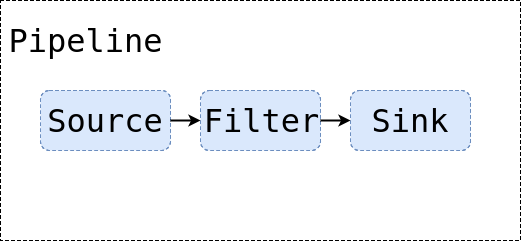
其基本流程图如下:


创建元素

在初始化GStreamer后,首先需要创建元素,如上所示代码中的:

1

2

3

/* Create the elements */

source = gst_element_factory_make ("videotestsrc", "source");

sink = gst_element_factory_make ("autovideosink", "sink");

使用gst_element_factory_make函数创建,该函数第一个参数是需要创建的元素类型,第二个参数是给这个元素实例的名称,如果为空,GStreamer会自动生成一个特有的名称。
此处创建了两个元素:videotestsrcautovideosink。其中,
videotestsrc属于source元素,通常用来产生或提供数据,经常用来创建一个测试用的模型。该元素在debug模式下或者教程中用得较多,实际应用中鲜有所闻。
autovideosink属于sink元素,用于接受或者消费数据,将其接收到的图像展示在窗口中等。程序可以有多个video sink,这通常取决于操作系统。autovideosink会自动选择并实例化最好的一个,所以不用担心实现细节,代码对于平台是比较独立的。

创建管道

创建了Element后则需要创建Pipeline,如上所示代码中的:

1

2

/* Create the empty pipeline */

pipeline = gst_pipeline_new ("test-pipeline");

所有元素在使用前必须包含进一个Pipeline,因为需要关心其时钟和Message功能。通常使用gst_pipeline_new创建管道。

1

2

3

4

5

6

7

/* Build the pipeline */

gst_bin_add_many (GST_BIN (pipeline), source, sink, NULL);

if (gst_element_link (source, sink) != TRUE) {

g_printerr ("Elements could not be linked.\n");

gst_object_unref (pipeline);

return -1;

}

Pipeline也是一种bin,一种特殊的bin,是一种包含了其他元素的元素。因此所有对bin适用的方法对Pipeline也同样适用。这里通过gst_bin_add_many函数添加多个元素到Pipeline,该函数接受多个元素,并添加到Pipeline中,以NULL结束。单个元素添加可使用gst_bin_add函数。
然后就需要将这些元素连接起来,因为虽然添加进了管道,但只是说明了管道中元素的位置,并没有将各个元素连接起来,数据无法流动。这里通过gst_element_link将各个元素连接起来,该函数第一个参数是源元素,第二个参数是链接的目标元素,连接必须遵照数据流动方向建立。
只有在同一个bin中的元素才能连接在一起,所以在连接之前必须先将其添加进Pipeline中。

属性操作

如上代码中修改source的属性中的一段:

1

2

/* Modify the source's properties */

g_object_set (source, "pattern", 0, NULL);

该行代码改变了videotestsrc元素的pattern属性,控制了测试视频元素的输出类型。
绝大多数GStreamer元素都可以自定义其属性:可以通过修改名称属性来改变元素行为(可写属性),或者通过查询来获取元素内部状态(可读属性)。
通常使用g_object_get函数获取属性,通过g_objece_set函数设置属性。
g_object_set函数接受一个以NULL结尾的属性名-属性值列表,所以可以一次性改变元素的属性。
Gstreamer元素都是一种特殊的GObject(GLib对象系统,提供属性设备的实例),所以属性处理方法都有一个带g_的前缀。
所有元素的可用属性名和属性值可以通过gst-inspect工具获取。

错误检测

剩余代码则是进行错误检测以增加程序的鲁棒性。如:

1

2

3

4

5

6

7

/* Start playing */

ret = gst_element_set_state (pipeline, GST_STATE_PLAYING);

if (ret == GST_STATE_CHANGE_FAILURE) {

g_printerr ("Unable to set the pipeline to the playing state.\n");

gst_object_unref (pipeline);

return -1;

}

在播放时候通过gst_element_set_state函数返回值来检测错误。
再如:

1

2

3

4

5

6

7

8

9

10

11

12

13

14

15

16

17

18

19

20

21

22

23

24

25

26

27

/* Wait until error or EOS */

bus = gst_element_get_bus (pipeline);

msg = gst_bus_timed_pop_filtered (bus, GST_CLOCK_TIME_NONE, GST_MESSAGE_ERROR | GST_MESSAGE_EOS);

/* Parse message */

if (msg != NULL) {

GError *err;

gchar *debug_info;

switch (GST_MESSAGE_TYPE (msg)) {

case GST_MESSAGE_ERROR:

gst_message_parse_error (msg, &err, &debug_info);

g_printerr ("Error received from element %s: %s\n", GST_OBJECT_NAME (msg->src), err->message);

g_printerr ("Debugging information: %s\n", debug_info ? debug_info : "none");

g_clear_error (&err);

g_free (debug_info);

break;

case GST_MESSAGE_EOS:

g_print ("End-Of-Stream reached.\n");

break;

default:

/* We should not reach here because we only asked for ERRORs and EOS */

g_printerr ("Unexpected message received.\n");

break;

}

gst_message_unref (msg);

}

其中,gst_bus_timed_pop_filtered函数等待执行结束并返回一个GstMessage。此处该函数在遇到错误或者到EOS状态时会返回,所以需要检测是什么原因导致函数返回的,因此通过下面的if语句对msg进行判断。
GstMessage是一个非常通用的结构,可以提供几乎任何类型的信息。而且,GStreamer为每种消息提供了一系列的解析函数。
通过使用宏定义函数GST_MESSAGE_TYPE可以知道Message包含的错误,然后通过gst_message_parse_error函数返回一个GLib Error的error结构体和一个字符串用于调试。

GStreamer总线

GStreamer总线(bus)是一个简单的系统,负责将由元素生成的GstMessages传递给应用程序的对象,以及应用程序线程。实际的媒体流是在另一个线程中完成的,而不是应用程序。
Message可以通过gst_bus_timed_pop_filtered()函数和其兄弟姐妹同步获取,也可以通过signal异步获取。应用程序应该始终关注总线,去获取错误以及其他回放相关的问题。