









RemoteFX vGPU 曾经是一个非常先进的GPU虚拟化和远程体验增强工具。然而在Windows 1709版本后,RemoteFX 就已经成了一个“abandonware”,由于过于老旧(最早面世于2010),已经很难和现在的新系统组件良好兼容。在 Windows 10 1809 版本里,他们砍掉了通过 GUI 新增 RemoteFX vGPU 的路径,并提示了用户该技术不再受到支持。在之后微软正式宣布了 RemoteFX 的退位,并表示新的接替技术正在开发中,推荐用户使用 Discrete Device Assignment 即分离设备指定方案替代。
然而问题是:
而我们熟悉的 RemoteFX 虽然有诸多缺陷,可日常使用还是很方便(特别是高分屏下流畅度会比纯CPU渲染高很多,并且节约了大量的CPU资源可供利用),所以就有了以下这些 how-to:
1) 检查你的宿主机上的GPU(得兼容才行)
打开管理员权限的Powershell,输入
Get-VMRemoteFXPhysicalVideoAdapter输出大概如下:
Id                          : pci#ven_8086&dev_5917&subsys_00281414&rev_07#3&11583659&0&10
Name                        : Intel(R) UHD Graphics 620
GPUID                       : 32902_22807_2626580_7
TotalVideoMemory            : 8684789760
AvailableVideoMemory        : 8684789760
DedicatedSystemMemory       : 0
DedicatedVideoMemory        : 134217728
SharedSystemMemory          : 8550572032
Enabled                     : True
CompatibleForVirtualization : True
DirectXVersion              : 12.1
PixelShaderVersion          : 5.0
DriverProvider              : Intel Corporation
DriverDate                  : 2019-01-09 08:00:00Z
DriverInstalledDate         : 2019-01-09 08:00:00Z
DriverVersion               : 25.20.100.6519
DriverModelVersion          : 2.5
CimSession                  : CimSession: .
ComputerName                : DESKTOP-AA
IsDeleted                   : False

Id                          : pci#ven_10de&dev_1c20&subsys_00241414&rev_a1#4&3b87fca8&0&00e4
Name                        : NVIDIA GeForce GTX 1060
GPUID                       : 4318_7200_2364436_161
TotalVideoMemory            : 0
AvailableVideoMemory        : 0
DedicatedSystemMemory       : 0
DedicatedVideoMemory        : 6348079104
SharedSystemMemory          : 8550572032
Enabled                     : False
CompatibleForVirtualization : False
DirectXVersion              : 12.1
PixelShaderVersion          : 5.0
DriverProvider              : NVIDIA
DriverDate                  : 2019-02-20 08:00:00Z
DriverInstalledDate         : 2019-02-20 08:00:00Z
DriverVersion               : 25.21.14.1917
DriverModelVersion          : 2.5
CimSession                  : CimSession: .
ComputerName                : DESKTOP-AA
IsDeleted                   : False
注意看Enabled 和 CompatibleForVirtualization 两项都得是 True 才能用。否则是不兼容的。以我的机器为例就是 Intel HD620 兼容,而 GTX 1060 不兼容。
2) 指定启用某个显卡作为vGPU
同样是在 Powershell 里
Enable-VMRemoteFXPhysicalVideoAdapter 你的GPU名,在上面的汇报里有Name项3) 将 RemoteFX vGPU 加到你指定的虚拟机
Add-VMRemoteFx3dVideoAdapter -VMName 虚拟机名4) 现在就可以在虚拟机的设置里设置 vGPU 的属性了,如图:
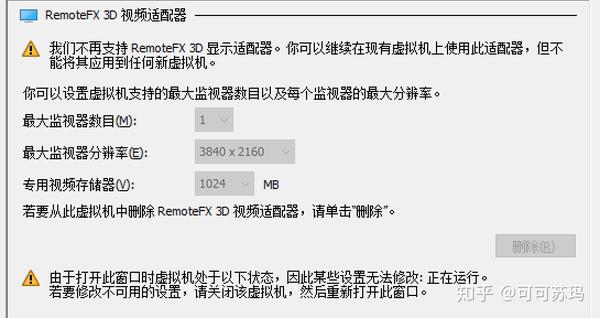
在 Hyper V 设置中将“增强会话模式”设置为默认不使用即可。增强会话模式现在和 RemoteFX 莫名其妙的不兼容了,让用户蛋疼又无可奈何。但好在你可以关掉该模式,使用比较传统的显示输出。我的显卡可以在客户机里设置到4K输出+200%放大,这样就和增强会话模式相差不大了。但是声音仍然无法输出,这是体验下降最大的地方。
原贴:https://zhuanlan.zhihu.com/p/59086305
此内容由惯性聚合(RSS阅读器)自动聚合整理,仅供阅读参考。 原文来自 — 版权归原作者所有。