


惯性聚合 高效追踪和阅读你感兴趣的博客、新闻、科技资讯
阅读原文 在惯性聚合中打开

推荐订阅源

D
Docker
Microsoft Azure Blog
云风的 BLOG
云风的 BLOG
cs.AI updates on arXiv.org
L
LangChain Blog
P
Privacy & Cybersecurity Law Blog
Hugging Face - Blog
Hugging Face - Blog
C
CXSECURITY Database RSS Feed - CXSecurity.com
大猫的无限游戏
大猫的无限游戏
Cyberwarzone
Cyberwarzone
The Register - Security
Stack Overflow Blog
Stack Overflow Blog
A
Arctic Wolf
cs.CL updates on arXiv.org
T
Threatpost
The GitHub Blog
The GitHub Blog
P
Privacy International News Feed
WordPress大学
WordPress大学
U
Unit 42
S
Securelist
T
The Exploit Database - CXSecurity.com
C
Cyber Attacks, Cyber Crime and Cyber Security
P
Proofpoint News Feed
Latest news
Latest news
Hacker News: Ask HN
Hacker News: Ask HN
小众软件
小众软件
Know Your Adversary
Know Your Adversary
The Cloudflare Blog
V
Vulnerabilities – Threatpost
The Hacker News
The Hacker News
Scott Helme
Scott Helme
有赞技术团队
有赞技术团队
Security Latest
Security Latest
Google DeepMind News
Application and Cybersecurity Blog
Simon Willison's Weblog
博客园 - Franky
Y
Y Combinator Blog
博客园 - 叶小钗
Security Archives - TechRepublic
Google DeepMind News
N
Netflix TechBlog - Medium
S
Secure Thoughts
T
Threat Research - Cisco Blogs
aimingoo的专栏
aimingoo的专栏
S
SegmentFault 最新的问题
Microsoft Security Blog
K
KPMG report finds enterprise disconnect between AI and its ROI | CIO
博客园 - 司徒正美
M
MIT News - Artificial intelligence

博客园 - GIS小能

利用Simplify进行ArcGIS Server多面合并查询 关于Flex Ant的相关注意事项 Flex开发必知(1) ArcGIS Server 10 问题汇总 ArcGIS Server 10 许可文件 Ecp 基于flex及SVG技术打造交互式地图(数据篇) 将应用程序从Flex 3迁移至Flex 4(转载) ArcGIS 10 破解安装(desktop及ArcGIS Server 10) 基于Geoserver配置多图层地图以及利用uDig来进行样式配置 基于ArcGIS Server 10 在flex瓦片客户端叠加瓦片服务 胡说八道--mate flex 优化原则 flex与flash交互详解 flex调用WMS远程图片所产生安全错误 loder导致的安全沙箱的2122错误 flex一周精选(20100308) 解析MapBar兴趣点加载原理 Flex一周精选(20100301) 浅谈Image和Bitmap
ArcGIS KeyGen注册机,五步操作实现ArcGIS9.X与ArcGIS10全模块无时限破解(转载:我是一只牛)
GIS小能 · 2011-10-18 · via 博客园 - GIS小能

重要声明:本注册机收集于互连网.由ygdx1986推荐给xqiushi,并未测试与使用.若出现一切不良后果请自负。

友情提示:

1.License Server Administrator、ArcGIS Administrator是两个不同的东西;

2.这些操作基于官方原版,若XXX过的,请行恢复到官方原版;

3.对于ArcGIS Engine,用注册机最后一项server,选100,点右下角的”所有”。将内容复制存成.ecp文件,双击使用或者参考这里:ArcGIS 10 License最新全套内容

使用说明:

0、安装ArcGISDesktop10程序及许可设置LicenseManager程序(均可更新至sp1);

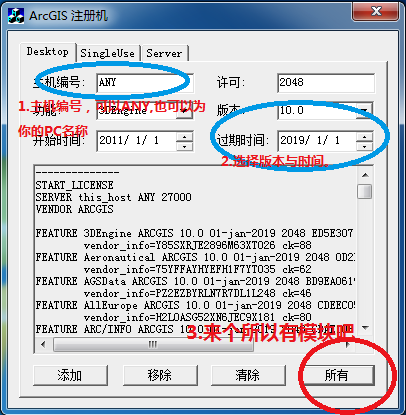
1打开注册机,注意:主机编号可以不改,选择好过期时间和版本号(与你所安装的版本一致);如图示:
image
补充说明:如果你只想授权几个功能就选择相应的功能按添加,每添加一个就增加一个功能的授权按移除可以移除上一个授权,按清除可清除所有已添加的授权,如果你想授权所有功能,按所有即可。
2生成了许可文件内容后,复制框内START_LICENSE到END_LICENSE之间的内容(PS:有些文章中说要全部复制,xqiushi认为只复制“START_LICENSE”与“END_LICENSE”之间的内容,未测试),新建一个文本文档,粘贴这些文字,另存文件为service.txt(没明白?点击下载ArcGIS 10桌面版service.txt);
3把生成的service.txt复制到License Manager的安装目录(默认为:C:\ProgramFiles\ArcGIS\License10.0\bin\)下,替换同名文件即可;
4开始”菜单打开License Server Administrator程序,点击启动\停止许可服务,再点击“停止”以停止服务,然后再点击“启动”以启动服务,
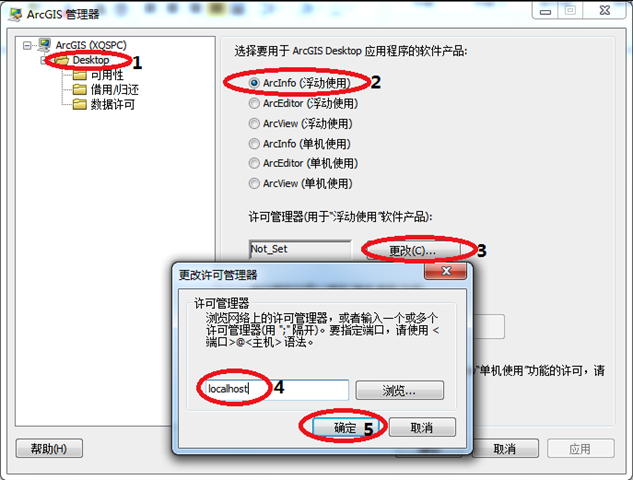
5打开ArcGIS Administrator,选择ArcInfo(浮动使用)将licensemanager改成localhost,如图片所示操作顺序。
image
就这么简单!

下载地址: ArcGIS注册机.rar