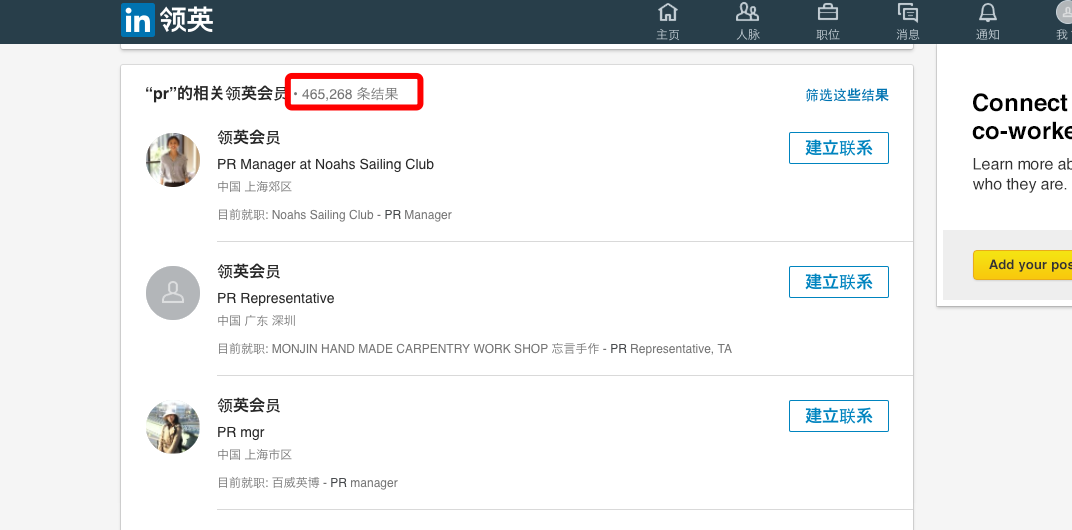
需求
朋友在国外留学,老板让完成一个任务: 登录LinkedIn后搜索pr关键词, 对结果做简单分析、筛选和分类,将目标信息手动摘录到Google Drive ,以便作进一步沟通,发展为client。朋友打电话抱怨说,工作量可怕,至少需要淹没一周的时间(从图中可以看到有465,276条匹配结果)。聊完,我觉得是个典型的信息采集工作,可以用爬虫完成
需求描述
我让朋友将手动操作写成伪代码,用if else写出操作逻辑,这样能避免反复沟通成本,最理想的情况是当面做演示,传送门发明之前只好作罢。
朋友之前有简单入门过编程,将任务表达得十分清晰
此处涉及隐私,操作文档就不放出了,是典型的网页信息采集任务(外加一些定制化的筛选和分类逻辑)
思路
最初想走捷径,直接调用api来取数据,在github里搜索一圈,试图找到好用LinkedIn api,逛了一圈,发现LinkedIn的库都是基于oauth2与LinkedIn通信(诸如python-linkedin),需要申请为开发者,操作挺繁琐,而且获得的数据也不够丰富
于是回退到用爬虫解决这个问题(网页所见即所得)
技术问题
初步尝试后,发现存在两个需要处理的问题
登录
要在LinkedIn的搜索前头的pr,需要先登录。
尽管我们通过在浏览器搜索pr,知道实际对应的url是:http://www.linkedin.com/search/results/index/?keywords=pr&origin=GLOBAL_SEARCH_HEADER 。但未登录会报404
简易的解决方案是模拟登陆,用requests的Session维持登录状态即可,文档见高级用法
如何模拟登录,还需需要分析下提交参数的,如果连分析都懒,google呀!这么常见的问题,赌五毛钱肯定有人遇到过!
果不其然:Logging in to LinkedIn with python requests sessions
于是我们我们便解决了登录问题(linkedin_spider.py):
 1
 2
 3
 4
 5
 6
 7
 8
 9
10
11
12
13
14
15
16
17
18
19
20
21
22
|
import requests
from bs4 import BeautifulSoup

client = requests.Session()

HOMEPAGE_URL = 'https://www.linkedin.com'
LOGIN_URL = 'https://www.linkedin.com/uas/login-submit'

html = client.get(HOMEPAGE_URL).content
soup = BeautifulSoup(html)
csrf = soup.find(id="loginCsrfParam-login")['value']

login_information = {
    'session_key':'username',
    'session_password':'password',
    'loginCsrfParam': csrf,
}

client.post(LOGIN_URL, data=login_information)
search_url = "http://www.linkedin.com/search/results/index/?keywords=pr&origin=GLOBAL_SEARCH_HEADER"
response = client.get('search_url')
print(response) # 200
|
ajax
我们查看页面内容(print(response.content))发现,搜索pr,linkedin的页面是通过ajax异步加载出的
我们运行js之后,才能拿到页面内容,我们可以使用phantomjs,这个问题我在之前爬京东时候记录过:用pyspider写的爬虫几例,pyspider集成了phantomjs
phantomjs实际上作为一个服务运行,你可以理解成一个管道,输入网页源码,输入解析完的对象
当然你也可以使用Selenium
策略
所以要完成我们的爬虫任务需要将以上两个问题的解决方案结合在一起,方法很多
- 直接使用Selenium驱动chrome(可能最简易)
- 在pyspider中模拟登陆(pyspider已经和phantomjs集成)
- 将phantomjs与我们前头的代码整合,phantomjs作为服务即可,原理可以看pyspider中相关源码,也可以看这个项目:PhantomjsFetcher
至于如何写入Google Drive ,这倒是个简易的任务,诸如你可以先将采集的信息存为CSV,然后导入Google Drive即可
或者使用相关库来操作Google Drive,诸如:googledrive/PyDrive
动手
最终我选择Selenium驱动chrome的方案(通过),重要的原因之一是,朋友的需求中有一点非这么做不可:需要使用chrome插件hunter来获取LinkedIn用户的邮箱(如果缺失的话)
google出来的Selenium资料基本是在window下的使用经验。在mac下的资料不错,踩的坑不少,记录一下
前头提到我们遇到两个问题:登陆和ajax,使用Selenium的话,这两个问题似乎都不存在,然后坑在后边
安装依赖
1
2
|
brew install chromedriver
pip install selenium #selenium==2.52.0
|
先跑起来
1
2
3
4
5
6
|
from selenium import webdriver
driver = webdriver.Chrome()
url = "https://www.zhihu.com"
driver.get(url)
print(driver.title)
driver.save_screenshot('/tmp/test.png') #截个图
|
很快我们就遇到问题。在默认情况下,每次的数据目录都是临时的,于是我们的浏览器每次都是崭新的,既没有插件,也没有任何历史记录,就算你登陆过LinkedIn,下次运行脚本也啥都没了
一番搜索,我们发现需要使用user-data-dir来指定用户数据目录,好让webdriver驱动的浏览器能和我们日常使用的一样
 1
 2
 3
 4
 5
 6
 7
 8
 9
10
11
12
13
|
#!/usr/bin/env python
# encoding: utf-8
from selenium import webdriver
options = webdriver.ChromeOptions()
options.add_argument("--user-data-dir=/Users/wwj/Library/Application Support/Google/Chrome"); # mac下 各种插件可用
driver = webdriver.Chrome(executable_path='/usr/local/bin/chromedriver',chrome_options=options)
#url = "https://www.linkedin.com/feed/" #在浏览器里登陆过
url = "https://www.linkedin.com/search/results/index/?keywords=pr&origin=GLOBAL_SEARCH_HEADER" #在浏览器里登陆过
driver.get(url)
#element = driver.find_element_by_xpath('')
driver.save_screenshot('/tmp/test.png') #等待时间
#data = element.text
#print(data)
|
我们又发现了一个问题,ajax的渲染
 1
 2
 3
 4
 5
 6
 7
 8
 9
10
11
12
13
14
15
16
17
18
|
#!/usr/bin/env python
# encoding: utf-8
from selenium import webdriver
from selenium.webdriver.support.ui import WebDriverWait
from selenium.webdriver.common.by import By
from selenium.webdriver.support import expected_conditions as EC
options = webdriver.ChromeOptions()
options.add_argument("--user-data-dir=/Users/wwj/Library/Application Support/Google/Chrome"); # mac下 各种插件可用
driver = webdriver.Chrome(executable_path='/usr/local/bin/chromedriver',chrome_options=options)
url = "https://www.linkedin.com/search/results/index/?keywords=pr&origin=GLOBAL_SEARCH_HEADER" #在浏览器里登陆过
driver.get(url)
#element = driver.find_element_by_xpath('')
#driver.implicitly_wait(10)
wait = WebDriverWait(driver, 10)
element = wait.until(EC.presence_of_element_located((By.CLASS_NAME,'search-results__title-and-total-wrapper')))#如果发现就继续往下走,所以这可以视为一种阻塞操作,文档不足,使用ipython探索,诸如By.CLASS_NAME
# 获取页面的数据 存入
driver.save_screenshot('/tmp/test.png')
driver.quit()
|
存储数据
开发的时候使用peewee存储,方便去重之类,之后导出为csv或是其他






