惯性聚合 高效追踪和阅读你感兴趣的博客、新闻、科技资讯
阅读原文 在惯性聚合中打开

推荐订阅源

C
Check Point Blog
罗磊的独立博客
博客园 - 叶小钗
Google DeepMind News
Hugging Face - Blog
Hugging Face - Blog
人人都是产品经理
人人都是产品经理
J
Java Code Geeks
WordPress大学
WordPress大学
大猫的无限游戏
大猫的无限游戏
Blog — PlanetScale
Blog — PlanetScale
F
Fortinet All Blogs
小众软件
小众软件
M
MIT News - Artificial intelligence
Cyber Security Advisories - MS-ISAC
酷 壳 – CoolShell
酷 壳 – CoolShell
The GitHub Blog
The GitHub Blog
A
About on SuperTechFans
Y
Y Combinator Blog
Recorded Future
Recorded Future
量子位
美团技术团队
S
Security @ Cisco Blogs
G
Google Developers Blog
Cyberwarzone
Cyberwarzone
C
Cybersecurity and Infrastructure Security Agency CISA
博客园 - 三生石上(FineUI控件)
博客园 - 司徒正美
D
Docker
S
Schneier on Security
T
Tor Project blog
阮一峰的网络日志
阮一峰的网络日志
T
Threatpost
P
Privacy & Cybersecurity Law Blog
C
Cisco Blogs
L
Lohrmann on Cybersecurity
NISL@THU
NISL@THU
Microsoft Azure Blog
博客园 - 聂微东
让小产品的独立变现更简单 - ezindie.com
T
The Exploit Database - CXSecurity.com
A
Arctic Wolf
I
Intezer
Latest news
Latest news
Martin Fowler
Martin Fowler
G
GRAHAM CLULEY
B
Blog
V
Vulnerabilities – Threatpost
The Register - Security
S
Securelist
T
Tenable Blog

夜行人

回家路上 第一期的直播演示项目 震动检测器 正能量 在线参观CodeLab Neverland 发布 CodeLab Adapter 3.3.1 DynamicTable 之 纸糊方向盘 CodeLab DynamicTable: 一个可实施的技术方案 CodeLab Insight 发布 Alpha 版 情人节 Home Assistant 周报 && IoT 周报 (02) Joplin: 关注隐私的 Evernote 开源替代软件 浏览器的未来与 Web 传感器 Home Assistant 周报 && IoT 周报 (01) 百宝箱(01) 论自由 介绍 WebThings Home Assistant 周报 && iot 周报 (00) 百宝箱(00) 毛姆读书心得 传世之作 周末徒步 CodeLab Adapter ❤️ Jupyter/Python 航班 躲雨 夏令营途中 [译]思想--作为一种技术 The future of coding 美国之行 三门问题的程序模拟 从Python转向Pharo https://blog.just4fun.site/post/iot/iot-open-source-projects/ Python异步编程笔记 https://blog.just4fun.site/post/iot/iot-open-source-hardware-community/ 万物积木化开发者社区 CodeLab ❤️ Blender Scratch3技术分析之云变量 API(第7篇) [译]对管道(Pipes)的偏爱 [译]提出正确的问题比得到正确答案更重要 蓝牙设备与Scratch3.0 创建你的第一个Scratch3.0 Extension Scratch3技术分析之项目内部数据(第6篇) Scratch3技术分析之社区 API(第5篇) Scratch3技术分析之User API(第4篇) Scratch3技术分析之项目主页API(第3篇) Scratch3技术分析之静态资源API(第2篇) Scratch3.0、micro:bit与Windows7 https://blog.just4fun.site/post/iot/zerynth-vs-micropython/ 核聚变、方所与半宅空间 可视化编程为何是个糟糕的主意 codelab.club周末聚会 关于codelab.club '下一件大事'是一个房间 Hungry Robot - Eat everything 编程作为一种思考方式 今日简史 史蒂夫·乔布斯传 罗素自选文集 https://blog.just4fun.site/post/edx/tianjin-scratch-ai/ https://blog.just4fun.site/post/edx/richie-cms-openedx/ 徒步武功山 WebUSB与micro:bit 积木化编程与3D场景 夜宿武功山顶 scratch3-adapter接入优必选Alpha系列机器人 https://blog.just4fun.site/post/edx/video-migration-note/ scratch3-adapter重构笔记 https://blog.just4fun.site/post/edx/edx-community-members/ 两种硬件编程风格的比较 使用micro:bit自制PPT翻页笔 柏拉图对话集 scratch3.0 + micro:bit 七月电影放映计划 非营利组织的管理 Screenly--用树莓派让任何屏幕变为可编程的数字标牌 以最佳实践开始你的Django项目 micro:bit与事件驱动 为Scratch3.0设计的插件系统(上篇) OCR应用一例 近两年读过的一些好书 blockly开发之使用python驱动浏览器中的turtle(2) 牛顿新传 文学理论入门 逻辑的引擎 人生的意义 blockly开发之生成并运行js代码(1) blockly开发之hello world(0) micro:bit使用笔记 神器之Termux https://blog.just4fun.site/post/iot/micropython-notes/ Cozmo what is this Scratch的前世今生 下段旅程 我行在远方 爆裂 途中杂记 https://blog.just4fun.site/post/edx/open-edx-startup/ cozmo系列之入门 - 有性格且可编程的机器人 PaperWeekly开发笔记 创业二三事
Snap! 中的硬件模拟器
种瓜 · 2024-05-25 · via 夜行人

文章目录

前言

@Bingo 昨晚提到:

想做一个虚拟仿真项目, 用 Python 测试了一下可行性, 感觉用 Snap! 实现是否更简单?

@Bingo 目前使用的是 wokwi/avr8js, wokwi/avr8js 使用 wokwi-elements 来呈现硬件设备的外观(基于 SVG)。

我简单查看了 wokwi-elements 的文档, 回复说:

Snap! 的舞台区是一个画布, 无法直接为 wokwi-elements 提供 svg 元素挂载点,可能需要构建一个漂浮的 html 面板来挂载模拟器的 svg 元素

今天尝试后发现, 可以直接将外部 SVG 图像直接渲染到角色上! 而且所有的工作都只是一个普通的 Snap! 项目, 这再一次让我震惊于 Snap! 的可扩展性!

将 SVG 图像渲染为角色造型

wokwi-elements 提供了丰富的组件, 它以 web 组件的方式提供出 API, 这些组件渲染为 SVG 图像。

Snap! 支持 SVG 图像。 如果我们能够动态地将 SVG 数据渲染为角色造型, 我们就可以将 wokwi-elements 包含的组件渲染到 Snap! 里。

之前我们在这篇文章里, 探索过动态添加 Snap! 造型, 当时处理的是 png 图像, 同样的原理似乎也可用于 SVG 图像。我在 Snap! 论坛搜索了一圈, 确认了这样做的可行性

以下是展示这种可行性的一个 demo:

项目地址: wokwi elements demo

FAQ

它有什么用?

之前有许多 MicroBlocks 用户希望 MicroBlocks 的模拟器能够支持更多的硬件设备, John Maloney 明确表示 MicroBlocks 的兴趣在于对物理世界编程, 不打算在模拟器上投入太多时间:

I think using a simulator misses the key point of physical computing, which is to connect to the physical world. Coding against a simulator is not much different than programming in Scratch, except what you can do is much more limited.

Physical computing can be extremely engaging for students – including some students who might not be interested in Scratch – but only if it actually connects to the physical world. Using a simulator, even as just an introduction, could make many students lose interest. Much more fun to dive into using real hardware.

Even a good simulator is a poor approximation to the physical world. A simulator can’t tell you the temperature in your garden, when the sun rises, or how it feels to control a game by tilting a micro:bit.

对于确实需要模拟器的用户, 可以使用 Snap! 中的硬件模拟器。

这样一来,既可以模拟运行项目,也可以实际驱动真实设备(Snap! 中的 MicroBlocks 插件 可以直接对硬件编程)。

目前支持哪些功能?

目前提供出以下两个积木:

  • 创建元素
  • 设置元素属性

就视觉方面而言, 这涵盖了大部分功能。

值得注意的是, wokwi-elements 仅代表硬件设备的视觉效果。它们不提供硬件的功能模拟代码, 用户可以自己选择驱动它们的模拟器(诸如 wokwi/avr8js),我喜欢使用 Snap! 的积木来驱动这些设备。

wokwi-elements 的一些元素支持交互式的操作(点击,拉动等), 并产生相应输出, 这部分功能暂未接入, 如果你有需要可以思考如何模仿目前已有的代码接入它们。 我更喜欢直接在 Snap! 中构建交互功能。

如何往 Snap! 里引入 wokwi 元件?

分两步:

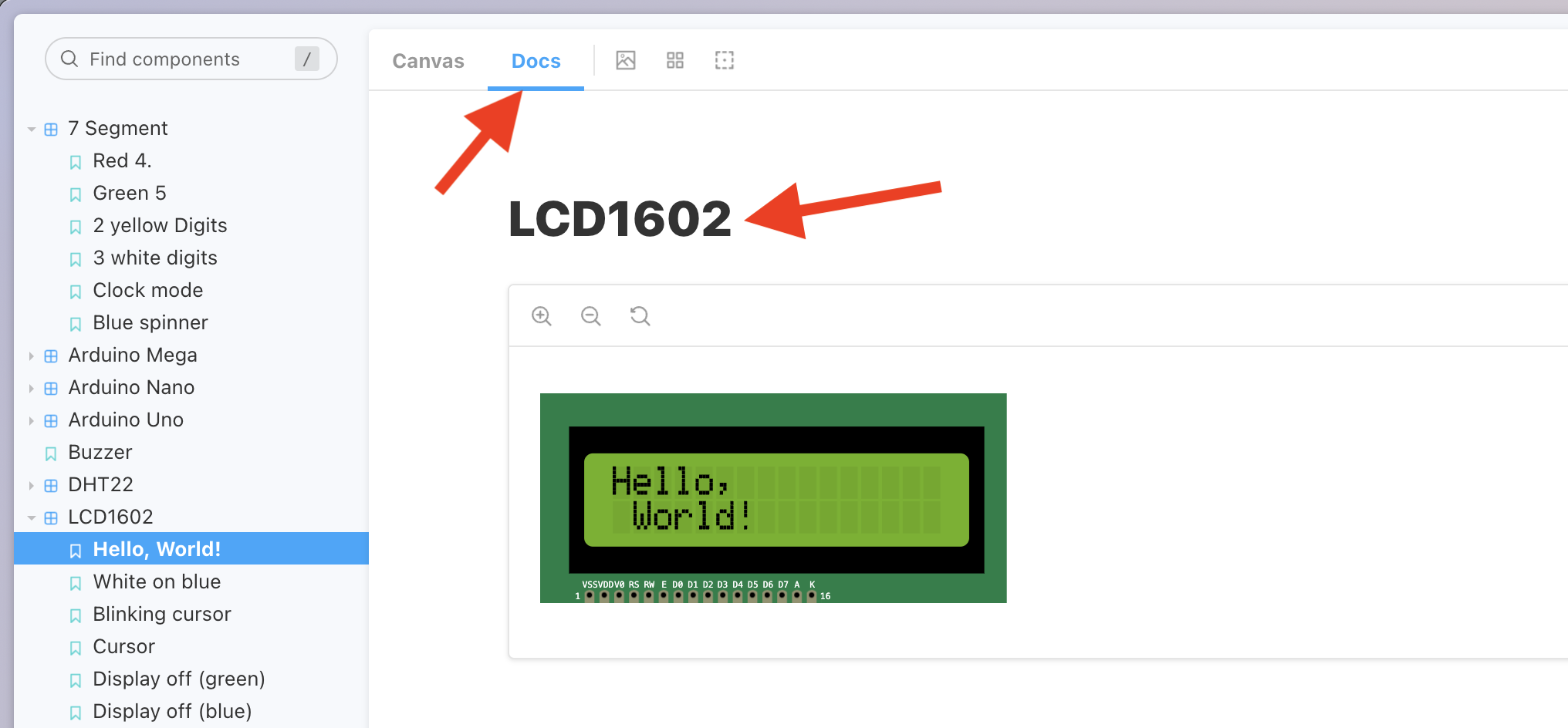
  1. elements.wokwi.com 找到你想引入的元件

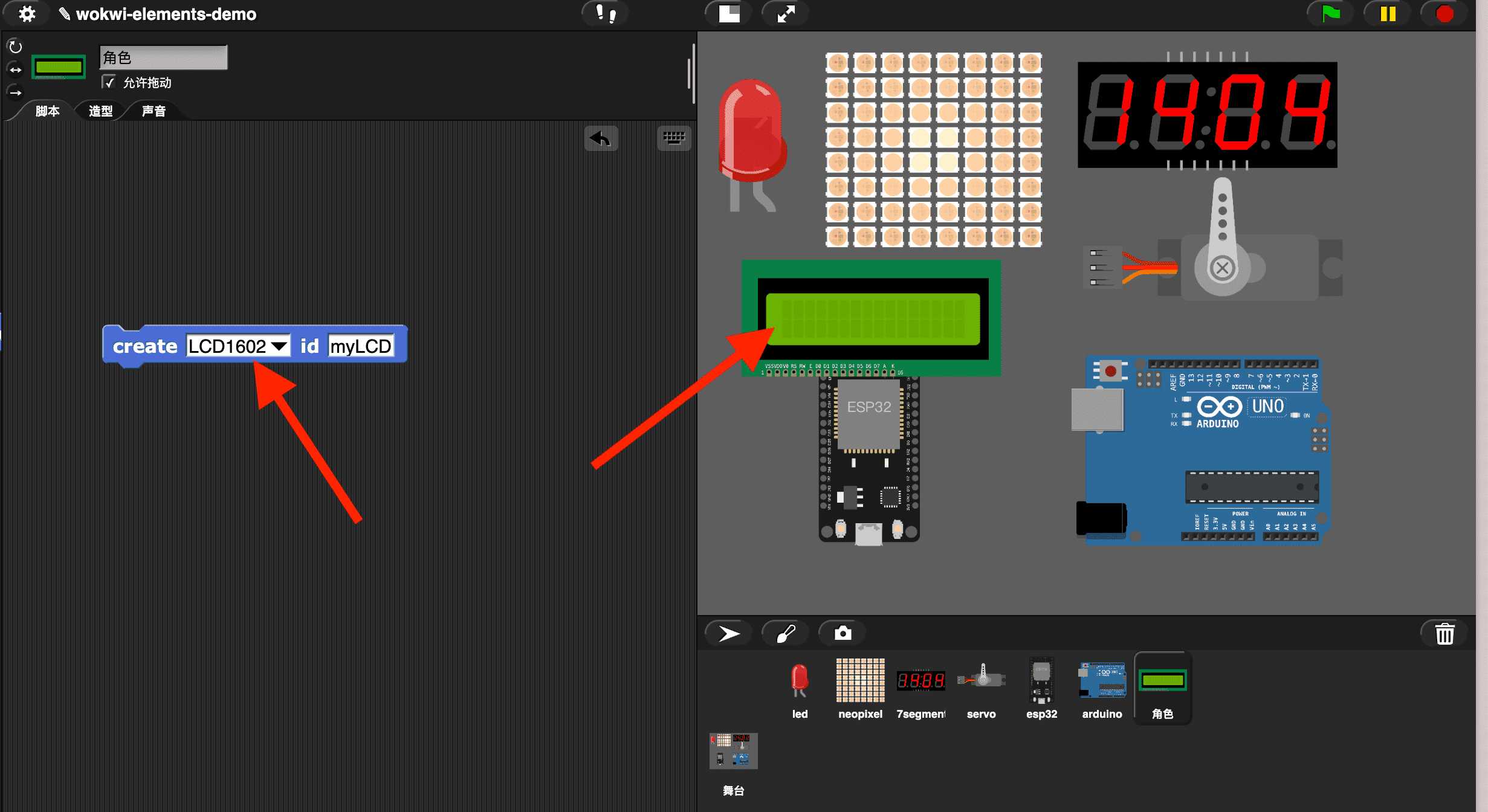
  1. 将元件名字复制到 Snap! 中,创建它:

如何提高清晰度?

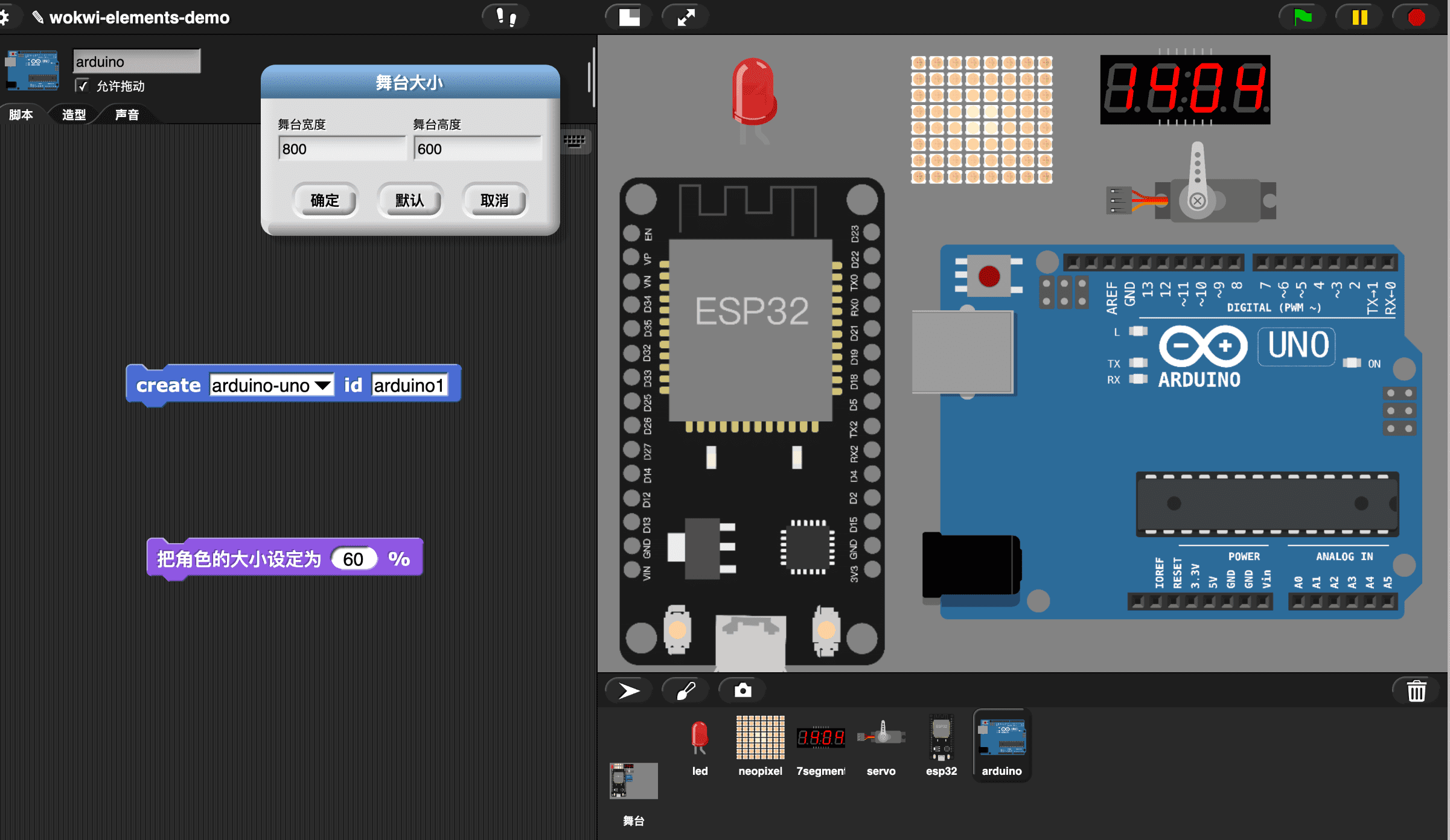
有时你想看清元件细节(如引脚编号), 可以通过 Snap! 的积木来放大角色。如果放大之后, 清晰度依然没有达到要求, 可以试将舞台大小设置为更大尺寸,如 800x600

可以使用 Python 驱动 wokwi-elements 吗?

由于我们往 Snap! 中接入了 Python 解释器, 所以在 Snap! 中使用 Python 驱动 wokwi-elements 应该是可行的。

但是直接使用 wokwi 提供的 Python 编程环境会更容易和专业.

参考