前言
近期在浏览器中使用 Smalltalk,由于其底层基于 JavaScript(ES6),近期抽空重新过了一下 JavaScript 的语法和特性。
表达式与运算符
在函数调用/数组构造时, 将数组表达式语法层面展开;还可以在构造字面量对象时, 将对象表达式按key-value的方式展开。
 1
 2
 3
 4
 5
 6
 7
 8
 9
10
11
12
13
14
15
16
|
function sum(x, y, z) {
  return x + y + z;
}

const numbers = [1, 2, 3];

console.log(sum(...numbers));
// expected output: 6

var arr1 = [0, 1, 2];
var arr2 = [3, 4, 5];
var arr3 = [...arr1, ...arr2]; //[0, 1, 2, 3, 4, 5]

var obj1 = { foo: 'bar', x: 42 };
var obj2 = { foo: 'baz', y: 13 };
var mergedObj = { ...obj1, ...obj2 }; // {foo: "baz", x: 42, y: 13}
|
赋值
 1
 2
 3
 4
 5
 6
 7
 8
 9
10
11
12
13
14
15
16
17
18
19
20
|
var a, b, rest;
[a, b] = [10, 20];
console.log(a); // 10
console.log(b); // 20

[a, b, ...rest] = [10, 20, 30, 40, 50];
console.log(a); // 10
console.log(b); // 20
console.log(rest); // [30, 40, 50]

({ a, b } = { a: 10, b: 20 });
console.log(a); // 10
console.log(b); // 20


// Stage 4(已完成)提案中的特性
({a, b, ...rest} = {a: 10, b: 20, c: 30, d: 40});
console.log(a); // 10
console.log(b); // 20
console.log(rest); // {c: 30, d: 40}
|
展开语法(Spread syntax)
处理数组
For loops
1
2
3
4
5
6
7
|
const files = ["foo.txt ", ".bar", "   ", "baz.foo"];
const filePaths = files
	.map((file) => file.trim())
	.filter(Boolean)
	.map((fileName) => `~/cool_app/${fileName}`);

// filePaths = [ '~/cool_app/foo.txt', '~/cool_app/.bar', '~/cool_app/baz.foo']
|
函数式风格,易于阅读和扩展,但对迭代的控制较少,不能 return 跳过元素。
数组与对象
JavaScript 数组具有非常健壮的 API,提供了许多惊人的工具
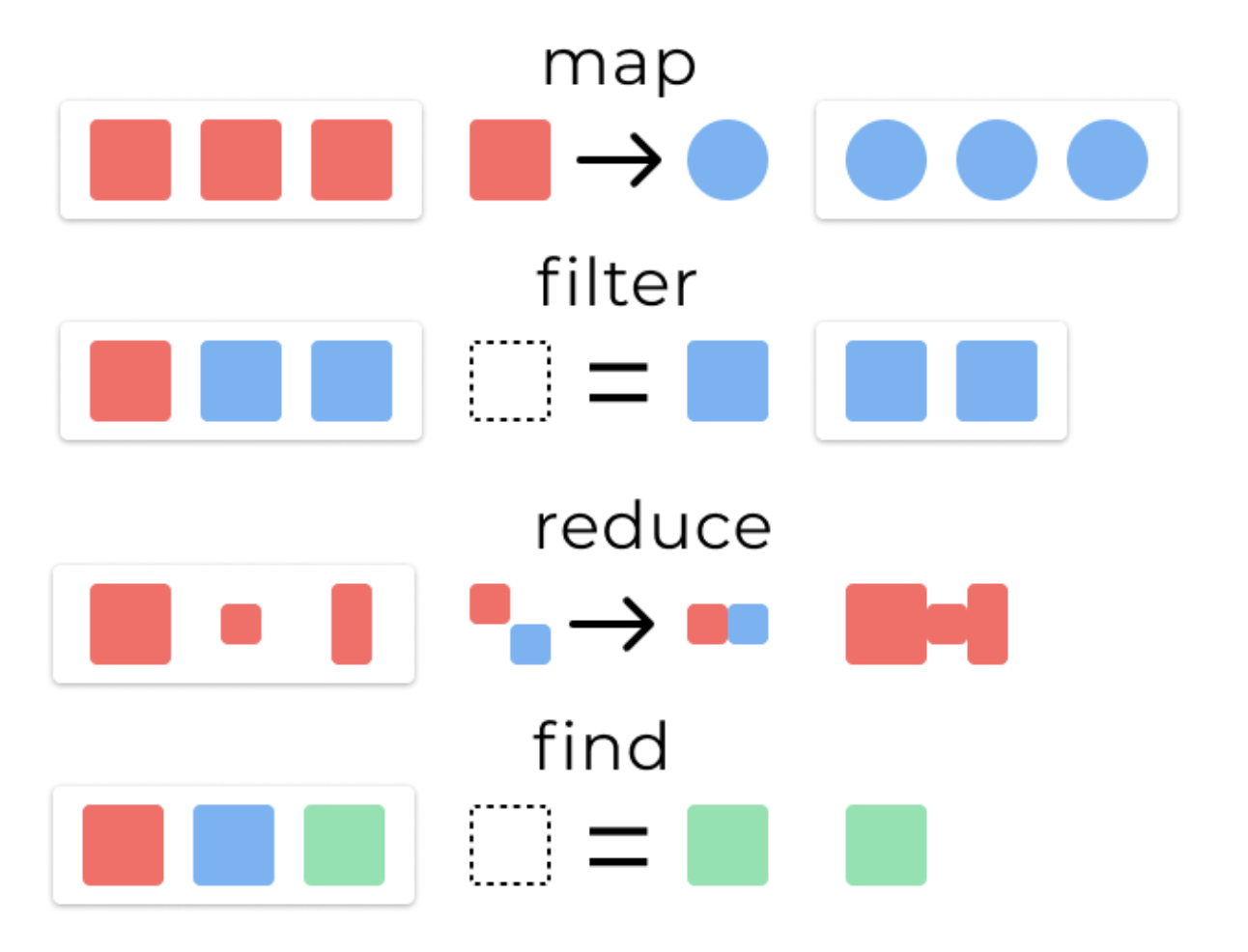
map : 将提供的转换应用于原始数组的每个元素, 结果是一个数组的长度与原始数组相同
1
2
3
|
const arr = [1, 2, 3];
const double = (x) => x * 2;
arr.map(double); // [2, 4, 6]
|
filter: 使用过滤函数创建新数组,以仅保留 true 基于该函数返回的元素。结果是一个等于或小于原始数组长度的数组
1
2
3
|
const arr = [1, 2, 3];
const isOdd = (x) => x % 2 === 1;
arr.filter(isOdd); // [1, 3]
|
reduce: 根据 reduce 函数和初始值创建任何类型的单一输出值。
1
2
3
4
5
6
7
|
const arr = [1, 2, 3];

const sum = (x, y) => x + y;
arr.reduce(sum, 0); // 6

const increment = (x, y) => [...x, x[x.length - 1] + y];
arr.reduce(increment, [0]); // [0, 1, 3, 6]
|
reduce 相关参数与细节参考 Array.prototype.reduce()
find: 返回匹配器函数返回的第一个元素 true。结果是原始数组中的单个元素。
1
2
3
|
const arr = [1, 2, 3];
const isOdd = (x) => x % 2 === 1;
arr.find(isOdd); // 1
|
使用spread operator
String
1
2
|
const name = "Zelda";
const letters = [...name]; // 'Z', 'e', 'l', 'd', 'a'
|
Set
1
2
3
|
const data = [1, 2, 3, 1, 2, 4];
const values = new Set(data);
const uniqueValues = [...values]; // [1, 2, 3, 4]
|
NodeList
1
2
|
const nodes = document.childNodes;
const nodeArray = [...nodes]; // [ <!DOCTYPE html>, html ]
|
MDN: for…of 语句
for…in 语句循环一个指定的变量来循环一个对象所有可枚举的属性。
for…of 语句在可迭代对象(包括Array、Map、Set、arguments 等等)上创建了一个循环,对值的每一个独特属性调用一次迭代。
for...in 可用于数组字符串或普通对象,但不能用于 Map 或 Set 对象。(适合我)
1
2
3
4
5
6
7
|
for (let prop in ["a", "b", "c"]) console.log(prop); // 0, 1, 2 (array indexes)

for (let prop in "str") console.log(prop); // 0, 1, 2 (string indexes)

for (let prop in { a: 1, b: 2, c: 3 }) console.log(prop); // a, b, c (object property names)

for (let prop in new Set(["a", "b", "a", "d"])) console.log(prop); // undefined (no enumerable properties)
|
forEach()仅迭代数组,但它可以在迭代时访问每个元素的值和索引。
1
2
3
4
5
6
7
|
["a", "b", "c"].forEach(
	(val) => console.log(val) // a, b, c (array values)
);

["a", "b", "c"].forEach(
	(val, i) => console.log(i) // 0, 1, 2 (array indexes)
);
|
for...of 可用于数组,字符串 Map 或 Set 对象,但不能用于普通对象。
1
2
3
4
5
6
7
|
for (let val of ["a", "b", "c"]) console.log(val); // a, b, c (array values)

for (let val of "str") console.log(val); // s, t, r (string characters)

for (let val of { a: 1, b: 2, c: 3 }) console.log(prop); // TypeError (not iterable)

for (let val of new Set(["a", "b", "a", "d"])) console.log(val); // a, b, d (Set values)
|
1
2
3
4
5
6
7
|
const mapObject = (arr, fn) =>
	arr.reduce((acc, el, i) => {
		acc[el] = fn(el, i, arr); // 当前的fn只使用了一个参数
		return acc;
	}, {});
// EXAMPLES
mapObject([1, 2, 3], (a) => a * a); // { 1: 1, 2: 4, 3: 9 }
|
1
2
3
4
5
6
7
|
const mapKeys = (obj, fn) =>
	Object.keys(obj).reduce((acc, k) => {
		acc[fn(obj[k], k, obj)] = obj[k]; //当前fn只用到2个参数
		return acc;
	}, {});
// 例子
mapKeys({ a: 1, b: 2 }, (val, key) => key + val); // { a1: 1, b2: 2 }
|
reduce() 方法对数组中的每个元素执行一个由您提供的 reducer 函数(升序执行),将其结果汇总为单个返回值。
reducer 函数接收 4 个参数:
- Accumulator (acc) (累计器)
- Current Value (cur) (当前值)
- Current Index (idx) (当前索引)
- Source Array (src) (源数组)
arr.reduce(callback(accumulator, currentValue[, index[, array]])[, initialValue])
参数细节参考原文。
initialValue: 作为第一次调用 callback 函数时的第一个参数的值。 如果没有提供初始值,则将使用数组中的第一个元素。 在没有初始值的空数组上调用 reduce 将报错。
 1
 2
 3
 4
 5
 6
 7
 8
 9
10
11
12
13
14
|
// 计算数组中每个元素出现的次数

var names = ["Alice", "Bob", "Tiff", "Bruce", "Alice"];

var countedNames = names.reduce(function (allNames, name) {
	if (name in allNames) {
		allNames[name]++;
	} else {
		allNames[name] = 1;
	}
	return allNames;
}, {});
// countedNames is:
// { 'Alice': 2, 'Bob': 1, 'Tiff': 1, 'Bruce': 1 }
|
对象
在javascript中,一个对象可以是一个单独的拥有属性和类型的实体。我们拿它和一个杯子做下类比。一个杯子是一个对象(物体),拥有属性。杯子有颜色,图案,重量,由什么材质构成等等。同样,javascript对象也有属性来定义它的特征。
使用getter和setter方法扩展原型
使用getter和setter方法扩展 Date原型,为预定义好的Date类添加一个year的属性。
 1
 2
 3
 4
 5
 6
 7
 8
 9
10
11
|
var d = Date.prototype;
Object.defineProperty(d, "year", {
  get: function() { return this.getFullYear() },
  set: function(y) { this.setFullYear(y) }
});

var now = new Date();
console.log(now.year); // 2000
now.year = 2001; // 987617605170
console.log(now);
// Wed Apr 18 11:13:25 GMT-0700 (Pacific Daylight Time) 2001
|
this
在JavaScript中,this关键字指的是当前正在执行代码的对象。简而言之,常见情况:
- 默认情况下,this引用全局对象。
- 在函数中,当不处于严格模式时,this指的是全局对象。
- 在函数中,在严格模式下this为 undefined。
- 在箭头函数中,this保留封闭词法上下文中this的值this。
- 在对象方法中,this指的是调用该方法的对象。
- 在构造函数调用中,this绑定到正在构造的新对象。
- 在事件处理程序中,this绑定到放置侦听器的元素。
对象上下文
 1
 2
 3
 4
 5
 6
 7
 8
 9
10
|
const obj = {
  f: function() {
    return this;
  }
};

const myObj = Object.create(obj);
myObj.foo = 1;

console.log(myObj.f()); // { foo: 1 }
|
箭头函数上下文
1
2
3
4
5
6
7
8
9
|
window.age = 10; // <-- notice me?
function Person() {
  this.age = 42; // <-- notice me?
  setTimeout(() => { // <-- Arrow function executing in the "p" (an instance of Person) scope
    console.log("this.age", this.age); // yields "42" because the function executes on the Person scope
  }, 100);
}

var p = new Person();
|
事件处理程序上下文
1
2
3
4
5
|
const el = document.getElementById('my-el');

el.addEventListener('click', function() {
  console.log(this === el); // true
});
|
Binding this
1
2
3
4
5
6
|
function f() {
  return this.foo;
}

var x = f.bind({foo: 'hello'});
console.log(x()); // 'hello'
|
实例的属性必须定义在类的方法里. ES6 类的方法内部如果含有this,它默认指向类的实例。
1
2
3
4
5
6
|
class Rectangle {
  constructor(height, width) {
    this.height = height;
    this.width = width;
  }
}
|
Promise
Promise 很棒的一点就是链式调用(chaining)。
参考:
Self语言基于 prototype
在 ES2015/ES6 中引入了 class 关键字,但那只是语法糖,JavaScript 仍然是基于原型的
JavaScript 对象是动态的属性“包”(指其自己的属性)。JavaScript 对象有一个指向一个原型对象的链。
 1
 2
 3
 4
 5
 6
 7
 8
 9
10
11
12
13
14
15
16
17
18
19
20
21
22
23
24
25
26
27
28
29
30
31
32
33
34
35
36
37
38
39
40
41
42
43
44
45
|
let f = function () {
   this.a = 1;
   this.b = 2;
}
/* 这么写也一样
function f() {
  this.a = 1;
  this.b = 2;
}
*/
let o = new f(); // {a: 1, b: 2}

// 在f函数的原型上定义属性
f.prototype.b = 3;
f.prototype.c = 4;

// 不要在 f 函数的原型上直接定义 f.prototype = {b:3,c:4};这样会直接打破原型链
// o.[[Prototype]] 有属性 b 和 c
//  (其实就是 o.__proto__ 或者 o.constructor.prototype)
// o.[[Prototype]].[[Prototype]] 是 Object.prototype.
// 最后o.[[Prototype]].[[Prototype]].[[Prototype]]是null
// 这就是原型链的末尾,即 null,
// 根据定义,null 就是没有 [[Prototype]]。

// 综上,整个原型链如下:

// {a:1, b:2} ---> {b:3, c:4} ---> Object.prototype---> null

console.log(o.a); // 1
// a是o的自身属性吗?是的,该属性的值为 1

console.log(o.b); // 2
// b是o的自身属性吗?是的,该属性的值为 2
// 原型上也有一个'b'属性,但是它不会被访问到。
// 这种情况被称为"属性遮蔽 (property shadowing)"

console.log(o.c); // 4
// c是o的自身属性吗?不是,那看看它的原型上有没有
// c是o.[[Prototype]]的属性吗?是的,该属性的值为 4

console.log(o.d); // undefined
// d 是 o 的自身属性吗?不是,那看看它的原型上有没有
// d 是 o.[[Prototype]] 的属性吗?不是,那看看它的原型上有没有
// o.[[Prototype]].[[Prototype]] 为 null,停止搜索
// 找不到 d 属性,返回 undefined
|
当继承的函数被调用时,this 指向的是当前继承的对象,而不是继承的函数所在的原型对象。
async 和 await
ECMAScript 2017 JavaScript版的一部分
简单来说,它们是基基于promises的语法糖,使异步代码更易于编写和阅读。通过使用它们,异步代码看起来更像是老式同步代码
async
 1
 2
 3
 4
 5
 6
 7
 8
 9
10
11
|
async function hello() { return "Hello" };
hello(); // 调用该函数会返回一个 promise

// 异步函数表达式
let hello = async function() { return "Hello" };
hello();

let hello = async () => { return "Hello" };

// 要实际使用promise完成时返回的值,我们可以使用.then()块
hello().then((value) => console.log(value))
|
将 async 关键字加到函数申明中,可以告诉它们返回的是 promise,而不是直接返回值。此外,它避免了同步函数为支持使用 await 带来的任何潜在开销。
await
await 只在异步函数里面才起作用。它可以放在任何异步的,基于 promise 的函数之前。它会暂停代码在该行上,直到 promise 完成,然后返回结果值。
1
2
3
4
5
|
async function hello() {
  return greeting = await Promise.resolve("Hello");
};

hello().then(alert); // 当前这行代码并不会阻塞上下文,它的内部是阻塞的,它自身被循环队列处理。
|
由于 async 关键字将函数转换为 promise,您可以使用 promise 和 await 的混合方式
 1
 2
 3
 4
 5
 6
 7
 8
 9
10
11
|
async function myFetch() {
  let response = await fetch('coffee.jpg');
  return await response.blob();
}

myFetch().then((blob) => {
  let objectURL = URL.createObjectURL(blob);
  let image = document.createElement('img');
  image.src = objectURL;
  document.body.appendChild(image);
});
|
闭包 (Closure)
闭包在实现上是一个结构体,它存储了一个函数和一个关联的环境。环境里是若干对符号和值的对应关系.
闭包跟函数最大的不同在于,当捕捉闭包的时候,它的自由变量会在捕捉时被确定,这样即便脱离了捕捉时的上下文,它也能照常运行.
 1
 2
 3
 4
 5
 6
 7
 8
 9
10
|
function makeFunc() {
    var name = "Mozilla";
    function displayName() {
        alert(name);
    }
    return displayName;
}

var myFunc = makeFunc();
myFunc();
|
在一些编程语言中,一个函数中的局部变量仅存在于此函数的执行期间。一旦 makeFunc() 执行完毕,你可能会认为 name 变量将不能再被访问。
JavaScript 中情况显然与此不同。 displayName 的实例维持了一个对它的词法环境(变量 name 存在于其中)的引用。因此,当 myFunc 被调用时,变量 name 仍然可用,其值 Mozilla 就被传递到alert中。
元编程
反射(Reflect)
反射(reflection)是指计算机程序在运行时(runtime)可以访问、检测和修改它本身状态或行为的一种能力。用比喻来说,反射就是程序在运行的时候能够“观察”并且修改自己的行为。
Reflect 是一个内置的对象,它提供拦截 JavaScript 操作的方法。
 1
 2
 3
 4
 5
 6
 7
 8
 9
10
11
12
|
const duck = {
  name: 'Maurice',
  color: 'white',
  greeting: function() {
    console.log(`Quaaaack! My name is ${this.name}`);
  }
}

Reflect.has(duck, 'color');
// true
Reflect.has(duck, 'haircut');
// false
|
代理(Proxy
在 ECMAScript 6 中引入的 Proxy 对象可以拦截某些操作并实现自定义行为)
1
2
3
4
5
6
7
8
9
|
let handler = {
  get: function(target, name){
    return name in target ? target[name] : 42;
}};

let p = new Proxy({}, handler);
p.a = 1;

console.log(p.a, p.b); // 1, 42
|
Proxy 对象定义了一个目标(这里是一个空对象)和一个实现了 get 陷阱的 handler 对象。这里,代理的对象在获取未定义的属性时不会返回 undefined,而是返回 42。
事件
事件
是你正在编写的 系统 中发生的动作或事件,系统告诉你的是这些动作或事件,如果需要的话,你可以以某种方式对它们做出反应。
 1
 2
 3
 4
 5
 6
 7
 8
 9
10
|
const btn = document.querySelector('button');

function random(number) {
  return Math.floor(Math.random()*(number+1));
}

btn.onclick = function() {
  const rndCol = 'rgb(' + random(255) + ',' + random(255) + ',' + random(255) + ')';
  document.body.style.backgroundColor = rndCol;
}
|
try/except & error
流程控制与错误处理
 1
 2
 3
 4
 5
 6
 7
 8
 9
10
11
12
13
14
15
16
17
|
function doSomethingErrorProne () {
  if (ourCodeMakesAMistake()) {
    throw (new Error('The message'));
  } else {
    doSomethingToGetAJavascriptError();
  }
}
....
try {
  doSomethingErrorProne();
}
catch (e) {
  console.log(e.name); // logs 'Error'
  console.log(e.message); // logs 'The message' or a JavaScript error message)
}

//finally
|
函数
函数参数
默认参数
从ECMAScript 6开始,有两个新的类型的参数:默认参数,剩余参数。
在JavaScript中,函数参数的默认值是undefined。
1
2
3
4
5
|
function multiply(a, b = 1) {
  return a*b;
}

multiply(5); // 5
|
剩余参数
剩余参数语法允许将不确定数量的参数表示为数组。
1
2
3
4
5
6
|
function multiply(multiplier, ...theArgs) {
  return theArgs.map(x => multiplier * x);
}

var arr = multiply(2, 1, 2, 3);
console.log(arr); // [2, 4, 6]
|
函数的实际参数会被保存在一个类似数组的arguments对象中。
 1
 2
 3
 4
 5
 6
 7
 8
 9
10
11
12
|
function myConcat(separator) {
   var result = ''; // 把值初始化成一个字符串,这样就可以用来保存字符串了!!
   var i;
   // iterate through arguments
   for (i = 1; i < arguments.length; i++) {
      result += arguments[i] + separator;
   }
   return result;
}

// returns "red, orange, blue, "
myConcat(", ", "red", "orange", "blue");
|
变量
变量的作用域
在函数之外声明的变量,叫做全局变量, 因为它可被 当前文档 中的任何其他代码所访问。
ES 6 有 语句块 作用域;语句块中声明的变量将成为 语句块 所在函数(或全局作用域)的局部变量
1
2
3
4
|
if (true) {
  let y = 5;
}
console.log(y); // ReferenceError: y 没有被声明
|
let不像 var 一样,let不会在全局对象里新建一个属性。
语句块
语句块通常用于流程控制,如if,for,while等等。 该块由一对大括号界定
1
2
3
4
|
while (x < 10) {
  x++;
}
//这里{ x++; }就是语句块。
|
 1
 2
 3
 4
 5
 6
 7
 8
 9
10
11
|
let x = 1;

if (x === 1) {
  let x = 2;

  console.log(x);
  // expected output: 2
}

console.log(x);
// expected output: 1
|
全局变量
全局变量是全局对象的属性。在网页中,(译注:缺省的)全局对象是 window ,所以你可以用形如 window.variable 的语法来设置和访问全局变量。
常量(Constants)
用关键字 const 创建一个只读的常量
常量的作用域规则与 let 块级作用域变量相同。
utils
1
2
|
let {x:{y:z}} = {x:{y:1}}
z // 1
|
正则表达式
正则表达式是用于匹配字符串中字符组合的模式。
在 JavaScript中,正则表达式也是对象。这些模式被用于 RegExp 的 exec 和 test 方法, 以及 String 的 match、matchAll、replace、search 和 split 方法。
创建
- 字面量:
var re = /ab+c/;
- 构造函数:
var re = new RegExp("ab+c");
使用正则表达式的方法
- exec: 一个在字符串中执行查找匹配的RegExp方法,它返回一个数组(未匹配到则返回 null)。
- test: 一个在字符串中测试是否匹配的RegExp方法,它返回 true 或 false。
- match: 一个在字符串中执行查找匹配的String方法,它返回一个数组,在未匹配到时会返回 null。
- matchAll: 一个在字符串中执行查找所有匹配的String方法,它返回一个迭代器(iterator)。
- search: 一个在字符串中测试匹配的String方法,它返回匹配到的位置索引,或者在失败时返回-1。
- replace: 一个在字符串中执行查找匹配的String方法,并且使用替换字符串替换掉匹配到的子字符串。
- split: 一个使用正则表达式或者一个固定字符串分隔一个字符串,并将分隔后的子字符串存储到数组中的 String 方法。
1
2
|
var myRe = /d(b+)d/g;
var myArray = myRe.exec("cdbbdbsbz");
|
模块
浏览器开始原生支持。
<script type="module"> 属性用于指示引入的模块:
1
|
<script type="module" src="main.mjs"></script>
|
只能在模块内部使用 import 和export 语句 ;不是普通脚本文件
export
1
2
|
// 在模块文件的末尾使用一个export 语句
export { name, draw, reportArea, reportPerimeter };
|
默认 export
1
2
3
|
// 注意,不要大括号。 import 也是
export default randomSquare;
// import randomSquare from './modules/square.mjs'; 等效于 import {default as randomSquare} from './modules/square.mjs';
|
import
1
|
import { name, draw, reportArea, reportPerimeter } from '/js-examples/modules/basic-modules/modules/square.mjs';
|
模块对象
1
2
3
4
|
import * as Module from '/modules/module.mjs';

Module.function1()
Module.function2()
|
最新的浏览器开始原生支持模块功能
使用JavaScript 模块依赖于import和 export
Dynamic ES module loader
SystemJS允许编写和使用依赖于 ES6 导入和导出语句的模块化javacsript代码。
utils
1
2
3
|
let a = 1
let c = {a}
c // {a: 1}
|
杂货铺
sleep
 1
 2
 3
 4
 5
 6
 7
 8
 9
10
11
12
13
14
15
16
|
function sleep(ms) {
  return new Promise(
    resolve => setTimeout(resolve, ms)
  );
}

async function delayedFunc() {
  for (let i of [...Array(30).keys()]){
	  await sleep(100);
    // this.rotation = i; // 让object旋转起来
    console.log(i);
  }
  }


delayedFunc.bind(this)();
|
感受
我侧重使用函数式风格(map/reduce/filter)的表达方式,js 可真是有着 C 语法的 LISP
参考





