
前言
我们之前在两种硬件编程风格的比较中提到:
在少儿编程/硬件编程教育领域,硬件编程有两种风格,我将这两种风格分别称为灌入式和交互式
在上述文章里,我试图论述了,对少儿编程教育而言,为何交互式编程优于灌入式编程。
如果我们按照Scratch的设计风格,那么拓展Scratch,使其与硬件交互的插件一定是交互式的。Scratch大量采用了Smalltalk的设计原则,这些原则包括:
- 如果一个系统要服务于创造精神,那么对于一个人来说,它必须是完全可以理解的。
- 系统应该用最少的且不可更改的部件构建; 这些部分应尽可能一般化; 系统的所有部分都应保持在统一的框架内。
- 计算应该被视为可通过发送消息来统一调用的对象的内在功能。
- 语言应围绕一个强大的隐喻设计,这样就可以统一应用于所有领域。
- 用户可以访问的每个组件都应该能够以有意义的方式呈现自己,以便于用户进行观察和操作。
这些原则,我们之后有时间再细说,单独提一下第三点:
计算应该被视为可通过发送消息来统一调用的对象的内在功能。
这一点指出了消息通信在Scratch所占据的核心位置,我之前构建codelab-adapter就主要围绕这条原则。我相信这点是Smalltalk留给Scratch的重要遗产,是Scratch如此灵活强大的原因,也是理解和写出复杂的Scratch程序的核心所在
第一代的Scratch就是用Smalltalk的方言Squeak写的,尽管Scratch经过2次的重写,最新的一代已经从Squeak迁移到了JavaScript,但设计原则上并没有发生变化。
所以我坚持Scratch的插件都应该遵循这些原则。如果Scratch3.0的硬件插件是灌入式的(目前国内不少公司确实在这样做),系统的所有部分将无法保持在统一的框架内。
交互式存在的问题
如果我们同意了Scratch插件应该采用交互式风格来写,并且以message为中心(官方团队目前都是这么做的,但他们在消息之上很聪明地抽象出了一层:远程调用)
那么我们就需要解决消息通信类系统固有的一些问题,典型的问题之一就是消息发送速率
在通信系统中,我们需要控制发送数据的速率,如果速率太高,可能带来许多问题,诸如带宽不足,或者服务端无法应对意料之外的高频消息,诸如社区里在使用官方的wedo插件时就遇到了:
消息发送速率问题当然有很多解决方案,在ZeroMQ中,框架内可以帮我们处理这个问题,诸如让消息在接受者一端排队,当消息高于设置水位之后,自动丢弃。codelab-adapter采用了ZeroMQ,所以这个问题可以通过简单配置来解决。
但scratch团队的Scratch Link并未采用ZeroMQ,所以他们选择手写令牌桶算法(token bucket)来实现速率限制(Rate Limiting)。
令牌桶算法是速率限制(Rate Limiting)中最常使用的一种算法。
令牌桶算法基于令牌桶中是否存在令牌来指示什么时候可以发送数据。如果桶中存在令牌,则允许发送数据;反之,则不允许。
图示如下:
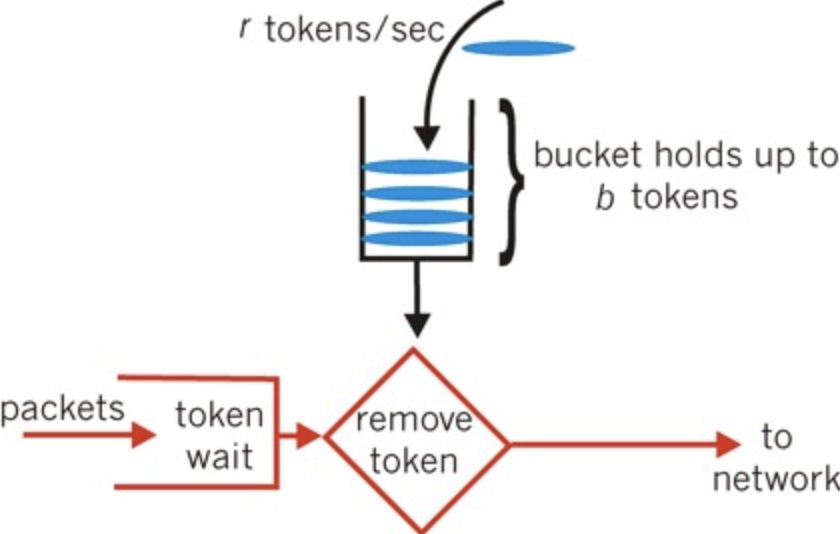
算法
令牌桶算法在概念上表述如下:
- 如果设置的平均发送速率为r,那么令牌以1/r秒的速率添加到桶中。
- 假设桶最多可存b个令牌。如果令牌在桶已满时到达,则将其丢弃。
- 当n个数据包到达时,从令牌桶中取出(删除)n个令牌,同时将数据包被发送出去。如果令牌不够,则数据不发送。
- 它们可以被丢弃;也可以排放在队列中以便当桶中累积了足够多的令牌时再发送;
由于在此我们主要关心数据包数量,而不考虑不讨论具体数据大小,所以我们暂不讨论流量问题。
算法实现
Python实现
 1
 2
 3
 4
 5
 6
 7
 8
 9
10
11
12
13
14
15
16
17
18
19
20
21
22
23
24
25
26
27
28
29
30
31
32
33
34
35
36
|
from time import time

class TokenBucket(object):
    """An implementation of the token bucket algorithm.

    >>> bucket = TokenBucket(80, 0.5)
    >>> print bucket.consume(10)
    True
    >>> print bucket.consume(90)
    False
    """
    def __init__(self, tokens, fill_rate):
        """tokens is the total tokens in the bucket. fill_rate is the
        rate in tokens/second that the bucket will be refilled."""
        self.capacity = float(tokens)
        self._tokens = float(tokens)
        self.fill_rate = float(fill_rate)
        self.timestamp = time()

    def consume(self, tokens):
        """Consume tokens from the bucket. Returns True if there were
        sufficient tokens otherwise False."""
        if tokens <= self.tokens:
            self._tokens -= tokens
        else:
            return False
        return True

    def get_tokens(self):
        if self._tokens < self.capacity:
            now = time()
            delta = self.fill_rate * (now - self.timestamp)
            self._tokens = min(self.capacity, self._tokens + delta)
            self.timestamp = now
        return self._tokens
    tokens = property(get_tokens)
|
我们来对它进行测试:
 1
 2
 3
 4
 5
 6
 7
 8
 9
10
11
12
13
|
if __name__ == "__main__":
    bucket = TokenBucket(80, 1)
    print("tokens = %s" % bucket._tokens)
    print("consume(10) = %s" % bucket.consume(10))
    print("consume(10) = %s" % bucket.consume(10))
    time.sleep(1)
    print("tokens = %s" % bucket._tokens)
    time.sleep(1)
    print("tokens = %s" % bucket._tokens)
    print("consume(90) = %s" % bucket.consume(90))
    print("tokens = %s" % bucket._tokens)
    print("consume(90) = %s" % bucket.consume(90))
    print("tokens = %s" % bucket._tokens)
|
输出为:
1
2
3
4
5
6
7
8
|
➜  /tmp python token_bucket.py
tokens = 80.0
consume(10) = True
consume(10) = True
tokens = 61.0040922165
tokens = 62.0080561638
consume(90) = False
tokens = 62.0081322193
|
scratch3_wedo2 extension的实现
我们来看看scratch官方的实现(包含在这次提交中)
 1
 2
 3
 4
 5
 6
 7
 8
 9
10
11
12
13
14
15
16
17
18
19
20
21
22
23
24
25
26
27
28
29
30
31
32
33
34
35
36
37
38
39
40
41
42
43
44
45
46
47
48
49
50
51
52
53
54
55
56
57
58
59
60
61
62
63
64
65
66
67
68
69
70
71
72
73
74
|
const Timer = require('../util/timer');

class RateLimiter {
    /**
     * A utility for limiting the rate of repetitive send operations, such as
     * bluetooth messages being sent to hardware devices. It uses the token bucket
     * strategy: a counter accumulates tokens at a steady rate, and each send costs
     * a token. If no tokens remain, it's not okay to send.
     * @param {number} maxRate the maximum number of sends allowed per second
     * @constructor
     */
    constructor (maxRate) {
        /**
         * The maximum number of tokens.
         * @type {number}
         */
        this._maxTokens = maxRate;

        /**
         * The interval in milliseconds for refilling one token. It is calculated
         * so that the tokens will be filled to maximum in one second.
         * @type {number}
         */
        this._refillInterval = 1000 / maxRate;

        /**
         * The current number of tokens in the bucket.
         * @type {number}
         */
        this._count = this._maxTokens;


        this._timer = new Timer();
        this._timer.start();

        /**
         * The last time in milliseconds when the token count was updated.
         * @type {number}
         */
        this._lastUpdateTime = this._timer.timeElapsed();
    }

    /**
     * Check if it is okay to send a message, by updating the token count,
     * taking a token and then checking if we are still under the rate limit.
     * @return {boolean} true if we are under the rate limit
     */
    okayToSend () {
        // Calculate the number of tokens to refill the bucket with, based on the
        // amount of time since the last refill.
        const now = this._timer.timeElapsed();
        const timeSinceRefill = now - this._lastUpdateTime;
        const refillCount = Math.floor(timeSinceRefill / this._refillInterval);

        // If we're adding at least one token, reset _lastUpdateTime to now.
        // Otherwise, don't reset it so that we can continue measuring time until
        // the next refill.
        if (refillCount > 0) {
            this._lastUpdateTime = now;
        }

        // Refill the tokens up to the maximum
        this._count = Math.min(this._maxTokens, this._count + refillCount);

        // If we have at least one token, use one, and it's okay to send.
        if (this._count > 0) {
            this._count--;
            return true;
        }
        return false;
    }
}

module.exports = RateLimiter;
|
测试用例为:
 1
 2
 3
 4
 5
 6
 7
 8
 9
10
11
12
13
14
15
16
17
18
19
20
21
|
const test = require('tap').test;
const RateLimiter = require('../../src/util/rateLimiter.js');
 test('rate limiter', t => {
    const rate = 30;
    const limiter = new RateLimiter(rate);
     // The rate limiter starts with a number of tokens equal to the max rate
    t.equal(limiter._count, rate);
     // Running okayToSend rate times uses up all of the tokens
    for (let i = 0; i < rate; i++) {
        t.true(limiter.okayToSend());
        t.equal(limiter._count, rate - (i + 1));
    }
    t.false(limiter.okayToSend());
     // After a delay of one second divided by the max rate, we should have exactly
    // one more token to use.
    setTimeout(() => {
        t.true(limiter.okayToSend());
        t.false(limiter.okayToSend());
        t.end();
    }, 1000 / rate);
});
|
使用scratch官方的RateLimiter
 1
 2
 3
 4
 5
 6
 7
 8
 9
10
|
// const RateLimiter = require('../../util/rateLimiter.js');
// this._rateLimiter = new RateLimiter(30);

    _send (uuid, message) {
        if (!this.getPeripheralIsConnected()) return Promise.resolve();

        if (!this._rateLimiter.okayToSend()) return Promise.resolve();

        return this._ble.write(UUID.IO_SERVICE, uuid, message, 'base64');
    }
|
在wedo插件中,我们可以看到RateLimiter暴露出的接口:this._rateLimiter.okayToSend()清晰易用
值得一提的是,scratch官方实现的令牌桶算法和Python的实现略有不同。scratch官方实现没有n条消息同时涌入的情况,而是逐条处理:this._count--
大家之后在Scratch3.0中自定义插件,需要处理速率问题时,可以直接使用官方的RateLimiter,我的建议是所有与消息相关的插件都该加上RateLimiter, 否则系统的健壮性是堪忧的,也很难做到宽围墙,可能一不小心就塌了
参考








