惯性聚合 高效追踪和阅读你感兴趣的博客、新闻、科技资讯
阅读原文 在惯性聚合中打开

推荐订阅源

云风的 BLOG
云风的 BLOG
阮一峰的网络日志
阮一峰的网络日志
有赞技术团队
有赞技术团队
小众软件
小众软件
P
Proofpoint News Feed
P
Proofpoint News Feed
Apple Machine Learning Research
cs.CV updates on arXiv.org
The Last Watchdog
The Last Watchdog
O
OpenAI News
Security Latest
Security Latest
博客园 - Franky
Forbes - Security
Forbes - Security
N
Netflix TechBlog - Medium
H
Hacker News: Front Page
Cloudbric
Cloudbric
Exploit-DB.com RSS Feed
Hugging Face - Blog
Hugging Face - Blog
Microsoft Security Blog
Threat Intelligence Blog | Flashpoint
S
Security Affairs
Recent Announcements
The GitHub Blog
The GitHub Blog
S
Schneier on Security
MongoDB | Blog
MongoDB | Blog
WordPress大学
WordPress大学
Last Week in AI
Last Week in AI
博客园 - 【当耐特】
Attack and Defense Labs
C
Cyber Attacks, Cyber Crime and Cyber Security
F
Fortinet All Blogs
Webroot Blog
Webroot Blog
S
Secure Thoughts
Spread Privacy
Spread Privacy
Blog — PlanetScale
Blog — PlanetScale
T
Troy Hunt's Blog
OSCHINA 社区最新新闻
OSCHINA 社区最新新闻
奇客Solidot–传递最新科技情报
奇客Solidot–传递最新科技情报
V
V2EX
Security Archives - TechRepublic
P
Privacy & Cybersecurity Law Blog
Cyber Security Advisories - MS-ISAC
Simon Willison's Weblog
C
Check Point Blog
L
LINUX DO - 最新话题
NISL@THU
NISL@THU
博客园_首页
罗磊的独立博客
A
Arctic Wolf
U
Unit 42

夜行人

回家路上 第一期的直播演示项目 震动检测器 正能量 在线参观CodeLab Neverland 发布 CodeLab Adapter 3.3.1 DynamicTable 之 纸糊方向盘 CodeLab DynamicTable: 一个可实施的技术方案 CodeLab Insight 发布 Alpha 版 情人节 Home Assistant 周报 && IoT 周报 (02) Joplin: 关注隐私的 Evernote 开源替代软件 浏览器的未来与 Web 传感器 Home Assistant 周报 && IoT 周报 (01) 百宝箱(01) 论自由 介绍 WebThings Home Assistant 周报 && iot 周报 (00) 百宝箱(00) 毛姆读书心得 传世之作 周末徒步 CodeLab Adapter ❤️ Jupyter/Python 航班 躲雨 夏令营途中 [译]思想--作为一种技术 The future of coding 美国之行 三门问题的程序模拟 从Python转向Pharo https://blog.just4fun.site/post/iot/iot-open-source-projects/ Python异步编程笔记 https://blog.just4fun.site/post/iot/iot-open-source-hardware-community/ 万物积木化开发者社区 CodeLab ❤️ Blender Scratch3技术分析之云变量 API(第7篇) [译]对管道(Pipes)的偏爱 [译]提出正确的问题比得到正确答案更重要 蓝牙设备与Scratch3.0 创建你的第一个Scratch3.0 Extension Scratch3技术分析之项目内部数据(第6篇) Scratch3技术分析之社区 API(第5篇) Scratch3技术分析之User API(第4篇) Scratch3技术分析之项目主页API(第3篇) Scratch3技术分析之静态资源API(第2篇) Scratch3.0、micro:bit与Windows7 https://blog.just4fun.site/post/iot/zerynth-vs-micropython/ 核聚变、方所与半宅空间 可视化编程为何是个糟糕的主意 codelab.club周末聚会 关于codelab.club '下一件大事'是一个房间 Hungry Robot - Eat everything 编程作为一种思考方式 今日简史 史蒂夫·乔布斯传 罗素自选文集 https://blog.just4fun.site/post/edx/tianjin-scratch-ai/ https://blog.just4fun.site/post/edx/richie-cms-openedx/ 徒步武功山 WebUSB与micro:bit 积木化编程与3D场景 夜宿武功山顶 scratch3-adapter接入优必选Alpha系列机器人 https://blog.just4fun.site/post/edx/video-migration-note/ scratch3-adapter重构笔记 https://blog.just4fun.site/post/edx/edx-community-members/ 两种硬件编程风格的比较 使用micro:bit自制PPT翻页笔 柏拉图对话集 scratch3.0 + micro:bit 七月电影放映计划 非营利组织的管理 Screenly--用树莓派让任何屏幕变为可编程的数字标牌 以最佳实践开始你的Django项目 micro:bit与事件驱动 为Scratch3.0设计的插件系统(上篇) OCR应用一例 近两年读过的一些好书 blockly开发之使用python驱动浏览器中的turtle(2) 牛顿新传 文学理论入门 逻辑的引擎 人生的意义 blockly开发之生成并运行js代码(1) blockly开发之hello world(0) micro:bit使用笔记 神器之Termux https://blog.just4fun.site/post/iot/micropython-notes/ Cozmo what is this Scratch的前世今生 下段旅程 我行在远方 爆裂 途中杂记 https://blog.just4fun.site/post/edx/open-edx-startup/ cozmo系列之入门 - 有性格且可编程的机器人 PaperWeekly开发笔记 创业二三事
CodeLab ❤️ IoT
种瓜 · 2019-02-25 · via 夜行人

文章目录

近期CodeLab在IoT方向构建了一些工具。和大多数IoT项目相似,我们的工作也围绕MQTT协议展开。

CodeLab之后除了对外提供基础工具,也希望能对外提供基础服务。我们的工具链和服务都基于开源项目构建。

我们近期的工作包括:

  • Scratch IoT Extension
  • codelab-adapter iot extension
  • IoT server: iot.codelab.club

Scratch IoT Extension
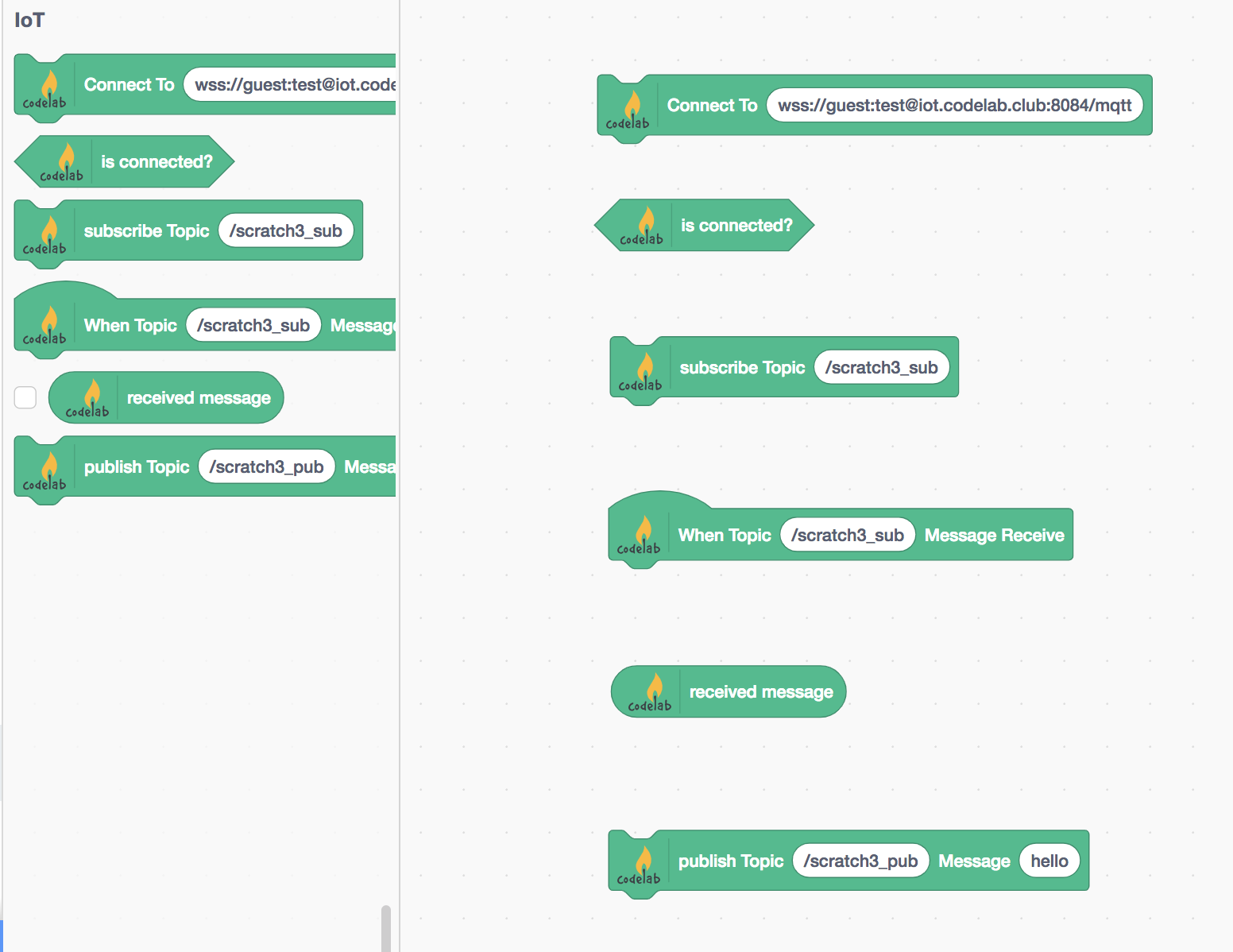
Scratch IoT Extension允许接入所有支持wss的mqtt服务。Scratch IoT Extension基于MQTT.js构建。

在积木设计上,我们希望IoT积木尽量与EIM积木保持一致。原先想把publish替换为broadcast,后来还是决定保留mqtt用户习惯的词汇。 关于这一点,我们还没有想清楚,欢迎交流和吐槽。

Scratch IoT Extension是通用的。 你可以使用CodeLab提供的mqtt服务,也可以使用自建的mqtt服务(或第三方服务)来替代积木里默认的地址:wss://guest:test@iot.codelab.club:8084/mqtt, 关于这串地址的含义参考mqtt url。 guest/test分别是测试用户名和密码。

如果你需要独立的用户而不是公共测试用户,欢迎与我们联系,它是免费的。

测试

我们来测试一下Scratch IoT Extension,让它与外部程序协同使用。有很多mqtt的测试工具可以选择,诸如

我选择python社区的工具hbmqtt。

首先安装它: pip3 install hbmqtt

订阅从Scratch发来的消息

hbmqtt_sub --url mqtt://guest:test@iot.codelab.club -t "/scratch3_pub"
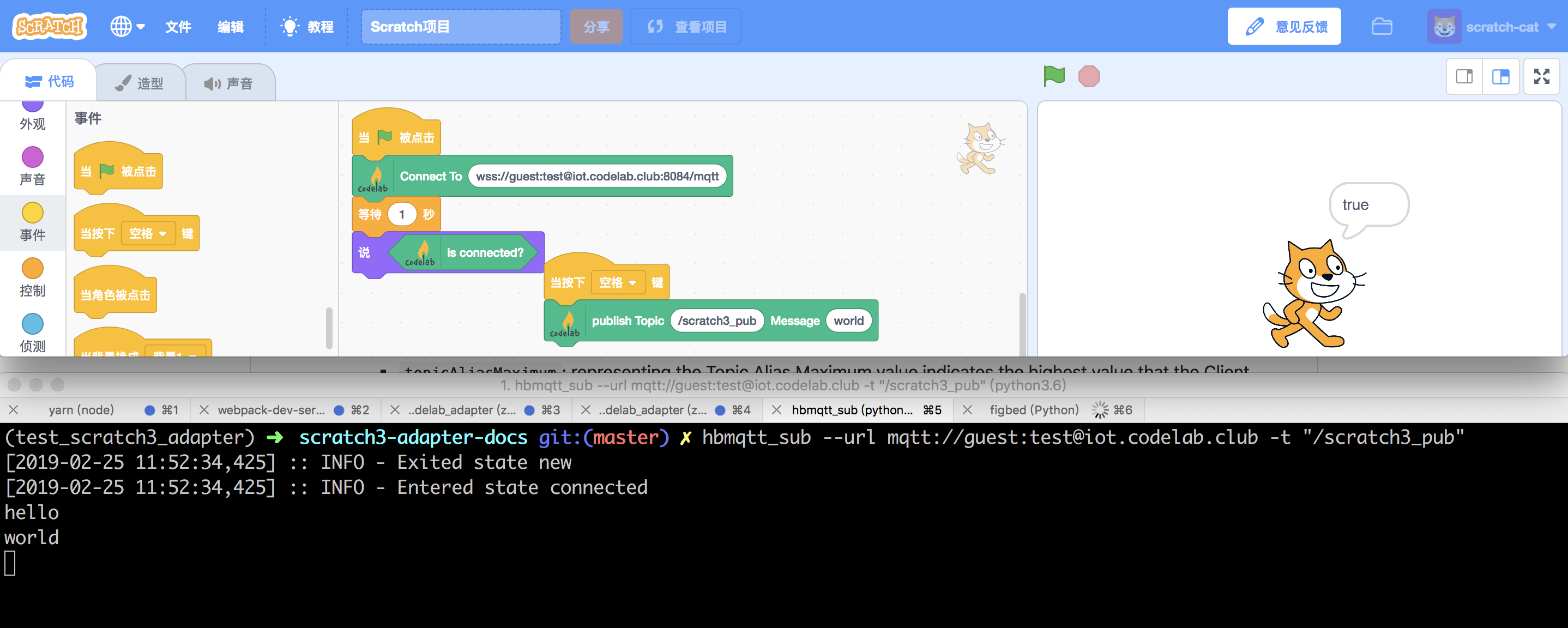
发布消息给Scratch3.0

hbmqtt_pub --url mqtt://guest:test@iot.codelab.club -t "/scratch3_sub" -m "hello from hbmqtt_pub"
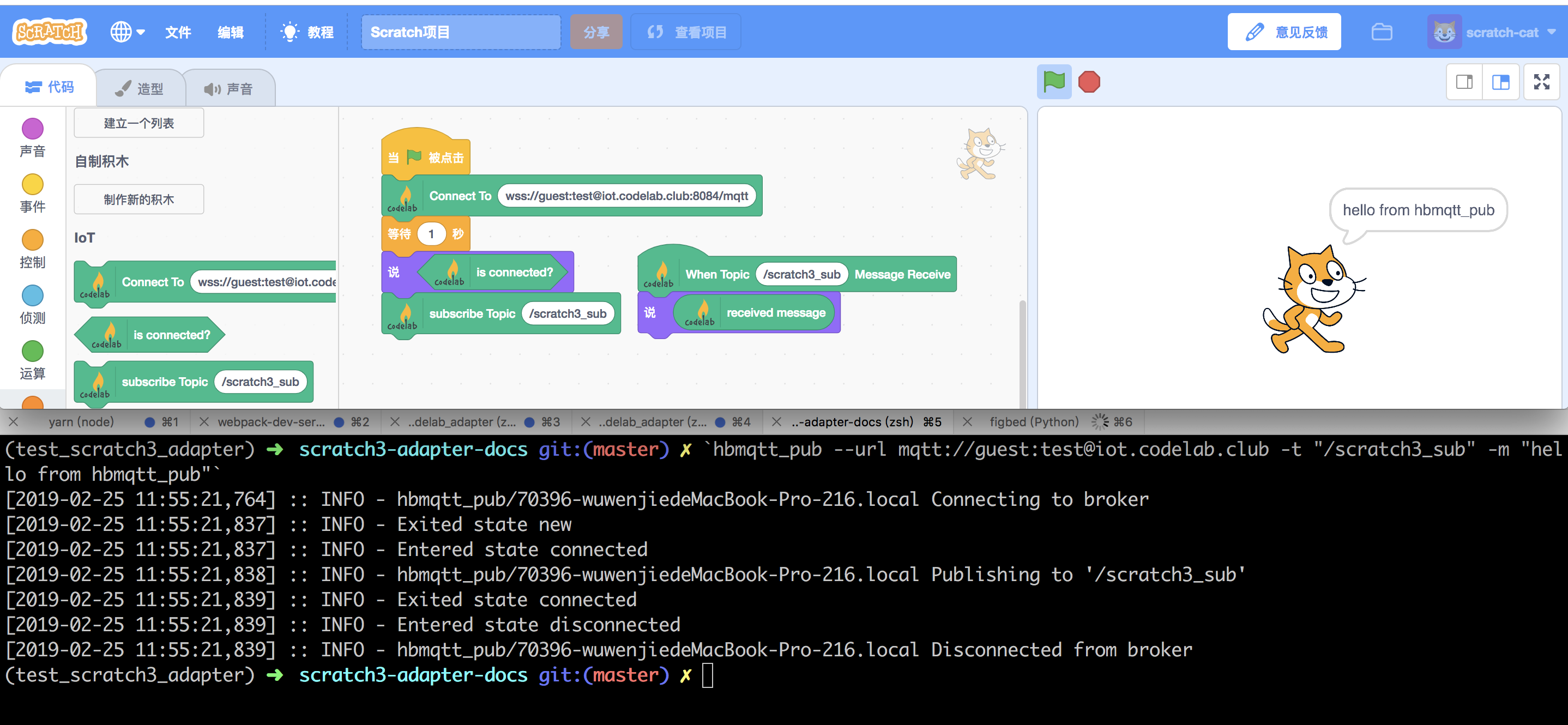

当然你可以选择任意的mqtt client与Scratch IoT Extension通信,无论它来自树莓派还是来自esp8266,都没有问题。

CodeLab关注开放性和通用性。

codelab-adapter iot extension

extension_iot.py的源代码已经放出。 它将在codelab-adapter 0.8.0中作为内置插件。

目前它已经能够与Scratch IoT Extension协同工作:
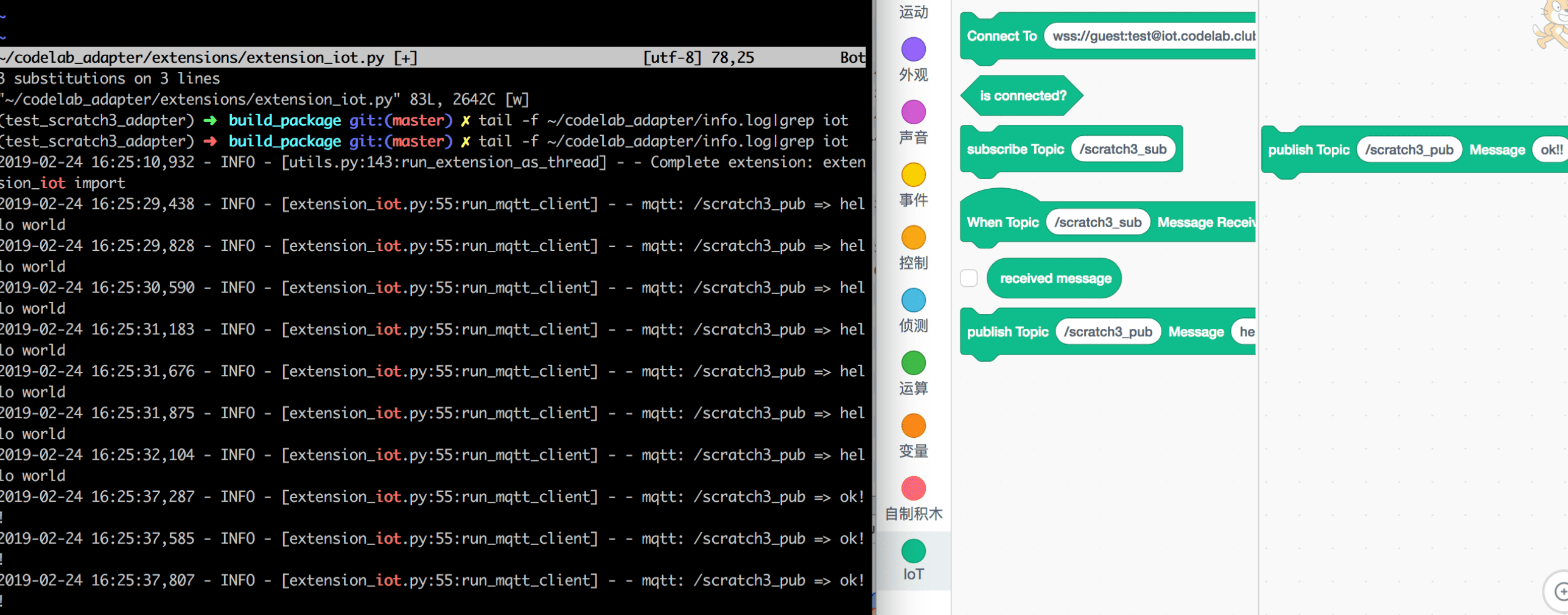
extension_iot.py不是开箱即用的那类插件(Cozmo/usbMicrobit是开箱即用的),我们在其中构建了pub/sub的基本例程。只需微调。加入你自己的业务代码(一般和硬件或本地服务有关),处理收发的消息。你可以将任何设备消息化,进而将其积木化。

添加业务代码的位置,我已经在源码中注释了。

你可以把extension_iot.py当作类似extension_eim.py的插件,它本身只是处理消息,没有实际用途,但通过微调,它可以成为任何东西,我们在extension_python_kernel.pyextension_vector.py展示了EIM(everything is a message)概念的威力。 我们将MQTT视为一个信道,在编程方面,我们会延续EIM的风格。

本周,我会给出一个具体例子: 在树莓派中使用extension_iot.py,定制出extension_iot_rpi.py, 而后者是可以实际服务于硬件教学的插件。 在这个例子中我们将展示,如何在几天内快速构建一个教学产品,可以直接推向最终用户,它甚至包括了管理功能(如远程故障处理和升级)!

目前有两家公司会与我们一起推进树莓派方向的工作。也欢迎更多人一起加入,把树莓派改造为一个开放、通用、可扩展的硬件教学平台。

这些工作充分展示了adapter的开放架构如何帮助构建生态。

IoT server

CodeLab构建了自己的server: iot.codelab.club
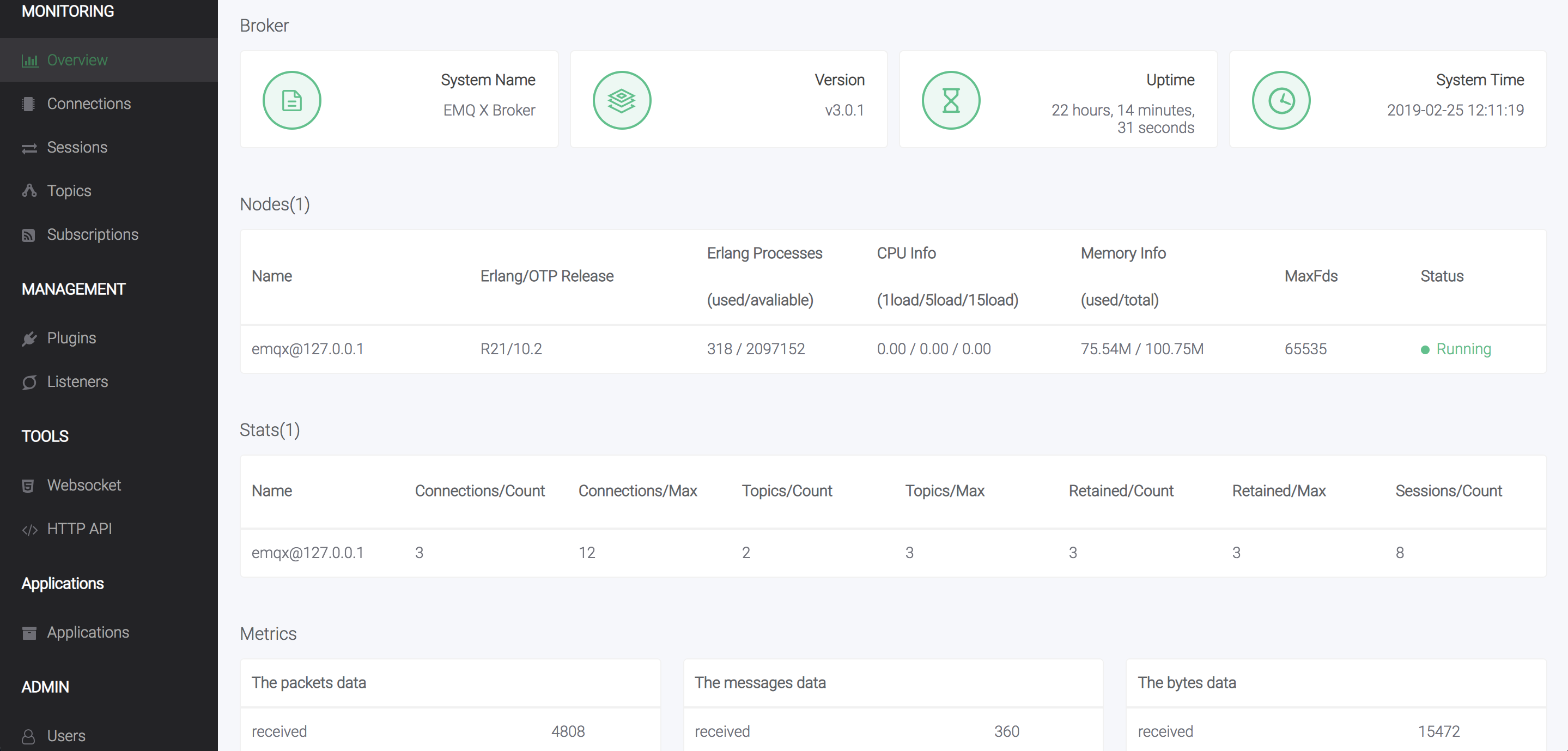
原本想找一个公开可用的mqtt server(MQTT Messaging Broker),却没有找到合适的,要么就是注册很烦,要么就是限制很多,要么就是不兼容开放标准,要么就是服务器在国外,访问不方便,不得已,只好自建了一个。

iot.codelab.club提供了mqtt测试用户:

用户名: guest, 密码: test

完整的mqtt url为:mqtt://guest:test@iot.codelab.club

你可以使用任何mqtt client连接它, mqtt python client的例子在这里:

 1
 2
 3
 4
 5
 6
 7
 8
 9
10
11
12
13
14
15
16
17
18
19
20
21
22
23
24
25
26
27
28
29
import logging
import asyncio

from hbmqtt.client import MQTTClient, ClientException
from hbmqtt.mqtt.constants import QOS_0

username = "guest"
password = "test"
mqtt_url = "mqtt://{}:{}@iot.codelab.club".format(username, password)

async def uptime_coro():
    C = MQTTClient() # todo: clientid
    await C.connect(mqtt_url)
    await C.subscribe([
            ('/scratch3_pub', QOS_0),
         ])
    try:
        while True:
            message = await C.deliver_message()
            topic = message.topic
            payload = message.data.decode()
            print("%s => %s" % (topic, payload))
        await C.unsubscribe(['/scratch3_sub'])
        await C.disconnect()
    except ClientException as ce:
        logging.error("Client exception: %s" % ce)

if __name__ == '__main__':
    asyncio.get_event_loop().run_until_complete(uptime_coro())

如果你想在micropython的兼容板中接入它,使用umqtt即可。

如果你需要iot.codelab.club的独立用户,可以向我们免费申请。

enjoy it~

参考