do one thing and do it well
以*nix哲学来看,websocketd是个优雅的工具,小而美,作为管道,有强大的可组合性
简介
Turn any program that uses STDIN/STDOUT into a WebSocket server. Like inetd, but for WebSockets.
websocketd是个命令行工具,他能轻易地包装其他命令行,使其能够通过websocket来访问
以上就是它做的所有事情了,简单的几乎不需要学习成本,就像ls/cat/netcat这些你熟悉的工具一样
上手
###安装
如果你是mac用户,直接使用brew安装就行:brew install websocketd,如果你是其他操作系统用户,点击Download and install
###使用
官方给出了一个非常简单的例子
创建一个count.sh文件,内容为:
1
2
3
4
5
|
#!/bin/bash
for ((COUNT = 1; COUNT <= 10; COUNT++)); do
    echo $COUNT
    sleep 1
done
|
使其可执行:chmod +x count.sh
我们先在本地运行试试:./count.sh,输出结果为:
 1
 2
 3
 4
 5
 6
 7
 8
 9
10
|
1
2
3
4
5
6
7
8
9
10
|
接下来我们将其转为一个websocket服务: websocketd --port=8080 ./count.sh
现在我们就可以在网页上看结果了
count.html:
 1
 2
 3
 4
 5
 6
 7
 8
 9
10
11
12
13
14
15
16
17
18
19
20
21
22
23
24
|
<!DOCTYPE html>
<head>
<title>websocketd test</title>
</head>
<body>
<pre id="log"></pre>
<script>
  // helper function: log message to screen
  function log(msg) {
        document.getElementById('log').textContent += msg + '\n';
          }
  // setup websocket with callbacks
  var ws = new WebSocket('ws://localhost:8080/');
    ws.onopen = function() {
          log('CONNECT');
            };
  ws.onclose = function() {
        log('DISCONNECT');
          };
  ws.onmessage = function(event) {
        log('MESSAGE: ' + event.data);
          };
</script>
</body>
|
直接用浏览器打开这个本地页面就行!(wesocket可以跨域)
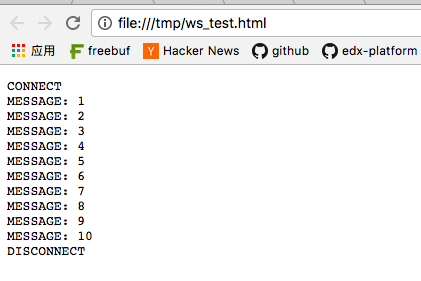
非常简单!
与特定编程语言结合
websocketd可以与各种语言编写的程序结合,官方源码库的example里就给出了很多:
- bash
- c#
- cgi-bin
- f#
- haskell
- html
- java
- nodejs
- perl
- php
- python
- ruby
- swift
- windows-jscript
- windows-vbscript
总有一款适合你
如果你的语言笔记小众,只要你的程序和shell脚本的输入/输出模式一样,就没问题
与python结合
我日常主要用python,所以列出与python的整合例子
同样来自官方的例子:count.py
 1
 2
 3
 4
 5
 6
 7
 8
 9
10
|
#!/usr/bin/env python
  # encoding: utf-8
  import time
  from sys import stdout
  i=1
  while True:
      time.sleep(1)
      i=i+1
      print(i)
      stdout.flush()
|
使其可执行:chmod +x count.py
运行:websocketd --port=8080 ./count.py
你讲看到和上边一样的结果
上边的源码有一处值得留意:stdout.flush(),有兴趣的同学可以参考Usage of sys.stdout.flush() method
一个可交互的例子
前头的例子都是单向的数据流,我们来看看一个交互性更强的例子(greeter.py)
1
2
3
4
5
6
7
|
from sys import stdin, stdout

# For each line FOO received on STDIN, respond with "Hello FOO!".
while True:
  line = stdin.readline().strip()
  print('Hello %s!' % line)
  stdout.flush() # Remember to flush
|
运行它:
1
2
|
chmod +x count.py
websocketd --port=8080 ./greeter.py
|
对应的前端为:
 1
 2
 3
 4
 5
 6
 7
 8
 9
10
11
12
13
14
15
16
17
18
19
20
21
22
23
24
25
26
|
<!DOCTYPE html>
<head>
<title>websocketd test</title>
</head>
<body>
<pre id="log"></pre>
<script>
  // helper function: log message to screen
  function log(msg) {
        document.getElementById('log').textContent += msg + '\n';
          }
  // setup websocket with callbacks
  var ws = new WebSocket('ws://localhost:8080/');
  ws.onopen = function() {
          log('CONNECT');
          // input
          ws.send("wwj");
            };
  ws.onclose = function() {
        log('DISCONNECT');
          };
  ws.onmessage = function(event) {
        log('MESSAGE: ' + event.data);
          };
</script>
</body>
|
打开页面,我们看到:
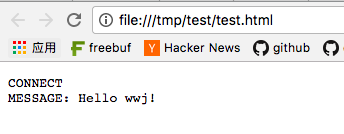
Awesome!
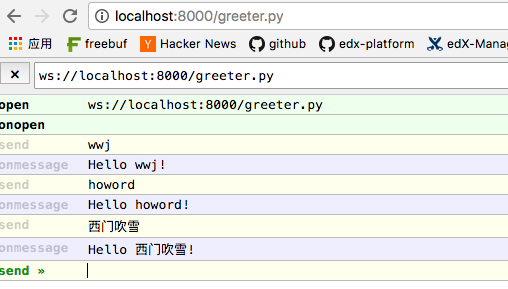
交互调试
调试带有交互功能的程序,手写js比较不方便,官方也给出了调试模式
以上边的例子为例:websocketd --port=8000 --dir=./ --devconsole
打开:http://localhost:8000/greeter.py
一些特性
关于websocketd的特性介绍你可以看它的主页
我这里对我发现的特性做个笔记:
- 支持多client连接,每个client连接后,都将看到
count.sh从头开始运行的过程数据(应该是独立的,每来一个请求,被包装的脚本从头运行?)
与其他工具组合
同*nix的其他管道工具一样,组合的可能性取决于你的想象力,在此列出我觉得有用的组合:
- 与ngrok组合,将websocket服务暴露到公网(当然你也可以用nginx反向代理)
- ws-repl,这个项目将websocketd与各种REPL对接(ps,这类需求我更推荐gotty)
参考








