




文章目录
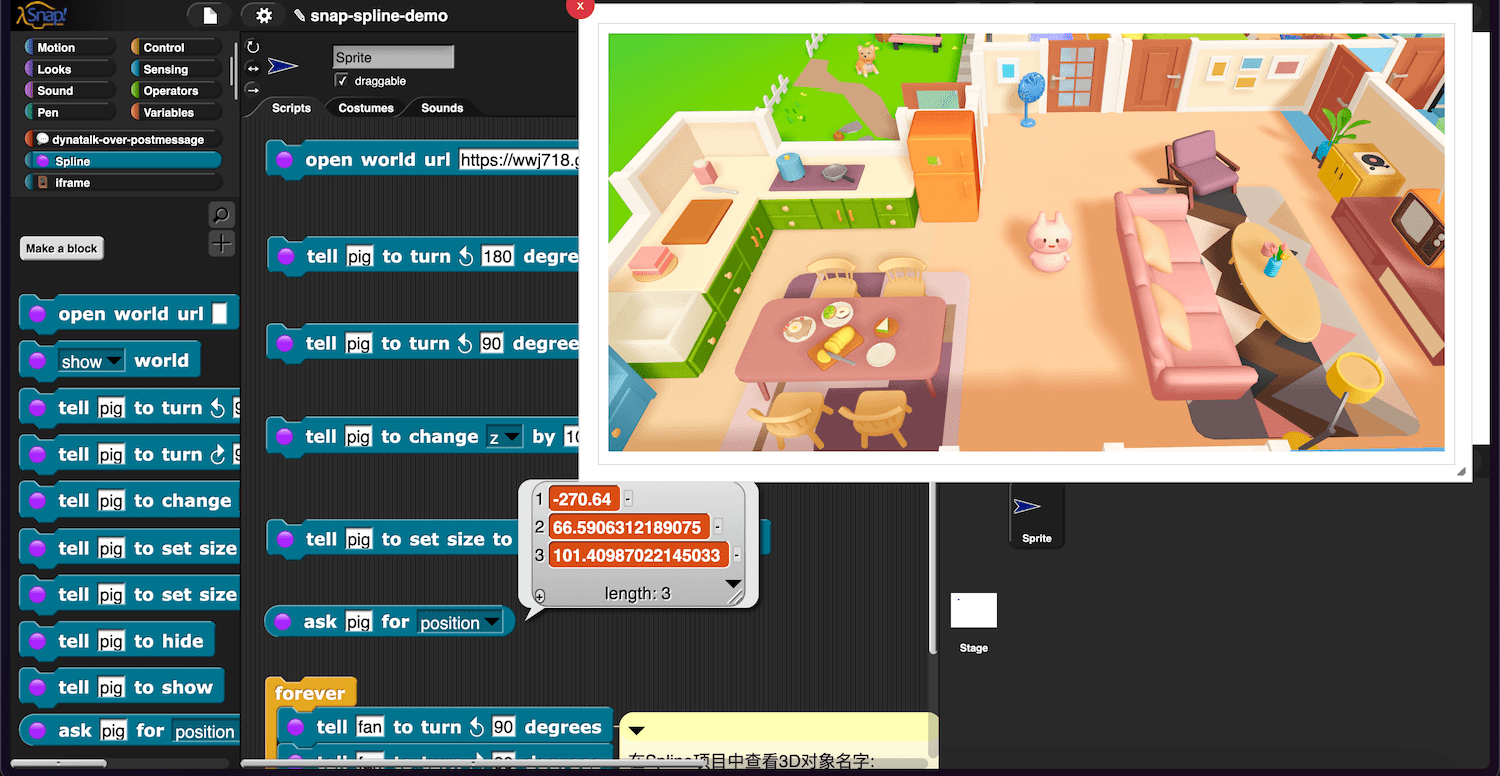
Preface
My interest in 3D environments came from this paper by Croquet team.
I learned this perspective on interactive graphical computing from Alan Kay: the power of desktop metaphor/GUI is psychological, it create a “illusion” for users, as if things are right there on the screen, so users can transfer their real-world experience, just like dealing with physical objects, to interacting with virtual objects on the screen.
From this perspective, we naturally crave a 3D environment because it can further enhance this “user illusion” that things exist in a virtual 3D space rather than on a 2D “desktop.” As a result, users can more easily transfer their experiences from the real world (the real world is a kind of 3D space).
These ideas focus on making computing adapt to humans, rather than making humans adapt to computing.
Introducing 3D world into Snap!
The stage provided by Snap! is usually used to make 2D projects. I was eager to introduce 3D world into Snap!.
There are many ways to achieve goals:
- Bernat’s 3D Beetle library demonstrates a feasible approach to integrating a 3D world created with babylonjs into Snap!
- The Dynalab team has tried using Snap! to drive the Croquet Microverse
The iframe library provides this possibility.
My idea is:
- Introducing web-based 3D world into Snap! using the iframe library.
- With postMessage API, Snap! can communicate with the 3D world inside an iframe
I need to choose a 3D engine to demonstrate how to implement the above ideas. After some comparison, I chose Spline, which is simple and easy. Spline has many similarities with Scratch, and it greatly reduces the difficulty of 3D creation.
It is possible to create a 3D editor(based on threejs or babylonjs) for Snap!, just like Snap!’s Bitmap Paint Editor/Vector Paint Editor, deeply integrated into Snap!. The downside of doing this is the development workload is huge, and it is doubtful whether it is as easy to use. I ultimately abandoned this idea and instead started thinking about:
Which 3D editor is easy to use and exposes an API for interaction? If such a editor exists, we can consider it as an “external editor” for Snap!
Spline is responsible for creating 3D projects and exposing API and Snap! is responsible for programming and control. Operating a Spline project in Snap! is similar to operating a MicroBlocks project in Snap!. Spline and MicroBlocks is responsible for “internal Programming”, providing services externally, while Snap! acts as a client using these services.
demo 1
You can export the project and load it in Snap!Cloud, remember to enable JavaScript extensions
Spline project used for demonstration, remixed from Little World Kawaii Pig。
The world url filled in Snap! is https://prod.spline.design/s7FG1KdbdsyW8yOY/scene.splinecode (FAQ explains how to get the world url of a project)
demo2
Spline project used for demonstration, remixed from Mini House - Conditional Logic。
The world url filled in Snap! is https://prod.spline.design/nO5gRl8xdZ5gp4UJ/scene.splinecode
demo3: get and set variable
Spline project used for demonstration, remixed from 3D Text - Blue.
The world url filled in Snap! is https://prod.spline.design/CJdfFOXzOrARU5Nz/scene.splinecode
About the usage of variables in Spline, refer to this tutorial
FAQ
How to get the world url
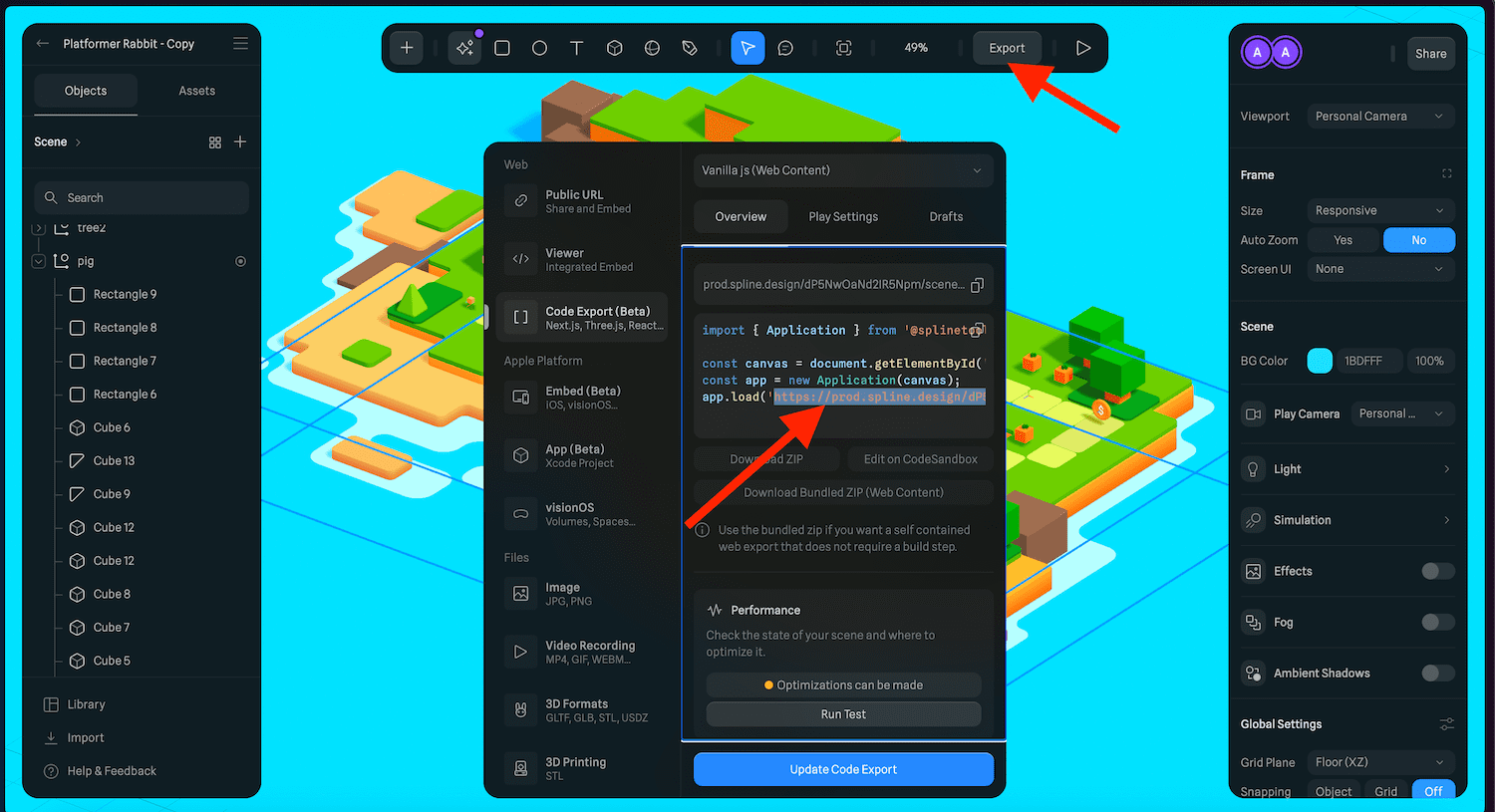
How to self-host project files?
Taking demo 2 (https://prod.spline.design/dP5NwOaNd2IR5Npm/scene.splinecode) as an example, you can download it, store it on your own server (I put it at: https://wwj718.github.io/post/img/scene.splinecode ), and then load it.
How does the open world url block work?
open world url block requires a url parameter, like https://prod.spline.design/nO5gRl8xdZ5gp4UJ/scene.splinecode, you can get the url
from the Export button of a Splne project.
Within open world url block , it will pass the url to this iframe page: https://wwj718.github.io/Snap-Spline-Demo?project=https://prod.spline.design/nO5gRl8xdZ5gp4UJ/scene.splinecode
The source code of the iframe page is here: Snap-Spline-Demo.
What APIs does Spline expose?
Here is the API description.
These APIs determine how external systems (such as Snap!) can interact with Spline projects.
What is the use of dynatalk-over-postmessage blocks
Everything is an object
Objects communicate via messages
The object interprets the message it understands
– Alan Kay
The browser provides the postMessage API for communicating with iframe pages, which is an asynchronous communication (pub/sub) method. Sometimes we want synchronous communication (such as the ask _ for _ blocks of the Spline library), similar to RPC or function call. Dynatalk can achieve this.
Creating dynatalk-over-postmessage is esay. It only needs to switch the message channel from MQTT to postMessage. Specifically, the mechanism for receiving and sending messages needs to be adjusted.