更新提醒(2021-03-18)
新的版本加入了与Scratch UI兼容的功能,相对于旧的版本要复杂些。
前言
开发一个 CodeLab Adapter 插件,往往会涉及两部分的工作:
- 在 CodeLab Adapter 里写一个Python插件
- 在 Scratch里写一个 js 插件
类似前后端的配合,只是他们通过消息通信,而不是 REST API。
本文侧重讨论Python插件部分。
CodeLab Adapter 自带一个消息系统,理论上,任何语言都可以与之通信,任何有开放接口的事物都可以接入其中。
本文仅讨论如何在 Scratch 上构建客户端(Scratch Extension,基于 JavaScript),使其与 CodeLab Adapter 通信(收发消息)来扩展 Scratch 的能力。当然,你也可以在任何语言中做这件事。
思路
一个 Adapter 插件(plugin)被视为 Adapter 系统的一个节点(Node), 通过这些节点去适配不同的外部硬件/软件,进而将其接入到系统中。
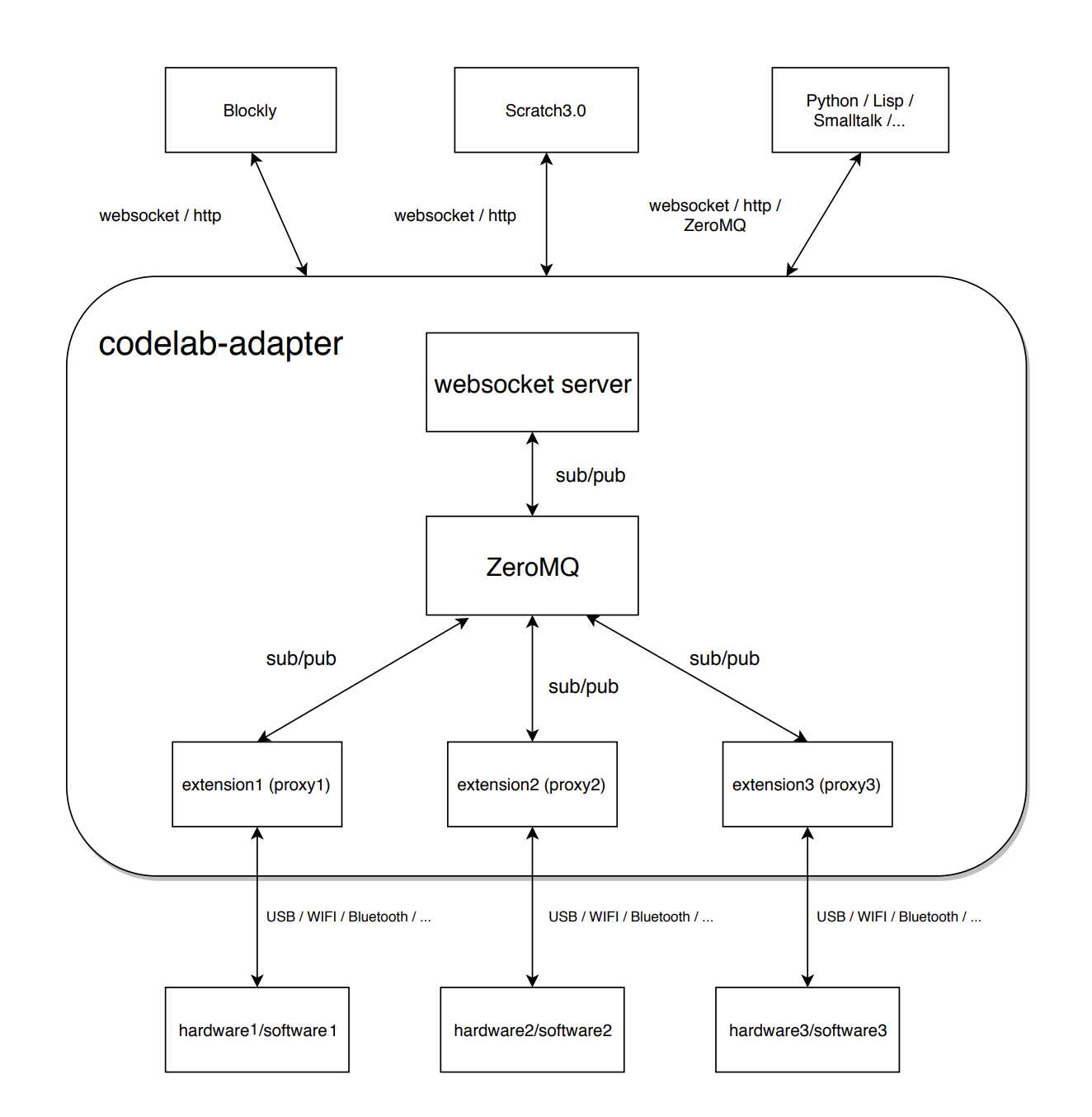
在系统中,流动的一切都是消息,所以由这些插件连接的事物(软件/硬件)可以彼此沟通(talk),系统得以持续生长。
希望使用 Adapter 某个插件的能力时(如在 Scratch 中),只需要发送消息与 Adapter 对话即可。
开始
案例(Tello)
本文采用案例式教学。
近期我们重写了 Adapter Tello 插件,本文将以此为例,介绍 开发一个 CodeLab Adapter 插件 的典型流程。
该流程是完全通用的。
如何交互?
首先考虑第一个问题:你想接入什么东西?与之交互的方式是什么?(Adapter 是一个利用消息不停交互的系统)
如果你想接入的东西是硬件(如 Tello),那么与之通信的方式可能是调用它们的开放 SDK 。
如果你想接入的东西是软件(如 Teachable Machine),那么与之通信的方式可能是基于某些标准协议(如 http/websocket).
如果你想接入的东西是一门编程语言的内核(如 Python),那么与之通信的方式可能是 eval
寻找 SDK
在本文中,我们 想接入什么东西 是 Tello。 我们在 Github 上找到与之通信的 Python SDK: DJITelloPy
与 Tello 通信的方式是利用 socket, DJITelloPy封装了细节,使我们可以以面向对象的风格与之交互, 我们来一撇 SDK 的使用方式。
 1
 2
 3
 4
 5
 6
 7
 8
 9
10
11
12
|
from djitellopy import Tello

tello = Tello()

tello.connect()
tello.takeoff()

tello.move_left(100)
tello.rotate_counter_clockwise(90)
tello.move_forward(100)

tello.land()
|
语义清晰,非常简易。
构建 Adapter 插件
一个 Adapter 插件不是一个孤岛,它试图与其他事物交谈(talk), 对外部的请求做出回应。
实现这件事的方式很多,软件工程有大量工作围绕这块: 对请求作出回应,提供服务,我们会想到 RESTful API、RPC…
Adapter 如果完成以上目标? 我们采取的策略是: 收发消息。我们把一切看作消息, 并且倾向于晚绑定(late binding)
回到正题。我们先来快速浏览一下 Tello 插件的代码(不必弄懂它,稍后会讲解)。
  1
  2
  3
  4
  5
  6
  7
  8
  9
 10
 11
 12
 13
 14
 15
 16
 17
 18
 19
 20
 21
 22
 23
 24
 25
 26
 27
 28
 29
 30
 31
 32
 33
 34
 35
 36
 37
 38
 39
 40
 41
 42
 43
 44
 45
 46
 47
 48
 49
 50
 51
 52
 53
 54
 55
 56
 57
 58
 59
 60
 61
 62
 63
 64
 65
 66
 67
 68
 69
 70
 71
 72
 73
 74
 75
 76
 77
 78
 79
 80
 81
 82
 83
 84
 85
 86
 87
 88
 89
 90
 91
 92
 93
 94
 95
 96
 97
 98
 99
100
101
102
103
104
105
106
107
108
109
110
111
112
113
114
115
116
117
118
119
120
121
122
123
124
125
126
127
128
129
130
131
132
133
|
import json
import time

from codelab_adapter_client import AdapterNode
from codelab_adapter_client.thing import AdapterThing
from djitellopy import Tello  # https://github.com/wwj718/DJITelloPy/archive/master.zip
from loguru import logger


class TelloProxy(AdapterThing):
    '''
    该类的主要职责是实现与 Scratch UI 的兼容性
    '''
    def __init__(self, node_instance):
        super().__init__(thing_name="Tello", node_instance=node_instance)

    def list(self, timeout=5) -> list:
        # 必须实现
        # scratch scan 会触发这个函数,返回值将进入 Scratch 扫描到的设备列表中。
        if not self.thing:
            self.thing = Tello()
        self.thing.RESPONSE_TIMEOUT = timeout
        logger.debug(f"self.thing: {self.thing}")
        try:
            self.thing.connect()  # 返回True有问题,如果没有飞机,就会except
            return ["192.168.10.1"]
        except Exception as e:
            logger.debug(f'error: {str(e)}')
            self.node_instance.pub_notification(str(e), type="ERROR")
            return []

    def connect(self, ip, timeout=5):
        # 必须实现
        # 用户在 scratch 界面点击连接时,会触发该函数
        if not self.thing:
            self.thing = Tello()
        is_connected = self.thing.connect()  # 幂等操作 ,udp
        self.is_connected = is_connected
        return True

    def status(self) -> bool:
        # 必须实现
        # return self.thing.connect()
        pass

    def disconnect(self):
        # 必须实现
        # Scratch 断开连接
        self.is_connected = False
        try:
            if self.thing:
                self.thing.clientSocket.close()
        except Exception:
            pass
        self.thing = None


class Tello3Node(AdapterNode):
    NODE_ID = "eim/node_tello3"
    HELP_URL = "https://adapter.codelab.club/extension_guide/tello3/"
    DESCRIPTION = "tello 3.0"  # list connect
    VERSION = "3.0.0"

    def __init__(self, **kwargs):
        super().__init__(logger=logger, **kwargs)
        self.tello = TelloProxy(self)

    def run_python_code(self, code):
        '''
        此处定义了与外部系统(诸如Scratch)沟通的有效消息
        list: Scratch 发现设备
        connect: scratch 建立连接
        disconnect: scratch 断开连接
        tello: 可调用的对象,一般被scratch具体功能积木调用,消息是传递面向对象风格的Python代码,如 tello.takeoff()
        '''
        try:
            output = eval(
                code,
                {"__builtins__": None},
                {
                    "tello": self.tello.thing,
                    "connect": self.tello.connect,
                    "disconnect": self.tello.disconnect,
                    "list": self.tello.list,
                })
        except Exception as e:
            output = e
        return output

    def extension_message_handle(self, topic, payload):
        # 必须实现
        # 与当前插件有关的消息都流入该函数
        self.logger.info(f'code: {payload["content"]}')
        python_code = payload["content"]
        output = self.run_python_code(python_code)
        try:
            output = json.dumps(output)
        except Exception:
            output = str(output)
        payload["content"] = output
        message = {"payload": payload}
        self.publish(message)

    def run(self):
        # 用于block进程,当收到进程停止消息(将切换self._running状态),则结束阻塞
        while self._running:
            time.sleep(0.5)

    def terminate(self, **kwargs):
        # 必须实现
        # 插件退出钩子,可以执行所需的资源清理(诸如释放设备)
        try:
            self.tello.disconnect()
        except Exception:
            pass
        super().terminate(**kwargs)


def main(**kwargs):
    #  入口函数,启动插件时将以独立 Python 进程运行。
    try:
        node = Tello3Node(**kwargs)
        node.receive_loop_as_thread()
        node.run()
    except Exception as e:
        if node._running:
            node.pub_notification(str(e), type="ERROR")
            time.sleep(0.1)
            node.terminate()


if __name__ == "__main__":
    main()
|
你可以使用 Adapter 内置的 JupyterLab 浏览/修改 这些插件源码, 保存并重启插件之后,即刻生效(不需要重启 Adapter)
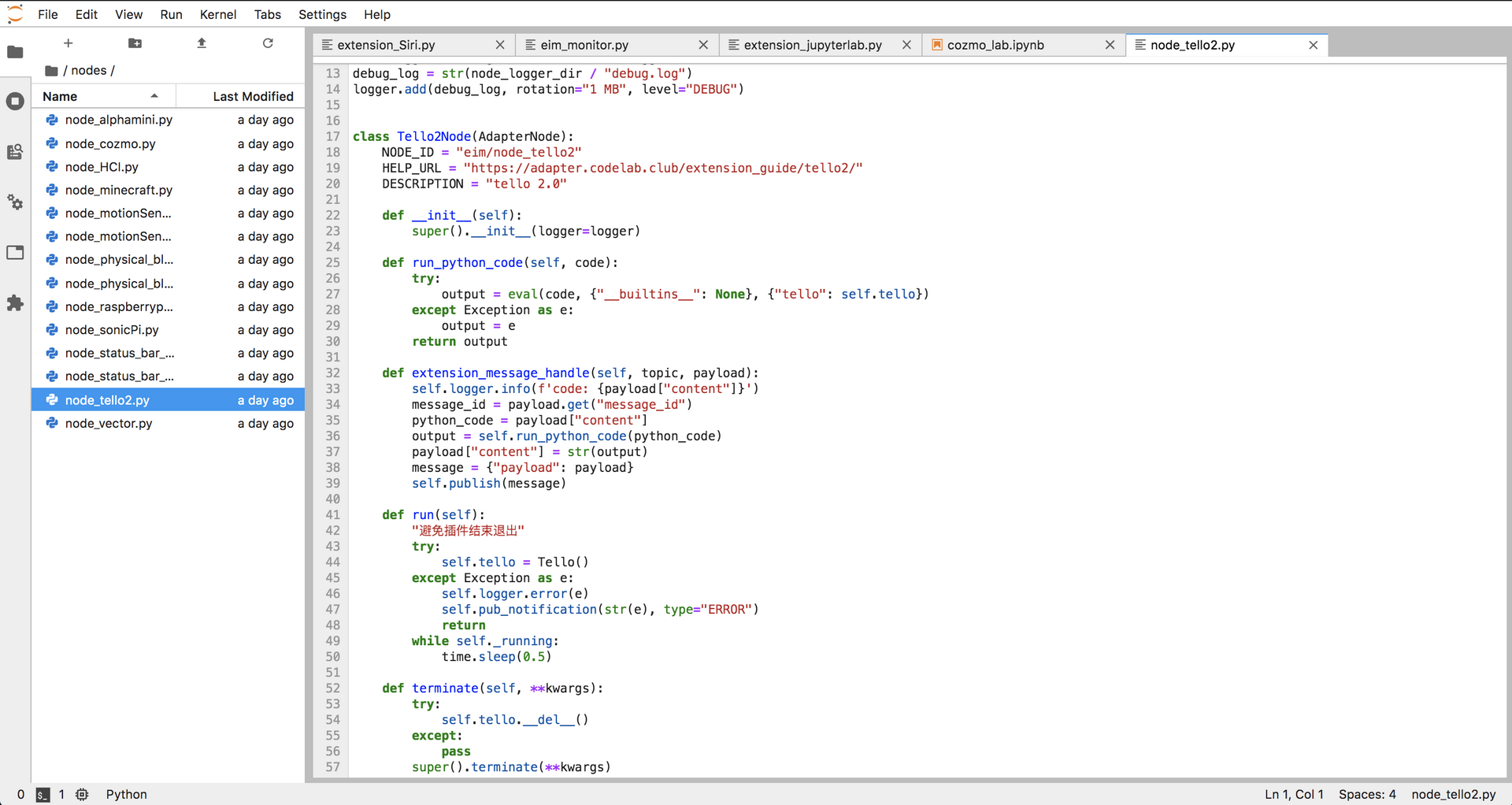
我们来看看 tello 插件各部分代码的含义和功能是什么(主要关心 Tello3Node)
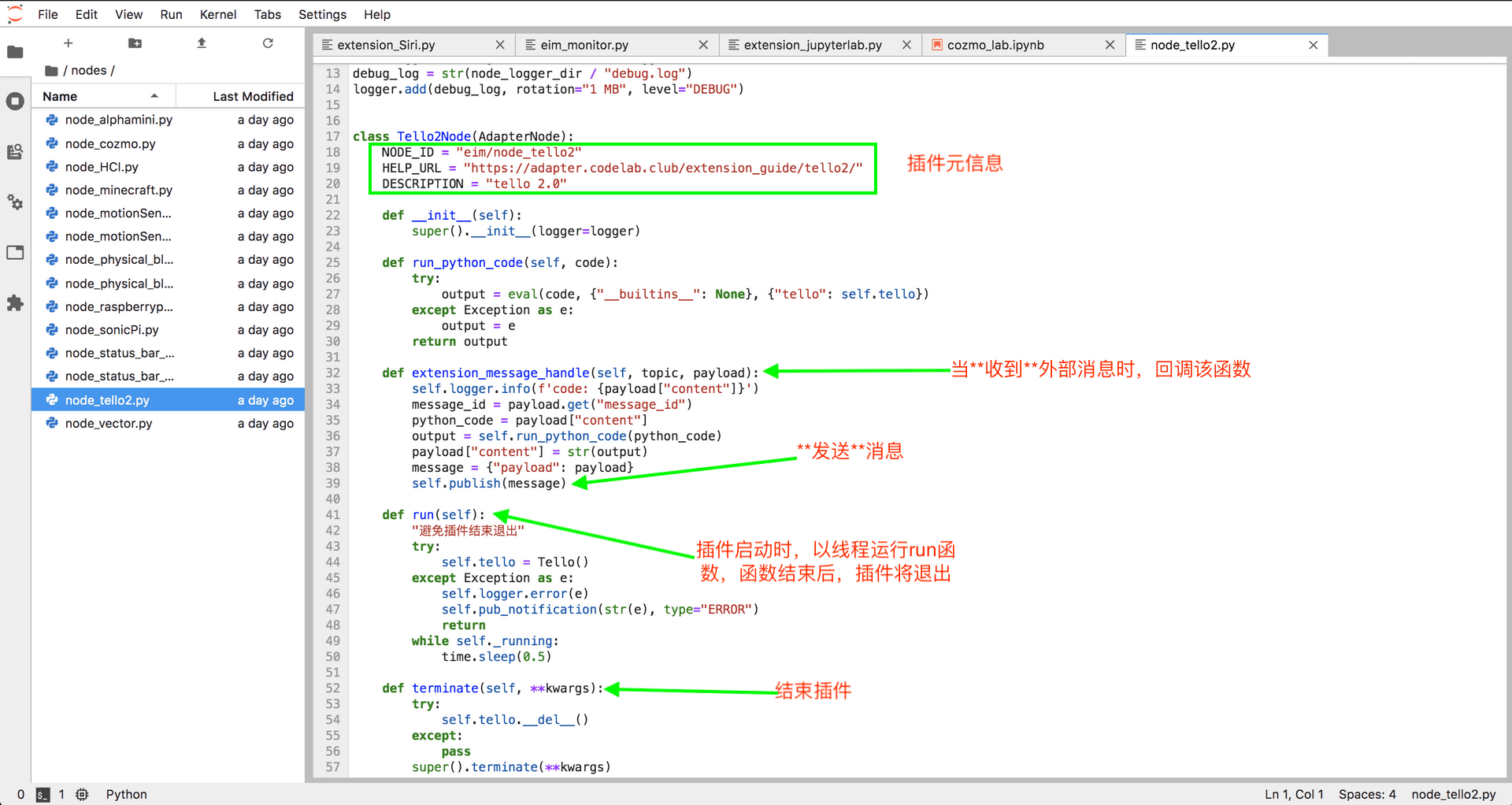
可是,并没有见到跟 Tello 有关的业务逻辑啊?
是的,这正是我们想法的核心部分: 晚绑定(late binding), 将功能描述不断后推,交给 client(甚至是用户)。
Adapter Tello 插件看起来颇像一个 REPL,它解释(run_python_code)收到的消息(副作用是 tello 飞行器的行为), Tello 的行为将由输入的消息决定,消息携带语义。我们贪图便利,直接将 Python 代码视为消息(因其能很好携带语义)
客户端
接下来我们来构建一个客户端来使用 Adapter Tello 插件。
前头提到,我们计划在 Scratch 里构建一个客户端,它是一个 Scratch Extension。
Scratch Extension
如果你对构建 Scratch Extension 不熟悉,请参考: 创建你的第一个 Scratch3.0 Extension
我们已经将 Scratch Tello 插件开放在这儿: scratch3_tello3
如何交互(talk)?
前头提到:
一个 Adapter 插件不是一个孤岛,它试图与其他事物交谈(talk), 对外部的请求做出回应。
Scratch Tello 插件(JavaScript)是如何与 Adapter 插件(Python)交互的呢?
它们通过 websocket(socketio)沟通, 但你不需要在意和弄懂它们沟通的细节,我们已经构建了一个 Adapter js client,抽象掉了 talk 的细节,让你可以基于它轻松在 js 里与 Adapter 交互。 (注意:你的开发环境里,需要有scratch3_eim)
源码解读
接下来,一起深入到源码里看看。
我们通过阐述这两块积木,来看看引擎盖后发生的事情。
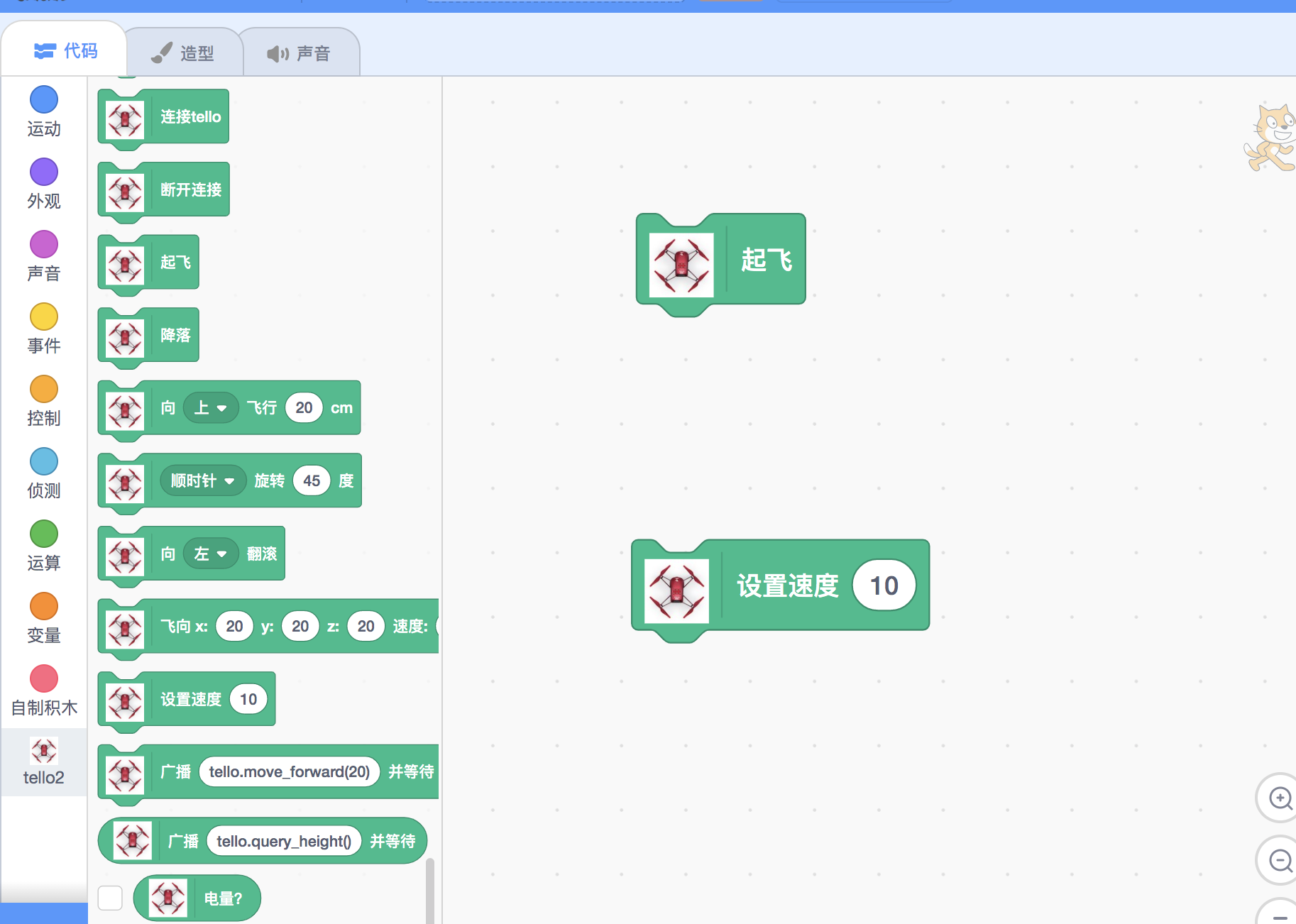
首先看看,当我们 起飞 积木运行的时候发生了什么:
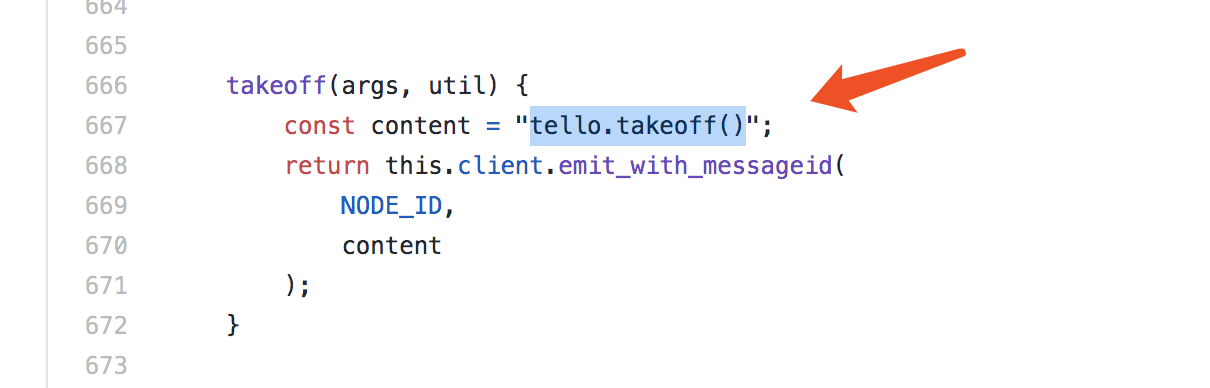
实际上,当 Scratch 中, 起飞 积木运行时,消息 tello.takeoff() 将发送到 Adapter Tello 插件,插件将解释这则消息– eval(执行)这段 Python 代码。
接着我们来看看 设置速度 积木(带有参数)运行的时候发生了什么:
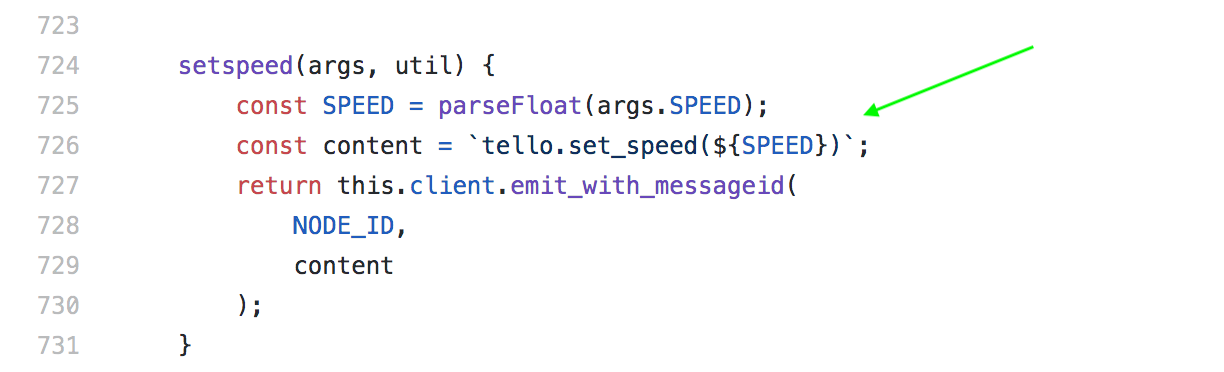
可以看出,我们试图将参数拼凑到 Python 代码里。
this.client.emit_with_messageid 是与 Adapter 通信的关键,这部分也很简单,只是发送消息,如果你兴趣不大,不需要弄懂它, 将其视为模版代码,跟着既有的插件(我们开放了插件)填空即可。
需要注意的是,发往插件的消息并不一定是 Python 代码,它只要携带语义就行。
AdapterBaseClient 类是与 Adapter 通信的唯一入口。 AdapterBaseClient在初始化的时候, 允许传入一些回调函数,获取来自Adapter一侧的消息。
如果你构建了新的 Adapter 插件,欢迎提交到插件市场
调试
为了方便开发 Adapter 插件,一些调试技巧可能对你有用
进阶 && 进一步阅读
FAQ
我手头没有 Tello,怎么更方便调试
你可以自定义一个一个Tello类替代 from djitellopy import Tello, 只需要实现js积木里调用的方法即可,诸如 takeoff, 这种方式有助于你理解沟通过程。
当然,你也可以使用我们构建了一个模拟设备的例子:
如何刷入自定义固件
Adatper 内置了哪些第三方库
wiki
如何引入新的 Python 第三方库
Adapter 允许再分发, 把需要的第三方库放在相应目录下,再分发即可
放在目录下即可,再分发
更多 FAQ
参考






