惯性聚合 高效追踪和阅读你感兴趣的博客、新闻、科技资讯
阅读原文 在惯性聚合中打开

推荐订阅源

Recent Commits to openclaw:main
U
Unit 42
WordPress大学
WordPress大学
Microsoft Azure Blog
Martin Fowler
Martin Fowler
人人都是产品经理
人人都是产品经理
Microsoft Security Blog
T
The Blog of Author Tim Ferriss
博客园 - Franky
云风的 BLOG
云风的 BLOG
酷 壳 – CoolShell
酷 壳 – CoolShell
P
Palo Alto Networks Blog
NISL@THU
NISL@THU
cs.CL updates on arXiv.org
Vercel News
Vercel News
Threat Intelligence Blog | Flashpoint
P
Privacy & Cybersecurity Law Blog
C
Cyber Attacks, Cyber Crime and Cyber Security
J
Java Code Geeks
Google DeepMind News
C
Cisco Blogs
OSCHINA 社区最新新闻
OSCHINA 社区最新新闻
Spread Privacy
Spread Privacy
小众软件
小众软件
T
Threat Research - Cisco Blogs
Project Zero
Project Zero
博客园 - 三生石上(FineUI控件)
D
Darknet – Hacking Tools, Hacker News & Cyber Security
The Register - Security
The Hacker News
The Hacker News
F
Fortinet All Blogs
Security Latest
Security Latest
Cisco Talos Blog
Cisco Talos Blog
The GitHub Blog
The GitHub Blog
Stack Overflow Blog
Stack Overflow Blog
T
The Exploit Database - CXSecurity.com
量子位
Blog — PlanetScale
Blog — PlanetScale
奇客Solidot–传递最新科技情报
奇客Solidot–传递最新科技情报
P
Proofpoint News Feed
G
GRAHAM CLULEY
D
DataBreaches.Net
P
Privacy International News Feed
Y
Y Combinator Blog
Simon Willison's Weblog
H
Hackread – Cybersecurity News, Data Breaches, AI and More
I
InfoQ
CTFtime.org: upcoming CTF events
Recent Announcements
P
Proofpoint News Feed

夜行人

回家路上 第一期的直播演示项目 震动检测器 正能量 在线参观CodeLab Neverland 发布 CodeLab Adapter 3.3.1 DynamicTable 之 纸糊方向盘 CodeLab DynamicTable: 一个可实施的技术方案 CodeLab Insight 发布 Alpha 版 情人节 Home Assistant 周报 && IoT 周报 (02) Joplin: 关注隐私的 Evernote 开源替代软件 浏览器的未来与 Web 传感器 Home Assistant 周报 && IoT 周报 (01) 百宝箱(01) 论自由 介绍 WebThings Home Assistant 周报 && iot 周报 (00) 百宝箱(00) 毛姆读书心得 传世之作 周末徒步 CodeLab Adapter ❤️ Jupyter/Python 航班 躲雨 夏令营途中 [译]思想--作为一种技术 The future of coding 美国之行 三门问题的程序模拟 从Python转向Pharo https://blog.just4fun.site/post/iot/iot-open-source-projects/ Python异步编程笔记 https://blog.just4fun.site/post/iot/iot-open-source-hardware-community/ 万物积木化开发者社区 CodeLab ❤️ Blender Scratch3技术分析之云变量 API(第7篇) [译]对管道(Pipes)的偏爱 [译]提出正确的问题比得到正确答案更重要 蓝牙设备与Scratch3.0 创建你的第一个Scratch3.0 Extension Scratch3技术分析之项目内部数据(第6篇) Scratch3技术分析之社区 API(第5篇) Scratch3技术分析之User API(第4篇) Scratch3技术分析之项目主页API(第3篇) Scratch3技术分析之静态资源API(第2篇) Scratch3.0、micro:bit与Windows7 https://blog.just4fun.site/post/iot/zerynth-vs-micropython/ 核聚变、方所与半宅空间 可视化编程为何是个糟糕的主意 codelab.club周末聚会 关于codelab.club '下一件大事'是一个房间 Hungry Robot - Eat everything 编程作为一种思考方式 今日简史 史蒂夫·乔布斯传 罗素自选文集 https://blog.just4fun.site/post/edx/tianjin-scratch-ai/ https://blog.just4fun.site/post/edx/richie-cms-openedx/ 徒步武功山 WebUSB与micro:bit 积木化编程与3D场景 夜宿武功山顶 scratch3-adapter接入优必选Alpha系列机器人 https://blog.just4fun.site/post/edx/video-migration-note/ scratch3-adapter重构笔记 https://blog.just4fun.site/post/edx/edx-community-members/ 两种硬件编程风格的比较 使用micro:bit自制PPT翻页笔 柏拉图对话集 scratch3.0 + micro:bit 七月电影放映计划 非营利组织的管理 Screenly--用树莓派让任何屏幕变为可编程的数字标牌 以最佳实践开始你的Django项目 micro:bit与事件驱动 为Scratch3.0设计的插件系统(上篇) OCR应用一例 近两年读过的一些好书 blockly开发之使用python驱动浏览器中的turtle(2) 牛顿新传 文学理论入门 逻辑的引擎 人生的意义 blockly开发之生成并运行js代码(1) blockly开发之hello world(0) micro:bit使用笔记 神器之Termux https://blog.just4fun.site/post/iot/micropython-notes/ Cozmo what is this Scratch的前世今生 下段旅程 我行在远方 爆裂 途中杂记 https://blog.just4fun.site/post/edx/open-edx-startup/ cozmo系列之入门 - 有性格且可编程的机器人 PaperWeekly开发笔记 创业二三事
MicroBlocks Client for Snap!
种瓜 · 2024-07-10 · via 夜行人

中文版本

Preface

Like many of us, you are a Smalltalker at heart! –John Maloney

Thanks to MicroBlocks and Snap!, we are not homeless –wenjie

After making the CoCube library in Snap!, I realized that most of the work in this library is general and can be used for any MicroBlocks device!

By extracting the general parts of the CoCube library, the MicroBlocks Client library was obtained.

Much of the content of this article overlaps with the CoCube library in Snap!, and the MicroBlocks Client library is essentially a general version of the CoCube library.

Motivation

Using Snap! to drive MicroBlocks devices usually has the following two motivations:

  • Use the existing Snap! AI library for MicroBlocks devices
  • Making advanced libraries (especially for robotics-related projects) in a host computer with stronger computing power

Idea

The key in making great and growable systems is much more to design how its modules communicate rather than what their internal properties and behaviors should be. – Alan Kay

Because Snap! and MicroBlocks are both products of the personal computing spirit, both possess exceptional dynamism, I am confident that the goal(programming MicroBlocks devices in Snap!) can be achieved through message passing. In fact, MicroBlocks IDE collaborates with VM through message passing mechanism.

I like to use message passing to design the interoperability mechanism between systems, as this can minimize the coupling between systems.

There is already a library in Snap! for directly passing messages between Snap! and MicroBlocks
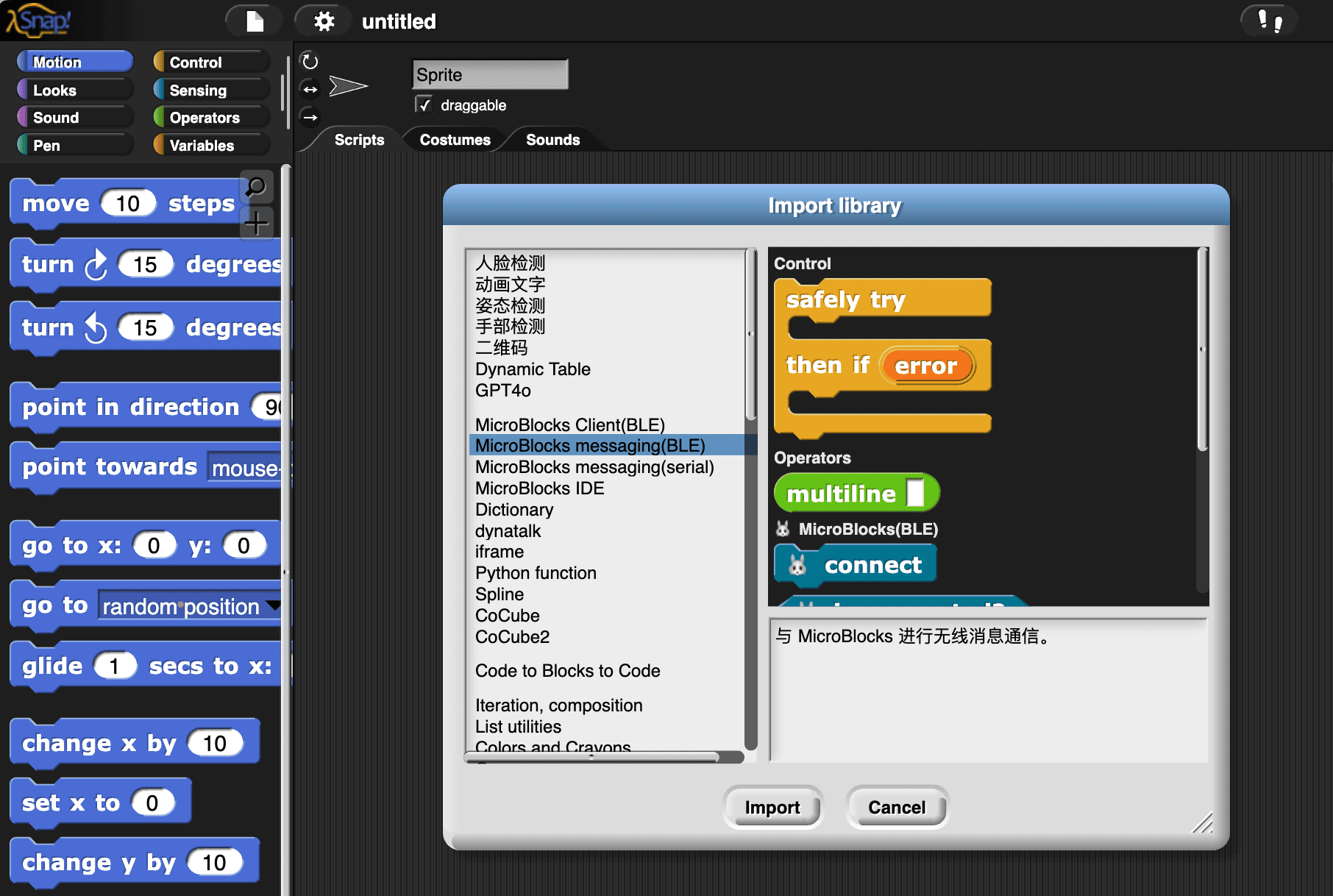
This library provides the basic functionality for message passing. I intend to use this library to create the MicroBlocks Client library, wanting to achieve:

  1. Users can get the status of MicroBlocks devices in Snap! (by reporter blocks)
  2. Users can send commands (by command blocks) to MicroBlocks devices in Snap!
  3. Users only need to program in Snap! without switching back and forth between Snap! and MicroBlocks.
  4. As good extensibility as possible

Regarding point 1: get the status of another system. There are usually two ways to do it:

  • push style: A system continuously broadcasts messages carrying status data to another system
  • pull style: Query the status, usually using request-response style communication.
    • RPC/HTTP is this style
    • Dynatalk is this style

The MicroBlocks messaging(BLE) library provides a PubSub style message passing mechanism. I intend to build dynatalk-over-ble based on it, and then implement a pull style MicroBlocks Client library based on dynatalk-over-ble (similar to dynatalk-over-postmessage)

In our use case, we only need to implement a unidirectional C/S architecture (Snap! as the client, MicroBlocks as the server). Therefore, the complexity of dynatalk-over-ble is only half that of regular dynatalk. The good news is that the half handled by the computationally weaker MicroBlocks is extremely simple.

Implement

On MicroBlocks side

As mentioned earlier, we want:

Users only need to program in Snap! without switching back and forth between Snap! and MicroBlocks.

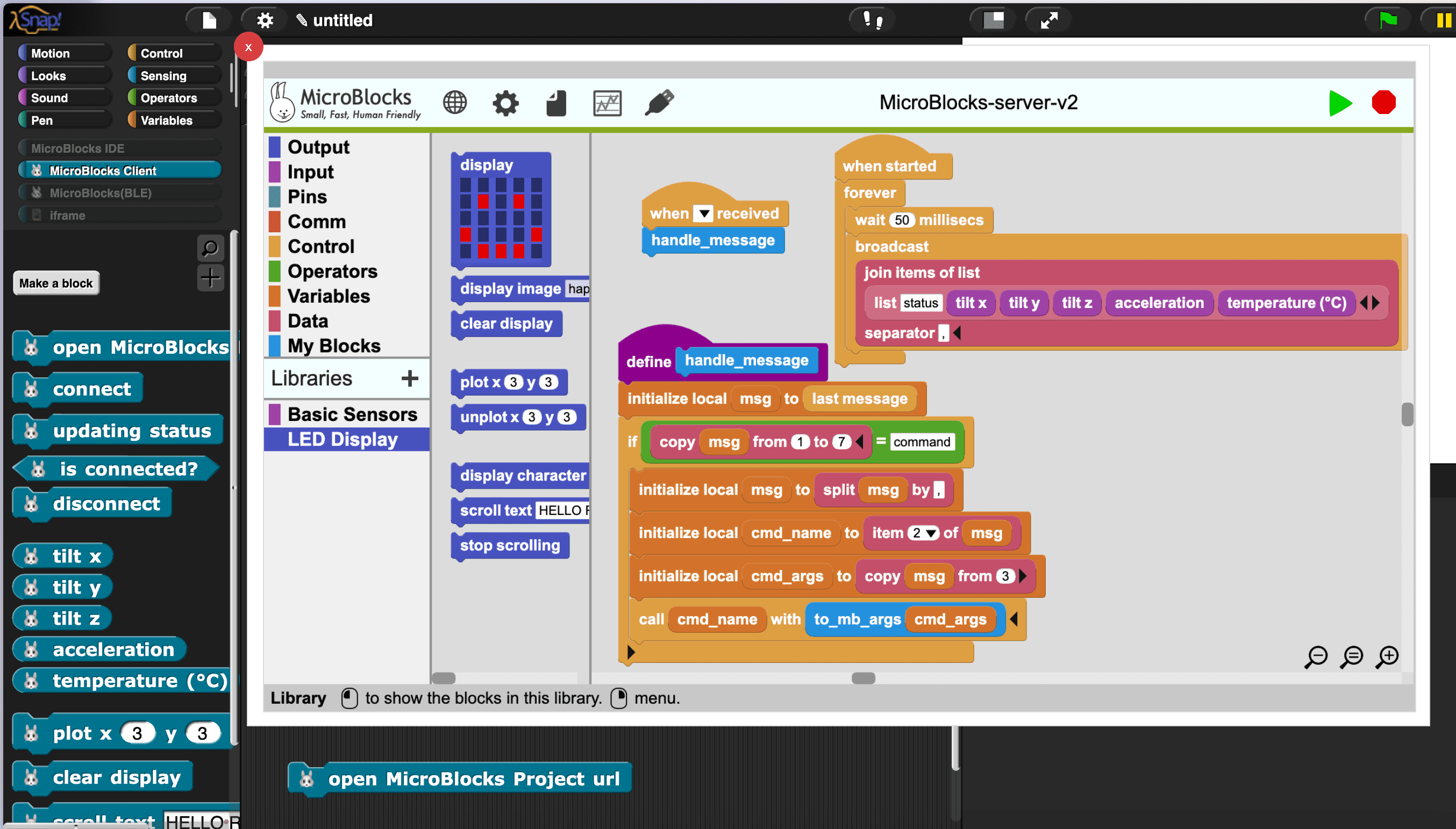
Therefore, I hope the code on the MicroBlocks side is completely universal. Users only need to save this universal program to the device and then no longer need to open the MicroBlocks platform, allowing them to program the device entirely in Snap!

To achieve this, we save this universal program to the device:

This program is responsible for the following tasks:

  • Interpret the received message and “ground” the semantics of the message to the specific functions of the hardware device. The “grounding” work is implemented using the call block, which is similar to eval in other programming languages and can dynamically run custom blocks and VM primitives.
    • handle_message block is used to handle non-blocking messages
    • handle_blocking_message block is used to handle blocking messages

You can think of this program as a server running on hardware, and Snap! as its client. We used the C/S architecture.

On Snap! side

As mentioned earlier, we want:

  1. Users can get the status of MicroBlocks devices in Snap! (by reporter blocks)
  2. Users can send commands (by command blocks) to MicroBlocks devices in Snap!

We show how they are implemented separately.

For point 1, get the status of MicroBlocks devices in Snap! (by reporter blocks):

For point 2, send commands (by command blocks) to MicroBlocks devices in Snap!

The message is in pure string form, carrying the method name (custom block name or vm primitives) and parameters, separated by ,. Here is an example: call, <msg-id>, [display:mbPlot], 3, 3

How to use MicroBlocks Client library?

To use the MicroBlocks Client library, simply open the Snap!.

Load the MicroBlocks Client library,

Click open MicroBlocks project block to open the MicroBlocks window. After connecting the device and uploading the program, you can disconnect the device and close the MicroBlocks window.

Then start programming in Snap!.

FAQ

How to add more MicroBlocks Client library?

Download https://snap.codelab.club/libraries/MicroBlocks-Client.xml. (Open in browser, save as local file)

then:

  • Renamed MicroBlocks-Client.xml to MicroBlocks-Client2.xml
  • Edit MicroBlocks-Client2.xml:
    • Replace all 🐰 with 🐰2 (VSCode has a batch replace function)
    • Replace all _ble_ with _ble2_
  • Drag MicroBlocks-Client2.xml into Snap!. (this is an example: https://wwj718.github.io/post/img/MicroBlocks-Client2.xml)

By analogy, you can add any number of MicroBlocks Clients!

Usage scenarios

When there are multiple MicroBlocks devices, Snap! is perfect as a dashboard to control them all.
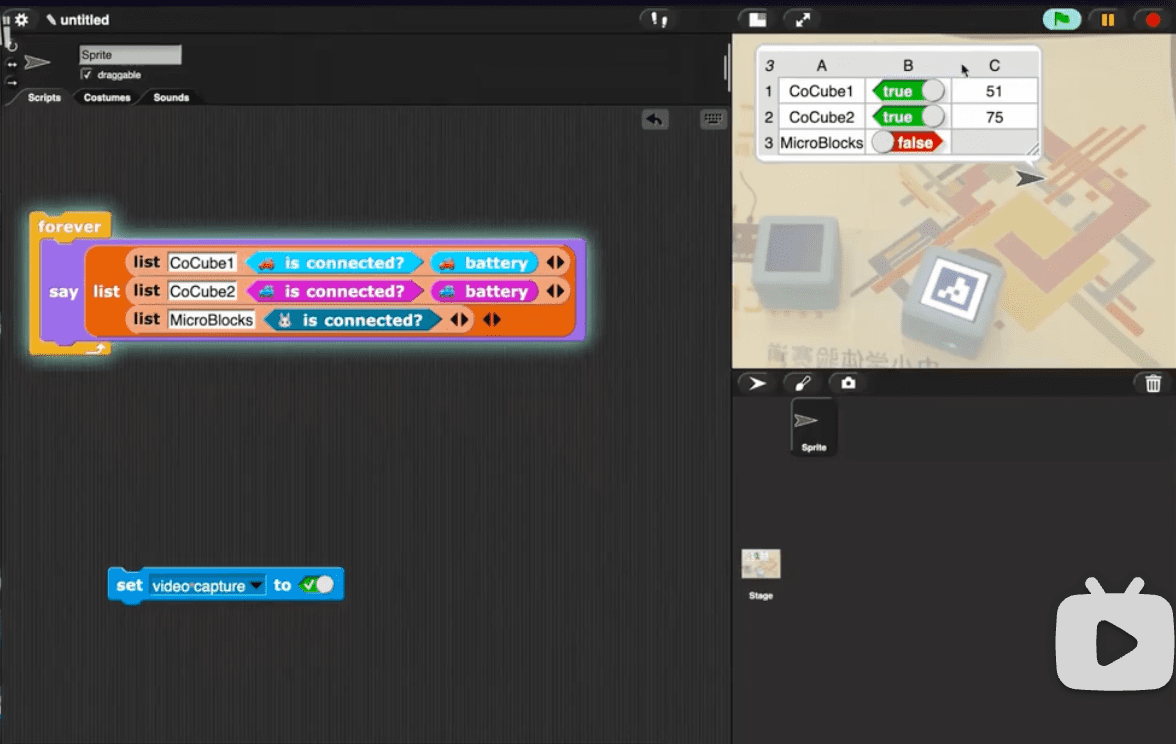
How to debug Snap! and MicroBlocks code simultaneously?

Yes, you can debug both software and hardware side code simultaneously! Everything is liveness!

You can connect the same device simultaneously in Snap! and MicroBlocks , then observe the flow of messages between them:
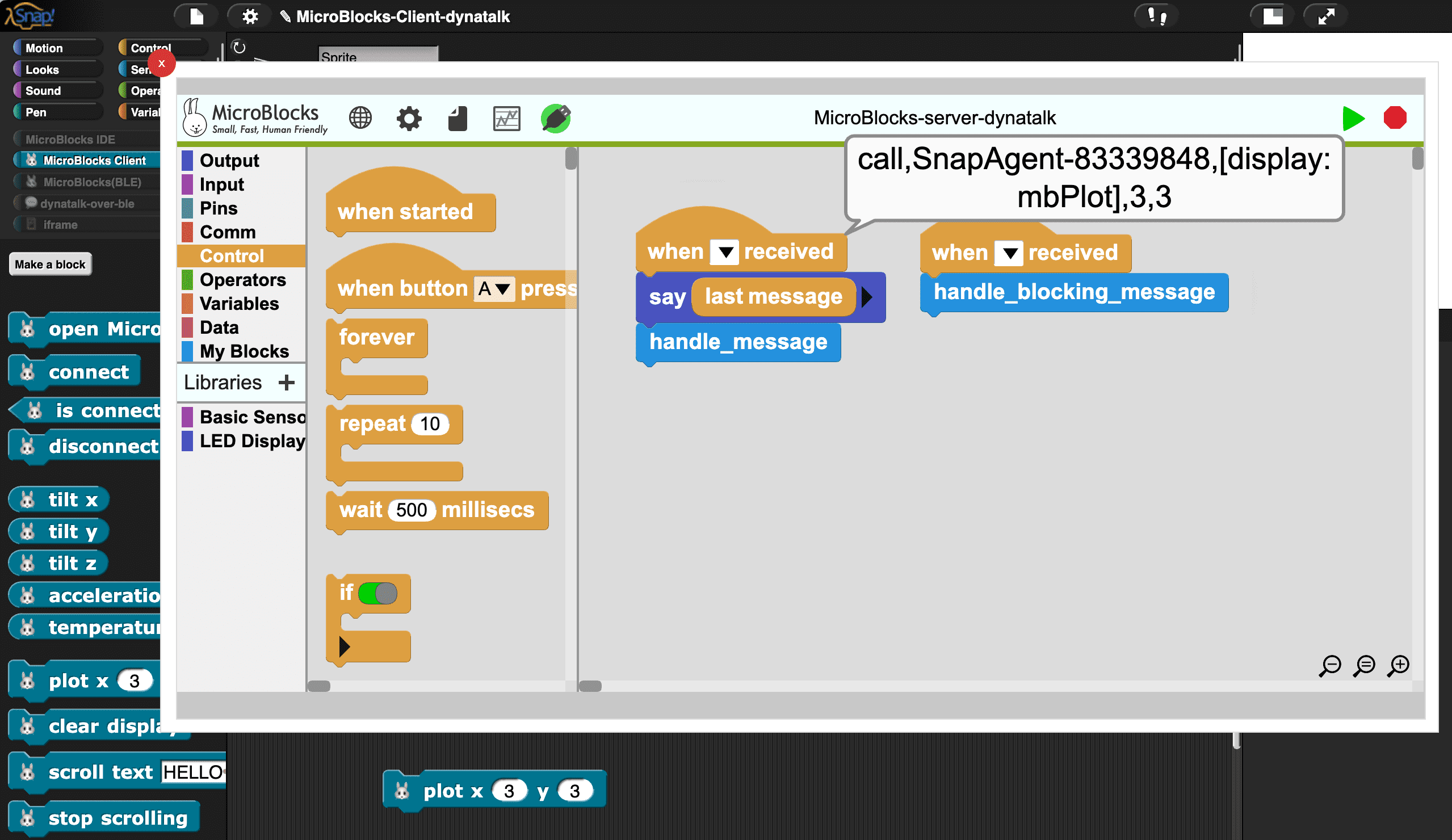
How to save and load MicroBlocks projects in the MicroBlocks window of Snap!?

Save project

Due to iframe limitations, you cannot use the Save button in the menu to save local files

Alternative solution: click Copy project url to clipboard , then paste it into the browser’s address bar, and then save it.

open project

Due to iframe limitations, you cannot use the Open button in the menu to open local files

Alternative solution: drag the local files directly into the MicroBlocks window.

How to find the vm primitives provided by MicroBlocks?

You can find these primitives in the ubl library file, in the form of . [a:b] , such as [display:mbPlot]
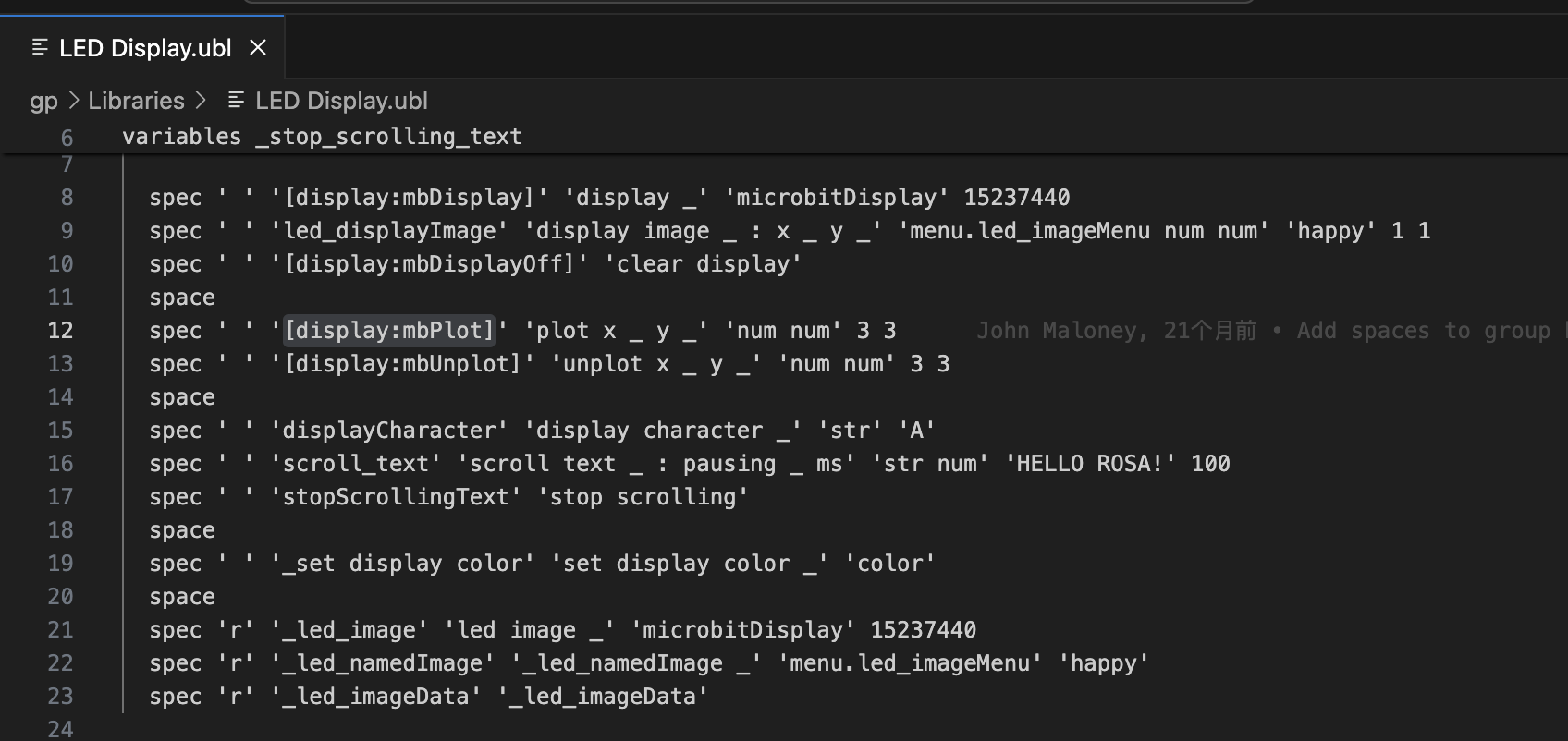
Peter shared some examples on Discord:
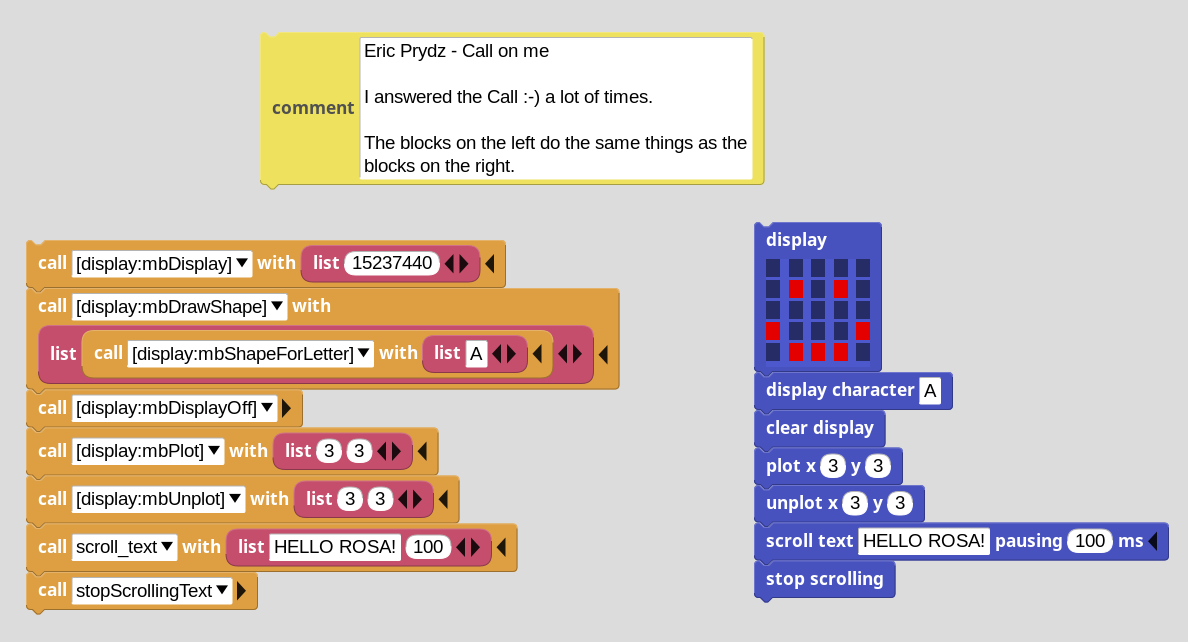
the push style version

On MicroBlocks side:

This program is responsible for the following tasks:

  1. Continuously push out the status of the device (when started block), it can be extended. The current update rate is 20/second (customizable).
  2. Interpret the received message ( handle_message block), grounding the semantics of the message to the specific functions of the hardware device. The “grounding” work is achieved using the call block, which is similar to eval in other programming languages, allowing for the dynamic execution of custom blocks and VM primitives.

Project link (Click to Run)

It is worth noting that the push version has the following advantages over the pull version:

  • Faster
  • Simpler

If necessary, they can be combined.

Is it possible to create a similar Python client library?

The design of this article can be easily migrated to Python. By using the microblocks_messaging_library and dynatalk-py libraries, it is easy to achieve the same functionality as the MicroBlocks Client library of Snap!.

 1
 2
 3
 4
 5
 6
 7
 8
 9
10
11
12
13
# pip install -U microblocks
from microblocks import MicroblocksClient

client = MicroblocksClient()
found_devices = client.discover(timeout=3) # timeout=5 in windows
print("found devices:", found_devices)
client.connect("MicroBlocks AZB", timeout=3)

client.display_character('f')

while True:
    tiltX = client.tiltX
    print(tiltX)

Remember to first load this program into the device (same as Snap!)

For more API examples: notebooks

The source code of the CoCube library

Connect multiple devices

 1
 2
 3
 4
 5
 6
 7
 8
 9
10
from microblocks import MicroblocksClient

client = MicroblocksClient()
found_devices = client.discover(timeout=5)
print("found devices:", found_devices)
# connect all discovered devices
devices = [MicroblocksClient(i) for i in found_devices]

for index, device in enumerate(devices):
    device.display_character(index)

Parallel Control

1
2
3
4
5
6
from concurrent.futures import ThreadPoolExecutor

# Launching parallel tasks: https://docs.python.org/3/library/concurrent.futures.html
with ThreadPoolExecutor() as executor:
    for client in devices:
        executor.submit(client.scroll_text, "hello")

How to make a Python library for a custom MicroBlocks device

The MicroblocksClient class above is generic. To make a Python library for a custom MicroBlocks device, you only need to inherit the MicroblocksClient class and add custom methods. See CoCube

 1
 2
 3
 4
 5
 6
 7
 8
 9
10
11
12
13
14
15
16
17
from microblocks import MicroblocksClient

class CoCube(MicroblocksClient):

    @property
    def battery(self):
        return int(self.request("Battery Percentage", []))

    @property
    def position_x(self):
        return int(self.request("position_X", []))

    def move_forward(self, speed=50):
        self.request("Move Forward", [speed])

    def move_backward(self, speed=50):
        self.request("Move Backward", [speed])

The CoCube Python library is created using Hatch. I recommend using Hatch for developing and publishing Python projects.

References