




惯性聚合 高效追踪和阅读你感兴趣的博客、新闻、科技资讯
阅读原文 在惯性聚合中打开

推荐订阅源

A
About on SuperTechFans
D
DataBreaches.Net
K
KPMG report finds enterprise disconnect between AI and its ROI | CIO
V
Visual Studio Blog
奇客Solidot–传递最新科技情报
奇客Solidot–传递最新科技情报
B
Blog RSS Feed
Recent Announcements
The Register - Security
S
Secure Thoughts
Y
Y Combinator Blog
The Last Watchdog
The Last Watchdog
L
LINUX DO - 最新话题
V2EX - 技术
V2EX - 技术
腾讯CDC
GbyAI
GbyAI
G
Google Developers Blog
博客园 - 司徒正美
博客园 - 三生石上(FineUI控件)
T
The Exploit Database - CXSecurity.com
T
Threat Research - Cisco Blogs
P
Proofpoint News Feed
Schneier on Security
Microsoft Security Blog
Jina AI
Jina AI
WordPress大学
WordPress大学
aimingoo的专栏
aimingoo的专栏
MyScale Blog
MyScale Blog
Help Net Security
Help Net Security
K
Kaspersky official blog
P
Privacy & Cybersecurity Law Blog
www.infosecurity-magazine.com
AI
AI
MongoDB | Blog
MongoDB | Blog
Scott Helme
Scott Helme
J
Java Code Geeks
Engineering at Meta
Engineering at Meta
H
Heimdal Security Blog
H
Help Net Security
D
Darknet – Hacking Tools, Hacker News & Cyber Security
云风的 BLOG
云风的 BLOG
Microsoft Azure Blog
S
Security Affairs
TaoSecurity Blog
TaoSecurity Blog
The GitHub Blog
The GitHub Blog
Hacker News: Ask HN
Hacker News: Ask HN
Martin Fowler
Martin Fowler
cs.AI updates on arXiv.org
Project Zero
Project Zero
T
The Blog of Author Tim Ferriss
Last Week in AI
Last Week in AI

夜行人

回家路上 第一期的直播演示项目 震动检测器 正能量 在线参观CodeLab Neverland 发布 CodeLab Adapter 3.3.1 DynamicTable 之 纸糊方向盘 CodeLab DynamicTable: 一个可实施的技术方案 CodeLab Insight 发布 Alpha 版 情人节 Home Assistant 周报 && IoT 周报 (02) Joplin: 关注隐私的 Evernote 开源替代软件 浏览器的未来与 Web 传感器 Home Assistant 周报 && IoT 周报 (01) 百宝箱(01) 论自由 介绍 WebThings Home Assistant 周报 && iot 周报 (00) 百宝箱(00) 毛姆读书心得 传世之作 周末徒步 CodeLab Adapter ❤️ Jupyter/Python 航班 躲雨 夏令营途中 [译]思想--作为一种技术 The future of coding 美国之行 三门问题的程序模拟 从Python转向Pharo https://blog.just4fun.site/post/iot/iot-open-source-projects/ Python异步编程笔记 https://blog.just4fun.site/post/iot/iot-open-source-hardware-community/ 万物积木化开发者社区 CodeLab ❤️ Blender Scratch3技术分析之云变量 API(第7篇) [译]对管道(Pipes)的偏爱 [译]提出正确的问题比得到正确答案更重要 蓝牙设备与Scratch3.0 创建你的第一个Scratch3.0 Extension Scratch3技术分析之项目内部数据(第6篇) Scratch3技术分析之社区 API(第5篇) Scratch3技术分析之User API(第4篇) Scratch3技术分析之项目主页API(第3篇) Scratch3技术分析之静态资源API(第2篇) Scratch3.0、micro:bit与Windows7 https://blog.just4fun.site/post/iot/zerynth-vs-micropython/ 核聚变、方所与半宅空间 可视化编程为何是个糟糕的主意 codelab.club周末聚会 关于codelab.club '下一件大事'是一个房间 Hungry Robot - Eat everything 编程作为一种思考方式 今日简史 史蒂夫·乔布斯传 罗素自选文集 https://blog.just4fun.site/post/edx/tianjin-scratch-ai/ https://blog.just4fun.site/post/edx/richie-cms-openedx/ 徒步武功山 WebUSB与micro:bit 积木化编程与3D场景 夜宿武功山顶 scratch3-adapter接入优必选Alpha系列机器人 https://blog.just4fun.site/post/edx/video-migration-note/ scratch3-adapter重构笔记 https://blog.just4fun.site/post/edx/edx-community-members/ 两种硬件编程风格的比较 使用micro:bit自制PPT翻页笔 柏拉图对话集 scratch3.0 + micro:bit 七月电影放映计划 非营利组织的管理 Screenly--用树莓派让任何屏幕变为可编程的数字标牌 以最佳实践开始你的Django项目 micro:bit与事件驱动 为Scratch3.0设计的插件系统(上篇) OCR应用一例 近两年读过的一些好书 blockly开发之使用python驱动浏览器中的turtle(2) 牛顿新传 文学理论入门 逻辑的引擎 人生的意义 blockly开发之生成并运行js代码(1) blockly开发之hello world(0) micro:bit使用笔记 神器之Termux https://blog.just4fun.site/post/iot/micropython-notes/ Cozmo what is this Scratch的前世今生 下段旅程 我行在远方 爆裂 途中杂记 https://blog.just4fun.site/post/edx/open-edx-startup/ cozmo系列之入门 - 有性格且可编程的机器人 PaperWeekly开发笔记 创业二三事
mediapipe in Snap!
种瓜 · 2024-05-09 · via 夜行人

文章目录

中文版本

MediaPipe Solutions provides a suite of libraries and tools for you to quickly apply artificial intelligence (AI) and machine learning (ML) techniques in your applications.– Github/MediaPipe

Goals

We hope that all the work of using mediapipe will be completed entirely in the Snap! IDE!

This has the following benefits:

No need to update the Snap! platform, no developer intervention required, all work is done in the user environment (just a Snap! project), which means ordinary users can continue to extend these capabilities. (This is an example of end-user programming)

We can fully utilize the liveness of Snap! and enjoy an efficient and pleasant development experience.

Dynamic import

mediapipe provides JavaScript API, so it seems we can introduce mediapipe into Snap! through JavaScript function.

import() can asynchronously and dynamically load ECMAScript modules, which is exactly what we need.

Let’s try to import the mediapipe library. mediapipe has rich features. An example we intend to create is Gesture Recognition (click to experience). I referred to the mediapipe documentation and the use case.

Project link (Click to Run)

The following introduces the key parts.

First, use import() to dynamically import the module:

 1
 2
 3
 4
 5
 6
 7
 8
 9
10
11
12
13
// Avoid duplicate imports
if (window.FilesetResolver) {
  return;
}

// https://developers.google.com/mediapipe/api/solutions/js/tasks-vision
url = "https://cdn.jsdelivr.net/npm/@mediapipe/tasks-vision@0.10.13"; // @latest
import(url).then((vision) => {
  // Put the functions of the module into global variables
  window.FilesetResolver = vision.FilesetResolver;
  window.GestureRecognizer = vision.GestureRecognizer;
  window.DrawingUtils = vision.DrawingUtils;
});

After importing, you can use the functions of the module:

 1
 2
 3
 4
 5
 6
 7
 8
 9
10
11
12
13
14
15
16
17
18
19
20
21
22
// https://codepen.io/mediapipe-preview/details/zYamdVd
// url 中的资源可托管到国内
if (window.gestureRecognizer) {
  return;
}
const createGestureRecognizer = async () => {
  const vision = await FilesetResolver.forVisionTasks(
    "https://cdn.jsdelivr.net/npm/@mediapipe/tasks-vision@0.10.13/wasm"
  );
  gestureRecognizer = await GestureRecognizer.createFromOptions(vision, {
    baseOptions: {
      // "https://scratch3-files.just4fun.site/gesture_recognizer.task"
      modelAssetPath:
        "https://storage.googleapis.com/mediapipe-models/gesture_recognizer/gesture_recognizer/float16/1/gesture_recognizer.task",
      delegate: "GPU",
    },
    numHands: 2,
  });
  window.gestureRecognizer = gestureRecognizer;
  // demosSection.classList.remove("invisible");
};
createGestureRecognizer();

After that, you can use gestureRecognizer to recognize the image.

Drawing hand landmarks

The example not only provides gesture results but also draws landmarks:
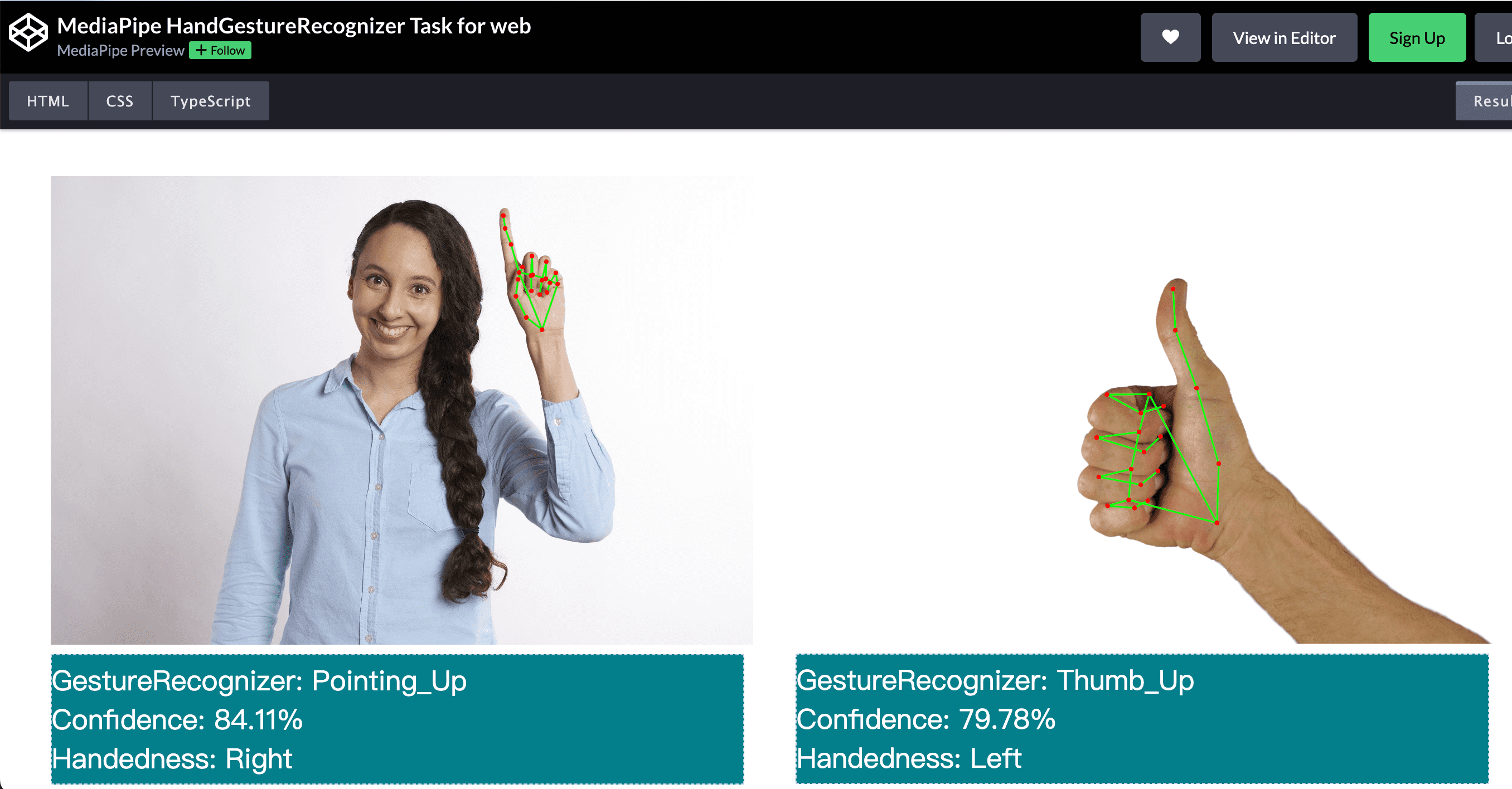
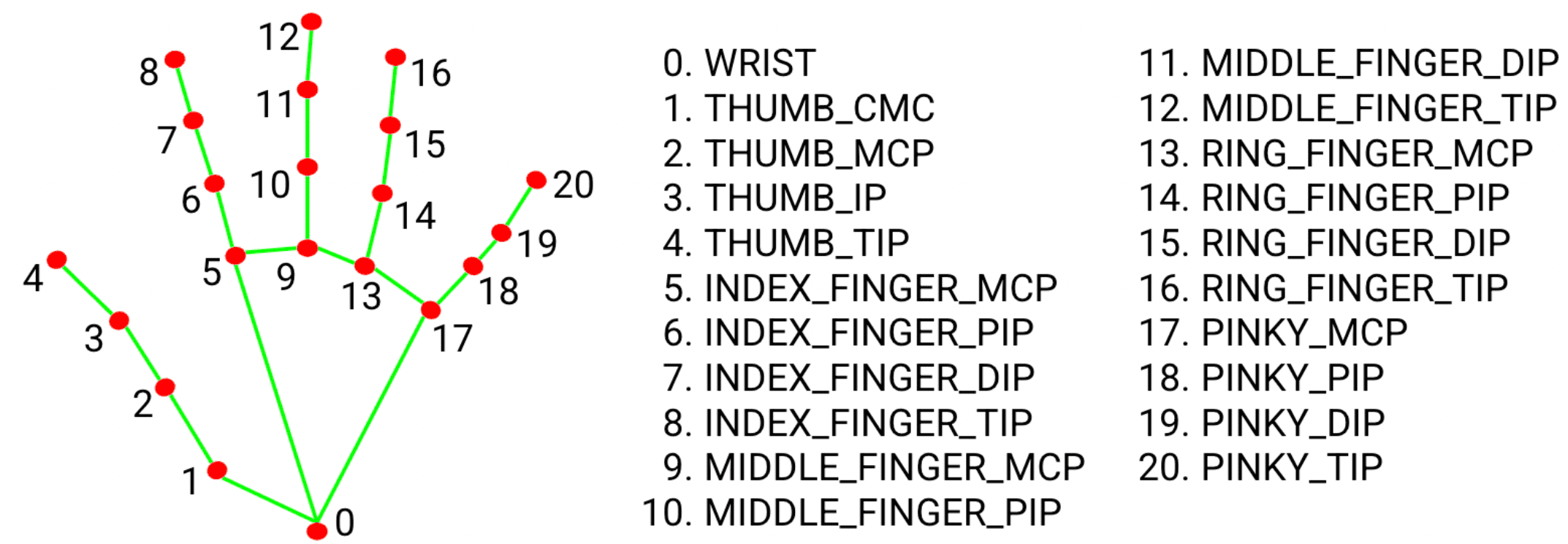
Details of landmarks:
From the example code, it can be seen that the drawing work uses drawingUtils. Instead of reading the drawingUtils code (which is usually very tedious), I prefer to draw in Snap! based on the raw data. This way, we can fully enjoy the benefits of Snap!’s liveness. Snap!’s pen feature is very easy to use and powerful, and we can use it to draw:
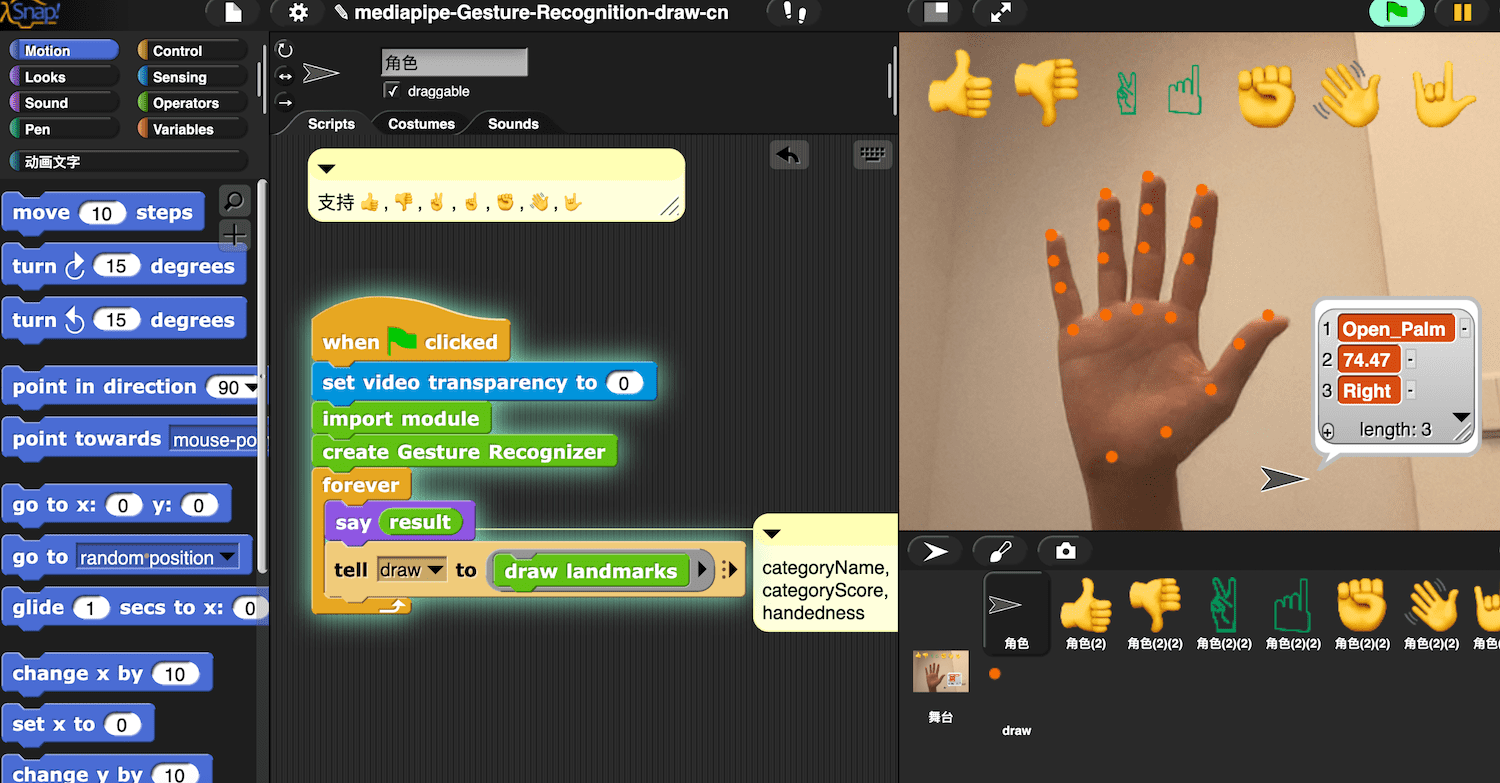
Specifically, use the pen of Snap! to draw the coordinate information contained in results.landmarks. In this process, it is necessary to convert the coordinate system of mediapipe (with the origin at the top left corner and the positive direction of the y-axis downward) to the Snap! stage coordinate system.

During the drawing process, Snap!, as a product of the interactive personal computing vision, contains features (such as liveness) that are particularly helpful for exploring data, allowing users to interactively observe the data:
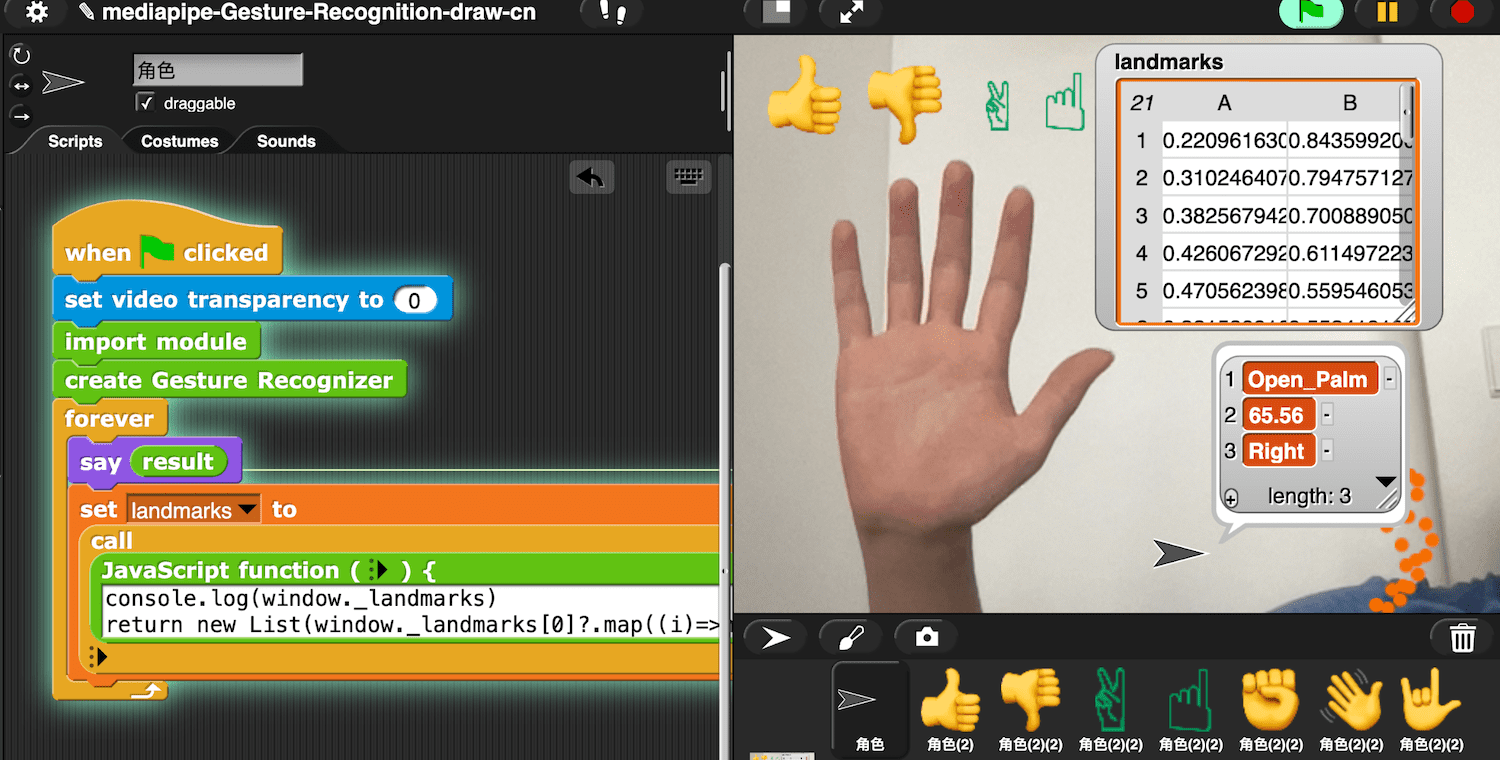
When you are interested in the current frame, you can pause the program and freeze the system at that moment:
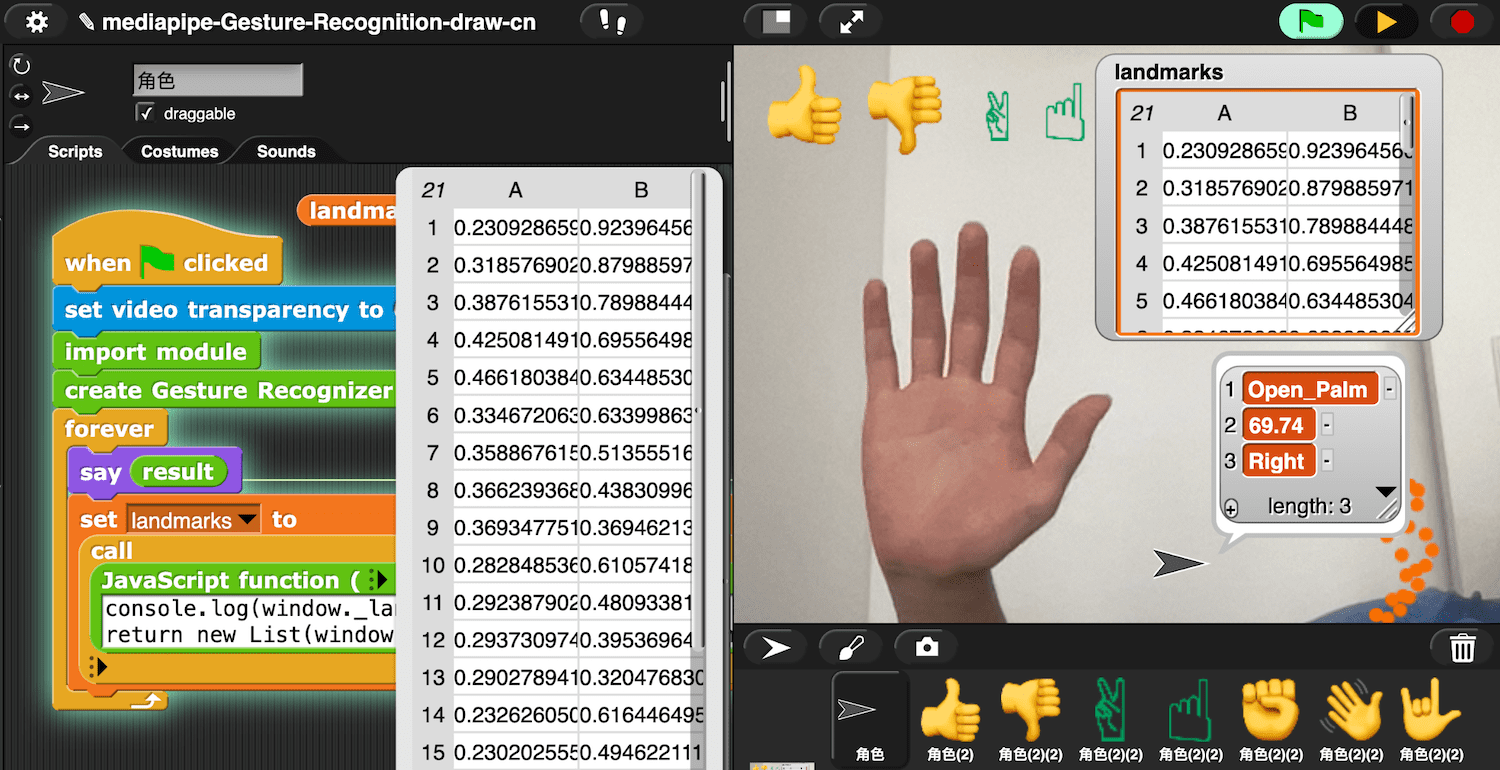
As if time had frozen, after exploring the data of the current time slice, you can continue the process.

Project link (Click to Run)

In this project, we only plotted the data of one hand, results.landmarks may contain the data of two hands.

Interoperability with MicroBlocks

mediapipe can fully utilize the computing power of edge devices (mobile phones/tablets) to provide AI functions. The computing power of edge devices is getting stronger, and Apple’s recently launched M4 chip has the fastest neural engine in Apple’s history, capable of performing up to 38 trillion operations per second. Apple’s artificial intelligence strategy seems to be reasoning/learning on edge devices.

With the standardization of WebGPU, Snap! will be able to fully utilize these capabilities. Since Snap! can also connect to MicroBlocks devices via BLE, it seems we can use a mobile phone as the computing power for a microcontroller. Using frameworks like mediapipe, it seems quite easy to create a wireless AI camera with a mobile phone (similar to the HuskyLens camera).

References