




惯性聚合 高效追踪和阅读你感兴趣的博客、新闻、科技资讯
阅读原文 在惯性聚合中打开

推荐订阅源

K
KPMG report finds enterprise disconnect between AI and its ROI | CIO
A
About on SuperTechFans
freeCodeCamp Programming Tutorials: Python, JavaScript, Git & More
酷 壳 – CoolShell
酷 壳 – CoolShell
博客园 - 【当耐特】
W
WeLiveSecurity
博客园 - 三生石上(FineUI控件)
The Cloudflare Blog
I
InfoQ
让小产品的独立变现更简单 - ezindie.com
Application and Cybersecurity Blog
雷峰网
雷峰网
Hacker News - Newest:
Hacker News - Newest: "LLM"
Exploit-DB.com RSS Feed
T
Troy Hunt's Blog
S
SegmentFault 最新的问题
Help Net Security
Help Net Security
博客园_首页
博客园 - 叶小钗
O
OpenAI News
PCI Perspectives
PCI Perspectives
月光博客
月光博客
人人都是产品经理
人人都是产品经理
B
Blog RSS Feed
GbyAI
GbyAI
cs.CL updates on arXiv.org
The Last Watchdog
The Last Watchdog
C
CXSECURITY Database RSS Feed - CXSecurity.com
有赞技术团队
有赞技术团队
D
Darknet – Hacking Tools, Hacker News & Cyber Security
腾讯CDC
Hacker News: Ask HN
Hacker News: Ask HN
I
Intezer
Y
Y Combinator Blog
阮一峰的网络日志
阮一峰的网络日志
Spread Privacy
Spread Privacy
T
Tailwind CSS Blog
CTFtime.org: upcoming CTF events
量子位
Cyberwarzone
Cyberwarzone
The Hacker News
The Hacker News
N
News and Events Feed by Topic
P
Proofpoint News Feed
Scott Helme
Scott Helme
D
Docker
Know Your Adversary
Know Your Adversary
Recent Commits to openclaw:main
TaoSecurity Blog
TaoSecurity Blog
钛媒体:引领未来商业与生活新知
钛媒体:引领未来商业与生活新知
T
Tor Project blog

夜行人

回家路上 第一期的直播演示项目 震动检测器 正能量 在线参观CodeLab Neverland 发布 CodeLab Adapter 3.3.1 DynamicTable 之 纸糊方向盘 CodeLab DynamicTable: 一个可实施的技术方案 CodeLab Insight 发布 Alpha 版 情人节 Home Assistant 周报 && IoT 周报 (02) Joplin: 关注隐私的 Evernote 开源替代软件 浏览器的未来与 Web 传感器 Home Assistant 周报 && IoT 周报 (01) 百宝箱(01) 论自由 介绍 WebThings Home Assistant 周报 && iot 周报 (00) 百宝箱(00) 毛姆读书心得 传世之作 周末徒步 CodeLab Adapter ❤️ Jupyter/Python 航班 躲雨 夏令营途中 [译]思想--作为一种技术 The future of coding 美国之行 三门问题的程序模拟 从Python转向Pharo https://blog.just4fun.site/post/iot/iot-open-source-projects/ Python异步编程笔记 https://blog.just4fun.site/post/iot/iot-open-source-hardware-community/ 万物积木化开发者社区 CodeLab ❤️ Blender Scratch3技术分析之云变量 API(第7篇) [译]对管道(Pipes)的偏爱 [译]提出正确的问题比得到正确答案更重要 蓝牙设备与Scratch3.0 创建你的第一个Scratch3.0 Extension Scratch3技术分析之项目内部数据(第6篇) Scratch3技术分析之社区 API(第5篇) Scratch3技术分析之User API(第4篇) Scratch3技术分析之项目主页API(第3篇) Scratch3技术分析之静态资源API(第2篇) Scratch3.0、micro:bit与Windows7 https://blog.just4fun.site/post/iot/zerynth-vs-micropython/ 核聚变、方所与半宅空间 可视化编程为何是个糟糕的主意 codelab.club周末聚会 关于codelab.club '下一件大事'是一个房间 Hungry Robot - Eat everything 编程作为一种思考方式 今日简史 史蒂夫·乔布斯传 罗素自选文集 https://blog.just4fun.site/post/edx/tianjin-scratch-ai/ https://blog.just4fun.site/post/edx/richie-cms-openedx/ 徒步武功山 WebUSB与micro:bit 积木化编程与3D场景 夜宿武功山顶 scratch3-adapter接入优必选Alpha系列机器人 https://blog.just4fun.site/post/edx/video-migration-note/ scratch3-adapter重构笔记 https://blog.just4fun.site/post/edx/edx-community-members/ 两种硬件编程风格的比较 使用micro:bit自制PPT翻页笔 柏拉图对话集 scratch3.0 + micro:bit 七月电影放映计划 非营利组织的管理 Screenly--用树莓派让任何屏幕变为可编程的数字标牌 以最佳实践开始你的Django项目 micro:bit与事件驱动 为Scratch3.0设计的插件系统(上篇) OCR应用一例 近两年读过的一些好书 blockly开发之使用python驱动浏览器中的turtle(2) 牛顿新传 文学理论入门 逻辑的引擎 人生的意义 blockly开发之生成并运行js代码(1) blockly开发之hello world(0) micro:bit使用笔记 神器之Termux https://blog.just4fun.site/post/iot/micropython-notes/ Cozmo what is this Scratch的前世今生 下段旅程 我行在远方 爆裂 途中杂记 https://blog.just4fun.site/post/edx/open-edx-startup/ cozmo系列之入门 - 有性格且可编程的机器人 PaperWeekly开发笔记 创业二三事
iframe library for Snap!
种瓜 · 2024-06-03 · via 夜行人

中文版本

Preface

The <iframe> HTML element represents a nested browsing context, embedding another HTML page into the current one. – iframe

I want to have a iframe library that can bring Internet resources into Snap! through iframe element and interoperate with Snap!.

With it, we can do many interesting things:

  • Display markdown documents programmatically
  • Display instructional video programmatically
  • Display online slides programmatically
  • Introducing 3D world/game, and using Snap! to program these 3D world
  • Embed the MicroBlocks into Snap!

The potential use cases are very diverse!

When I shared the demonstration videos, @Patch commented:

This library opens a new window for Snap!

And I replied:

I also see the iframe library in this way, so the icon I just added to this library is the emoji window: 🪟

I have always wanted a iframe library, but I have been hesitant to start because I am not fond of and skilled in frontend work. Fortunately, with ChatGPT, these tasks have become easy. By collaborating with ChatGPT, I don’t have to worry about technical details (which I used to be not good at in the past), and I can focus on expressing ideas. Soon, I have been able to create something that I couldn’t have done on my own.

For me, the value of ChatGPT is twofold. Objectively, it fills in the gaps in my knowledge. But its greater value is subjective: it greatly reduced my fear of unfamiliar fields, which I used to avoid working in.By making knowledge details irrelevant, ChatGPT makes programming exciting again, allowing us to focus more on our passions and project visions.

Like previous work, we hope to achieve the following two goals:

No need to update the Snap! platform, no developer intervention required, all work is done in the user environment (just a Snap! project), which means ordinary users can continue to extend these capabilities. (This is an example of end-user programming)

We can fully utilize the liveness of Snap! and enjoy an efficient and pleasant development experience.

So the iframe library is built entirely within the Snap! IDE, “just an ordinary Snap! project”, without any modifications to the platform.

We will demonstrate how to use the iframe library through several examples:

  • Basic usage (introducing external websites)
  • Display markdown documents dynamically
  • Embedding MicroBlocks Project
  • Interoperate with 3D world (using Spline as an example)
  • Send a message from the iframe page to Snap!

Basic usage

Project link (Click to Run)

You can also open multiple pages, each page can be controlled by its id:
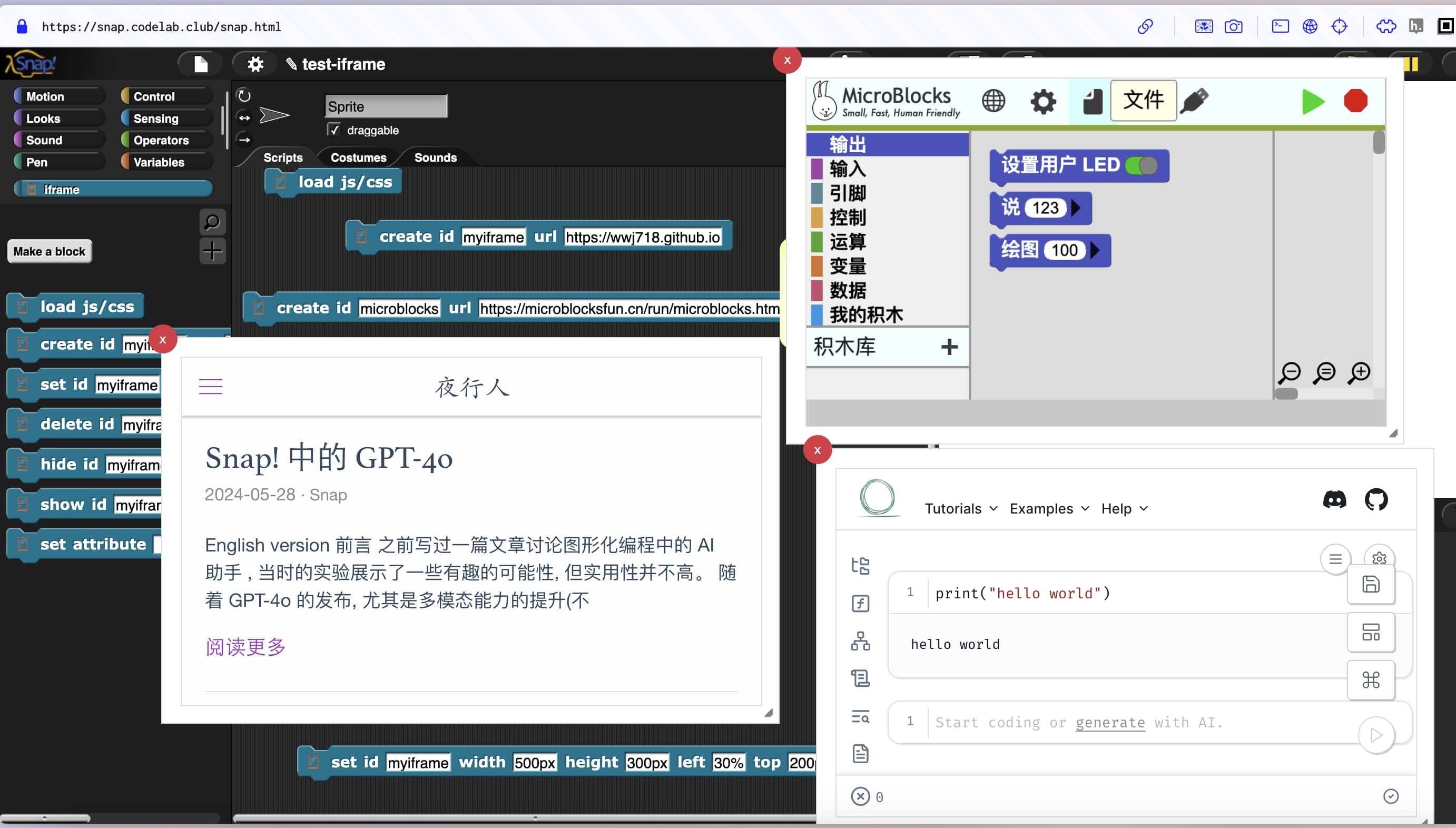
Display markdown documents dynamically

Project link (Click to Run)

Help documentation in Snap!

The official block documentation of Snap! is made in the form of pictures (right-click a block and click help...):
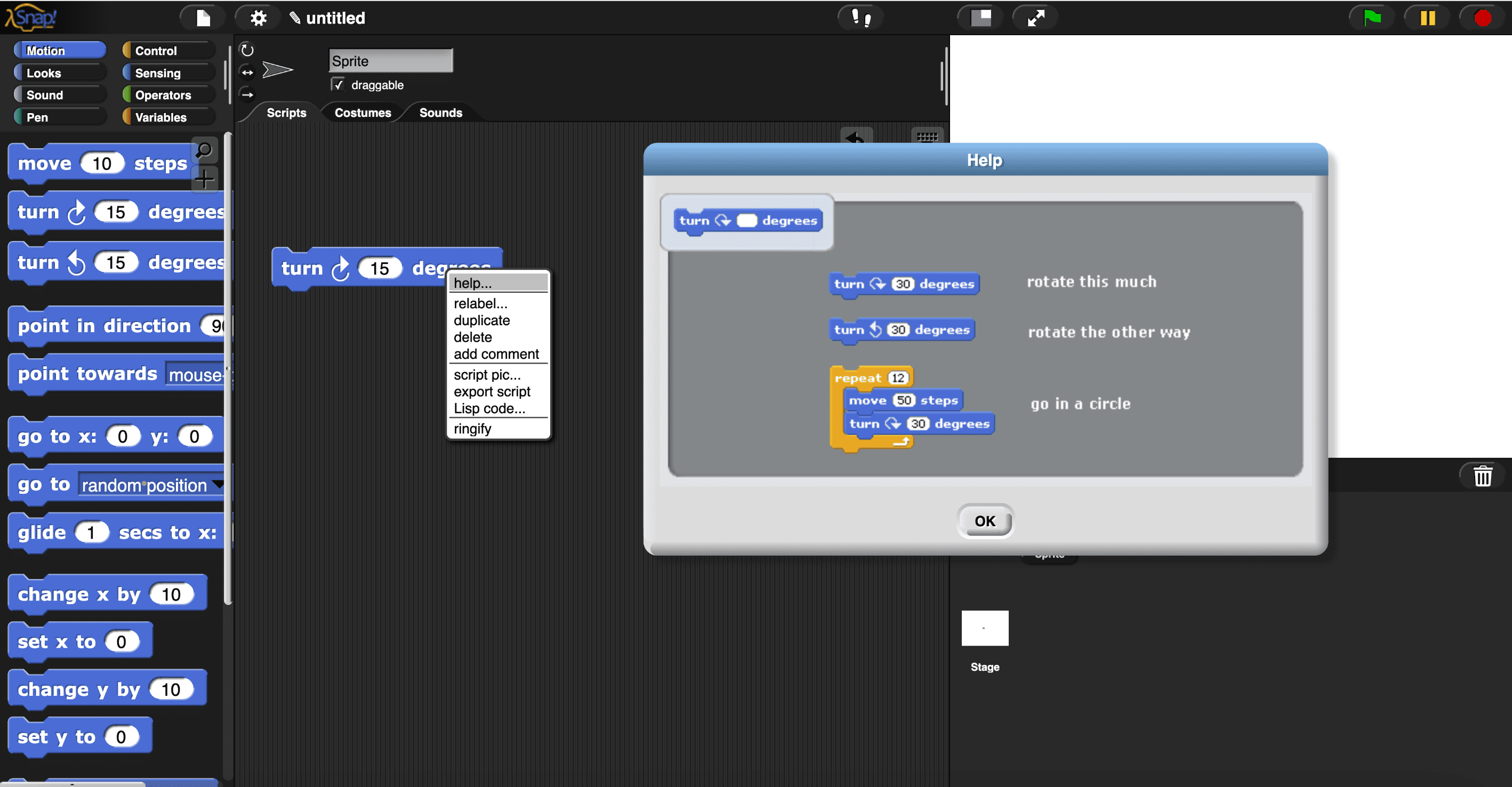
Compared to using markdown to write and display documents, this is not flexible (for example, it cannot display videos).

The main reason I built the iframe is to support displaying documents using markdown.

iframe can display markdown documents in various ways, such as writing markdown documents in the usual way, hosting them on the web, and then using iframe to open the document link.

I used a dynamic solution that is more Snap!-style: hosting only a universal markdown rendering page (default blank). If you are interested in how it works, you can check the page source code. The code that makes things work is only 4 lines!

1
2
3
4
5
6
window.addEventListener("message", (event) => {
  console.log("Received message from main page:", event.data);
  document.getElementById("messageContainer").innerHTML = marked.parse(
    event.data
  );
});

Through the postMessage API, messages sent from the Snap! page can be received in the iframe page.

This page displays markdown content controlled by blocks!

Embedding MicroBlocks Project

Some projects involve hardware and software collaboration. Embedded MicroBlocks project in Snap! , no need to open the MicroBlocks page separately to upload or view the hardware program.
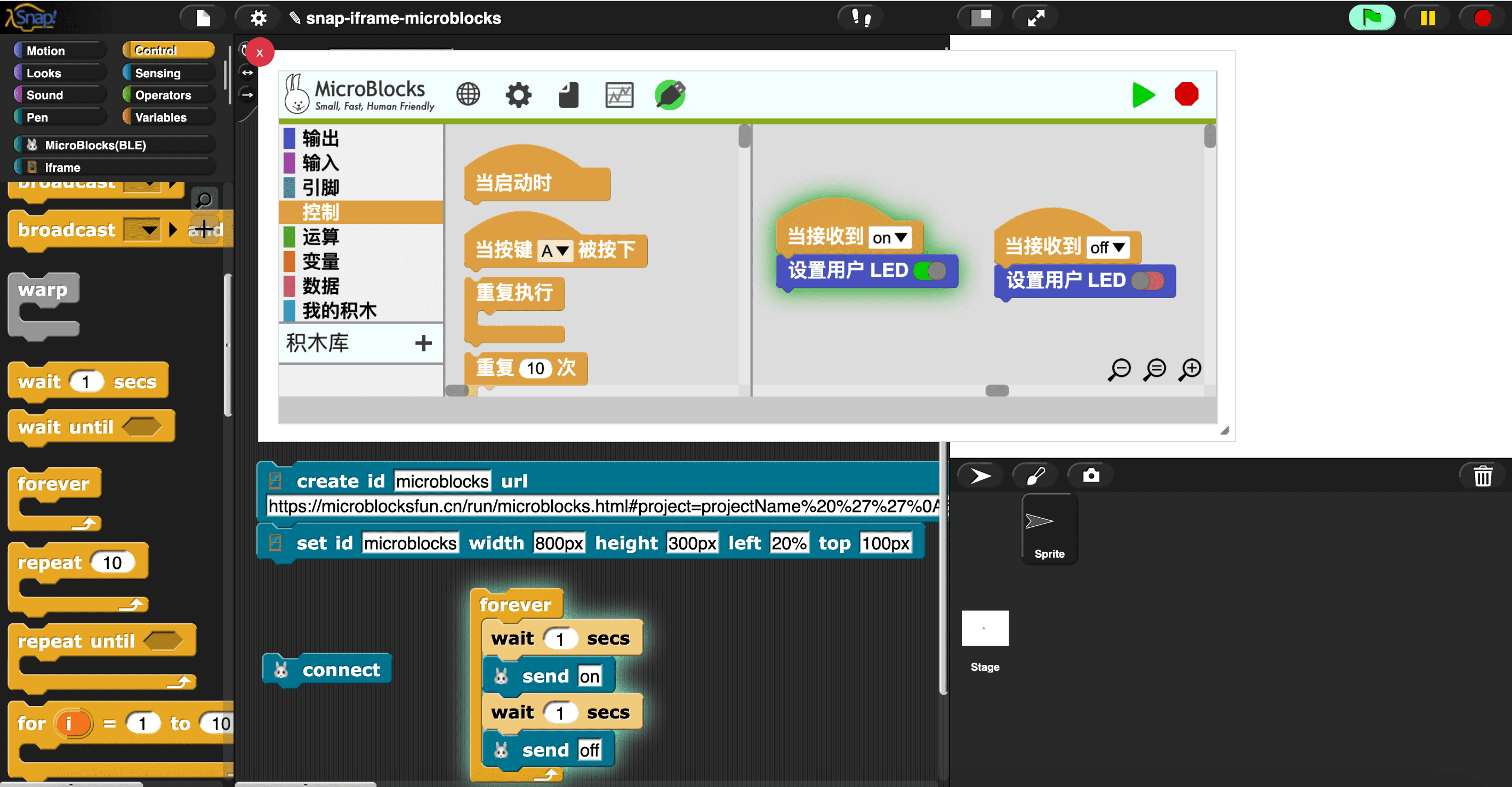
Project link (Click to Run)

Interoperate with 3D world (using Spline as an example)

Refer to Spline library for Snap!

FAQ

What is the iframe library used for?

Deploy your own web application, introduce it into Snap! using the iframe library, and then you can provide it with a highly customizable graphical programming environment!

In the past, this type of project would usually require a software developer to complete, it was just a user-level Snap! project!

What to do next?

Currently, Snap! and iframe pages can send messages to each other via postMessage API, and these messages are asynchronous and non-blocking.

  • Snap! -> iframe
    • Snap! side: Use the postMessage block to send messages to a specific iframe page
    • iframe side: Use window.addEventListener('message', (event) => {}) to receive the messages from Snap!
  • iframe -> Snap!
    • Snap! side: Use the handle postMessage block to receive the messages from iframe pages
    • iframe side:
      • Use window.parent.postMessage(msg, "*") to send a message.

Sometimes we want to synchronize messages, such as Call and wait for the result.

Dynatalk focuses on communication among objects

I plan to create dynatalk-over-postmessage: building dynatalk on top of postMessage. Once completed, all capabilities of dynatalk will be used in the iframe library.

Update: dynatalk-over-postmessage is complete, the Spline library uses it.

What permissions does the iframe page support?

The current iframe page supports the following permissions: allow = "geolocation; microphone; camera; bluetooth; serial"

ChatGPT: List all options for iframe allow

How can the iframe page in Snap! be made resizable and draggable?

Using jQuery UI, specifically:

html

 1
 2
 3
 4
 5
 6
 7
 8
 9
10
11
12
<div
  id="snap_iframe_container"
  style="left: 30%; top: 200px; width: 500px; height: 300px; padding: 1em"
>
  <iframe
    allow="geolocation; microphone; camera; bluetooth; serial"
    src="https://wwj718.github.io"
    class="ui-widget-content"
    id="snap_iframe_myiframe"
    style="width: 100%; height: 100%"
  ></iframe>
</div>

css:

1
2
3
4
5
6
7
8
9
#resizable {
  width: 150px;
  height: 150px;
  padding: 0.5em;
}
.ui-resizable-helper {
  border: 20px solid #efefef;
  margin: -20px;
}

js:

1
2
3
$("#snap_iframe_container")
  .resizable({ helper: "ui-resizable-helper" })
  .draggable();

How to control the game in the iframe page?

Web games are usually controlled by mouse/keyboard, and Snap! cannot directly trigger mouse/keyboard events.

One solution is to use MicroBlocks’ mouse and keyboard library (using the rpi pico board), and the message flow is:

Snap! -> MicroBlocks board -> computer

Project link (Click to Run)

References