








在Redis的官网(http://redis.io/clients#c)上可以看到支持Redis C#的客户端。
redis的网络连接方式和传统的rdbms相似,一种是长连接,一种是连接池,此处使用长连接进行连接。
目前redis官方版本不支持.net直接进行连接,需要使用一些开源类库。目前最流行的就是ServiceStack.redis,可以通过https://github.com/ServiceStack/ServiceStack.Redis下载最新版本。
下载完成解压,在\ServiceStack.Redis-master\build\release\MonoDevelop目录下看到ServiceStack.Redis.zip文件,这个就是需要引入到.net项目中的4个dll文件。
测试时发现四个文件版本比较旧,可以通过编译redis源码,生成最新的dll文件。

打开VS2013,创建一个控制台应用程序,写了一些简单的Redis操作
 1 using System;
 2 using System.Collections.Generic;
 3 using System.Linq;
 4 using System.Text;
 5 using System.Threading.Tasks;
 6
 7 using ServiceStack.Redis;
 8 using ServiceStack.Redis.Support;
 9
10 namespace RedisDemo
11 {
12     class Program
13     {
14         private static RedisClient redis = new RedisClient("192.168.32.216", 6379, "anny");
15         static void Main(string[] args)
16         {
17             //单个字符串写入
18             redis.SetValue("age", "20");
19             //读取指定key的字符串
20             redis.GetValue("age");
21
22             //存储数字
23             redis.Set<int>("int_age", 30);
24             int age = redis.Get<int>("int_age");
25             Console.WriteLine("int_age={0}", age);
26
27             //将字符串列表写入Redis List
28             List<string> colourList = new List<string>{"red","pink","green","blue","black","white"};
29             colourList.ForEach(item => redis.AddItemToList("colourList", item));
30
31             //读取Redis List内容
32             List<string> colourList1 = redis.GetAllItemsFromList("colourList");
33             colourList1.ForEach(item => Console.Write(item + " "));
34
35             //存储实体对象,在Redis中以json格式存储
36             UserInfo user = new UserInfo(){Id=1, Name="Mark", Age=32, City="ShangHai" };
37             redis.Set<UserInfo>("user_1", user);
38             UserInfo user1 = redis.Get<UserInfo>("user_1");
39             Console.WriteLine("id={0},name={1},age={2},city={3}", user1.Id, user1.Name, user1.Age, user1.City);
40
41             //object序列化方式
42             var ser = new ObjectSerializer();
43             redis.Set<byte[]>("user1", ser.Serialize(user));
44             UserInfo user11 = ser.Deserialize(redis.Get<byte[]>("user1")) as UserInfo;
45             Console.WriteLine("id={0},name={1},age={2},city={3}", user1.Id, user1.Name, user1.Age, user1.City);
46
47             //存储对象列表到redis中
48             List<UserInfo> userList = new List<UserInfo>{
49                 new UserInfo{Id=2, Name="Jack", Age=27, City="beijing" },
50                 new UserInfo{Id=3, Name="Tom", Age=25, City="XiaMen" }
51             };
52
53             redis.Set<byte[]>("userlist", ser.Serialize(userList));
54             List<UserInfo> userList1 = ser.Deserialize(redis.Get<byte[]>("userlist")) as List<UserInfo>;
55             userList1.ForEach(i =>
56             {
57                 Console.WriteLine("id={0},name={1},age={2},city={3}", i.Id, i.Name, i.Age, i.City);
58             });
59
60
61             Console.Read();
62         }
63
64         [Serializable]
65         class UserInfo
66         {
67             public int Id { get; set; }
68             public string Name { get; set; }
69             public int Age { get; set; }
70
71             public string City { get; set; }
72         }
73     }
74 }
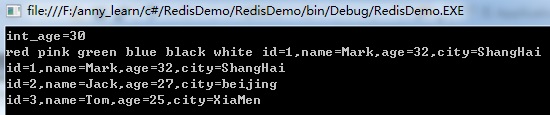
Redis linux环境下查看:
root@ubuntu:/usr/local/redis/bin# ./redis-cli -a anny
127.0.0.1:6379> keys *
1) "age"
2) "colourList"
3) "int_age"
4) "user1"
5) "userlist"
6) "user_1"
127.0.0.1:6379> type colourList
list
127.0.0.1:6379> lrange colourList 0 -1
1) "red"
2) "pink"
3) "green"
4) "blue"
5) "black"
6) "white"
127.0.0.1:6379> type userlist
string
127.0.0.1:6379> get userlist
"\x00\x01\x00\x00\x00\xff\xff\xff\xff\x01\x00\x00\x00\x00\x00\x00\x00\x0c\x02\x00\x00\x00@RedisDemo, Version=1.0.0.0, Culture=neutral, PublicKeyToken=null\x04\x01\x00\x00\x00\x81\x01System.Collections.Generic.List`1[[RedisDemo.Program+UserInfo, RedisDemo, Version=1.0.0.0, Culture=neutral, PublicKeyToken=null]]\x03\x00\x00\x00\x06_items\x05_size\b_version\x04\x00\x00\x1cRedisDemo.Program+UserInfo[]\x02\x00\x00\x00\b\b\t\x03\x00\x00\x00\x02\x00\x00\x00\x02\x00\x00\x00\a\x03\x00\x00\x00\x00\x01\x00\x00\x00\x04\x00\x00\x00\x04\x1aRedisDemo.Program+UserInfo\x02\x00\x00\x00\t\x04\x00\x00\x00\t\x05\x00\x00\x00\r\x02\x05\x04\x00\x00\x00\x1aRedisDemo.Program+UserInfo\x04\x00\x00\x00\x13<Id>k__BackingField\x15<Name>k__BackingField\x14<Age>k__BackingField\x15<City>k__BackingField\x00\x01\x00\x01\b\b\x02\x00\x00\x00\x02\x00\x00\x00\x06\x06\x00\x00\x00\x04Jack\x1b\x00\x00\x00\x06\a\x00\x00\x00\abeijing\x01\x05\x00\x00\x00\x04\x00\x00\x00\x03\x00\x00\x00\x06\b\x00\x00\x00\x03Tom\x19\x00\x00\x00\x06\t\x00\x00\x00\x06XiaMen\x0b"
127.0.0.1:6379> type user_1
string
127.0.0.1:6379> get user_1
"{\"Id\":1,\"Name\":\"Mark\",\"Age\":32,\"City\":\"ShangHai\"}"
此内容由惯性聚合(RSS阅读器)自动聚合整理,仅供阅读参考。 原文来自 — 版权归原作者所有。