











Excel文件读、写可以使用Office自带的库(Microsoft.Office.Interop.Excel),前提是本机须安装office才能运行,且不同的office版本之间可能会有兼容问题。
还可以使用NPOI,在不安装office的时候也是可以读写的,速度很快。当然,还有支持Excel2007以上版本的OpenXml。以及其他一些开源项目,由于本人不太熟悉,在此不做过多介绍。
为了解决烦人Office版本兼容问题,本项目-ShiQuan.Offices 决定采用基于NPOI,进行Excel文件读、写操作。
本项目目前实现内容包括:
1、直接根据DataTable,生成Excel文件内容。
2、根据列表设置和DataTable,生成Excel文件内容。
3、根据Excel模板,使用模板设置,生成Excel文件内容。
4、读取Excel内容,返回DataTable。
本项目基于LGPL3.0开源,供大家参考、使用,欢迎提供宝贵意见!
项目源码:https://gitee.com/ShiQuanSoft/ShiQuan.Offices
下面介绍分享如何使用该项目-ShiQuan.Offices。
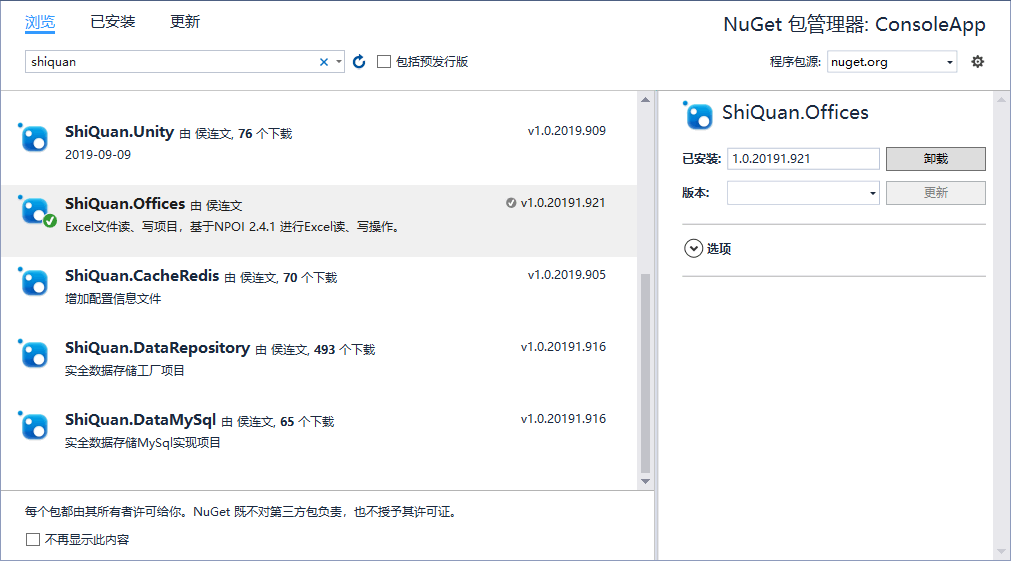
首先,创建ConsoleApp测试项目,添加程序包安装:
1、先我们试下,普通的DataTable生成Excel文件是怎样的?
try
            {
                //取出数据源
                DataTable dtData = new DataTable();
                dtData.Columns.Add("account");
                dtData.Columns.Add("realname");
                dtData.Columns.Add("birthday");
                dtData.Columns.Add("description");
                dtData.Columns.Add("remark");

                DataRow dr = dtData.NewRow();
                dr["account"] = "账户";
                dr["realname"] = "姓名";
                dr["birthday"] = "2000-05-25";
                dr["description"] = "说明";
                dr["remark"] = "说明";/*多余字段,不会数据导出*/
                dtData.Rows.Add(dr);
                Console.WriteLine("生成2007以上版本Excel...");
                NPOIHelper.SaveToExcel(dtData, "XSSFWorkbook.xlsx");
                Console.WriteLine("生成2003版本Excel...");
                NPOIHelper.SaveToExcel(dtData, "HSSFWorkbook.xls");
            }
            catch (Exception ex)
            {
                Console.WriteLine("导出异常:" + ex.Message);
            }
运行效果:

2、一般从系统中导出Excel,我们都将采用中文标题,设置相应的数据列格式,对齐方式等信息?
try
            {
                //取出数据源
                DataTable dtData = new DataTable();
                dtData.Columns.Add("account");
                dtData.Columns.Add("realname");
                dtData.Columns.Add("gender");
                dtData.Columns.Add("birthday");
                dtData.Columns.Add("enabled");
                dtData.Columns.Add("price");
                dtData.Columns.Add("percent");
                dtData.Columns.Add("money");
                dtData.Columns.Add("remark");

                DataRow dr = dtData.NewRow();
                dr["account"] = "账户";
                dr["realname"] = "姓名";
                dr["gender"] = "0";/*0:女*/
                dr["birthday"] = "2000-05-25";
                dr["price"] = "10.5656";
                dr["percent"] = "0.56";
                dr["money"] = "1000.56";
                dr["enabled"] = "1";/*是否启用:1:是*/
                dr["remark"] = "说明";/*多余字段,不会数据导出*/
                dtData.Rows.Add(dr);
                /*设置导出格式*/
                ColumnCollection colModel = new ColumnCollection();
                colModel.Add("account", "账户");
                colModel.Add("realname", "姓名");
                colModel.Add("birthday", "出生日期", typeof(DateTime), "yyyy年MM月dd日");
                colModel.Add("price", "保留两位",typeof(double), "#0.00");
                colModel.Add("percent", "百分比", typeof(double), "0.00%");
                colModel.Add(new ColumnModel() { Name = "money", Desc = "货币格式", Type = typeof(double), Format = "¥#,##0", TextAlign = ColumnAlign.Right });
                colModel.Add("gender", "性别", new DataOptions("0:女,1:男".Split(',')));
                colModel.Add(new ColumnModel[]
                {
                    new ColumnModel() { Name = "enabled", Desc = "是否启用", Options = new DataOptions("0:否,1:是".Split(',')), TextAlign = ColumnAlign.Center }
                });

                Console.WriteLine("保存Excel...");
                //调用导出方法
                NPOIHelper.SaveToExcel(dtData,colModel, "用户信息.xls");
                Console.WriteLine("Excel保存成功!");
            }
            catch (Exception ex)
            {
                Console.WriteLine("导出异常:" + ex.Message);
            }
运行效果:
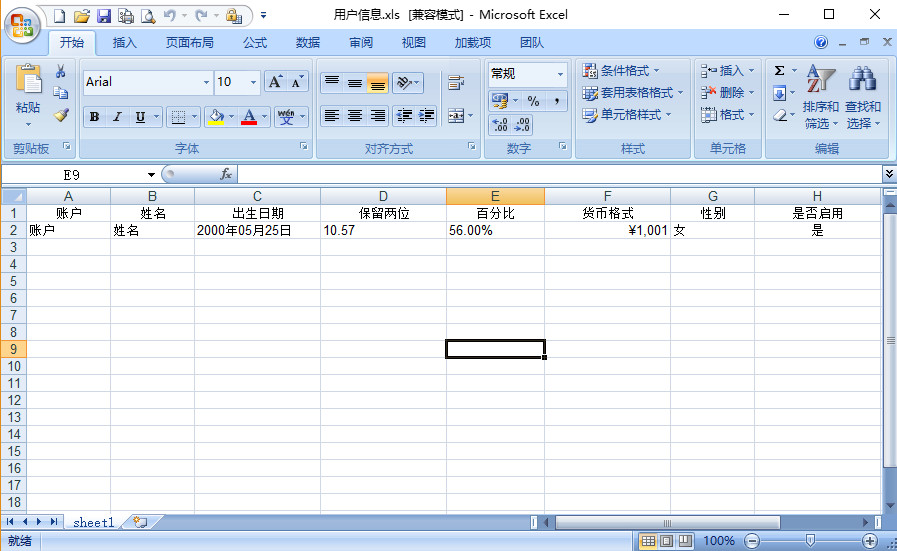
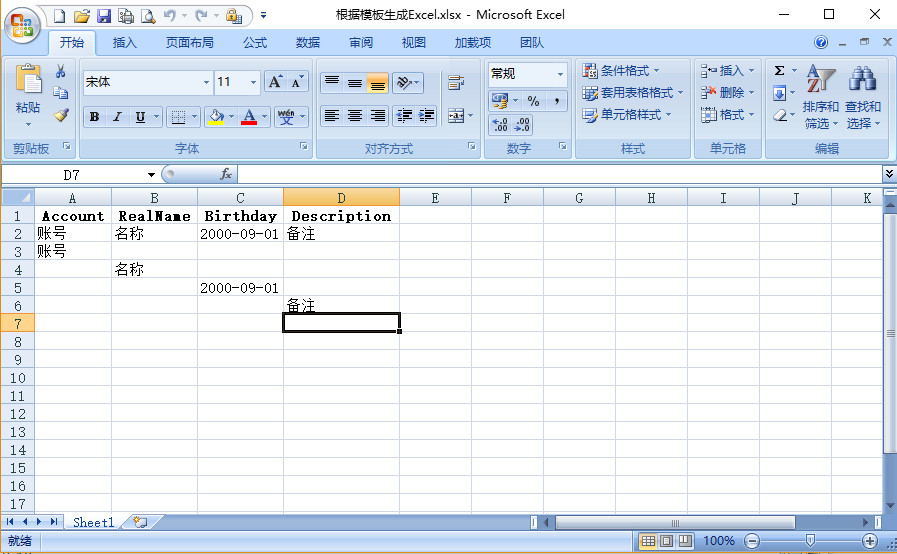
3、当我们使用普通的设置数据列格式,还不能满足要求时,此时,只能采用预定的Excel模板,使用数据填充方式,生成Excel文件?
var fileName = "根据模板生成Excel.xlsx";
            try
            {
                var templateFile = "templateFile.xlsx";
                System.IO.File.WriteAllBytes(templateFile, ConsoleApp.Properties.Resources.template);

                List<TemplateModel> list = new List<TemplateModel>();
                list.Add(new TemplateModel() { RowIndex = 1, ColIndex = 0, Value = "账号" });
                list.Add(new TemplateModel() { RowIndex = 1, ColIndex = 1, Value = "名称" });
                list.Add(new TemplateModel() { RowIndex = 1, ColIndex = 2, Value = "2000-09-01" });
                list.Add(new TemplateModel() { RowIndex = 1, ColIndex = 3, Value = "备注" });

                list.Add(new TemplateModel() { RowIndex = 2, ColIndex = 0, Value = "账号" });
                list.Add(new TemplateModel() { RowIndex = 3, ColIndex = 1, Value = "名称" });
                list.Add(new TemplateModel() { RowIndex = 4, ColIndex = 2, Value = "2000-09-01" });
                list.Add(new TemplateModel() { RowIndex = 5, ColIndex = 3, Value = "备注" });
                Console.WriteLine("根据模板生成Excel...");
                NPOIHelper.SaveToExcel(templateFile,"sheet1", list, fileName);
                Console.WriteLine("Excel保存成功!");
            }
            catch (Exception ex)
            {
                Console.WriteLine("生成异常:" + ex.Message);
            }
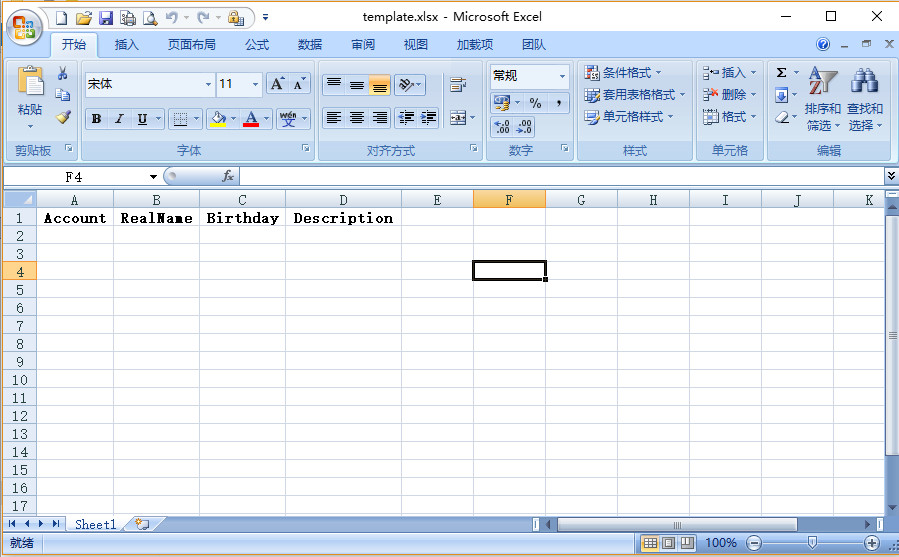
定义的模板:
运行效果:
4、生成Excel文件方法介绍完毕,下面我们看下怎么读取Excel文件内容,我们以直接读取模板生成的Excel文件为例?
try
            {

                Console.WriteLine("读取Excel内容...");
                DataTable dtData = NPOIHelper.ReadToTable(fileName);
                StringBuilder fileContent = new StringBuilder();
                //标题
                foreach (DataColumn dc in dtData.Columns)
                {
                    fileContent.Append(dc.ColumnName + "\t");
                }
                fileContent.AppendLine();

                foreach (DataRow dr in dtData.Rows)
                {
                    foreach (DataColumn dc in dtData.Columns)
                    {
                        if (dr[dc.ColumnName] == DBNull.Value)
                            fileContent.Append("\t");
                        else
                            fileContent.Append(dr[dc.ColumnName].ToString() + "\t");
                    }
                    fileContent.AppendLine();
                }
                Console.WriteLine("文件内容:");
                Console.WriteLine(fileContent.ToString());
            }
            catch (Exception ex)
            {
                Console.WriteLine("生成异常:" + ex.Message);
            }
运行效果:

至此 ShiQuan.Offices Excel文件读、写操作项目介绍分享完毕,欲听更多精彩,且听下回分解!
此内容由惯性聚合(RSS阅读器)自动聚合整理,仅供阅读参考。 原文来自 — 版权归原作者所有。