惯性聚合 高效追踪和阅读你感兴趣的博客、新闻、科技资讯
阅读原文 在惯性聚合中打开

推荐订阅源

G
Google Developers Blog
Google DeepMind News
Hugging Face - Blog
Hugging Face - Blog
D
Docker
F
Fortinet All Blogs
博客园 - 三生石上(FineUI控件)
Project Zero
Project Zero
Engineering at Meta
Engineering at Meta
J
Java Code Geeks
CTFtime.org: upcoming CTF events
Simon Willison's Weblog
S
Security Affairs
NISL@THU
NISL@THU
T
Tor Project blog
A
About on SuperTechFans
宝玉的分享
宝玉的分享
腾讯CDC
S
Schneier on Security
Cyber Security Advisories - MS-ISAC
P
Privacy & Cybersecurity Law Blog
cs.CL updates on arXiv.org
Stack Overflow Blog
Stack Overflow Blog
P
Privacy International News Feed
雷峰网
雷峰网
C
Cyber Attacks, Cyber Crime and Cyber Security
Vercel News
Vercel News
Cisco Talos Blog
Cisco Talos Blog
D
DataBreaches.Net
让小产品的独立变现更简单 - ezindie.com
Google Online Security Blog
Recorded Future
Recorded Future
L
LINUX DO - 热门话题
Microsoft Security Blog
Latest news
Latest news
C
Check Point Blog
有赞技术团队
有赞技术团队
T
The Exploit Database - CXSecurity.com
cs.AI updates on arXiv.org
云风的 BLOG
云风的 BLOG
SecWiki News
SecWiki News
Application and Cybersecurity Blog
爱范儿
爱范儿
月光博客
月光博客
V
Vulnerabilities – Threatpost
T
Threat Research - Cisco Blogs
P
Palo Alto Networks Blog
T
The Blog of Author Tim Ferriss
C
Cisco Blogs
Webroot Blog
Webroot Blog
S
Security @ Cisco Blogs

博客园 - WilsonWu

[Azure] 使用 Azure 快速搭建 Redis 服务器 [Azure] Azure 中国服务使用注意事项及兼容版存储访问工具 [Visual Studio] 开启Visual Studio 2012通过右键菜单创建单元测试(Unit Test) [Azure] 创建支持Apache,PHP以及MySQL的CentOS Web Virtual Machine Server [Windows 8] 开发初体验:对话框(MessageBox)和程序任务栏(ApplicationBar) [Windows Phone] 为应用添加后台计划任务 – Scheduled Task Agent [Windows Phone] 在中文版Visual Studio 2010中开发Windows Phone应用程序 [VSTS] 让ADO.NET Entity Framework支持Oracle数据库 [VSTS] 配置 Team Foundation Server 团队权限最佳实践 [VSTS] 从零开始 Team Foundation Server 2010 安装配置详细图文教程 [Windows Phone] 在Windows Phone程序中播放GIF动画 [Windows Phone] Windows Phone 7 播放远程流媒体的代码实现方法 [Windows Phone] 在Windows Phone应用中使用Google Map替代Bing Map [Windows Phone] 另类方法解决ScrollViewer设置透明度后文字模糊问题 [免费讲座] 成都软件技术沙龙 - 开启基于Scrum的敏捷开发全新征程讲座 欢迎访问iOS开发者论坛:www.codeios.com! [TechEd 2010] 回首微软TechEd十年,我们获益良多! [.NET] 在Windows系统中搭建基于.NET的iPhone应用程序虚机开发环境 [Windows 7] 使用Windows Media Center看免费大片
[Azure] 使用 Visual Studio 2013 管理中国版 Azure 订阅
WilsonWu · 2014-10-20 · via 博客园 - WilsonWu

比较关心微软平台技术的朋友应该都知道,微软云服务(Microsoft Azure)以下简称Azure分为全球版和中国版,由于政府法规问题中国版的服务是由二十一世纪互联运营,整体来看中国版Azure和全球版从运营,功能以及使用方式上都存在一些差别,而对于做开发的朋友来说,能够使用统一的工具来管理云服务以及开发资源无疑是一个非常方便的方式,Visual Studio作为微软统一开发工具也对Azure做了非常强大的管理及使用的支持。

然而对于中国版Azure来说,首先其验证方式不是使用Microsoft Account(Live ID)来验证访问权限,所以默认在Visual Studio中是无法登陆中国版Azure来进行管理的,所以我这里就简单介绍一下在Visual Studio中使用和管理中国版Azure的方法。

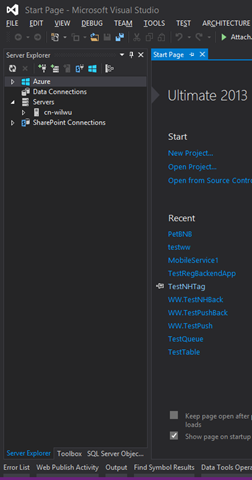
1. 打开Visual Studio并调出Server Explorer界面:
image

可以看到默认情况下VS 2013已经有Azure的节点,但这里默认验证方式是通过Microsoft Account连接全球版Azure的。

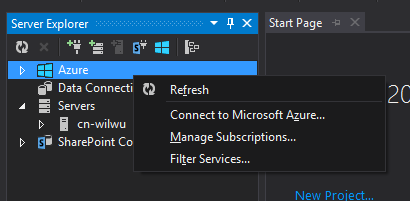
2. 在Azure节点右键点击鼠标调出管理菜单,并选择Manage Subscriptions…选项:
image

3. 在弹出的窗口中选择Certificates选项卡:

image

这里罗列了所有可用证书,以及可管理的Azure订阅。

4. 点击Import…按钮,在弹出的对话框中可以看用于生成Azure管理证书的超链接按钮(Download subscription file):

image

这个超链接按钮点击后访问的页面地址是:https://manage.windowsazure.com/publishsettings

而由于我们这里是要生成中国版Azure的管理证书,所以我们访问中国版Azure的证书生成连接:https://manage.windowsazure.cn/publishsettings

使用账号密码登陆后即可看到如下文件被生成:

image

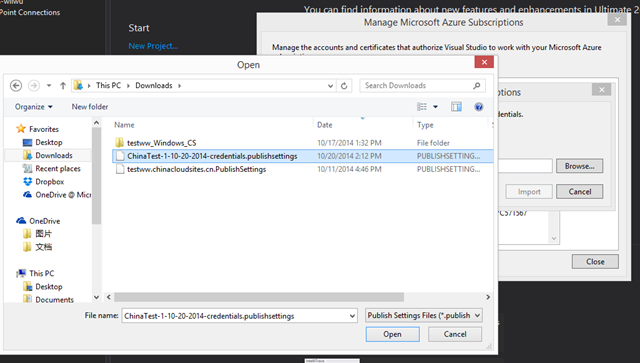
5. 回到VS中导入该文件:

image

6. 导入成功后可以看到管理证书中出现了中国版Azure的订阅内容:

image

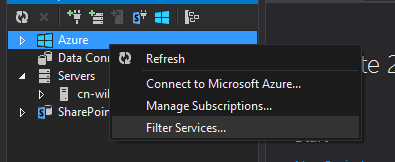
7. 回到Server Explorer中鼠标右键选择Azure节点,由于目前在我的VS中既有全球版的Azure账户也有中国版的,所以这里我选择Filter来过滤一下,让大家看到中国版Azure账户的内容:
image

image

8. 过滤完成后我们来回到Azure节点看看服务状态与管理门户中的对比:

image

这样就可以在VS中完美的使用中国版Azure了,整个使用体验和全球版无任何差异。