惯性聚合 高效追踪和阅读你感兴趣的博客、新闻、科技资讯
阅读原文 在惯性聚合中打开

推荐订阅源

N
News and Events Feed by Topic
Stack Overflow Blog
Stack Overflow Blog
CTFtime.org: upcoming CTF events
量子位
Apple Machine Learning Research
B
Blog RSS Feed
F
Full Disclosure
aimingoo的专栏
aimingoo的专栏
云风的 BLOG
云风的 BLOG
小众软件
小众软件
Hugging Face - Blog
Hugging Face - Blog
A
About on SuperTechFans
G
Google Developers Blog
U
Unit 42
腾讯CDC
雷峰网
雷峰网
爱范儿
爱范儿
H
Help Net Security
Engineering at Meta
Engineering at Meta
Vercel News
Vercel News
Cloudbric
Cloudbric
freeCodeCamp Programming Tutorials: Python, JavaScript, Git & More
S
Secure Thoughts
有赞技术团队
有赞技术团队
Jina AI
Jina AI
L
LINUX DO - 最新话题
Martin Fowler
Martin Fowler
C
Cybersecurity and Infrastructure Security Agency CISA
V
Visual Studio Blog
TaoSecurity Blog
TaoSecurity Blog
F
Fortinet All Blogs
S
Security @ Cisco Blogs
K
KPMG report finds enterprise disconnect between AI and its ROI | CIO
IT之家
IT之家
T
The Blog of Author Tim Ferriss
K
Kaspersky official blog
N
News | PayPal Newsroom
美团技术团队
月光博客
月光博客
PCI Perspectives
PCI Perspectives
Exploit-DB.com RSS Feed
Google Online Security Blog
L
LINUX DO - 热门话题
Help Net Security
Help Net Security
Recent Announcements
cs.CL updates on arXiv.org
罗磊的独立博客
酷 壳 – CoolShell
酷 壳 – CoolShell
Latest news
Latest news
让小产品的独立变现更简单 - ezindie.com

博客园 - WilsonWu

[Azure] 使用 Visual Studio 2013 管理中国版 Azure 订阅 [Azure] 使用 Azure 快速搭建 Redis 服务器 [Azure] Azure 中国服务使用注意事项及兼容版存储访问工具 [Visual Studio] 开启Visual Studio 2012通过右键菜单创建单元测试(Unit Test) [Azure] 创建支持Apache,PHP以及MySQL的CentOS Web Virtual Machine Server [Windows 8] 开发初体验:对话框(MessageBox)和程序任务栏(ApplicationBar) [Windows Phone] 为应用添加后台计划任务 – Scheduled Task Agent [Windows Phone] 在中文版Visual Studio 2010中开发Windows Phone应用程序 [VSTS] 让ADO.NET Entity Framework支持Oracle数据库 [VSTS] 配置 Team Foundation Server 团队权限最佳实践 [VSTS] 从零开始 Team Foundation Server 2010 安装配置详细图文教程 [Windows Phone] Windows Phone 7 播放远程流媒体的代码实现方法 [Windows Phone] 在Windows Phone应用中使用Google Map替代Bing Map [Windows Phone] 另类方法解决ScrollViewer设置透明度后文字模糊问题 [免费讲座] 成都软件技术沙龙 - 开启基于Scrum的敏捷开发全新征程讲座 欢迎访问iOS开发者论坛:www.codeios.com! [TechEd 2010] 回首微软TechEd十年,我们获益良多! [.NET] 在Windows系统中搭建基于.NET的iPhone应用程序虚机开发环境 [Windows 7] 使用Windows Media Center看免费大片
[Windows Phone] 在Windows Phone程序中播放GIF动画
WilsonWu · 2011-10-15 · via 博客园 - WilsonWu

最近又冒出做一个应用的想法,其中一个方案是需要播放GIF动画,但默认的Windows Phone 7的图片控件是不支持的,不过可以用Web Browser实现,单个人觉得不好,所以找了一下资料,下面给大家介绍一下实现方法。

1. 准备工作

这个实现中最主要用到的是一套开源的GIF操作库:

Logo

http://imagetools.codeplex.com/

这套开源库主要是针对Silverlight和Windows Phone操作各种类型图像文件而做的,但是用起来不太顺手,目前稳定版是0.3版,大家可以自行下载。

2. 引用并编写代码

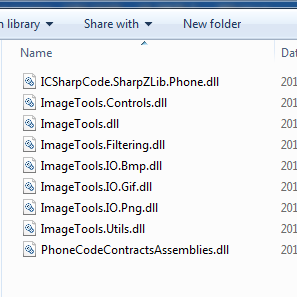
ImageTools的使用网上资料不太多,且都是重复内容,我按照网上资料操作编写的测试程序没一个能用的,最后还是自己试出来的,首先我们找到ImageTools中的DLL文件(共9个):
image

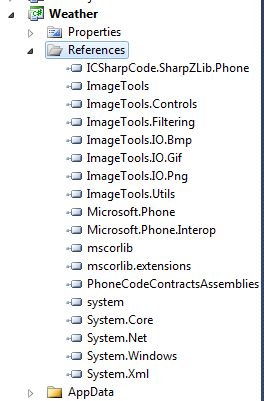
这里建议大家把这9个DLL都引用到项目中,如果只操作GIF的话可以不用PNG和BMP这两个,其他的一定要在,否则会报莫名错误,另外直接下载的0.3版ImageTools的DLL网上有朋友说存在Bug,如果真有问题可以下载源码后自己编译出来DLL用,我就是编译出来DLL然后用的,没发现问题。

添加好引用后如下:
image

接着在XAML中添加下面代码:

首先是引用:

xmlns:imagetools="clr-namespace:ImageTools.Controls;assembly=ImageTools.Controls"

然后是一个资源:

<phone:PhoneApplicationPage.Resources> 
    <imagetools:ImageConverter x:Key="ImageConverter" /> 
</phone:PhoneApplicationPage.Resources>

最后是GIF播放控件:

<imagetools:AnimatedImage Height="500" Name="animatedImage1" Source="{Binding ImageSource, Converter={StaticResource ImageConverter}}" />

然后加入一个要播放的GIF文件在AppData目录:

image

test

后台代码如下:

ImageTools.IO.Decoders.AddDecoder<GifDecoder>();
ImageTools.ExtendedImage myImage = new ImageTools.ExtendedImage();
myImage.UriSource = new Uri("AppData/test.gif", UriKind.Relative); 
this.animatedImage1.Source = (ImageTools.ExtendedImage)myImage;

最终效果如下:

1

感谢大家!希望这个实现对大家有帮助!