





惯性聚合 高效追踪和阅读你感兴趣的博客、新闻、科技资讯
阅读原文 在惯性聚合中打开

推荐订阅源

Threat Intelligence Blog | Flashpoint
Exploit-DB.com RSS Feed
The Last Watchdog
The Last Watchdog
K
KPMG report finds enterprise disconnect between AI and its ROI | CIO
T
Troy Hunt's Blog
L
LINUX DO - 最新话题
C
Check Point Blog
T
Threat Research - Cisco Blogs
OSCHINA 社区最新新闻
OSCHINA 社区最新新闻
罗磊的独立博客
V
Vulnerabilities – Threatpost
cs.CV updates on arXiv.org
J
Java Code Geeks
Apple Machine Learning Research
大猫的无限游戏
大猫的无限游戏
S
Security @ Cisco Blogs
IT之家
IT之家
T
The Exploit Database - CXSecurity.com
The GitHub Blog
The GitHub Blog
D
Docker
Engineering at Meta
Engineering at Meta
AWS News Blog
AWS News Blog
S
Security Affairs
U
Unit 42
P
Palo Alto Networks Blog
V
Visual Studio Blog
Y
Y Combinator Blog
D
DataBreaches.Net
Forbes - Security
Forbes - Security
阮一峰的网络日志
阮一峰的网络日志
美团技术团队
Security Latest
Security Latest
aimingoo的专栏
aimingoo的专栏
Simon Willison's Weblog
A
Arctic Wolf
博客园_首页
钛媒体:引领未来商业与生活新知
钛媒体:引领未来商业与生活新知
H
Hacker News: Front Page
博客园 - 司徒正美
博客园 - Franky
宝玉的分享
宝玉的分享
TaoSecurity Blog
TaoSecurity Blog
Latest news
Latest news
Scott Helme
Scott Helme
MongoDB | Blog
MongoDB | Blog
量子位
cs.AI updates on arXiv.org
C
Cisco Blogs
P
Privacy International News Feed
Application and Cybersecurity Blog

博客园 - WilsonWu

[Azure] 使用 Visual Studio 2013 管理中国版 Azure 订阅 [Azure] 使用 Azure 快速搭建 Redis 服务器 [Azure] Azure 中国服务使用注意事项及兼容版存储访问工具 [Visual Studio] 开启Visual Studio 2012通过右键菜单创建单元测试(Unit Test) [Azure] 创建支持Apache,PHP以及MySQL的CentOS Web Virtual Machine Server [Windows 8] 开发初体验:对话框(MessageBox)和程序任务栏(ApplicationBar) [Windows Phone] 为应用添加后台计划任务 – Scheduled Task Agent [Windows Phone] 在中文版Visual Studio 2010中开发Windows Phone应用程序 [VSTS] 让ADO.NET Entity Framework支持Oracle数据库 [VSTS] 配置 Team Foundation Server 团队权限最佳实践 [VSTS] 从零开始 Team Foundation Server 2010 安装配置详细图文教程 [Windows Phone] 在Windows Phone程序中播放GIF动画 [Windows Phone] Windows Phone 7 播放远程流媒体的代码实现方法 [Windows Phone] 另类方法解决ScrollViewer设置透明度后文字模糊问题 [免费讲座] 成都软件技术沙龙 - 开启基于Scrum的敏捷开发全新征程讲座 欢迎访问iOS开发者论坛:www.codeios.com! [TechEd 2010] 回首微软TechEd十年,我们获益良多! [.NET] 在Windows系统中搭建基于.NET的iPhone应用程序虚机开发环境 [Windows 7] 使用Windows Media Center看免费大片
[Windows Phone] 在Windows Phone应用中使用Google Map替代Bing Map
WilsonWu · 2011-09-26 · via 博客园 - WilsonWu

最近做一个应用,其中用到地图及相关功能,默认情况下没有找第三方的地图API,直接用了自带的Bing Map控件,但是用了一段时间发现Bing Map对于中国用户来说还是不行,很多地理位置没有标明,而且不够细致,所以立刻想到的就是Google Map,于是找了一下相关资源,在Windows Phone应用中使用Google Map其实非常简单,下面详述一下步骤:

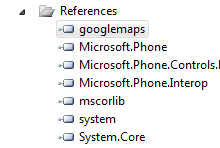
1. 有一个封装好的DLL类库:googlemaps.dll(点击下载),这个是核心内容,在项目里首先添加该DLL的引用:
image

2. 添加到XAML文件中几个引用并命名:

xmlns:my="clr-namespace:Microsoft.Phone.Controls.Maps;assembly=Microsoft.Phone.Controls.Maps"  
xmlns:GoogleTileSource="clr-namespace:googlemaps;assembly=googlemaps" 
xmlns:MSPCMCore="clr-namespace:Microsoft.Phone.Controls.Maps.Core;assembly=Microsoft.Phone.Controls.Maps"

3. 调用Google Map,这里要先简单说一下,比起iOS开发来说WP开发实在太方便了,也多亏了这个DLL写的好,只要将原有的Bing Map控件中嵌套一点内容即可,添加标签及获取地理位置完全不影响,XAML内容如下:

<my:Map x:Name="mMain" Margin="0,0,0,0" CopyrightVisibility="Collapsed" LogoVisibility="Collapsed" ScaleVisibility="Visible" CredentialsProvider="ApBXPZf5IR94SLXE8nh5FYsb5WHKrH1XPY7428-EqQudseivcWhCROIJvGmtnkAV"> 
    <my:MapTileLayer Name="street" Margin="0,0,0,32"> 
        <my:MapTileLayer.TileSources> 
            <GoogleTileSource:GoogleTile TileTypes="Street"> 
            </GoogleTileSource:GoogleTile> 
        </my:MapTileLayer.TileSources> 
    </my:MapTileLayer> 
</my:Map>

就这么简单,具体内部实现我也没研究,有兴趣的大家可以找找这个DLL的源码。

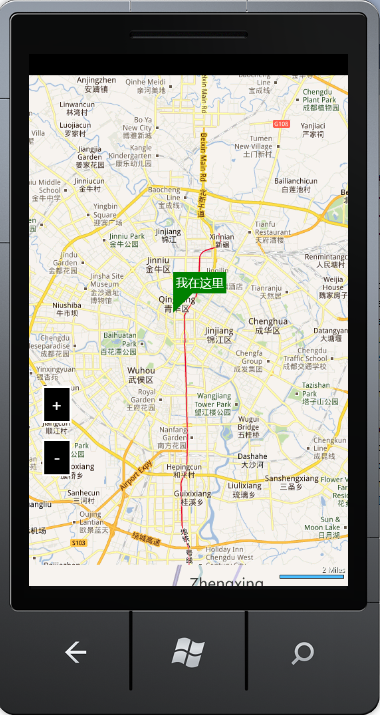
效果如下:
image

希望这个例子对大家有用!