


惯性聚合 高效追踪和阅读你感兴趣的博客、新闻、科技资讯
阅读原文 在惯性聚合中打开

推荐订阅源

MyScale Blog
MyScale Blog
F
Fortinet All Blogs
Cyber Security Advisories - MS-ISAC
D
Docker
freeCodeCamp Programming Tutorials: Python, JavaScript, Git & More
爱范儿
爱范儿
V
Visual Studio Blog
Last Week in AI
Last Week in AI
WordPress大学
WordPress大学
aimingoo的专栏
aimingoo的专栏
小众软件
小众软件
L
LangChain Blog
Vercel News
Vercel News
阮一峰的网络日志
阮一峰的网络日志
IT之家
IT之家
P
Proofpoint News Feed
博客园_首页
D
DataBreaches.Net
T
The Blog of Author Tim Ferriss
The GitHub Blog
The GitHub Blog
酷 壳 – CoolShell
酷 壳 – CoolShell
C
Check Point Blog
Engineering at Meta
Engineering at Meta
Microsoft Azure Blog

博客园 - 谢绝围观

LeetCode 910. Smallest Range II Binary Indexed Tree (Fenwick Tree) Lint Code 1365. Minimum Cycle Section LintCode 896. Prime Product 简明题解 UVa 1471 - Defense Lines Windows下安装配置MinGW GCC调试环境 详解LeetCode 137. Single Number II LeetCode 309. Best Time to Buy and Sell Stock with Cooldown LeetCode 84. Largest Rectangle in Histogram 修改注册表删除Windows资源管理器 “通过QQ发送” 右键菜单项 LeetCode 312. Burst Balloons LeetCode 287. Find the Duplicate Number LeetCode 10. Regular Expression Matching LeetCode 117. Populating Next Right Pointers in Each Node II 在Windows Azure VM下搭建SSTP VPN - 谢绝围观 利用.NET Code Contracts实现运行时验证 Log4net 配置实例 解决Windows Server 2012 下利用RRAS创建VPN断线的问题 - 谢绝围观 慎用静态类static class
EAC 抓取CD为AAC文件
谢绝围观 · 2018-09-28 · via 博客园 - 谢绝围观

下载EAC v1.3

下载FAAC

安装完EAC以后进入主界面,选菜单EAC->compression option,如图:
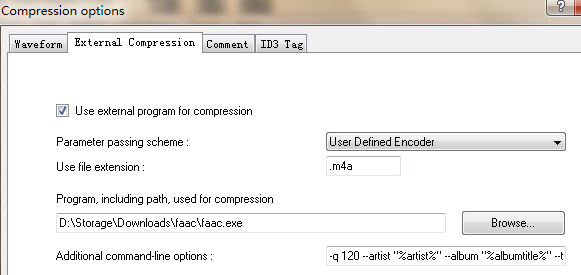
选User Defined Encoder,选择之前解压好的faac.exe路径

输出格式填 .m4a, 不然无法写入唱片的metadata(m4a只是个后缀,实际编码还是aac)

Additional command-line option填以下命令行参数 (参考

-q 120 --artist "%artist%" --album "%albumtitle%" --disc %cdnumber% --title "%title%" --year "%year%" --track "%tracknr%" -o %dest% %source% 

-q 可以选10 - 5000之间的数,越大质量越好,文件体积也越大。一般的手机听听选150就差不多了

抓取音轨前记得填一下标题,作者等metadata信息,写入文件,方便将来查找:

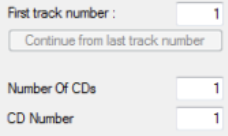
右侧还可以继续填写专辑总共有几张,当前的CD是第几张:
最后选左侧的CMP图标就可以开始了:

EAC会先抓取音轨为WAV,然后压缩为指定格式,默认最后会删除WAV文件。