









一 读取的3种方式:
read_image( image,'filename') //image 是输出对象,后面是输入文件的路径和名称
读取多图:
1,申明一个数组,分别保存路径
ImagePath:=[]
ImagePath[0]:='D:/1.bmp'
ImagePath[1]:='D:/2.bmp'
ImagePath[2]:='D:/3.bmp'
for i:=0 to 2 by 1
read_image(Image,ImagePath[i])
endfor
2,for 循环
for i:=1 to 3 by 1
read_image(Image,'D:/’+'i'+'.bmp')
endfor
3, 读取目录下所有文件
助手,打开图像,选择路径,插入代码
list_files(输入文件目录地址,选取的要求(files指定选取文件格式,recursive递归,深入所有,derectories选取文件夹,follow_links,max_depth 5...),输出的被选择的文件列表)
选择符合规则的tuple,其中\\.是转义符,等价于'-->'
tuple_regexp_select(文件名字,['\\.(bmp|tif)$','ignore_case忽略大小写'],输出)
fabric文件路径
二 图像变量Region
预处理:
| 消除噪声 | mean_image/ binomial_filter |
| 抑制小斑点或者细线 | median_image |
| 平滑 | smooth_image |
| 保存边缘的平滑 | anisotropic_diffusion |
变量Region:
Region 为某些附和要求性质的像素的子集,或者说一些被选择的图块区域s,region大小不受图像限制,有fill和margin两种表达方式,类似于游程编码,可用于压缩,eg:用a2b3c4代表aabbbcccc
region操作:
选择相应区域
select_shape(regions,output,'select type',..requirements)
计算相应区域的面积,中心坐标:
area_center(regions,area,row,column)
不规则区域的转换:
shape_trans(region,regiontrans,type)
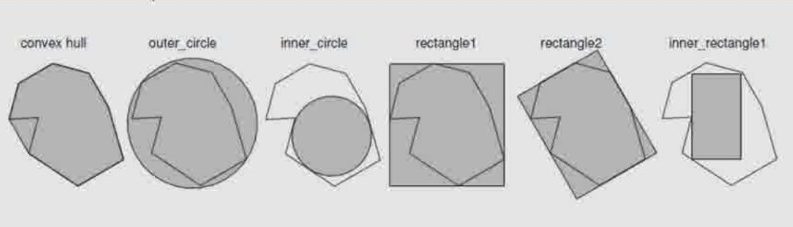
convex hull凸包围(由外向内包围)
outer_circle 外圆(能够包括对象的半径最小的圆形)
inner_circle 内圆
rectangle1 正矩形
rectangle2 最小包围矩形
inner_rectangle1 最大内矩形
三 图型变量XLD(eXtended Line Descriptions)
XLD代表亚像素级别的轮廓或者多边形
threshold_sub_pix(inputimage, output,requirement)
gen_contour_region_xld(inputRegion,output,...)
XLD的选择操作(select_shape_xld/selet_contours_xld):
select_shape_xld(XLD:SelectedXLD:Features,Operation,Min,Max:)
select_contours_xld(Contours:SelectedContours:Feature,Min1,Max1,Min2,Max2:)
计算xld的面积以及中心位置:
area_center_xld(XLD:::Area,row,column,pointOrder)
xld的合并操作:
union_colliner_contours_xld: 合并同一直线的xld
union_cocircular_contours_xld: 合并同圆的xld
union_adjacent_contours_xld: 合并相邻的xld
xld的转换操作与region类似:
shape_trans_xld(XLD:XLDTrans:Type:)
有上面几个类型
Xld的分割操作(segment_contours_xld)
把初始xld分割成直线,直线和圆,直线和椭圆
segment_contours_xld(Contours: ContoursSplit: Mode,SmoothCont, MaxLineDist1, MaxLineDist2:)
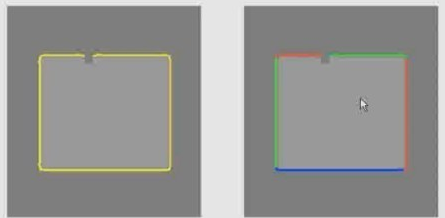
Xld 的拟合操作(fit_***_contour_xld) 把不完整的形状拟合完整
fit_line_contour_xld
fit_circle_contour_xld
fit_ellipse_contour_xld
fit_rectangle2_contour_xld
总结:
图像和视频,文件的读取
Region和XLD的初步介绍
注意:
在使用edges_sub_pix提取出来的结果,往往不是完整的圆形,需要用union来整合出完整的圆形。
此内容由惯性聚合(RSS阅读器)自动聚合整理,仅供阅读参考。 原文来自 — 版权归原作者所有。