



惯性聚合 高效追踪和阅读你感兴趣的博客、新闻、科技资讯
阅读原文 在惯性聚合中打开

推荐订阅源

Help Net Security
Help Net Security
G
Google Developers Blog
雷峰网
雷峰网
WordPress大学
WordPress大学
Threat Intelligence Blog | Flashpoint
Engineering at Meta
Engineering at Meta
Security Latest
Security Latest
T
Threat Research - Cisco Blogs
AWS News Blog
AWS News Blog
F
Full Disclosure
C
Cybersecurity and Infrastructure Security Agency CISA
T
The Exploit Database - CXSecurity.com
J
Java Code Geeks
U
Unit 42
C
Cyber Attacks, Cyber Crime and Cyber Security
V
V2EX
C
Cisco Blogs
博客园 - 司徒正美
Project Zero
Project Zero
L
LINUX DO - 热门话题
阮一峰的网络日志
阮一峰的网络日志
Blog — PlanetScale
Blog — PlanetScale
Scott Helme
Scott Helme
A
About on SuperTechFans
Hugging Face - Blog
Hugging Face - Blog
S
Securelist
小众软件
小众软件
aimingoo的专栏
aimingoo的专栏
S
Schneier on Security
G
GRAHAM CLULEY
酷 壳 – CoolShell
酷 壳 – CoolShell
Cyberwarzone
Cyberwarzone
MongoDB | Blog
MongoDB | Blog
钛媒体:引领未来商业与生活新知
钛媒体:引领未来商业与生活新知
博客园 - 叶小钗
T
Threatpost
Recorded Future
Recorded Future
C
CXSECURITY Database RSS Feed - CXSecurity.com
宝玉的分享
宝玉的分享
N
News and Events Feed by Topic
人人都是产品经理
人人都是产品经理
The Register - Security
S
Security Archives - TechRepublic
博客园 - Franky
N
News | PayPal Newsroom
Simon Willison's Weblog
S
SegmentFault 最新的问题
W
WeLiveSecurity
A
Arctic Wolf
B
Blog

博客园 - tiny羊

自制一个可以为XNA所用的GIF 转 PNG 的小工具 XNA 4.0中实现简单的快捷键模板 C#关键字 之 访问与上下文 C#关键字 之 转换 C#关键字 之 运算符 C#关键字 之 参数 - tiny羊 C#关键字 之 块 C#关键字 之 修饰符 Sql小题几道 泛型类及系统中常用的泛型类 泛型函数 Javascript简明教程6 定义时执行与单例模式 编程语言发展趋势图 Javascript简明教程系列 Javascript简明教程五 DOM Javascript简明教程四 作用域 Javascript简明教程三 函数 Javascript简明教程二 变量 - tiny羊 Javascript简明教程一 使用Javascript
展示PNG动画精灵
tiny羊 · 2011-12-30 · via 博客园 - tiny羊

首先,我为动画精灵创建一个类

   1: public class AnimatedSprite
   2:   {
   3:       Point _frameSize;
   4:       int _currentFrame;
   5:       private readonly int _frame = 4;
   6:       private readonly Texture2D _sprite;
   7:       public AnimatedSprite(Texture2D texture, int frame)
   8:       {
   9:           _frameSize = new Point(texture.Width/frame, texture.Height);
  10:           _frame = frame;
  11:           _sprite = texture;
  12:       }        
  13:       
  14:       public void Update()
  15:       {
  16:           _currentFrame = (_currentFrame + 1) % _frame;
  17:       }
  18:  
  19:       public void Draw(SpriteBatch spriteBatch)
  20:       {
  21:           spriteBatch.Draw(
  22:               _sprite,
  23:               Vector2.Zero,
  24:               new Rectangle(_currentFrame*_frameSize.X, 0,
  25:                             _frameSize.X, _frameSize.Y
  26:                   ),
  27:               Color.White, 0,
  28:               Vector2.Zero, 1,
  29:               SpriteEffects.None, 0
  30:               );
  31:  
  32:       }
  33:   }

在页面中进行调用

   1: private AnimatedSprite Player { get; set; }
   2:  
   3:         protected override void LoadContent()
   4:         {
   5:             _spriteBatch = new SpriteBatch(GraphicsDevice);
   6:             Player = new AnimatedSprite(
   7:         Content.Load<Texture2D>("Roles\\Ningke\\stand")
   8:         , 4);
   9:             TargetElapsedTime = new TimeSpan(0, 0, 0, 0, 125); 
  10:             
  11:         }
  12:  
  13: protected override void Update(GameTime gameTime)
  14:         {
  15:             if (GamePad.GetState(PlayerIndex.One).Buttons.Back == ButtonState.Pressed)
  16:                 this.Exit();
  17:             KeyboardTemplate(_graphics.ToggleFullScreen, Keys.Enter, Keys.RightAlt);
  18:             KeyboardTemplate(this.Exit, Keys.F4, Keys.LeftControl);
  19:             Player.Update();
  20:             base.Update(gameTime);
  21:         }
  22: protected override void Draw(GameTime gameTime)
  23:         {
  24:             GraphicsDevice.Clear(Color.CornflowerBlue);
  25:             _spriteBatch.Begin();
  26:             Player.Draw(_spriteBatch);
  27:             _spriteBatch.End();
  28:             base.Draw(gameTime);
  29:         }

即可实现动画精灵效果
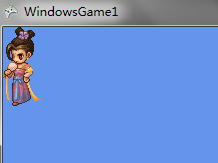
clip_image001

挺好玩的.

-