








Since XAML things have become a bit complicated in trying to conceptualize MVC architectures for Windows applications. The gap between web and win is narrowing and the whole WPF thing adds diverse possibilities to one’s toobox. What to use? Model-view-controler, the model-view-presenter or the new paradigm called model-view-viewmodel?
I have tried to understand what it’s all about and this is what I found out.
WPF has changed a few things:
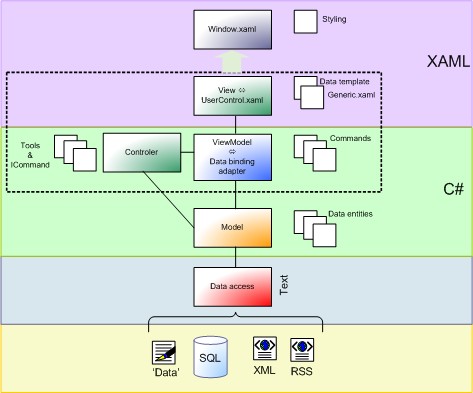
DataModel
DataModel is responsible for exposing data in a way that is easily consumable by WPF. All of its public APIs must be called on the UI thread only. It must implement INotifyPropertyChanged and/or INotifyCollectionChanged as appropriate. When data is expensive to fetch, it abstracts away the expensive operations, never blocking the UI thread (that is evil!). It also keeps the data “live” and can be used to combine data from multiple sources. These sorts of classes are fairly straightforward to unit test.
ViewModel
A ViewModel is a model for a view in the application (duh!). It exposes data relevant to the view and exposes the behaviors for the views, usually with Commands. The model is fairly specific to a view in the application, but does not subclass from any WPF classes or make assumptions about the UI that will be bound to it. Since they are separate from the actual UI, these classes are also relatively straightforward to unit test.
View
A View is the actual UI behind a view in the application. The pattern we use is to set the DataContext of a view to its ViewModel. This makes it easy to get to the ViewModel through binding. It also matches the DataTemplate/Data pattern of WPF. Ideally, the view can be implemented purely as Xaml with no code behind. The attached property trick comes in very handy for this.
The lines between DataModels and ViewModels can be blurry. DataModels are often shown in the UI with some DataTemplate, which isn’t really so different than the way we use ViewModels. However, the distinction usually makes sense in practice. I also want to point out that there’s often composition at many layers. ViewModels may compose other ViewModels and DataModels. And, DataModels may be composed of other DataModels.
The ViewModel is a model of the view. That means: You want to DataBind a property from
your DataObject (model) to a property from your ViewObject (view) but you sometimes cannot bind directly to a CLR property of the model (because of converting or calculating). This is when ViewModel comes into play. It propagates the already calculated or converted value from your model, so you can bind this property directly to the view property.
The main thrust of the Model/View/ViewModel architecture seems to be that on top of the data (”the Model”), there’s another layer of non-visual components (”the ViewModel”) that map the concepts of the data more closely to the concepts of the view of the data (”the View”). It’s the ViewModel that the View binds to, not the Model directly.
Using the INotifyPropertyChanged you can bubble changes up the stack. The reason that public methods should be on the UI thread is because the model could call long running or async stuff which would block the UI, though there are methods to let the UI thread handle property changes from a separate thread. See the doc on the Dispatcher object and the WPF threading model for more on this. Note in this context that you can let things happen in the background by means of the BeginInvoke() method of the Dispatcher and the paramter that specifies the priority. The SystemIdle in particular is interesting to be used when the Dispatcher is not busy.
The DataModel you can find in the download is mimiced from the Dan Crevier’s sample and can serve as an abstract base class for your own models.
The DispatcherTimer is reevaluated at the top of every Dispatcher loop.
Timers are not guaranteed to execute exactly when the time interval occurs, but are guaranteed to not execute before the time interval occurs. This is because DispatcherTimer operations are placed on the Dispatcher queue like other operations. When the DispatcherTimer operation executes is dependent on the other jobs in the queue and their priorities.
If a System.Timers.Timer is used in a WPF application, it is worth noting that the System.Timers.Timer runs on a different thread then the user interface (UI) thread. In order to access objects on the user interface (UI) thread, it is necessary to post the operation onto the Dispatcher of the user interface (UI) thread using Invoke or BeginInvoke. For an example of using a System.Timers.Timer, see the Disable Command Source Via System Timer sample. Reasons for using a DispatcherTimer opposed to a System.Timers.Timer are that the DispatcherTimer runs on the same thread as the Dispatcher and a DispatcherPriority can be set on the DispatcherTimer.
A DispatcherTimer will keep an object alive whenever the object’s methods are bound to the timer.
So, the right way to schedule things inside the WPF UI is something like;
[csharp]
private DispatcherTimer _timer;
timer = new DispatcherTimer(DispatcherPriority.Background);
timer.Interval = TimeSpan.FromMinutes(5);
timer.Tick += delegate { ScheduleUpdate(); };
timer.Start();
[/csharp]
the timer is injected implicitly in the thread associated to the dispatcher of the UI.
此内容由惯性聚合(RSS阅读器)自动聚合整理,仅供阅读参考。 原文来自 — 版权归原作者所有。