



惯性聚合 高效追踪和阅读你感兴趣的博客、新闻、科技资讯
阅读原文 在惯性聚合中打开

推荐订阅源

Google Online Security Blog
C
CXSECURITY Database RSS Feed - CXSecurity.com
C
CERT Recently Published Vulnerability Notes
C
Cybersecurity and Infrastructure Security Agency CISA
Cisco Talos Blog
Cisco Talos Blog
Hacker News - Newest:
Hacker News - Newest: "LLM"
Scott Helme
Scott Helme
Project Zero
Project Zero
E
Exploit-DB.com RSS Feed
S
Secure Thoughts
K
Kaspersky official blog
L
Lohrmann on Cybersecurity
NISL@THU
NISL@THU
WordPress大学
WordPress大学
N
News and Events Feed by Topic
钛媒体:引领未来商业与生活新知
钛媒体:引领未来商业与生活新知
L
LINUX DO - 热门话题
小众软件
小众软件
P
Privacy & Cybersecurity Law Blog
博客园 - 聂微东
Google DeepMind News
H
Hackread – Cybersecurity News, Data Breaches, AI and More
A
About on SuperTechFans
Hacker News: Ask HN
Hacker News: Ask HN
AWS News Blog
AWS News Blog
Cyber Security Advisories - MS-ISAC
H
Hacker News: Front Page
F
Full Disclosure
Latest news
Latest news
Schneier on Security
The Hacker News
The Hacker News
T
Troy Hunt's Blog
www.infosecurity-magazine.com
Jina AI
Jina AI
Martin Fowler
Martin Fowler
P
Proofpoint News Feed
TaoSecurity Blog
TaoSecurity Blog
G
GRAHAM CLULEY
Forbes - Security
Forbes - Security
V
V2EX - 技术
酷 壳 – CoolShell
酷 壳 – CoolShell
V
Vulnerabilities – Threatpost
C
Cyber Attacks, Cyber Crime and Cyber Security
MongoDB | Blog
MongoDB | Blog
博客园 - 三生石上(FineUI控件)
S
SegmentFault 最新的问题
Hugging Face - Blog
Hugging Face - Blog
P
Privacy International News Feed
C
Check Point Blog
N
News and Events Feed by Topic

博客园 - winkingzhang

Build 2016概览 WinRT开发系列之编程语言:功能和效率 WinRT开发系列之基础概念:WinRT不是…… VS2010 Extension实践(3)——实现自定义配置 [VS2010 Extension]PowerExtension.GoToDefinition VS2010 Extension实践(2) VS2010 Extension实践 如何通过反射调用带有ref或者out的参数的方法[迁移] Win7硬盘安装和移动硬盘访问出错的修复办法[迁移] zt. Windows Mobile开发文章收藏 [WPF]在Style中设置ToolTip的问题分析 WPF模式思考 (zt) How to Get IIS Web Sites Information Programmatically Visual Studio 调试器 Application Request Routing and the IIS 7.0 Web Management Service Reference Resources for MOSS and WSS FileSystemWatcher事件多次触发的解决方法 ASP.NET Application Life Cycle CAS and Native Code
[WPF]RadioButton在Group的Header区部分不响应鼠标选择的bug分析
winkingzhang · 2009-01-13 · via 博客园 - winkingzhang

昨晚看到南柯之石的WPF BUG之四:点击RadioButton的空白没有反应,就做了简单的验证,之后发表了一些分析和看法,

但是那个分析不够准确和充分,会误导别人的想法。在此表示歉意。这里我会从头做分析。

由于南柯之石已经描述过bug,这里只是简单说一下:就是在GroupBox的Header上放一个RadioButton,此时鼠标点击RadioButton的某些空白区域没有反应。

下面言归正传,开始对这个bug的探索:

首先这里给出出现bug的xaml片段(这个从南柯之石的blog转帖过来的,我做了部分修改,方便重现bug):

BUG in XAML
    <Grid Margin="12" TextBlock.FontSize="36">
        
<Grid.RowDefinitions>
            
<RowDefinition Height="1*" />
            
<RowDefinition Height="5*" />
            
<RowDefinition Height="4*" />
        
</Grid.RowDefinitions>
        
<TextBlock Margin="0,0,0,5" TextWrapping="Wrap">
            
<Run FontWeight="Bold">Bug Description:</Run>
        
</TextBlock>
        
<Border x:Name="dummyContainer" BorderBrush="Red" BorderThickness="1" Grid.Row="1">
            
<GroupBox x:Name="targetGroupBox" Padding="9" BorderBrush="CadetBlue" BorderThickness="10" Background="Red">
                
<GroupBox.Header>
                    
<RadioButton x:Name="targetRadioButton" Content="Header RadioButton" GroupName="header"/>
                
</GroupBox.Header>
                
<GroupBox.Content>
                    
<StackPanel>
                        
<RadioButton Content="Common RadioButton"/>
                        
<RadioButton Content="Common RadioButton"/>
                    
</StackPanel>
                
</GroupBox.Content>
            
</GroupBox>
        
</Border><GroupBox Padding="9" Grid.Row="2">
            
<GroupBox.Header>
                
<RadioButton Content="Header RadioButton" GroupName="header"/>
            
</GroupBox.Header>
            
<GroupBox.Content>
                
<StackPanel>
                    
<RadioButton Content="Common RadioButton"/>
                    
<RadioButton Content="Common RadioButton"/>
                
</StackPanel>
            
</GroupBox.Content>
        
</GroupBox>
    
</Grid>

这里鼠标Click或者Hover GroupBox的Header区域上的RadioButton的某些地方,你会发现没有任何响应。在WPF中,UI出的问题,很多都是VisualTree上的,所以我拿XAMLPad看了看这个片段生成的VisualTree,如下图:
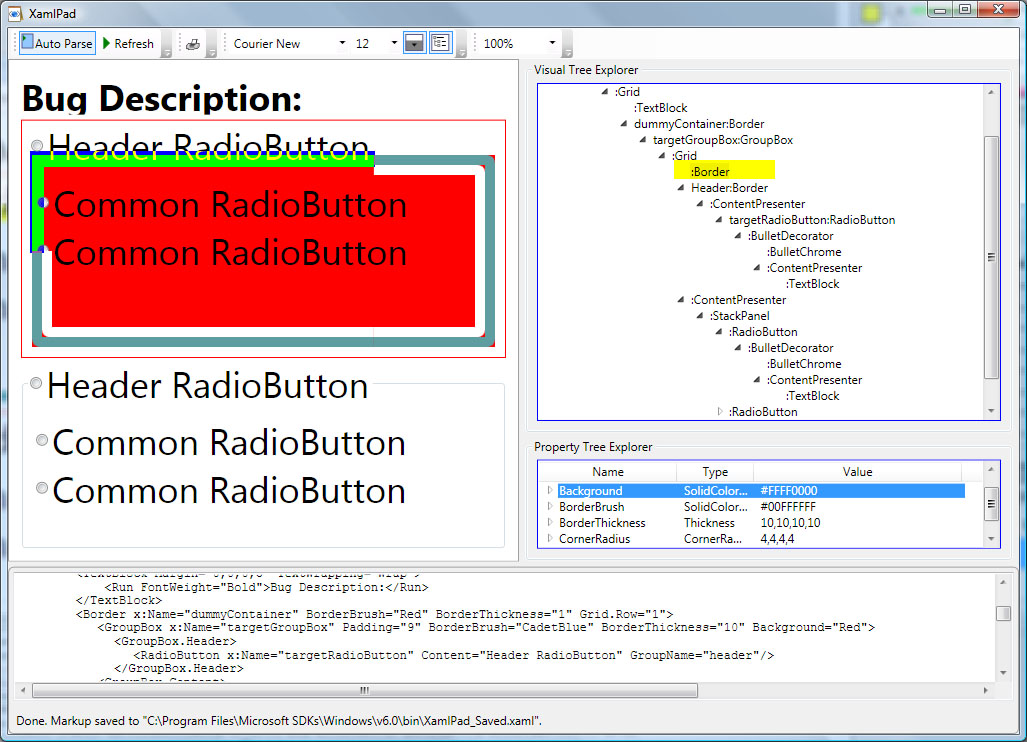
RadioButton Bug

 在这个图上,我标记了两个地方:
1、我为targetRadioButton的VisualTree里藏着的Border区域做了标记(采用黄色覆盖,然后和背景色的反色)在这个反色区域,鼠标都是不响应的。
2、在VisualTree上,我标记除了那个在targetRadioButton里隐藏的Border,下面的属性浏览器可以看到他的属性:背景是透明的,白色边框刷子,边框宽度每个边为10,圆角半径是4……

通过这个图,还有GroupBox的Theme样式可以得知,这个Border是在最上面的,界面不可见,但消息却不是透明,当鼠标响应在这些区域,消息就不会到达后面的RadioButton和其他控件了。

有兴趣的朋友可以自己试试看。

结论:

1、这个实际是GroupBox的bug,实际测试在这样的区域了,放置的UI都有问题。
2、在WPF下,很多的bug看起来很隐蔽,不妨看看它的VisualTree。