


惯性聚合 高效追踪和阅读你感兴趣的博客、新闻、科技资讯
阅读原文 在惯性聚合中打开

推荐订阅源

WordPress大学
WordPress大学
Engineering at Meta
Engineering at Meta
D
DataBreaches.Net
月光博客
月光博客
Recent Announcements
Google DeepMind News
U
Unit 42
腾讯CDC
爱范儿
爱范儿
J
Java Code Geeks
有赞技术团队
有赞技术团队
Blog — PlanetScale
Blog — PlanetScale
N
Netflix TechBlog - Medium
B
Blog
Stack Overflow Blog
Stack Overflow Blog
GbyAI
GbyAI
T
The Blog of Author Tim Ferriss
小众软件
小众软件
freeCodeCamp Programming Tutorials: Python, JavaScript, Git & More
Y
Y Combinator Blog
大猫的无限游戏
大猫的无限游戏
Microsoft Azure Blog
T
Tailwind CSS Blog
钛媒体:引领未来商业与生活新知
钛媒体:引领未来商业与生活新知

博客园 - winkingzhang

Build 2016概览 WinRT开发系列之编程语言:功能和效率 WinRT开发系列之基础概念:WinRT不是…… VS2010 Extension实践(3)——实现自定义配置 VS2010 Extension实践(2) VS2010 Extension实践 如何通过反射调用带有ref或者out的参数的方法[迁移] Win7硬盘安装和移动硬盘访问出错的修复办法[迁移] zt. Windows Mobile开发文章收藏 [WPF]在Style中设置ToolTip的问题分析 [WPF]RadioButton在Group的Header区部分不响应鼠标选择的bug分析 WPF模式思考 (zt) How to Get IIS Web Sites Information Programmatically Visual Studio 调试器 Application Request Routing and the IIS 7.0 Web Management Service Reference Resources for MOSS and WSS FileSystemWatcher事件多次触发的解决方法 ASP.NET Application Life Cycle CAS and Native Code
[VS2010 Extension]PowerExtension.GoToDefinition
winkingzhang · 2010-02-26 · via 博客园 - winkingzhang

自己实现了一个Visual Studio.NET 2010扩展,使用MS-PL协议发布。

功能
模仿Word上对链接的处理,当按住设置的Modifier键,鼠标点击代码中的标识词就可以快速切换到该标识词的定义代码,即Visual Studio中的GoToDefinition功能(F12)。

下载链接:https://files.cnblogs.com/winkingzhang/PowerExtension.GoToDefinition.zip


使用截图
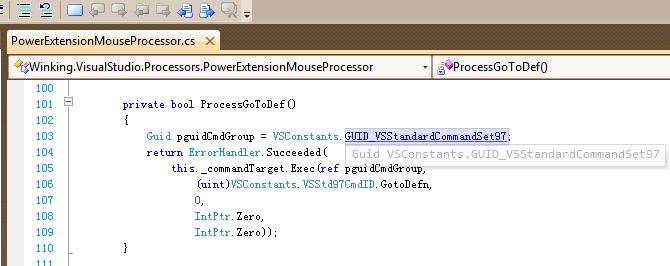
Snapshot
配置截图
Visual Studio .NET 2010 Beta2 Options

如果你发现bug,欢迎跟帖提出,谢谢!

运行环境
Visual Studio .NET 2010 Ultimate RTM
Visual Studio .NET 2010 Premium RTM
Visual Studio .NET 2010 Professional RTM

发布历史

V1.2

支持Visual Studio 2010 RTM

V1.1
修改默认的Modifier键成Alt;
增加自定义设置功能,通过Options对话框来修改自己喜欢的Modifier;

V1.0
实现Ctrl+MouseClick浏览代码定义;
实现按住Ctrl键后为可导航的标识词添加下划线;