





一、资源
1)Uploadify v2.1.0,可以到这里下载:www.uploadify.com。
2)JQuery EasyUI ,下载地址:http://jquery-easyui.wikidot.com/download
二、预览
1)初始界面

2) 点击【BROWSE】选择多文件
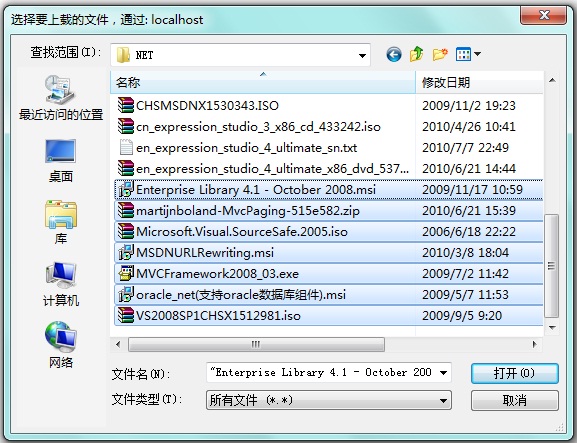
3) 选择的文件列表,点击【全部上传】开始上传文件队列
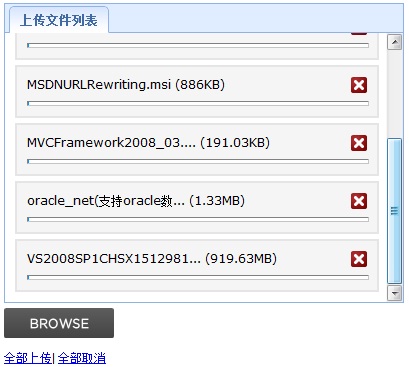
三、代码
1)解压jquery.uploadify-v2.1.0.zip,复制example\index.php的代码,对应粘贴到你的页面(HTML或ASPX),注意拷贝相应的CSS、JS和SWF文件到你的项目对应目录
2)解压 JQuery EasyUI.zip,拷贝相应的CSS、JS文件到你的项目对应目录,并在你的页面中的<title></title>标签中添加引用
HTML:
<!DOCTYPE html PUBLIC "-//W3C//DTD XHTML 1.0 Transitional//EN" "http://www.w3.org/TR/xhtml1/DTD/xhtml1-transitional.dtd">
<html xmlns="http://www.w3.org/1999/xhtml">
<head>
<meta http-equiv="Content-Type" content="text/html; charset=utf-8" />
<title>多文件上传 - 可设置多文件还是单文件上传,以及上传文件的大小</title>
<!--JQuery-->
<script type="text/javascript" src="scripts/jquery-1.4.2.min.js"></script>
<!--JQuery EasyUI-->
<link href="css/easyui/themes/default/easyui.css" rel="stylesheet" type="text/css" />
<link href="css/easyui/themes/icon.css" rel="stylesheet" type="text/css" />
<script type="text/javascript" src="scripts/jquery.easyui.min.js"></script>
<!--MultiUpload-->
<link href="css/default.css" rel="stylesheet" type="text/css" />
<link href="css/uploadify.css" rel="stylesheet" type="text/css" />
<script type="text/javascript" src="scripts/swfobject.js"></script>
<script type="text/javascript" src="scripts/jquery.uploadify.v2.1.0.min.js"></script>
<script type="text/javascript">
$(document).ready(function () {
$("#uploadify").uploadify({
'uploader': 'Flash/uploadify.swf',
'script': 'UploadHandler.ashx',
'cancelImg': 'Images/cancel.png',
'folder': 'Uploads',
'queueID': 'fileQueue',
//'fileDesc': '*.rar;*.jpg;*.gif',
//'fileExt': '*.rar;*.jpg;*.gif',
'sizeLimit': '2097152', //2M
'auto': false,
'multi': true,
'onError': function (a, b, c, d) {
if (d.status == 404)
alert('Could not find upload script.');
else if (d.type === "HTTP")
alert('error ' + d.type + ": " + d.status);
else if (d.type === "File Size")
alert(c.name + ' ' + d.type + ' Limit: ' + Math.round(d.sizeLimit / 1024) + 'KB');
else
alert('error ' + d.type + ": " + d.info);
}
});
});
</script>
</head>
<body>
<div class="easyui-tabs" style="width: 400px; height: 300px;padding-bottom:5px">
<div title="上传文件列表" id="fileQueue" style="padding: 10px;">
</div>
<!--<div title="已上传文件" id="fileUploaded" closable="false" style="padding: 10px;">
</div>-->
</div>
<input type="file" name="uploadify" id="uploadify" />
<p>
<a href="javascript:$('#uploadify').uploadifyUpload()">全部上传</a>| <a href="javascript:$('#uploadify').uploadifyClearQueue()">
全部取消</a>
</p>
</body>
</html>
UploadHandler.ashx文件代码:
<%@ WebHandler Language="C#" Class="UploadHandler" %>
using System;
using System.IO;
using System.Net;
using System.Web; public class UploadHandler : IHttpHandler
{
public void ProcessRequest(HttpContext context)
{
context.Response.ContentType = "text/plain";
context.Response.Charset = "utf-8";
//获取上传文件队列
HttpPostedFile oFile = context.Request.Files["Filedata"];
if (oFile != null)
{
string topDir = context.Request["folder"];
//创建顶级目录
if (!Directory.Exists(HttpContext.Current.Server.MapPath(topDir)))
{
Directory.CreateDirectory(HttpContext.Current.Server.MapPath(topDir));
}
//当天上传的文件放到已当天日期命名的文件夹中
string dateFolder = HttpContext.Current.Server.MapPath(topDir) + "\\" + DateTime.Now.Date.ToString("yyyy-MM-dd");
if (!Directory.Exists(dateFolder))
{
Directory.CreateDirectory(dateFolder);
}
oFile.SaveAs(dateFolder + "\\" + oFile.FileName);
context.Response.Write("1");
}
else
{
context.Response.Write("0");
}
}
public bool IsReusable
{
get { return false; }
}
}
下一篇谈一下如何让上传的文件跟特定的数据库信息关联。
此内容由惯性聚合(RSS阅读器)自动聚合整理,仅供阅读参考。 原文来自 — 版权归原作者所有。