


惯性聚合 高效追踪和阅读你感兴趣的博客、新闻、科技资讯
阅读原文 在惯性聚合中打开

推荐订阅源

T
Threat Research - Cisco Blogs
Microsoft Security Blog
aimingoo的专栏
aimingoo的专栏
WordPress大学
WordPress大学
Recorded Future
Recorded Future
The Register - Security
Microsoft Azure Blog
Stack Overflow Blog
Stack Overflow Blog
爱范儿
爱范儿
大猫的无限游戏
大猫的无限游戏
Blog — PlanetScale
Blog — PlanetScale
H
Help Net Security
Webroot Blog
Webroot Blog
Help Net Security
Help Net Security
Forbes - Security
Forbes - Security
H
Hacker News: Front Page
cs.CV updates on arXiv.org
云风的 BLOG
云风的 BLOG
Hacker News: Ask HN
Hacker News: Ask HN
Security Archives - TechRepublic
Google Online Security Blog
Attack and Defense Labs
T
Tailwind CSS Blog
J
Java Code Geeks
C
CXSECURITY Database RSS Feed - CXSecurity.com
Threat Intelligence Blog | Flashpoint
Cyberwarzone
Cyberwarzone
小众软件
小众软件
G
Google Developers Blog
SecWiki News
SecWiki News
V
V2EX
C
Cybersecurity and Infrastructure Security Agency CISA
T
The Blog of Author Tim Ferriss
S
SegmentFault 最新的问题
MyScale Blog
MyScale Blog
S
Security Affairs
AI
AI
S
Securelist
D
Docker
人人都是产品经理
人人都是产品经理
T
Troy Hunt's Blog
罗磊的独立博客
The Hacker News
The Hacker News
阮一峰的网络日志
阮一峰的网络日志
Google DeepMind News
宝玉的分享
宝玉的分享
P
Proofpoint News Feed
P
Proofpoint News Feed
Vercel News
Vercel News
Jina AI
Jina AI

博客园 - playman0211

【转】读取系统时间和时间戳【UE4】【C++】 关于Unity中关节的使用(一) Unity --- 关节组件 C# CRC16算法实现【转】 IhyerDB modBus采集器配置. 简单理解C#中的抽象工厂模式是什么概念! C# 进制转换(二进制、十六进制、十进制互转) 软件加密锁编程技巧【转】 C#按回车Enter使输入焦点自动跳到下一个TextBox的方法收集 Gjhf c#格式化数字(转) oracle数据库删除数据Delete语句和Truncate语句的对比 用Instant client批量安装Oracle客户端-安装配置 C#使用instantclient连接 Oracle 10g (转) InstantClient安装使用 (转) oracle case when的使用方法 Oracle case when 用法(转) C# 读写ini文件 【转】 SQL Server CONVERT() 函数
UE蓝图---实现场景物体Transform状态重置效果
playman0211 · 2022-08-19 · via 博客园 - playman0211

  在工业领域应用中,通常会遇到操作场景模型变换的操作,经过了移动、旋转、缩放后,要求可一键重置还原最初的Transform状态。

  思路:1、在模型阶段设置每个模型Tag值为Oper,表明是可被操作的对象

     2、程序启动后保存所有目标模型的Transform值

     3、通过字符串方式:模型名称?X,Y,Z?X,Y,Z?X,Y,Z,用问号作为分隔符,将模型名称与location、rotation、size的X,Y,Z分别保存下来

     4、解析数组,主要利用Parse Into Array,将问号分隔符切开

     5、通过比对,将数组搜索到的模型进行SetWorldTransform,完成重置操作
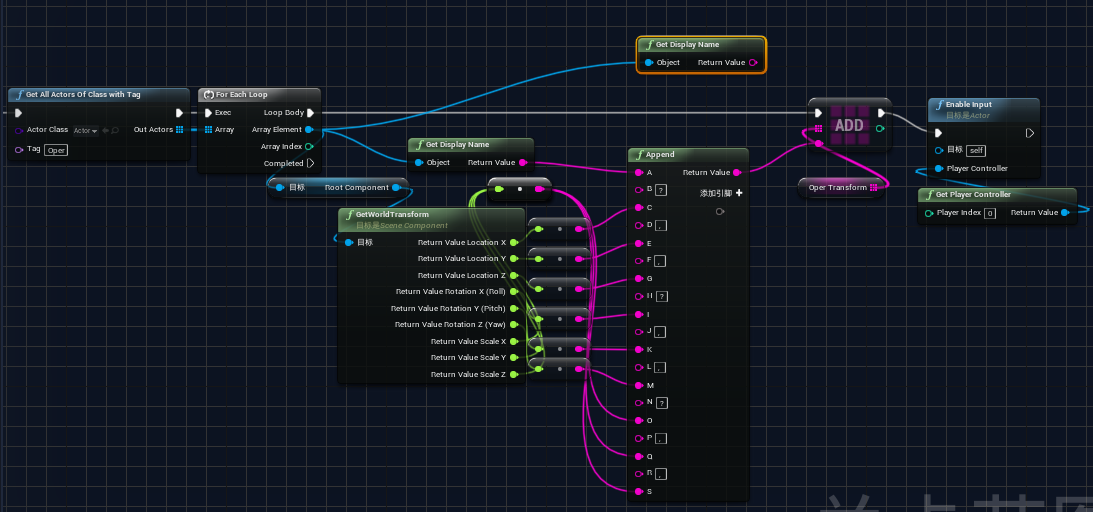
在BeginPlay中执行以上蓝图,获取保存信息的字符串数组

 在重置按钮执行以上蓝图,解析并执行模型的SetWorldTransform

至此,模型重置功能全部完成,需要将Actor变成蓝图对象。