








ESET Research has discovered HybridPetya, on the VirusTotal sample sharing platform. It is a copycat of the infamous Petya/NotPetya malware, adding the capability of compromising UEFI-based systems and weaponizing CVE‑2024‑7344 to bypass UEFI Secure Boot on outdated systems.
Key points of this blogpost:
- New ransomware samples, which we named HybridPetya, resembling the infamous Petya/NotPetya malware, were uploaded to VirusTotal in February 2025.
- HybridPetya encrypts the Master File Table, which contains important metadata about all the files on NTFS-formatted partitions.
- Unlike the original Petya/NotPetya, HybridPetya can compromise modern UEFI-based systems by installing a malicious EFI application onto the EFI System Partition.
- One of the analyzed HybridPetya variants exploits CVE‑2024‑7344 to bypass UEFI Secure Boot on outdated systems, leveraging a specially crafted cloak.dat file.
- ESET telemetry shows no signs of HybridPetya being used in the wild yet; this malware does not exhibit the aggressive network propagation seen in the original NotPetya.
Late in July 2025, we encountered suspicious ransomware samples, uploaded to VirusTotal from Poland, under various filenames, including notpetyanew.exe and other similar ones, suggesting a connection with the infamously destructive malware that struck Ukraine and many other countries back in 2017. The NotPetya attack is believed to be the most destructive cyberattack in history, with more than $10 billion in total damages. Despite NotPetya’s similarity to the Petya ransomware, first discovered in March 2016, NotPetya’s purpose was pure destruction, as encryption key recovery from the victim’s personal installation key was not possible. Because of the shared characteristics of the currently discovered samples with both Petya and NotPetya, we named the new discovery HybridPetya.
While ESET telemetry shows no active use of HybridPetya in the wild, one important detail in these samples still caught our attention – unlike the original NotPetya (and Petya ransomware as well), HybridPetya is also capable of compromising modern UEFI-based systems by installing a malicious EFI application to the EFI System Partition. The deployed UEFI application is then responsible for encryption of the NTFS-related Master File Table (MFT) file – an important metadata file containing information about all the files on the NTFS-formatted partition.
After a bit more digging, we discovered something even more interesting on VirusTotal: an archive containing the whole EFI System Partition contents, including a very similar HybridPetya UEFI application, but this time bundled in a specially formatted cloak.dat file, vulnerable to CVE‑2024‑7344 – the UEFI Secure Boot bypass vulnerability – that our team disclosed in early 2025.
Interestingly, despite the filenames on VirusTotal and the format of the ransom note in the current samples suggesting that they might be related to NotPetya, the algorithm used for the generation of the victim’s personal installation key, unlike in the original NotPetya, allows the malware operator to reconstruct the decryption key from the victim’s personal installation keys. Thus, HybridPetya can serve as regular ransomware (more like Petya), rather than being solely destructive like NotPetya.
Interestingly, on September 9th, 2025, @hasherezade published a post about the existence of a UEFI Petya PoC, with a video demonstrating execution of the malware with UEFI Secure Boot enabled. Even though the sample from the video is obviously different from the one presented in this blogpost (showing the typical Petya ASCII art skull, which is not present in the samples we discovered), we suspect that there might be some relationship between the two cases, and that HybridPetya might also be just a proof of concept developed by a security researcher or an unknown threat actor.
In this blogpost, we focus on the technical analysis of HybridPetya.
In this section, we provide a technical analysis of HybridPetya’s components: the bootkit and its installer. We also separately dissect a version of HybridPetya that is capable of bypassing UEFI Secure Boot by exploiting CVE-2024-7344. Note that HybridPetya supports both legacy and UEFI based systems – in this blogpost, we’ll focus on the UEFI part.
Interestingly, the code responsible for generating the victims’ personal installation keys seems to be inspired by the RedPetyaOpenSSL PoC. We are aware of at least one other UEFI-compatible PoC rewrite of NotPetya, dubbed NotPetyaAgain, which is written in Rust; however, that code is unrelated to HybridPetya.
We obtained two distinct versions of the UEFI bootkit component, both very similar but with certain differences. When executed, the bootkit first loads its configuration from the \EFI\Microsoft\Boot\config file, and checks the encryption flag indicating the current encryption status – same as the original Petya/NotPetya samples, the encryption flag can have one of the following values:
It continues with execution based on the encryption status flag, as shown in Figure 1.
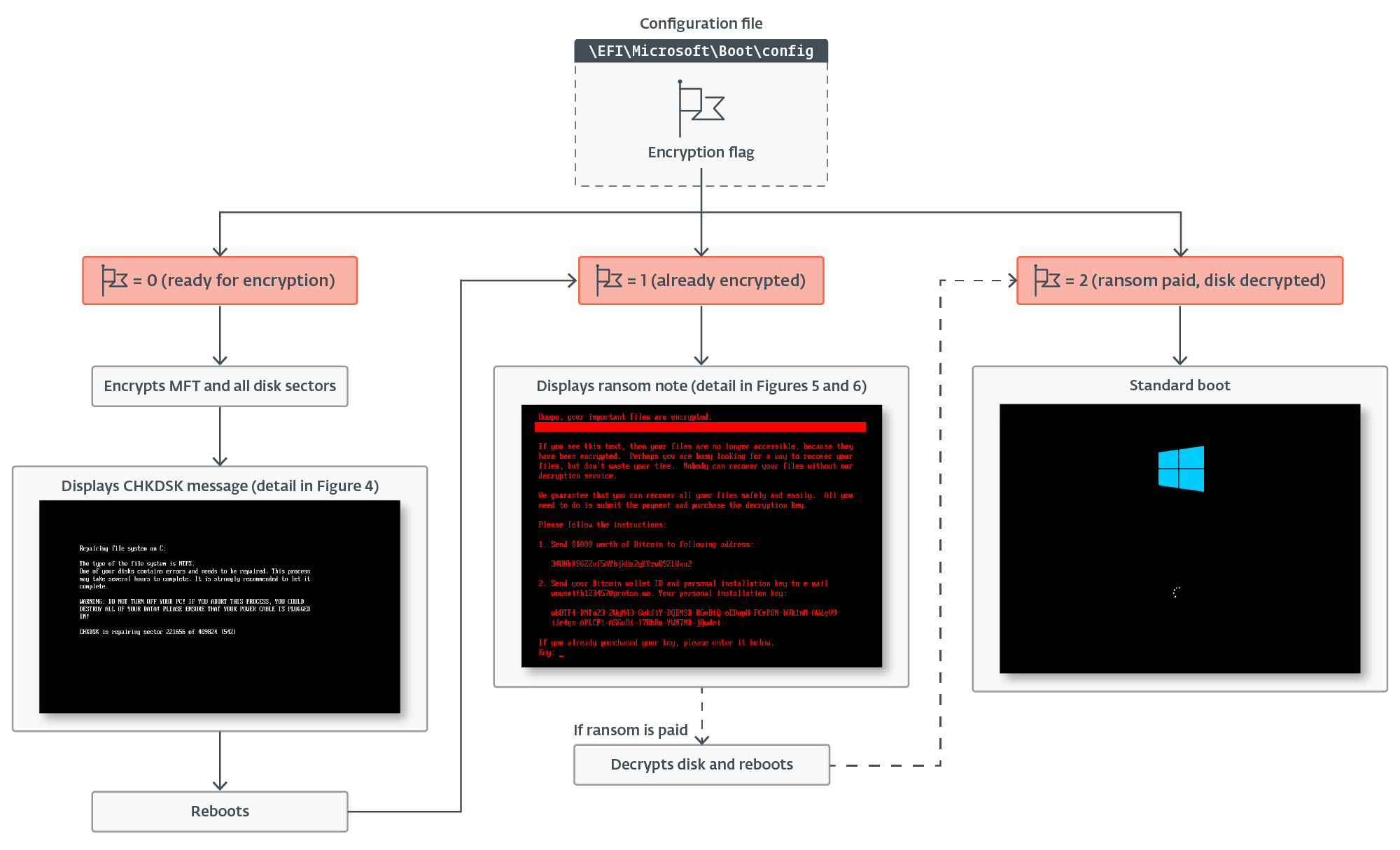
If the value of the encryption flag is 0, the bootkit extracts the 32-byte-long Salsa20 encryption key and 8-byte-long nonce from the configuration data, and subsequently rewrites the configuration file, now with the encryption key zeroed and the encryption flag set to 1. It continues with encryption of the \EFI\Microsoft\Boot\verify file with the Salsa20 encryption algorithm using the key and nonce from the configuration. Then, before proceeding to its main functionality – disk encryption – it creates the file \EFI\Microsoft\Boot\counter on the EFI System Partition; the purpose of this file is explained later.
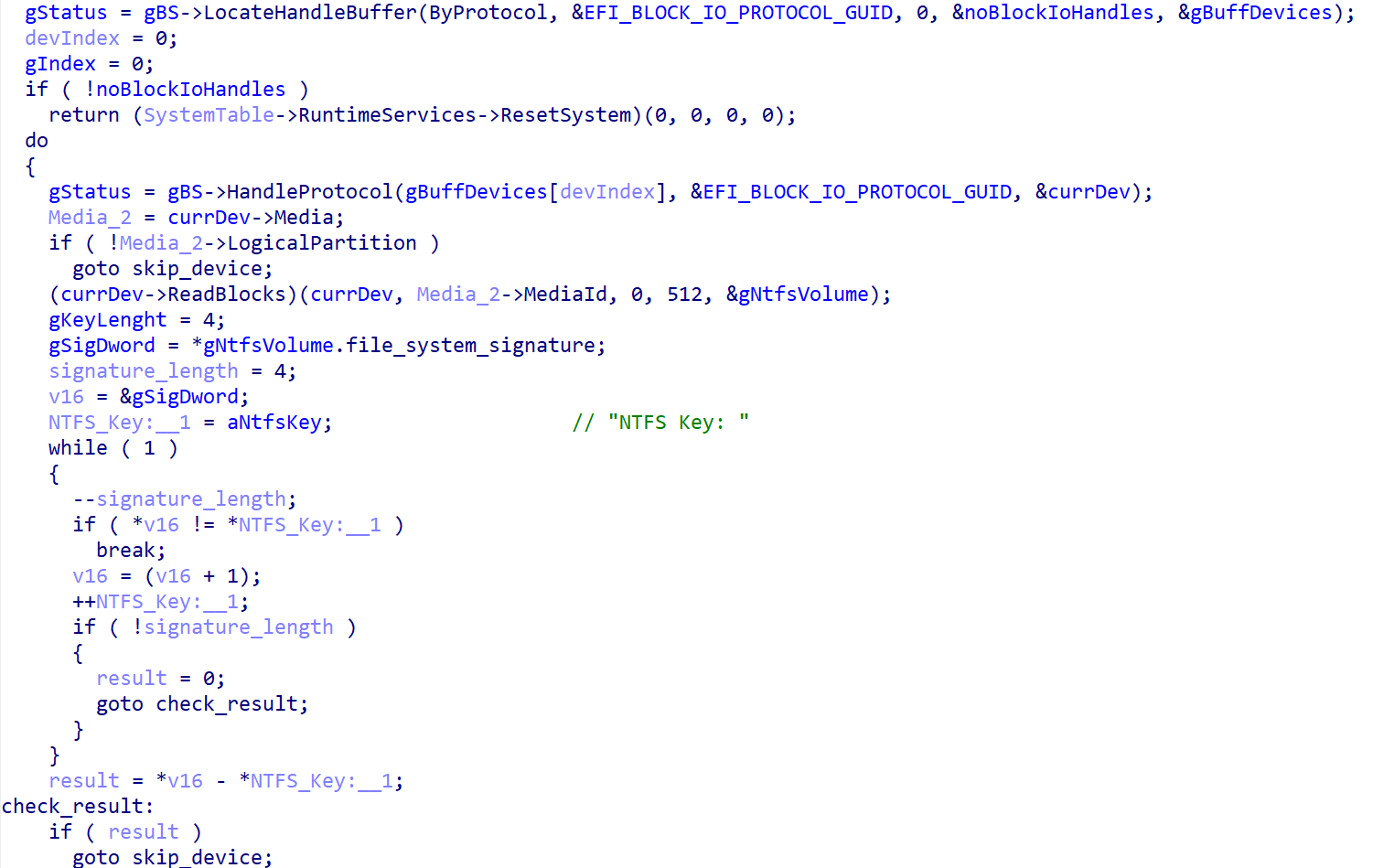
The disk encryption process starts with identification of all NTFS-formatted partitions. As shown in Figure 2, the sample does so by getting the list of handles for connected storage devices, identifying the individual partitions by checking that EFI_BLOCK_IO_MEDIA->LogicalPartition is TRUE, and finally verifying whether the partition is NTFS formatted by comparing the first four bytes of the data present in the first partition’s sector with the NTFS signature NTFS.
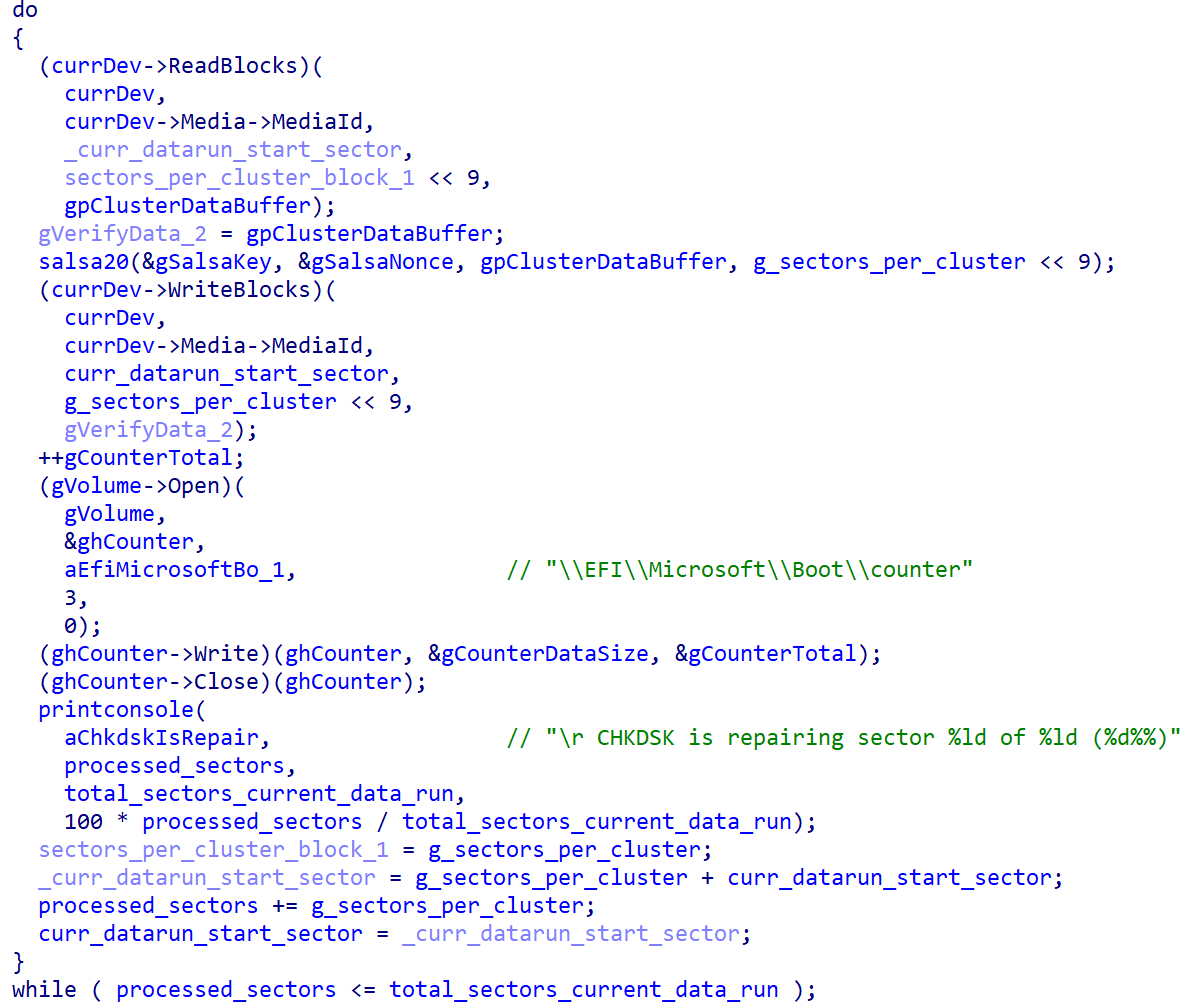
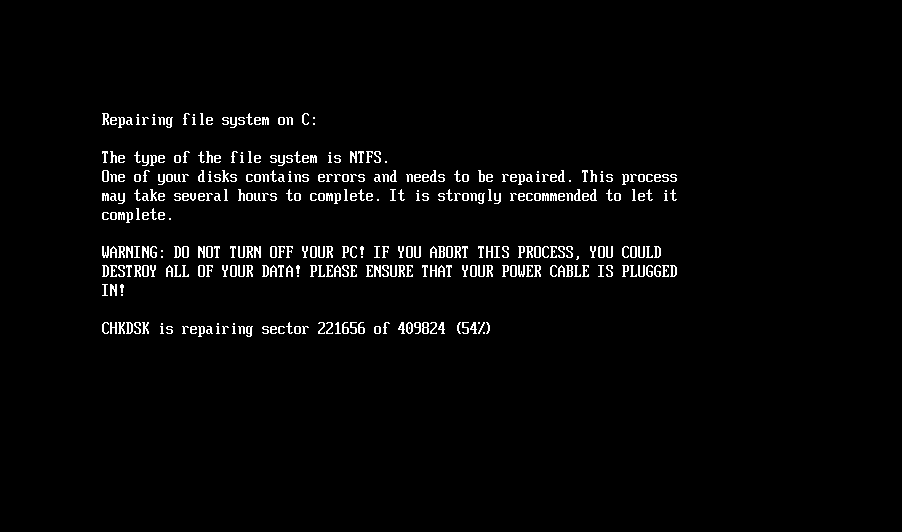
Once the NTFS partitions have been identified, the bootkit continues with encryption of the Master File Table (MFT) file, the essential metadata file containing information about other files and the location of their data on the NTFS-formatted partition. As shown in Figure 3, during the encryption, the bootkit rewrites the contents of the \EFI\Microsoft\Boot\counter file with the number of already encrypted disk clusters, and updates the fake CHKDSK message displayed on the victim’s screen (shown in Figure 4), with the information about the current encryption status (though, based on the message, the victim may believe that the disk is being checked for errors, not being encrypted).
When done with the encryption, the bootkit reboots the machine.
If the bootkit detects that the disk is already encrypted, meaning that the value of the encryption flag from the configuration file is 1, it shows the ransom note shown in Figure 5 or Figure 6 (depending on the bootkit version), and asks the victim to enter the decryption key. Note that while the HybridPetya ransom note has the same format as that of the original NotPetya (shown in Figure 7), the ransom amount, bitcoin address, and the operator’s email address are different. Also, the version deployed with the UEFI Secure Boot bypass uses a different contact email address (wowsmith999999@proton[.]me) than the version deployed by the obtained installers (wowsmith1234567@proton[.]me). It’s worth mentioning that the bitcoin address is the same in both versions.
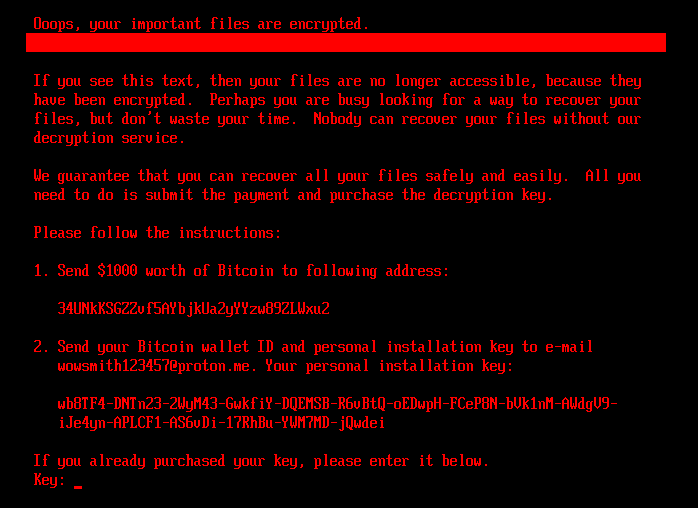
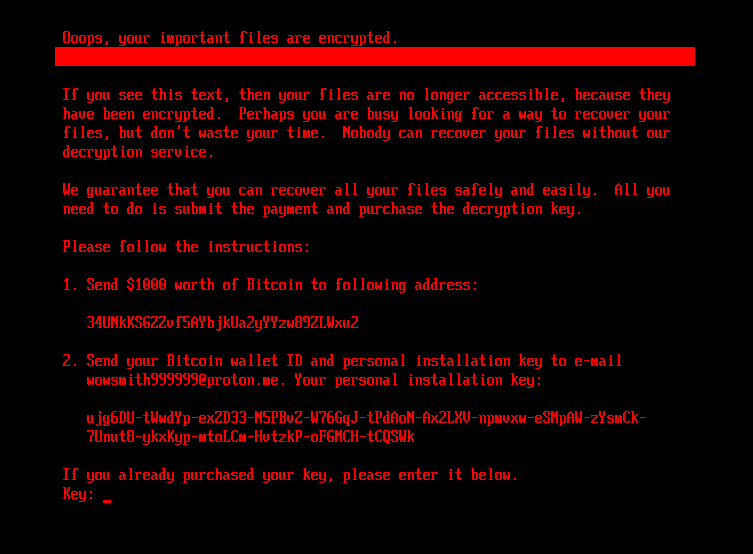
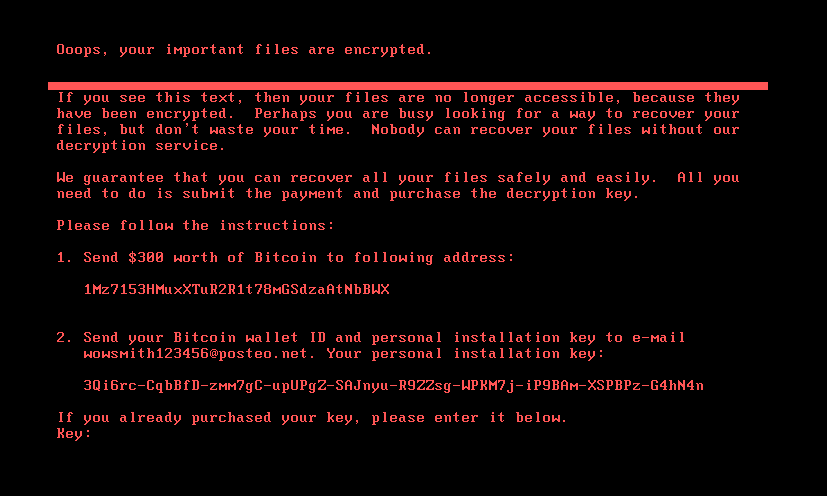
When a key with the correct length – 32 characters – is entered and confirmed by the victim pressing Enter, the bootkit proceeds to verification of the key. As depicted in Figure 8, key validity is established by attempting to decrypt the aforementioned \EFI\Microsoft\Boot\verify file with the supplied key, and checking whether the plaintext contains only bytes with value 0x07. Note that the bootkit variant deployed via the UEFI Secure Boot bypass hashes the supplied key with an algorithm probably based on SPONGENT-256/256/16, using that hash value as the decryption key, while the bootkit deployed by the obtained installers takes the user’s input as is.
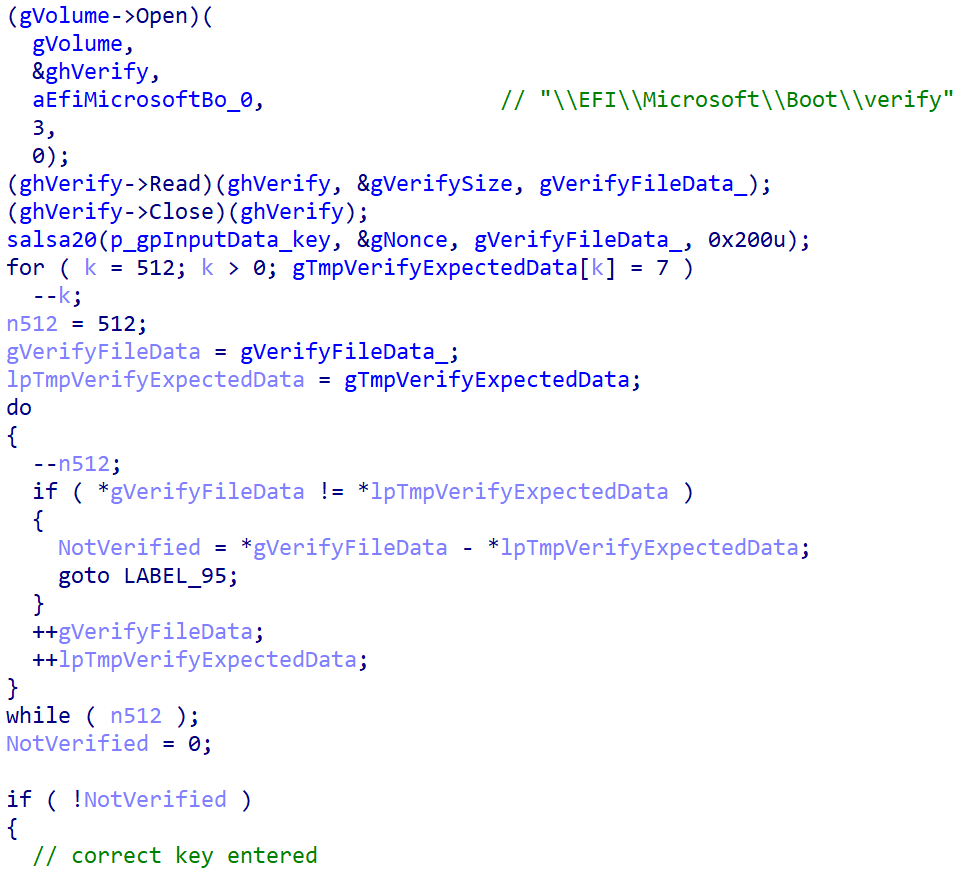
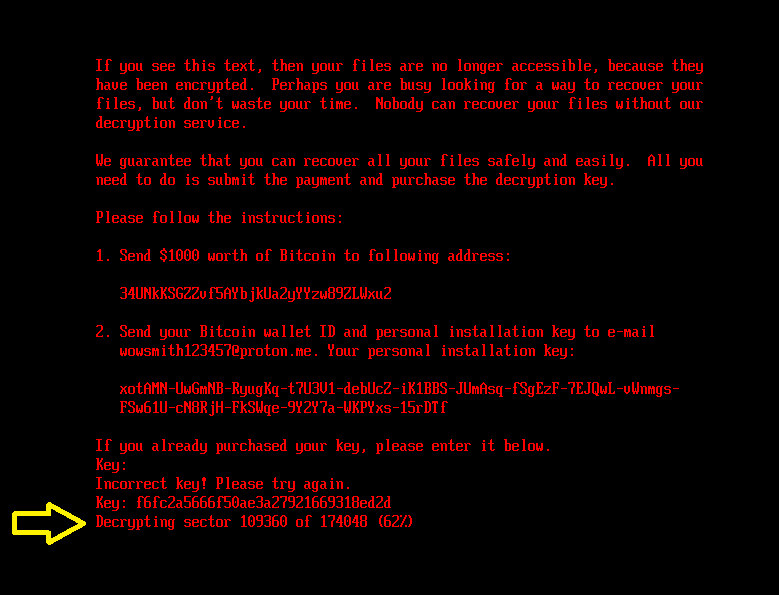
If the correct key is entered, the bootkit updates the configuration file with the encryption flag value set to 2 and also fills in the decryption key. Then it reads the contents of the \EFI\Microsoft\Boot\counter file (containing the number of disk clusters previously encrypted) and proceeds with disk decryption. For the decryption, the bootkit proceeds with a very similar process to that of NTFS partition discovery and MFT decryption (the Salsa20 encryption and decryption process is the same) as described in the Disk encryption section. The decryption stops when the number of decrypted clusters is equal to the value from the counter file. During the process of MFT decryption, the bootkit shows the current decryption process status, depicted in Figure 9, on the victim’s screen.
Next, the bootkit proceeds with recovering the legitimate bootloaders \EFI\Microsoft\Boot\bootmgfw.efi and \EFI\Boot\bootx64.efi from the backup file previously created during the installation process: \EFI\Microsoft\Boot\bootmgfw.efi.old.
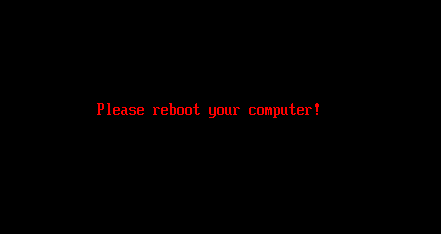
Finally, after the decryption process is finished and the legitimate bootloaders recovered, the bootkit prompts the victim to reboot the device (Figure 10). If everything went well, the device should start the operating system successfully after the reboot.
In this section, we focus on the bootkit-installation functionality of the discovered HybridPetya installers. Note that the installers we were able to obtain do not take UEFI Secure Boot into account. However, as explained in the CVE-2024-7344 exploitation section, there is likely a variant with such an improvement.
To decide whether the system is UEFI based, the installer retrieves the disk information (IOCTL_DISK_GET_DRIVE_LAYOUT_EX), checks whether the GPT partitioning scheme is used (PARTITION_STYLE_GPT), and walks through the partitions until it discovers the one with PARTITION_INFORMATION_GPT.PartitionType set to PARTITION_SYSTEM_GUID, which is the identifier of the EFI System Partition. After discovering the EFI System Partition, it continues:
When done, it triggers a system crash (Blue Screen Of Death, BSOD) by using the same method that Petya did – invoking the NtRaiseHardError API with the ErrorStatus parameter set to 0xC0000350 (STATUS_HOST_DOWN) and the ResponseOption set to value 6 (OptionShutdownSystem), resulting in a system shutdown.
The abovementioned changes ensure that on systems with Windows set as the primary OS, the bootkit binary will be executed once the device is powered on again.
In this section, we examine an archive that we discovered on VirusTotal that contains a variant of the UEFI bootkit described in the UEFI bootkit section, but this time bundled in a specially formatted cloak.dat file related to CVE-2024-7344 – the UEFI Secure Boot bypass vulnerability that our team publicly disclosed in early 2025.
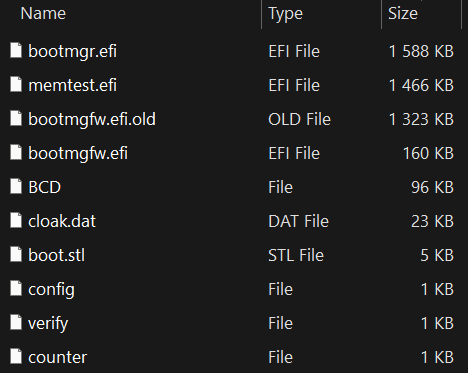
A list of the files present in the archive along with their contents suggests that this EFI System Partition was copied from a system already encrypted by this Petya/NotPetya copycat variant. Note that we haven’t obtained the installer responsible for deploying this version with the UEFI Secure Boot bypass, but based on the archive’s contents, which are shown in Figure 11, it would be pretty similar to the process described in the previous section. Specifically, the archive contains:
As described in our report from January 2025, the exploit mechanism is quite simple. The cloak.dat file contains specially formatted data that contains a UEFI application. When the reloader.efi binary (deployed as bootmgfw.efi) is executed during boot, it searches for the presence of the cloak.dat file on the EFI System Partition, and loads the embedded UEFI application from the file in a very unsafe way, completely ignoring any integrity checks, thus bypassing UEFI Secure Boot.
Note that our blogpost from January 2025 didn’t explain the exploitation in fine detail; thus, the malware author probably reconstructed the correct cloak.dat file format based on reverse engineering the vulnerable application on their own.
The vulnerability cannot be exploited on systems with Microsoft’s January 2025 dbx update applied. For guidance on how to protect and verify whether your system is exposed to this vulnerability, check the Protection and Detection section of our January 2025 blogpost.
HybridPetya is now at least the fourth publicly known example of a real or proof-of-concept UEFI bootkit with UEFI Secure Boot bypass functionality, joining BlackLotus (exploiting CVE‑2022‑21894), BootKitty (exploiting LogoFail), and the Hyper-V Backdoor PoC (exploiting CVE‑2020‑26200). This shows that Secure Boot bypasses are not just possible – they’re becoming more common and attractive to both researchers and attackers.
Although HybridPetya is not actively spreading, its technical capabilities – especially MFT encryption, UEFI system compatibility, and Secure Boot bypass – make it noteworthy for future threat monitoring.
For any inquiries about our research published on WeLiveSecurity, please contact us at threatintel@eset.com.
ESET Research offers private APT intelligence reports and data feeds. For any inquiries about this service, visit the ESET Threat Intelligence page.
A comprehensive list of indicators of compromise (IoCs) and samples can be found in our GitHub repository.
| SHA-1 | Filename | Detection | Description |
| BD35908D5A5E9F7E41A6 |
bootmgfw.efi | EFI/Diskcoder.A | HybridPetya - UEFI bootkit component. |
| 9DF922D00171AA3C31B7 |
N/A | EFI/Diskcoder.A | HybridPetya - UEFI bootkit component, extracted from cloak.dat. |
| 9B0EE05FFFDA0B16CF9D |
N/A | Win32/Injector.AJBK | HybridPetya installer. |
| CDC8CB3D211589202B49 |
core.dll | Win32/Filecoder.OSK | HybridPetya installer. |
| D31F86BA572904192D74 |
f20000.mbam |
Win32/Filecoder.OSK | HybridPetya installer. |
| A6EBFA062270A3212414 |
improved_not |
Win32/Kryptik.BFRR | HybridPetya installer. |
| C8E3F1BF0B67C83D2A6D |
notpetya |
Win32/Kryptik.BFRR | HybridPetya installer. |
| C7C270F9D3AE80EC5E89 |
notpetyanew.exe | Win32/Kryptik.BFRR | HybridPetya installer. |
| 3393A8C258239D680255 |
notpetyanew_imp |
Win32/Kryptik.BFRR | HybridPetya installer. |
| 98C3E659A903E74D2EE3 |
bootmgfw.efi | N/A | UEFI application vulnerable to CVE-2024-7433. |
| D0BD283133A80B471375 |
cloak.dat | EFI/Diskcoder.A | Specially formatted cloak.dat related to CVE-2024-7433, contains XORed HybridPetya UEFI bootkit component. |
This table was built using version 17 of the MITRE ATT&CK framework.
| Tactic | ID | Name | Description |
| Resource Development | T1587.001 | Develop Capabilities: Malware | HybridPetya is new ransomware with UEFI compatibility and a UEFI bootkit component developed by unknown authors. |
| T1587.004 | Develop Capabilities: Exploits | HybridPetya’s authors developed an exploit for the CVE‑2024‑7344 UEFI Secure Boot bypass vulnerability. | |
| Execution | T1203 | Exploitation for Client Execution | HybridPetya exploits CVE‑2024‑7344 to execute an unsigned UEFI bootkit on outdated systems with UEFI Secure Boot enabled. |
| T1106 | Native API | HybridPetya installers use undocumented native API NtRaiseHardError to cause a system crash after the bootkit’s installation. | |
| Persistence | T1542.003 | Pre-OS Boot: Bootkit | HybridPetya persists using the bootkit component. It supports both legacy and UEFI systems. |
| T1574 | Hijack Execution Flow | HybridPetya installers hijack the regular system boot process by replacing the legitimate Windows bootloader with a malicious one. | |
| Privilege Escalation | T1068 | Exploitation for Privilege Escalation | HybridPetya exploits CVE‑2024‑7344 to bypass UEFI Secure Boot and execute the malicious UEFI bootkit with high privileges during bootup. |
| Defense Evasion | T1211 | Exploitation for Defense Evasion | HybridPetya exploits CVE‑2024‑7344 to bypass UEFI Secure Boot. |
| T1620 | Reflective Code Loading | HybridPetya installers use the reflective DLL loading technique. | |
| T1036 | Masquerading | The HybridPetya bootkit displays fake CHKDSK messages on the screen during disk encryption to mask its malicious activity. | |
| Impact | T1486 | Data Encrypted for Impact | The HybridPetya installer encrypts files with specified extensions and the bootkit component encrypts MFT file on each NTFS-formatted partition. |
| T1529 | System Shutdown/Reboot | HybridPetya reboots the device after MFT encryption. |

此内容由惯性聚合(RSS阅读器)自动聚合整理,仅供阅读参考。 原文来自 — 版权归原作者所有。