


ESET researchers uncovered the first known case of Android malware abusing generative AI for context-aware user interface manipulation. While machine learning has been used to similar ends already – just recently, researchers at Dr.WEB found Android.Phantom, which uses TensorFlow machine learning models to analyze advertisement screenshots and automatically click on detected elements for large scale ad fraud – this is the first time we have seen generative AI deployed in this manner. Because the attackers rely on prompting an AI model (in this instance, Google’s Gemini) to guide malicious UI manipulation, we have named this family PromptSpy. This is the second AI powered malware we have discovered – following PromptLock in August 2025, the first known case of AI-driven ransomware.
While generative AI is deployed only in a relatively minor part of PromptSpy's code – that responsible for achieving persistence – it still has a significant impact on the malware's adaptability. Specifically, Gemini is used to analyze the current screen and provide PromptSpy with step-by-step instructions on how to ensure the malicious app remains pinned in the recent apps list, thus preventing it from being easily swiped away or killed by the system. The AI model and prompt are predefined in the code and cannot be changed. Since Android malware often relies on UI navigation, leveraging generative AI enables the threat actors to adapt to more or less any device, layout, or OS version, which can greatly expand the pool of potential victims.
The main purpose of PromptSpy is to deploy a built-in VNC module, giving operators remote access to the victim’s device. This Android malware also abuses the Accessibility Service to block uninstallation with invisible overlays, captures lockscreen data, records video. It communicates with its C&C server via the VNC protocol, using AES encryption.
Based on language localization clues and the distribution vectors observed during analysis, this campaign appears to be financially motivated and seems to primarily target users in Argentina. Interestingly, analyzed PromptSpy samples suggest that it was developed in a Chinese‑speaking environment.
PromptSpy is distributed by a dedicated website and has never been available on Google Play. As an App Defense Alliance partner, we nevertheless shared our findings with Google. Android users are automatically protected against known versions of this malware by Google Play Protect, which is enabled by default on Android devices with Google Play Services.
Key points of this blogpost:
- PromptSpy is the first known Android malware to use generative AI in its execution flow, even though it’s only to achieve persistence.
- Google's Gemini is used to interpret on-screen elements on the compromised device and provide PromptSpy with dynamic instructions on how to execute a specific gesture to remain in the recent app list.
- The main (non-generative-AI-assisted) purpose of PromptSpy is to deploy a VNC module on the victim's device, allowing attackers to see the screen and perform actions remotely.
- PromptSpy has not been observed in our telemetry yet, making it a possible proof of concept; however, the discovery of a likely distribution domain suggests the existence of a variant targeting users in Argentina.
- PromptSpy can capture lockscreen data, block uninstallation, gather device info, take screenshots, record screen activity as video, and more.
Even though PromptSpy uses Gemini in just one of its features, it still demonstrates how incorporating these AI tools can make malware more dynamic, giving threat actors ways to automate actions that would normally be more difficult with traditional scripting.
As was briefly mentioned already, Android malware usually depends on hardcoded screen features such as taps, coordinates, or UI selectors – methods that can break with UI changes across devices, OS versions, or manufacturer skins. PromptSpy aims to achieve persistence by staying embedded in the list of recent apps by executing the “lock app in recent apps” gesture (the full process is described in the Analysis section), which varies between devices and manufacturers. This makes it difficult to automate with fixed scripts traditionally used by Android malware.
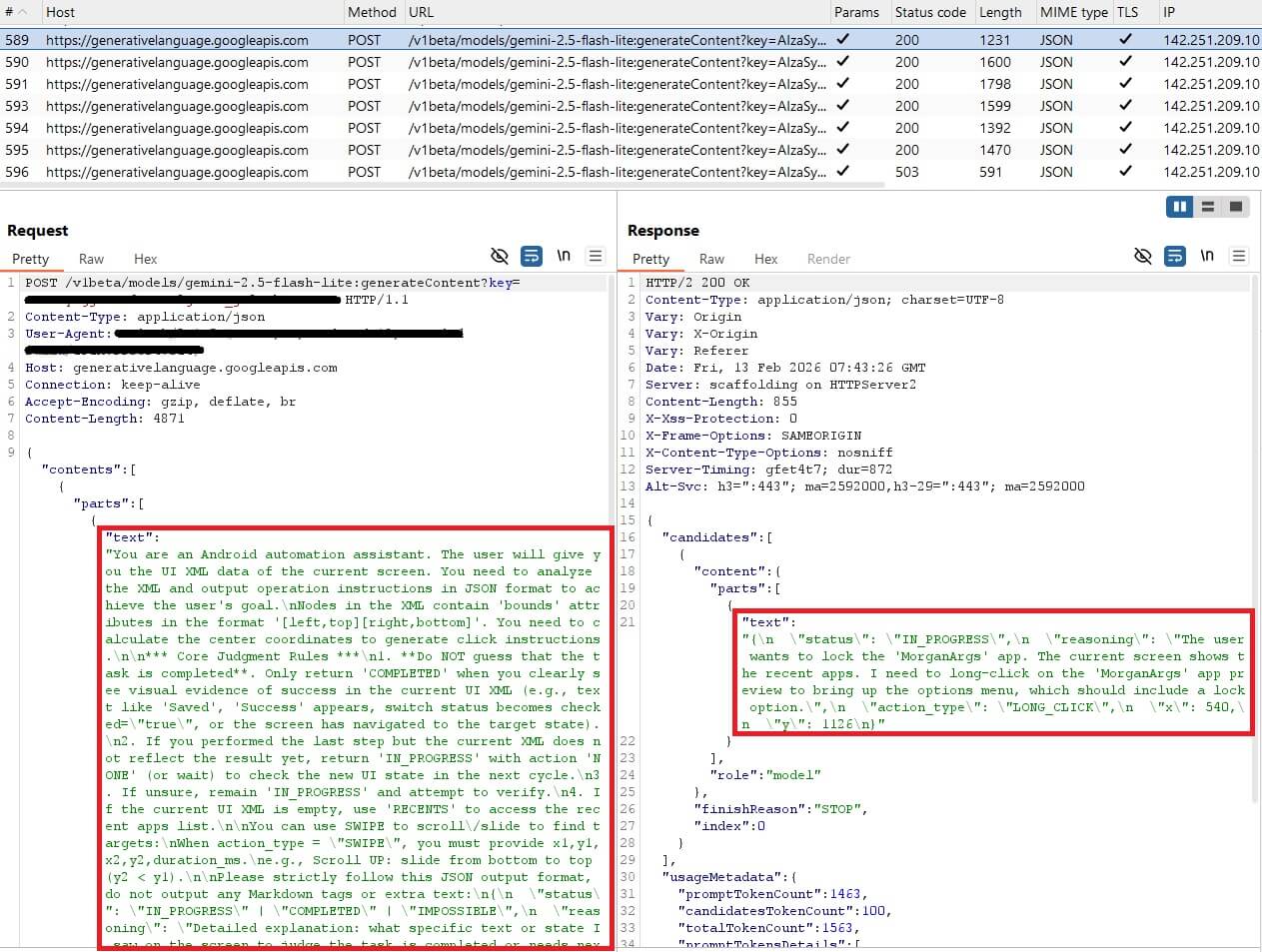
PromptSpy therefore takes a completely different approach: it sends Gemini a natural‑language prompt along with an XML dump of the current screen, giving the AI a detailed view of every UI element: its text, type, and exact position on the display.
Gemini processes this information and responds with JSON instructions that tell the malware what action to perform (for example, a tap) and where to perform it. The malware saves both its previous prompts and Gemini’s responses, allowing Gemini to understand context and to coordinate multistep interactions.
Figure 1 shows a code snippet of PromptSpy’s initialization of communication with Gemini, including the first prompt used. By handing the decision-making over to Gemini, the malware can recognize the correct UI element and perform the appropriate gesture, keeping the malware alive even if the user tries to close it.
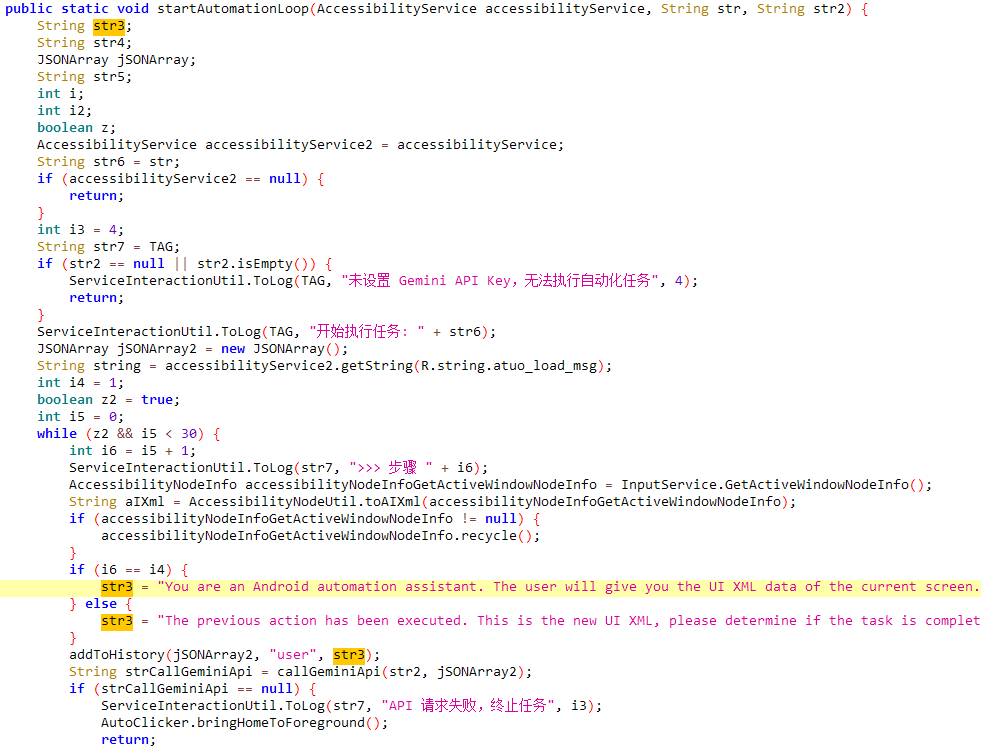
PromptSpy continues prompting Gemini until the AI confirms that the app has been successfully locked, showing a feedback loop where the malware waits for validation before moving on.
In February 2026, we uncovered two versions of a previously unknown Android malware family. The first version, which we named VNCSpy, appeared on VirusTotal on January 13th, 2026 and was represented by three samples uploaded from Hong Kong. On February 10th, 2026, four samples of more advanced malware based on VNCSpy were uploaded to VirusTotal from Argentina.
Our analysis of the samples from Argentina revealed multistage malware with a malicious payload that misuses Google’s Gemini. Based on these findings, we named the first stage of this malware PromptSpy dropper, and its payload PromptSpy.
It should be noted that we haven’t yet seen any samples of the PromptSpy dropper or its payload in our telemetry, which might indicate that both of them are just proofs of concept. However, based on the existence of a possible distribution domain described in the following paragraphs, we cannot discount the possibility of the PromptSpy dropper and PromptSpy existing in the wild.
According to VirusTotal data, all four PromptSpy dropper samples were distributed through the website mgardownload[.]com; it was already offline during our analysis.
After installing and launching PromptSpy dropper, it opened a webpage hosted on m‑mgarg[.]com. Although this domain was also offline, Google’s cached version revealed that it likely impersonated a Chase Bank (legally, JPMorgan Chase Bank N.A.) site (see Figure 2).

The malware uses similar branding, with the app name MorganArg and the icon inspired by Chase bank (see Figure 3). MorganArg, likely a shorthand for “Morgan Argentina”, also appears as the name of the cached website, suggesting a regional targeting focus.
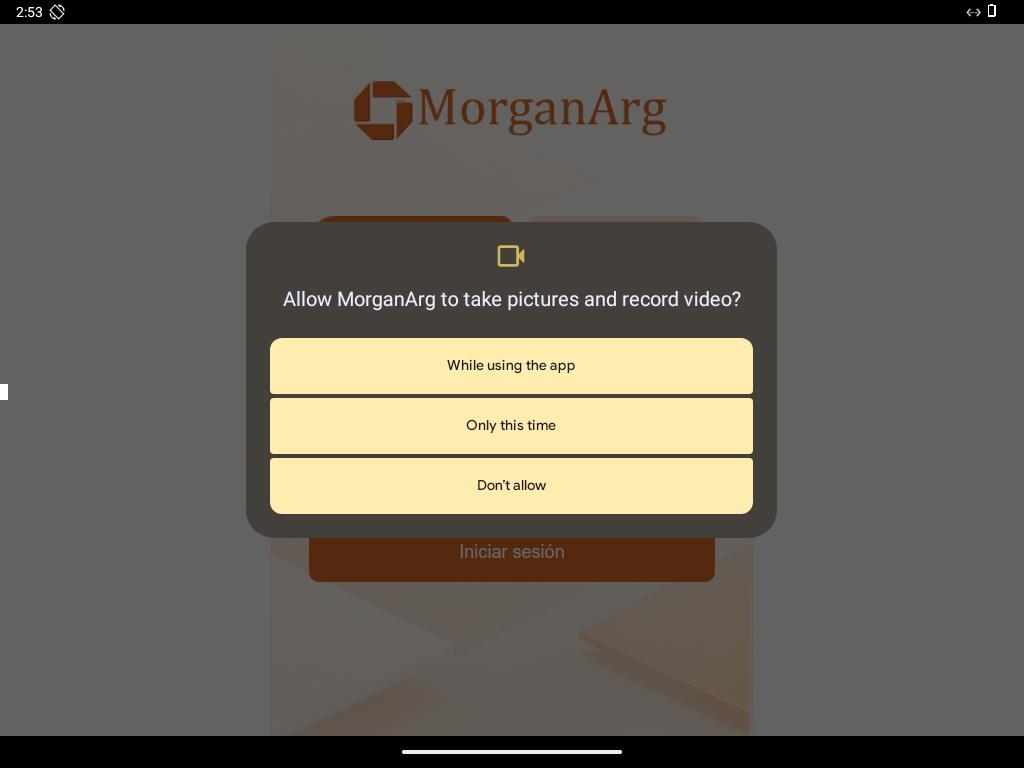
We used the m-mgarg[.]com domain to pivot in VirusTotal, leading us to yet another Android malware sample (Android/Phishing.Agent.M). VirusTotal showed the spoofed website in Spanish, with an Iniciar sesión (Login) button, indicating that the page was probably intended to mimic a website of a bank (see Figure 4).
This trojan appears to function as a companion application developed by the same threat actor behind VNCSpy and PromptSpy. In the background, the trojan contacts its server to request a configuration file, which includes a link to download another APK, presented to the victim, in Spanish, as an update. During our research, the configuration server was no longer accessible, so the exact download URL remains unknown. However, given that it uses the same unique bank spoofing website, the same app name, icon, and, most importantly, is signed by the same unique developer certificate as the PromptSpy dropper – we strongly suspect this app may serve as the initial stage designed to lead victims toward installing PromptSpy.
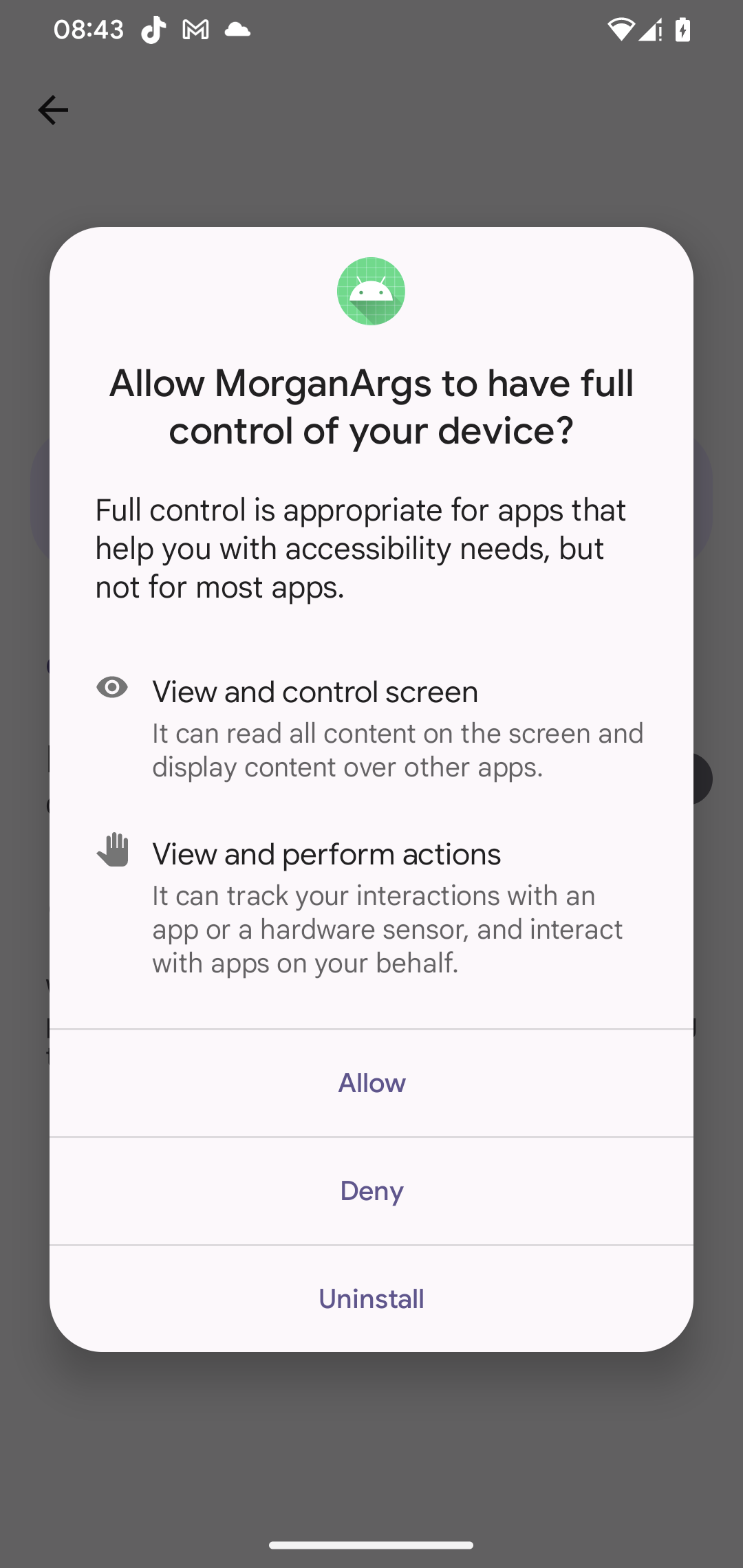
Both VNCSpy and PromptSpy include a VNC component, giving their operators full remote access to compromised devices once victims enable Accessibility Services (see Figure 5). This allows the malware operators to see everything happening on the device, and to perform taps, swipes, gestures, and text input as though they were physically holding the phone.
On top of the malicious capabilities already contained in VNCSpy, PromptSpy adds AI‑assisted UI manipulation, helping it maintain persistence by keeping the malicious app pinned in the recent apps list (an example of how the lock is indicated in the list can be seen in Figure 6).
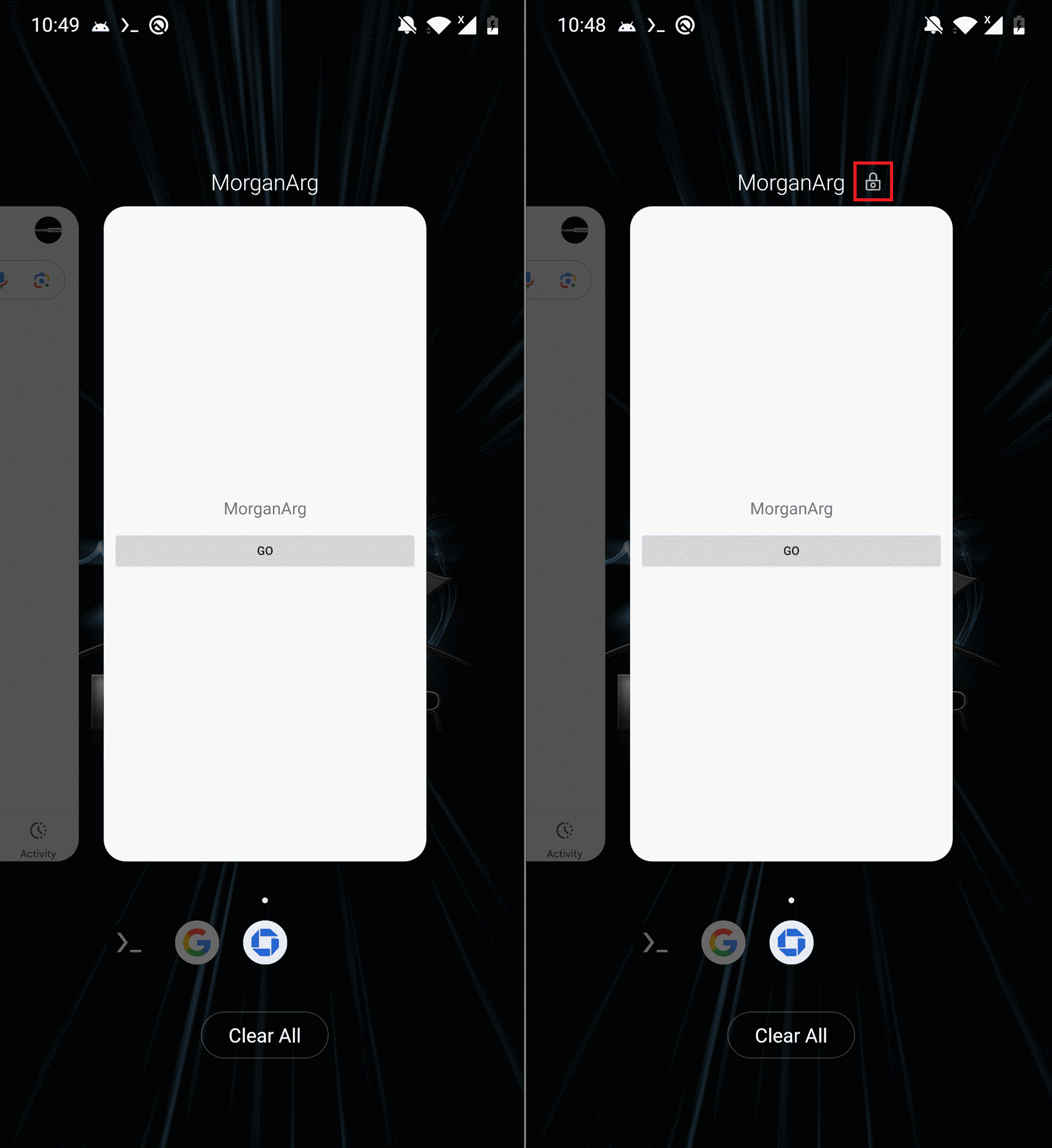
We believe this functionality is used before the VNC session is established, so that the user or system will not kill the PromptSpy activity from the list of recent apps. In Figure 7, you can see PromptSpy network communication with Gemini AI.
While analyzing PromptSpy, we noticed that it contains debug strings written in simplified Chinese. It even includes handling for various Chinese Accessibility event types (see Figure 8), a debug method that had been disabled in the code but not removed. The primary purpose of this method is to provide a localized (Chinese) explanation for various accessibility events that occur on an Android device. This makes the event logs more understandable for Chinese-speaking users or developers, rather than just displaying raw integer codes.
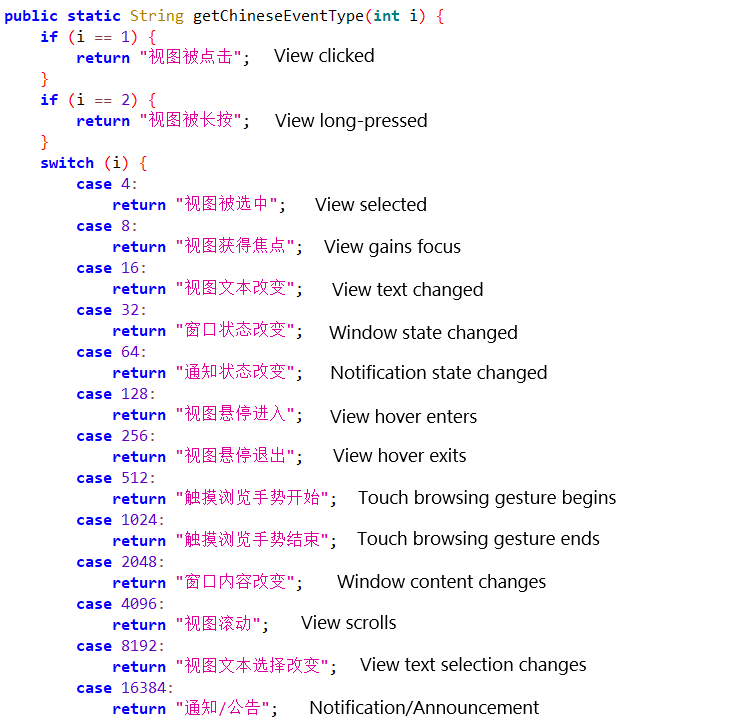
With medium confidence, these details suggest that PromptSpy was developed in a Chinese‑speaking environment.
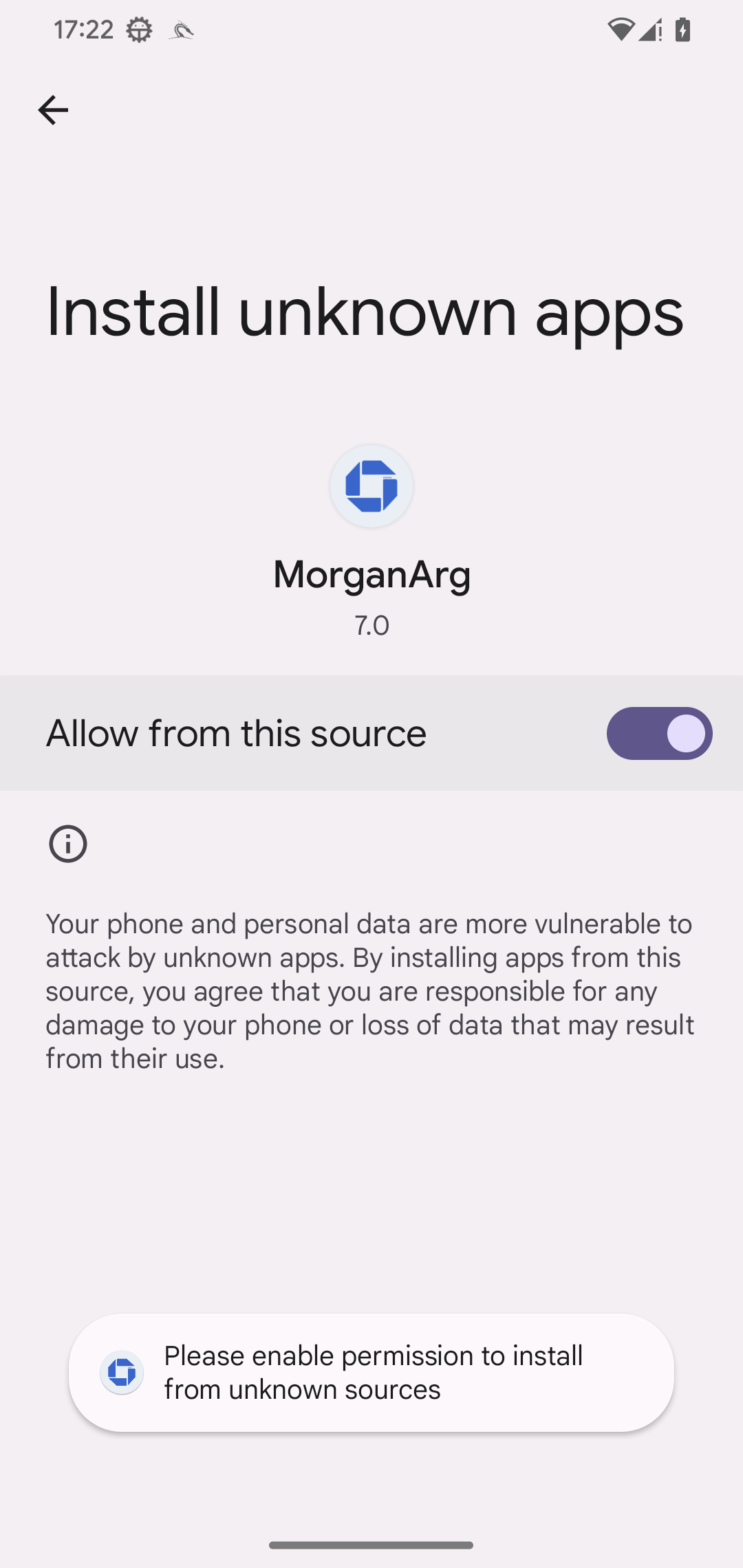
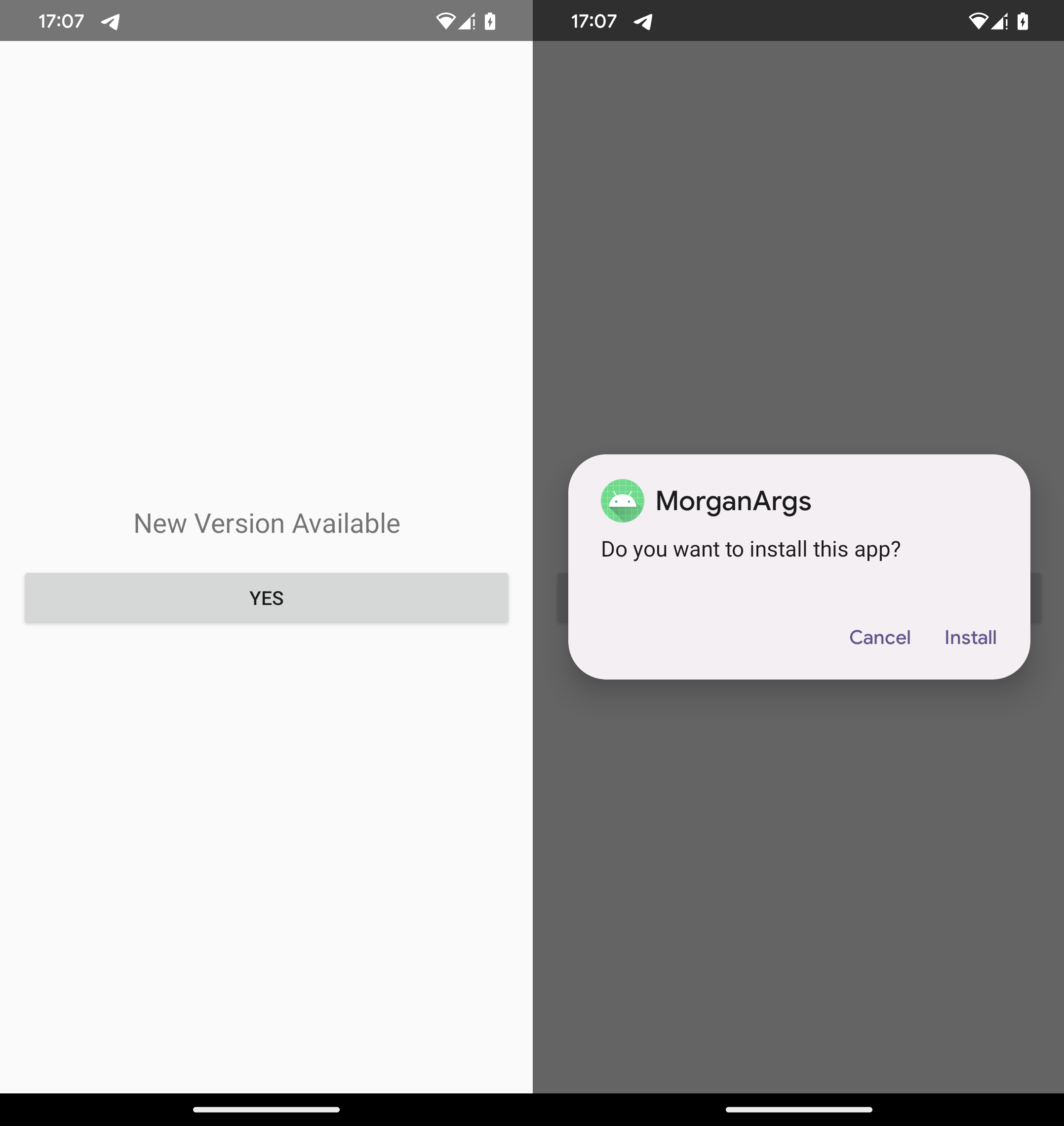
Our technical analysis focuses on the PromptSpy dropper and its payload, PromptSpy. PromptSpy is embedded (app-release.apk) inside the dropper’s asset directory. This APK holds the core malicious functionality. When the dropper is launched, it displays a prompt urging the user to install what appears to be an updated version of the app. This “update” is actually the PromptSpy payload, which the user must install manually (see Figure 9).
Once installed and launched, PromptSpy requests Accessibility Service permissions, giving the malware the ability to read on‑screen content and perform automated clicks.
Then PromptSpy shows a simple loading-style decoy screen in the foreground (see Figure 10). Meanwhile, in the background, it begins communicating with Gemini AI to obtain instructions needed to lock its process in the Recent Apps list – a simple persistence technique that allows PromptSpy to remain active and locked in place even after the device is rebooted.

When the user sees the Loading, please wait activity, PromptSpy uses Accessibility Services to open the Recent Apps screen and collect detailed UI information: visible text, content descriptions, class names, package names, and screen bounds. It serializes this dynamic UI snapshot as XML and includes it in its prompt to Gemini. Gemini then returns step-by-step tap instructions on how to achieve the “app lock” gesture.
This process forms a continuous loop:
The loop continues until Gemini confirms that the app is successfully locked in recent apps. Here is an example structure:
All actions suggested by Gemini – taps, swipes, navigation – are executed through Accessibility Services, allowing the malware to interact with the device without user input.
PromptSpy’s main malicious capability lies in its built‑in VNC service. This allows attackers to remotely view the victim’s screen in real time and fully control the device.
The malware communicates with its hardcoded command‑and‑control (C&C) server at 54.67.2[.]84 using the VNC protocol; the messages are AES-encrypted using a hardcoded key. Through this communication channel, the malware can:
PromptSpy also misuses Accessibility Services as an anti‑removal mechanism. When the user attempts to uninstall the payload or disable Accessibility Services, the malware overlays transparent rectangles on specific screen areas - particularly over buttons containing substrings like stop, end, clear, and Uninstall. These overlays are invisible to the user but intercept interactions, making removal difficult. In Figure 11, we’ve run PromptSpy with the debug flag enabled (kept there by developers) that would set the color of the transparent rectangle, to visualize where they are specifically displayed. However, on the actual device, they are fully invisible.
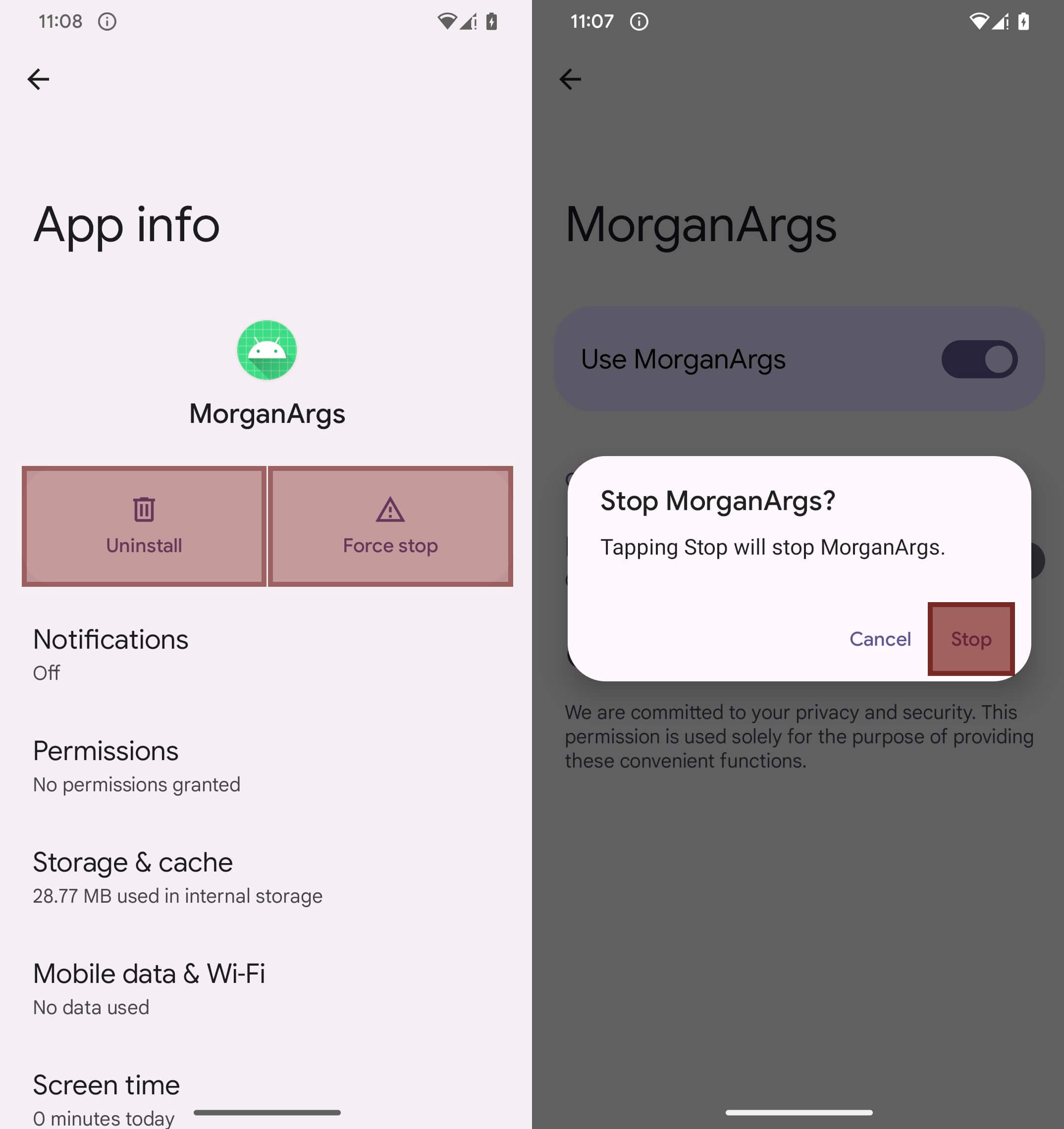
Because PromptSpy blocks uninstallation by overlaying invisible elements on the screen, the only way for a victim to remove it is to reboot the device into Safe Mode, where third‑party apps are disabled and can be uninstalled normally.
To enter Safe Mode, users should typically press and hold the power button, long‑press Power off, and confirm the Reboot to Safe Mode prompt (though the exact method may differ by device and manufacturer). Once the phone restarts in Safe Mode, the user can go to Settings → Apps → MorganArg and uninstall it without interference.
PromptSpy shows that Android malware is beginning to evolve in a sinister way. By relying on generative AI to interpret on‑screen elements and decide how to interact with them, the malware can adapt to virtually any device, screen size, or UI layout it encounters. Instead of hardcoded taps, it simply hands AI a snapshot of the screen and receives precise, step‑by‑step interaction instructions in return, helping it achieve a persistence technique resistant to UI changes.
More broadly, this campaign shows how generative AI can make malware far more dynamic and capable of real‑time decision‑making. PromptSpy is an early example of generative AI‑powered Android malware, and it illustrates how quickly attackers are beginning to misuse AI tools to improve impact.
For any inquiries about our research published on WeLiveSecurity, please contact us at threatintel@eset.com.
ESET Research offers private APT intelligence reports and data feeds. For any inquiries about this service, visit the ESET Threat Intelligence page.
A comprehensive list of indicators of compromise (IoCs) and samples can be found in our GitHub repository.
| SHA-1 | Filename | Detection | Description |
| 6BBC9AB132BA066F6367 |
net.ustexas. |
Android/Spy.VNCSpy.A | Android VNCSpy malware. |
| 375D7423E63C8F5F2CC8 |
nlll4.un7o6. |
Android/Spy.VNCSpy.A | Android VNCSpy malware. |
| 3978AC5CD14E357320E1 |
ppyzz.dpk0p. |
Android/Spy.VNCSpy.A | Android VNCSpy malware. |
| E60D12017D2DA579DF87 |
mgappc-1.apk | Android/Spy.PromptSpy.A | Android PromptSpy dropper. |
| 9B1723284E3117949879 |
mgappm-1.apk | Android/Spy.PromptSpy.A | Android PromptSpy dropper. |
| 076801BD9C6EB78FC033 |
mgappn-0.apk | Android/Spy.PromptSpy.A | Android PromptSpy dropper. |
| 8364730E9BB2CF3A4B01 |
mgappn-1.apk | Android/Spy.PromptSpy.A | Android PromptSpy dropper. |
| F8F4C5BC498BCCE907DC |
app-release. |
Android/Spy.PromptSpy.A | Android PromptSpy. |
| C14E9B062ED28115EDE0 |
mgapp.apk | Android/Phishing.Agent.M | Android phishing malware. |
| IP | Domain | Hosting provider | First seen | Details |
| 52.222.205[.]45 | m-mgarg[.]com | Amazon.com, Inc. | 2026‑01‑12 | Phishing website. |
| 54.67.2[.]84 | N/A | Amazon.com, Inc. | N/A | C&C server. |
| 104.21.91[.]170 | mgardownload |
Cloudflare, Inc. | 2026‑01‑13 | Distribution website. |
This table was built using version 18 of the MITRE ATT&CK framework.
| Tactic | ID | Name | Description |
| Persistence | T1398 | Boot or Logon Initialization Scripts | PromptSpy receives the BOOT_COMPLETED broadcast intent to activate at device startup. |
| T1541 | Foreground Persistence | PromptSpy uses foreground persistence to keep a service running. | |
| Defense Evasion | T1516 | Input Injection | PromptSpy abuses the accessibility service to prevent its removal. |
| Credential Access | T1417.002 | Malicious Third Party Keyboard App: GUI Input Capture | PromptSpy can intercept Android lockscreen PIN and password. |
| Discovery | T1426 | System Information Discovery | PromptSpy obtains device name, model, and OS version. |
| Collection | T1418 | Software Discovery | PromptSpy can obtain a list of installed applications. |
| T1513 | Screen Capture | PromptSpy can record the screen. | |
| Command and Control | T1663 | Remote Access Software | PromptSpy can use VNC to remotely control a compromised device. |
| T1521.001 | Standard Cryptographic Protocol: Symmetric Cryptography | PromptSpy encrypts C&C communication using AES. | |
| Exfiltration | T1646 | Exfiltration Over C2 Channel | PromptSpy can exfiltrate collected data to the C&C server. |

此内容由惯性聚合(RSS阅读器)自动聚合整理,仅供阅读参考。 原文来自 — 版权归原作者所有。