


惯性聚合 高效追踪和阅读你感兴趣的博客、新闻、科技资讯
阅读原文 在惯性聚合中打开

推荐订阅源

酷 壳 – CoolShell
酷 壳 – CoolShell
H
Hacker News: Front Page
P
Palo Alto Networks Blog
T
ThreatConnect
Apple Machine Learning Research
博客园_首页
T
True Tiger Recordings
P
Privacy & Cybersecurity Law Blog
B
Blog
IT之家
IT之家
Last Week in AI
Last Week in AI
F
Full Disclosure
Hacker News: Ask HN
Hacker News: Ask HN
C
Comments on: Blog
Microsoft Azure Blog
C
Cybersecurity and Infrastructure Security Agency CISA
Microsoft Security Blog
博客园 - 【当耐特】
N
News and Events Feed by Topic
NISL@THU
NISL@THU
腾讯CDC
雷峰网
雷峰网
Security Latest
Security Latest
李成银的技术随笔
M
Microsoft Research Blog - Microsoft Research
L
LangChain Blog
L
Lohrmann on Cybersecurity
cs.CL updates on arXiv.org
C
Check Point Blog
Y
Y Combinator Blog
Recent Announcements
博客园 - Franky
N
News | PayPal Newsroom
V
V2EX
A
About on SuperTechFans
The Register - Security
月光博客
月光博客
奇客Solidot–传递最新科技情报
奇客Solidot–传递最新科技情报
Google Online Security Blog
MyScale Blog
MyScale Blog
Cisco Talos Blog
Cisco Talos Blog
Vercel News
Vercel News
WordPress大学
WordPress大学
C
Cyber Attacks, Cyber Crime and Cyber Security
The Hacker News
The Hacker News
IntelliJ IDEA : IntelliJ IDEA – the Leading IDE for Professional Development in Java and Kotlin | The JetBrains Blog
爱范儿
爱范儿
A
Arctic Wolf
L
LINUX DO - 最新话题
freeCodeCamp Programming Tutorials: Python, JavaScript, Git & More

WeLiveSecurity

The quest for greater tech independence Why geopolitical turmoil is a gift for scammers, and how to stay safe FrostyNeighbor: Fresh mischief and digital shenanigans Eyes wide open: How to mitigate the security and privacy risks of smart glasses Fake call logs, real payments: How CallPhantom tricks Android users Fixing trivial passwords is as easy as 123456 A rigged game: ScarCruft compromises gaming platform in a supply-chain attack This month in security with Tony Anscombe – April 2026 edition The calm before the ransom: What you see is not all there is GopherWhisper: A burrow full of malware New NGate variant hides in a trojanized NFC payment app Ransomware’s back office: What the ransom note won’t say Why that next data breach alert could be a trap Supply chain dependencies: Have you checked your blind spot? Recovery scammers hit you when you’re down: Here’s how to avoid a ‘second strike’ As breakout time accelerates, prevention-first cybersecurity takes center stage Digital assets after death: Managing risks to your loved one’s digital estate This month in security with Tony Anscombe – March 2026 edition RSAC 2026 wrap-up – Week in security with Tony Anscombe A cunning predator: How Silver Fox preys on Japanese firms this tax season Virtual machines, virtually everywhere – but not all protected Cloud workload security: Mind the gaps Move fast and save things: A quick guide to recovering a hacked account EDR killers explained: Beyond the drivers Face value: What it takes to fool facial recognition Cyber fallout from the Iran war: What to have on your radar Sednit reloaded: Back in the trenches What cybersecurity actually does for your business How SMBs use threat research and MDR to build a defensive edge Protecting education: How MDR can tip the balance in favor of schools This month in security with Tony Anscombe – February 2026 edition Mobile app permissions (still) matter more than you may think Faking it on the phone: How to tell if a voice call is AI or not PromptSpy ushers in the era of Android threats using GenAI Is Poshmark safe? How to buy and sell without getting scammed Is it OK to let your children post selfies online? Naming and shaming: How ransomware groups tighten the screws on victims Taxing times: Top IRS scams to look out for in 2026 OfferUp scammers are out in force: Here’s what you should know A slippery slope: Beware of Winter Olympics scams and other cyberthreats This month in security with Tony Anscombe – January 2026 edition DynoWiper update: Technical analysis and attribution Love? Actually: Fake dating app used as lure in targeted spyware campaign in Pakistan Drowning in spam or scam emails lately? Here’s why ESET Research: Sandworm behind cyberattack on Poland’s power grid in late 2025 Children and chatbots: What parents should know Old habits die hard: 2025’s most common passwords were as predictable as ever Why LinkedIn is a hunting ground for threat actors – and how to protect yourself Is it time for internet services to adopt identity verification? Your information is on the dark web. What happens next? Credential stuffing: What it is and how to protect yourself This month in security with Tony Anscombe – December 2025 edition A brush with online fraud: What are brushing scams and how do I stay safe? Revisiting CVE‑2025‑50165: A critical flaw in Windows Imaging Component LongNosedGoblin tries to sniff out governmental affairs in Southeast Asia and Japan ESET Threat Report H2 2025 Black Hat Europe 2025: Was that device designed to be on the internet at all? Black Hat Europe 2025: Reputation is currency – even in the ransomware economy Locks, SOCs and a cat in a box: What Schrödinger can teach us about cybersecurity Seeking symmetry during ATT&CK® season: How to harness today’s diverse analyst and tester landscape to paint a security masterpiece The biggest catch: How whaling attacks target top executives Phishing, privileges and passwords: Why identity is critical to improving cybersecurity posture MuddyWater: Snakes by the riverbank Oversharing is not caring: What’s at stake if your employees post too much online This month in security with Tony Anscombe – November 2025 edition What parents should know to protect their children from doxxing Influencers in the crosshairs: How cybercriminals are targeting content creators MDR is the answer – now, what’s the question? The OSINT playbook: Find your weak spots before attackers do PlushDaemon compromises network devices for adversary-in-the-middle attacks What if your romantic AI chatbot can’t keep a secret? Can password managers get hacked? Here’s what to know Why shadow AI could be your biggest security blind spot In memoriam: David Harley The who, where, and how of APT attacks in Q2 2025–Q3 2025 ESET APT Activity Report Q2 2025–Q3 2025 Sharing is scaring: The WhatsApp screen-sharing scam you didn’t see coming How social engineering really works | Unlocked 403 cybersecurity podcast (S2E6) Ground zero: 5 things to do after discovering a cyberattack This month in security with Tony Anscombe – October 2025 edition Fraud prevention: How to help older family members avoid scams Cybersecurity Awareness Month 2025: When seeing isn't believing Recruitment red flags: Can you spot a spy posing as a job seeker? How MDR can give MSPs the edge in a competitive market Cybersecurity Awareness Month 2025: Cyber risk thrives in the shadows Gotta fly: Lazarus targets the UAV sector SnakeStealer: How it preys on personal data – and how to stay safe Cybersecurity Awareness Month 2025: Building resilience against ransomware Minecraft mods: When ‘hacking’ your game becomes a security risk IT service desks: The security blind spot that may put your business at risk Cybersecurity Awareness Month 2025: Why software patching matters more than ever AI-aided malvertising: How chatbots can help spread scams How Uber seems to know where you are – even with restricted location permissions Cybersecurity Awareness Month 2025: Passwords alone are not enough The case for cybersecurity: Why successful businesses are built on protection Beware of threats lurking in booby-trapped PDF files Manufacturing under fire: Strengthening cyber-defenses amid surging threats New spyware campaigns target privacy-conscious Android users in the UAE Cybersecurity Awareness Month 2025: Knowledge is power This month in security with Tony Anscombe – September 2025 edition
Common Apple Pay scams, and how to stay safe
2026-01-22 · via WeLiveSecurity

Scams

Here’s how the most common scams targeting Apple Pay users work and what you can do to stay one step ahead

22 Jan 2026  •  , 6 min. read

Common Apple Pay scams, and how to stay safe

Apple Pay is clearly a hit with consumers. According to estimates, it had hundreds of millions of global users and processed trillions of payments in 2025 alone. But where there is money to be made, scammers will not be far behind.

Apple is well known for designing digital ecosystems with security and privacy in mind. That’s why Apple Pay uses biometric authentication (i.e., Face ID) to authorize payments. And it features measures such as tokenization, so hackers can’t steal card details directly from your device/wallet and your purchases remain protected. But the platform and its solid reputation can still be abused for scams, typically by “hacking“ the owner of the device/wallet.

Google Pay users should take note too, as common scams mainly seek to manipulate user behavior, rather than exploit technological gaps. Meanwhile, the near-field communication (NFC) technology that is at the heart of mobile payment services is increasingly in the crosshairs of some ne’er-do-wells – ESET researchers have found that detections of NFC-abusing Android malware almost doubled between the first and second halves of 2025.

Here are some common scams targeting Apple Pay users.

Top six scams targeting Apple Pay users

Apple Pay scammers are usually after your financial information, your money or your Apple ID and logins/2FA codes. Here are the most common types of fraud:

Phishing

You receive a text message, phone call or email usually claiming your details need to be verified. The lure could be a prize you need to reclaim, or a refund that is due to you. Or it could be a fake story about how your Apple Pay account has been suspended, your card was added to Apple Pay or similar pretexts. Clicking through on the links provided will usually take you to a phishing site where you’ll be asked to provide your bank account or card details. Much the same scenario occurs with smishing texts that either ask you click a link or call a phone number..
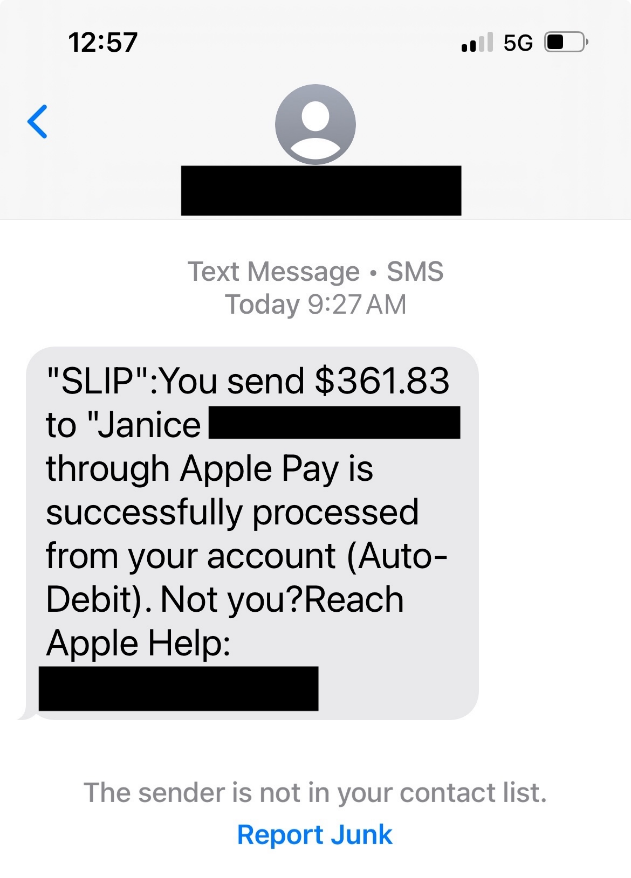
apple-pay-scam-example-1
Source: Apple discussion board

In some cases, the scammer may harvest those details in real time. If this happens, your bank will send a one-time passcode to confirm the new setup. The phishing site instantaneously requests this code. If you enter it, the fraudster will have your card details added to their wallet.

Marketplace

A fake buyer connects stolen cards to their Apple Pay account and uses them to purchase an item (usually of high value) that you’re selling on a digital marketplace. Once the legitimate cardholder finds out what’s happened, they’ll dispute the charges with their bank. You’ll then be ordered to reimburse them. By this time, of course, you’ve already shipped your item to the scammer.

Overpayment

A fraudster messages you about an item you’re selling on a marketplace. They pay but send you too much money. They ask you to refund then the difference, using Apple Cash (the peer-to-peer service available to Apple Pay customers in the US) or another cash app (e.g., Venmo, Zelle). It turns out the buyer used a stolen card, meaning you lose the product, the original payment they made and the refund amount.

Unsolicited payment

Similar to the above scam, except you receive a payment out of the blue from someone using Apple Pay. They ask you to return it via Apple Cash or a gift card. Once again, you’ll eventually be required to pay the original amount back to the rightful owner of the card that was used by the scammer. And, of course, you’ll be out of pocket to the tune of the refund.
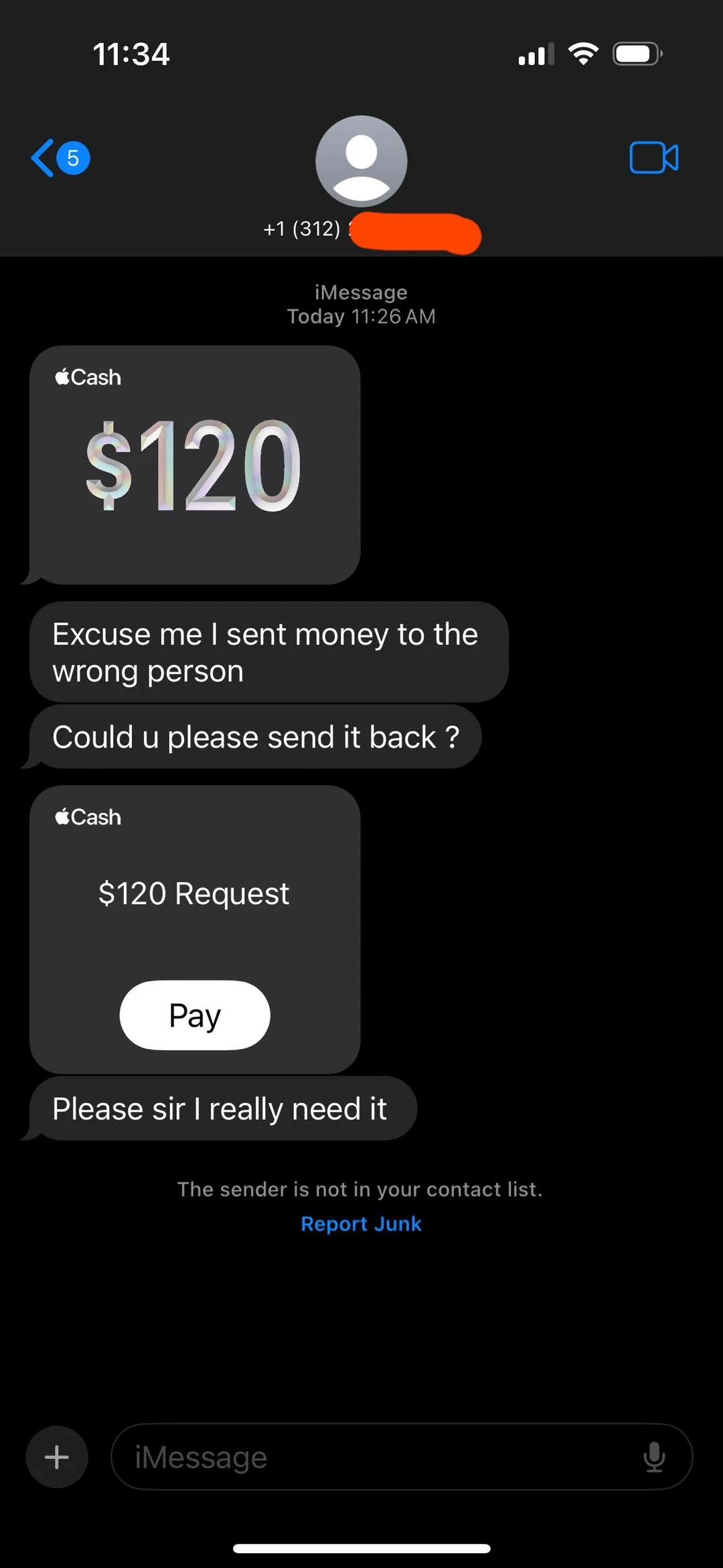
apple-pay-scam-example-2
Source: Reddit

Fake receipt

Scammers agree to buy an item you’re selling online. They send you a screenshot showing they’ve paid via Apple Pay. They may claim the money is pending or in ‘escrow’ until you ship it and provide a tracking number. In fact, they’ve never paid – Apple Pay doesn’t hold funds in escrow.

Public Wi-Fi

Hackers could run an “evil twin” hotspot in a public area like a café or airport that mimics a legitimate public Wi-Fi network. They use it to monitor traffic to and from your device, and may redirect you to a fake Apple portal in order to harvest your Apple ID and password. These can, in some cases, be used for attempts to drain your Apple Cash balance.

Red flags to beware of

If you spot any of the following, it’s likely you have been contacted by a scammer:

  • A text, email or phone using urgency to rush you into making an unwise decision, such as sharing your logins or financial information with someone you’ve never met. This is a classic social engineering technique.
  • A request for your 2FA codes, which will allow the scammer to hijack your Apple account and/or add your card to their wallet. Neither Apple nor your bank will ever ask for these.
  • Being asked to send back some or all of a payment you’ve just received via Apple Pay should be a red flag, as should being instructed to do so via another method, such as gift card or Apple Cash.
  • A demand for you to ship your items before you’ve received payment (accompanied with a screenshot alleging the buyer has already paid).
  • Any unsolicited text, call or email in which the caller/sender says they work for Apple or your bank, and requesting sensitive personal/financial/login information.

Staying safe

Apple Pay scams may seem disconcertingly widespread, but keeping your personal information, money and accounts safe and secure isn’t as difficult as you might think. First, take a moment to recognize the most common red flags and Apple Pay scams, as listed above. Keep checking in from time to time to refresh your memory and update your knowledge as these scams evolve. Next, consider:

  • Enabling stolen device protection to ensure sensitive changes require Face ID. Settings > Face ID & Passcode > Stolen Device Protection.
  • Turning on “allow notifications” for all cards in your Apple Pay wallet, so you’re alerted as soon as a payment is made.
  • If buying an item online, use only the cards in your Apple Pay account that allow for chargebacks, in case the seller is a scammer.
  • If you use a public Wi-Fi, make sure to use a virtual private network (VPN) so that your connection is kept secure and your data cannot be intercepted.
  • Consider using a VPN provided by a trusted cybersecurity vendor, which may also include other services to keep iOS users safe online, including identity protection that includes dark web scanning.

If you think you’ve been scammed

If you think you’ve fallen victim to an Apple Pay scam, time is of the essence. It may be possible to cancel a payment, by clicking through in the Apple Pay app, or contacting your bank. If you’ve unwittingly shared your Apple ID/logins or card information, change your passwords immediately and contact your bank to cancel and reissue your cards.

It may also be worth reporting fraud to the Federal Trade Commission (FTC) or, in Europe, the relevant authorities, which can be reached via Europol.

Digital payment services and wallets make our lives easier. But they also make it quicker and easier to fall for fraud. It pays to slow down and think for a second when buying, selling and reviewing messages online.


Let us keep you
up to date

Sign up for our newsletters