
惯性聚合 高效追踪和阅读你感兴趣的博客、新闻、科技资讯
阅读原文 在惯性聚合中打开

推荐订阅源

酷 壳 – CoolShell
酷 壳 – CoolShell
H
Hacker News: Front Page
P
Palo Alto Networks Blog
T
ThreatConnect
Apple Machine Learning Research
博客园_首页
T
True Tiger Recordings
P
Privacy & Cybersecurity Law Blog
B
Blog
IT之家
IT之家
Last Week in AI
Last Week in AI
F
Full Disclosure
Hacker News: Ask HN
Hacker News: Ask HN
C
Comments on: Blog
Microsoft Azure Blog
C
Cybersecurity and Infrastructure Security Agency CISA
Microsoft Security Blog
博客园 - 【当耐特】
N
News and Events Feed by Topic
NISL@THU
NISL@THU
腾讯CDC
雷峰网
雷峰网
Security Latest
Security Latest
李成银的技术随笔
M
Microsoft Research Blog - Microsoft Research
L
LangChain Blog
L
Lohrmann on Cybersecurity
cs.CL updates on arXiv.org
C
Check Point Blog
Y
Y Combinator Blog
Recent Announcements
博客园 - Franky
N
News | PayPal Newsroom
V
V2EX
A
About on SuperTechFans
The Register - Security
月光博客
月光博客
奇客Solidot–传递最新科技情报
奇客Solidot–传递最新科技情报
Google Online Security Blog
MyScale Blog
MyScale Blog
Cisco Talos Blog
Cisco Talos Blog
Vercel News
Vercel News
WordPress大学
WordPress大学
C
Cyber Attacks, Cyber Crime and Cyber Security
The Hacker News
The Hacker News
IntelliJ IDEA : IntelliJ IDEA – the Leading IDE for Professional Development in Java and Kotlin | The JetBrains Blog
爱范儿
爱范儿
A
Arctic Wolf
L
LINUX DO - 最新话题
freeCodeCamp Programming Tutorials: Python, JavaScript, Git & More

WeLiveSecurity

The quest for greater tech independence Why geopolitical turmoil is a gift for scammers, and how to stay safe FrostyNeighbor: Fresh mischief and digital shenanigans Eyes wide open: How to mitigate the security and privacy risks of smart glasses Fake call logs, real payments: How CallPhantom tricks Android users Fixing trivial passwords is as easy as 123456 A rigged game: ScarCruft compromises gaming platform in a supply-chain attack This month in security with Tony Anscombe – April 2026 edition The calm before the ransom: What you see is not all there is GopherWhisper: A burrow full of malware New NGate variant hides in a trojanized NFC payment app Ransomware’s back office: What the ransom note won’t say Why that next data breach alert could be a trap Supply chain dependencies: Have you checked your blind spot? Recovery scammers hit you when you’re down: Here’s how to avoid a ‘second strike’ As breakout time accelerates, prevention-first cybersecurity takes center stage Digital assets after death: Managing risks to your loved one’s digital estate This month in security with Tony Anscombe – March 2026 edition RSAC 2026 wrap-up – Week in security with Tony Anscombe A cunning predator: How Silver Fox preys on Japanese firms this tax season Virtual machines, virtually everywhere – but not all protected Cloud workload security: Mind the gaps Move fast and save things: A quick guide to recovering a hacked account EDR killers explained: Beyond the drivers Face value: What it takes to fool facial recognition Cyber fallout from the Iran war: What to have on your radar Sednit reloaded: Back in the trenches What cybersecurity actually does for your business How SMBs use threat research and MDR to build a defensive edge Protecting education: How MDR can tip the balance in favor of schools This month in security with Tony Anscombe – February 2026 edition Faking it on the phone: How to tell if a voice call is AI or not PromptSpy ushers in the era of Android threats using GenAI Is Poshmark safe? How to buy and sell without getting scammed Is it OK to let your children post selfies online? Naming and shaming: How ransomware groups tighten the screws on victims Taxing times: Top IRS scams to look out for in 2026 OfferUp scammers are out in force: Here’s what you should know A slippery slope: Beware of Winter Olympics scams and other cyberthreats This month in security with Tony Anscombe – January 2026 edition DynoWiper update: Technical analysis and attribution Love? Actually: Fake dating app used as lure in targeted spyware campaign in Pakistan Drowning in spam or scam emails lately? Here’s why ESET Research: Sandworm behind cyberattack on Poland’s power grid in late 2025 Children and chatbots: What parents should know Common Apple Pay scams, and how to stay safe Old habits die hard: 2025’s most common passwords were as predictable as ever Why LinkedIn is a hunting ground for threat actors – and how to protect yourself Is it time for internet services to adopt identity verification? Your information is on the dark web. What happens next? Credential stuffing: What it is and how to protect yourself This month in security with Tony Anscombe – December 2025 edition A brush with online fraud: What are brushing scams and how do I stay safe? Revisiting CVE‑2025‑50165: A critical flaw in Windows Imaging Component LongNosedGoblin tries to sniff out governmental affairs in Southeast Asia and Japan ESET Threat Report H2 2025 Black Hat Europe 2025: Was that device designed to be on the internet at all? Black Hat Europe 2025: Reputation is currency – even in the ransomware economy Locks, SOCs and a cat in a box: What Schrödinger can teach us about cybersecurity Seeking symmetry during ATT&CK® season: How to harness today’s diverse analyst and tester landscape to paint a security masterpiece The biggest catch: How whaling attacks target top executives Phishing, privileges and passwords: Why identity is critical to improving cybersecurity posture MuddyWater: Snakes by the riverbank Oversharing is not caring: What’s at stake if your employees post too much online This month in security with Tony Anscombe – November 2025 edition What parents should know to protect their children from doxxing Influencers in the crosshairs: How cybercriminals are targeting content creators MDR is the answer – now, what’s the question? The OSINT playbook: Find your weak spots before attackers do PlushDaemon compromises network devices for adversary-in-the-middle attacks What if your romantic AI chatbot can’t keep a secret? Can password managers get hacked? Here’s what to know Why shadow AI could be your biggest security blind spot In memoriam: David Harley The who, where, and how of APT attacks in Q2 2025–Q3 2025 ESET APT Activity Report Q2 2025–Q3 2025 Sharing is scaring: The WhatsApp screen-sharing scam you didn’t see coming How social engineering really works | Unlocked 403 cybersecurity podcast (S2E6) Ground zero: 5 things to do after discovering a cyberattack This month in security with Tony Anscombe – October 2025 edition Fraud prevention: How to help older family members avoid scams Cybersecurity Awareness Month 2025: When seeing isn't believing Recruitment red flags: Can you spot a spy posing as a job seeker? How MDR can give MSPs the edge in a competitive market Cybersecurity Awareness Month 2025: Cyber risk thrives in the shadows Gotta fly: Lazarus targets the UAV sector SnakeStealer: How it preys on personal data – and how to stay safe Cybersecurity Awareness Month 2025: Building resilience against ransomware Minecraft mods: When ‘hacking’ your game becomes a security risk IT service desks: The security blind spot that may put your business at risk Cybersecurity Awareness Month 2025: Why software patching matters more than ever AI-aided malvertising: How chatbots can help spread scams How Uber seems to know where you are – even with restricted location permissions Cybersecurity Awareness Month 2025: Passwords alone are not enough The case for cybersecurity: Why successful businesses are built on protection Beware of threats lurking in booby-trapped PDF files Manufacturing under fire: Strengthening cyber-defenses amid surging threats New spyware campaigns target privacy-conscious Android users in the UAE Cybersecurity Awareness Month 2025: Knowledge is power This month in security with Tony Anscombe – September 2025 edition
Mobile app permissions (still) matter more than you may think
2026-02-27 · via WeLiveSecurity

Mobile Security

Start using a new app and you’ll often be asked to grant it permissions. But blindly accepting them could expose you to serious privacy and security risks.

27 Feb 2026  •  , 5 min. read

Mobile app permissions (still) matter more than you may think

App permissions are almost like an invisible sentry, governing what type of data and device access your apps get. If you’ve ever downloaded a new app or activated a new feature, the chances are you will have been presented with a permissions prompt. But how many of us have absent-mindedly clicked “allow” without thinking?

Some permissions are appropriate for the app. But some may (intentionally or not) push the boundaries of what’s strictly necessary. And others could be outright malicious. It’s important to understand which to wave through and which to block.

What’s the deal with app permissions?

An app permission pop-up is essentially a dialog between your mobile OS and yourself. It’s effectively telling you that a new application has requested to access certain data or features. And it’s asking your approval (permission) for the app to do so. These requests used to come pre-installation. But modern iOS versions surface permissions prompts at runtime, when you first start using the app. Android does both, popping up install-time prompts only for low-risk permissions.

Since Android 6.0, permissions fall into two categories: normal permissions, such as internet access, which are granted silently at install time with no user prompt, and dangerous permissions, such as location, microphone, or contacts, which must be explicitly approved by the user at runtime ( when you first attempt to use the relevant feature). Newer versions have also introduced additional permissions, such as background location and notifications, that may require separate or multi-step consent flows. iOS surfaces all sensitive permissions at runtime in a similar way.

For developers, permissions are a critical way to deliver seamless, feature-rich experiences to users. If an app had to request access to device data/functions each time it used them, it would be almost unusable.

Both iOS and Android have introduced meaningful built-in protections in recent years that mitigate the risks associated with granting excessive privileges to apps. However, the final decision usually rests with you. 

The dangers of app permissions

Whether maliciously or otherwise, some apps ask for more access than they need. Think of a mobile game asking for access to your contacts, or a calculator app requesting permission to access your mic and camera, for example.

By approving permissions without taking time to think about it, you might enable malicious developers to access sensitive smartphone data (calendar, messaging apps, SMS, files and storage, contacts, call logs, location, mic and camera etc). They could theoretically even read your screen as you type. With this access they could:

Harvest passwords to your most sensitive accounts (e.g., online banking)

  • Intercept one-time SMS passcodes
  • Enrol your device in premium-rate subscription services
  • Build up a picture of your digital life to sell to advertisers
  • Put your physical safety at risk by monitoring your location
  • Switch on camera/mic to turn your smartphone into a bugging device
  • Encrypt your files and hold them to ransom
  • Instal malware on your device (e.g., infostealers, ransomware)

AI assistant apps (not to mention apps masquerading as such) represent a growing permissions risk worth singling out. Many request always-on microphone access for wake-word detection, as well as contacts, calendar, and in some cases screen content. Treat AI apps with the same scrutiny as any other category. Health and fitness data is another underappreciated exposure. Apps with access to your health metrics can share or sell that data in ways with real-world consequences, including implications for insurance and data brokerage.
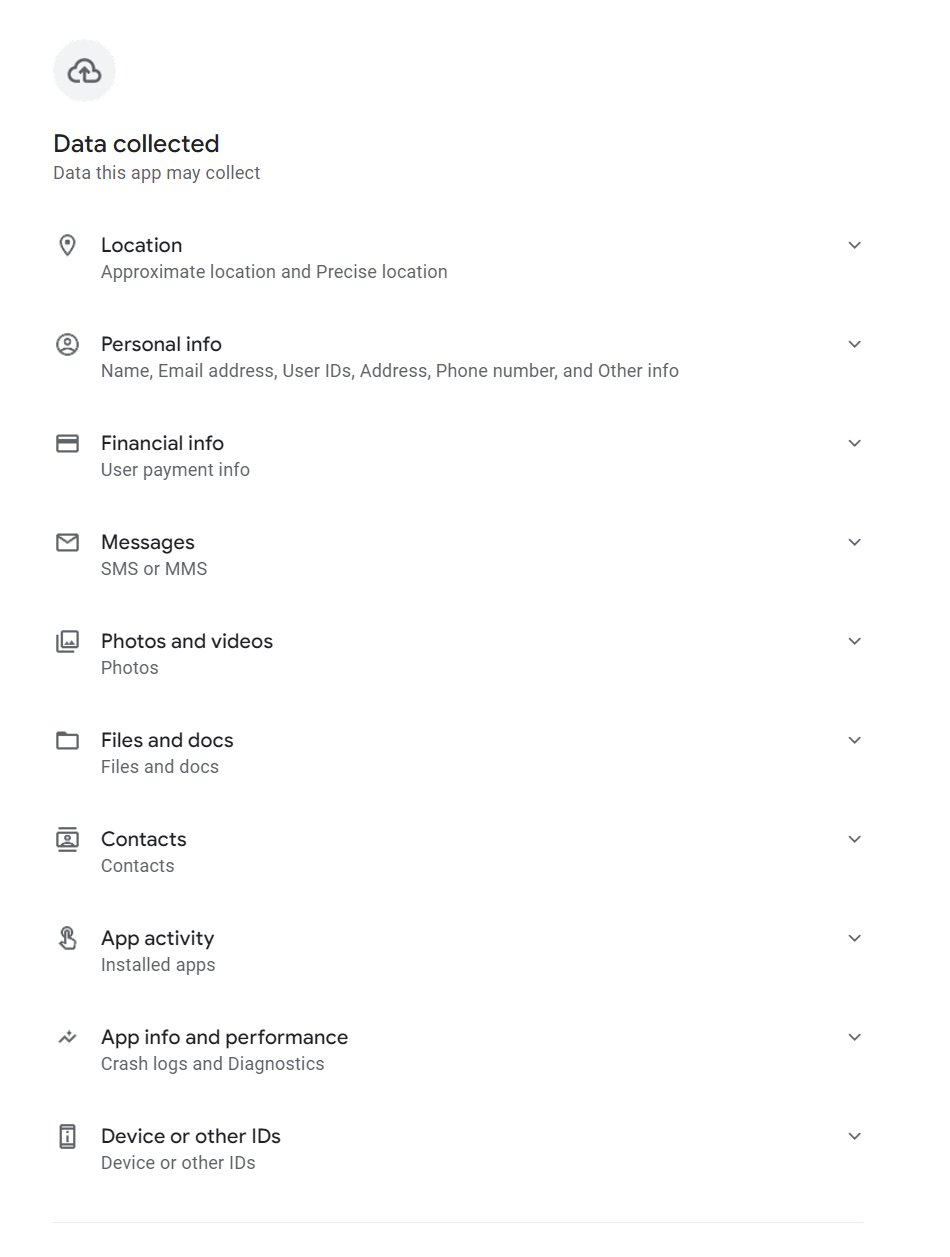
permissions
Long list of permissions requested by a deceptive loan app back in 2023  (source: ESET Research)

Which app permissions should ring alarm bells?

App permissions depend on context. What one app requests to deliver the experience users expect may be very different to the permissions another needs. However, there are certain permissions that should always raise some red flags. They include:

  • Accessibility services: Also known as “God mode,” this could allow malicious developers to see what you type, read your messages and covertly grant itself other permissions without you knowing. (Note, this isn’t natively available on iOS. New Android OS versions will not allow apps installed outside of the Play Store to request this permission. And they will check every few weeks whether you want to continue granting this permission.)
  • Background location: This could enable a malicious actor to track your device everywhere you go, to build a detailed picture of your daily life. (Note: to mitigate this risk, Android and iOS won’t enable you to “always allow” up front, and they will periodically ask you to confirm you want to maintain “always allow” tracking).
  • SMS/call logs: Few apps actually need access to your text messages and call history. By doing so, a hacker could read your one-time passcodes and hijack your accounts. (Note: For an app to ask for these permissions on Android, it must first be registered as the Default App for that function. iOS doesn’t allow any apps downloaded from the App Store to request permission to "Read SMS" or "See Call History.")
  • Overlay permission: Allows an app to draw a “window” on top of another app you might be using, which could enable “clickjacking” attacks. (Note: Android requires users to explicitly enable this via Settings > Apps > Special App Access > Appear on top. iOS does not have a similar permission).

Managing app permissions safely

Before allowing or blocking, always consider if a permission is necessary for the app in question to do its job.

Another good rule of thumb is to only “allow once” or “while using.” Only safety apps like “Find My” should really have access 24/7/365.

You should be asked to review your permissions regularly with many apps. But it may be a good idea to proactively audit permissions. Here’s how:

iOS

  1. Go to Settings > Privacy & Security.
  2. Scroll to the bottom and tap (or turn on) App Privacy Report.
  3. This shows you which apps accessed your data and when.

Alternatively:

  1. Go to Settings > Apps.
  2. Select a specific app (e.g., Instagram).
  3. You will see a list of all toggles (Camera, Mic, Contacts). Turn off anything that isn't essential.

Android

  1. Go to Settings > Security & Privacy > Privacy > Privacy Dashboard.
  2. Tap on 7-Day View (top right menu) to see a timeline of every app that used your sensors over the last week. (These steps may not be the same across all Android-powered devices, so do check.)
  3. If you see an app using the microphone at 3:00 AM, tap it to revoke access immediately.

Alternatively (navigation paths still vary across Android skins):

  1. Go to Settings > Apps > [App Name].
  2. Ensure "Manage app if unused" (or "Pause app activity if unused") is toggled ON.
  3. If you don't use the app for a few months, Android will automatically strip its permissions, delete temporary files, and stop notifications.

Above all, only ever download apps from legitimate stores (Google Play/App Store). Read their reviews first before deciding whether to do so. Consider installing a mobile security solution from a reputable security provider.

Stay safe!


Let us keep you
up to date

Sign up for our newsletters