

惯性聚合 高效追踪和阅读你感兴趣的博客、新闻、科技资讯
阅读原文 在惯性聚合中打开

推荐订阅源

T
Threat Research - Cisco Blogs
V
V2EX
爱范儿
爱范儿
Martin Fowler
Martin Fowler
T
The Blog of Author Tim Ferriss
Cyber Security Advisories - MS-ISAC
C
Check Point Blog
罗磊的独立博客
A
About on SuperTechFans
MyScale Blog
MyScale Blog
S
Security @ Cisco Blogs
博客园 - 聂微东
Simon Willison's Weblog
Cyberwarzone
Cyberwarzone
云风的 BLOG
云风的 BLOG
U
Unit 42
Latest news
Latest news
Apple Machine Learning Research
Security Latest
Security Latest
Y
Y Combinator Blog
cs.CL updates on arXiv.org
The Hacker News
The Hacker News
C
Cyber Attacks, Cyber Crime and Cyber Security
Cisco Talos Blog
Cisco Talos Blog
AWS News Blog
AWS News Blog
NISL@THU
NISL@THU
美团技术团队
S
Securelist
P
Privacy International News Feed
T
Tenable Blog
酷 壳 – CoolShell
酷 壳 – CoolShell
人人都是产品经理
人人都是产品经理
S
SegmentFault 最新的问题
Hugging Face - Blog
Hugging Face - Blog
cs.CV updates on arXiv.org
K
Kaspersky official blog
Google Online Security Blog
cs.AI updates on arXiv.org
www.infosecurity-magazine.com
D
Darknet – Hacking Tools, Hacker News & Cyber Security
B
Blog RSS Feed
W
WeLiveSecurity
A
Arctic Wolf
Hacker News - Newest:
Hacker News - Newest: "LLM"
Google DeepMind News
让小产品的独立变现更简单 - ezindie.com
Recent Commits to openclaw:main
N
Netflix TechBlog - Medium
有赞技术团队
有赞技术团队
V2EX - 技术
V2EX - 技术

博客园 - 痞子刘

20款实用经典的Chrome插件推荐,不过要自己到扩展中心搜噢! jQuery扩展loadthumb,用jQuery实现图片预加载和等比例缩小 新书推荐《锋利的jQuery》 onbeforeunload与onunload事件 jQuery 1.3.3 新功能 Twitter新手教程 jQuery性能优化指南(3) jQuery性能优化指南(2) jQuery性能优化指南(1) 50个最好的wordpress插件 26款你可能从未听过的浏览器 养成使用jQuery Sizzle选择器的良好习惯 有关css和js针对不同浏览器兼容的问题 K-MeleonCCF浏览器 jquery 1.3正式版发布了 你是最适合创业的程序员吗? 1st JavaScript Editor Pro 3.8,强大的JavaScript开发工具(JavaScript IDE),完美支持CSS, HTML, DOM and DHTML开发、校验、调试 file上传控件onchange事件失效的解决方法 ASP.NET生成JSON字符串
Content-Disposition的使用和注意事项
痞子刘 · 2008-10-14 · via 博客园 - 痞子刘

我们在开发web系统时有时会有以下需求:
  • 希望某类或者某已知MIME 类型的文件(比如:*.gif;*.txt;*.htm)能够在访问时弹出“文件下载”对话框
  • 希望以原始文件名(上传时的文件名,例如:山东省政府1024号文件.doc)提供下载,但服务器上保存的地址却是其他文件名(如:12519810948091234_asdf.doc)
  • 希望某文件直接在浏览器上显示而不是弹出文件下载对话框
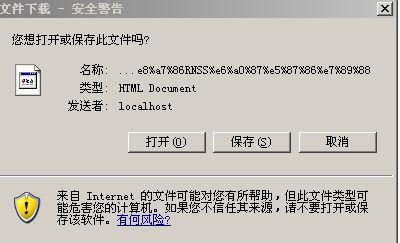
近日在使用Content-disposition的使用出现UTF-8识别不了的情况,经过HttpUtility.UrlEncode(fileName,Encoding.UTF8)编码后的文件名称直接显示给用户了,如图:

名称为uft 8格式,但是ie6.0却识别不了,很是不解,以前曾经使用此种方法是可行的,只好利用Google了,经查找网络里大多为像Qihangnet写的这篇文章似的,我也贴出来供大家使用。
Qihangnet的这篇文章跟我的想法基本是相似的,在
HttpContext.Current.Response.AddHeader("Content-Disposition", "attachment; filename=\"" + UTF_FileName(filename) + ".doc\";"); .doc的后缀名是关键,我在没有写.doc或.txt之类的后缀时,依旧跟上图一样,加上后缀后utf 8格式的字符串自动识别成汉字了,至于为什么我还不是很清楚,贴出来让大家也注意一下就是了。

//------------------------------------------start-------------------------------------------------------------------

作者:Qihangnet 
出处:http://www.qihangnet.com/PermaLink,guid,db65d50a-ba90-4229-a3a2-71b4f1b407b9.aspx

    要解决上述需求就可以使用Content-disposition来解决。第一个需求的解决办法是

Response.AddHeader "content-disposition","attachment; filename=fname.ext"

将上述需求进行归我给出如下例子代码:

public static void ToDownload(string serverfilpath,string filename)
{
FileStream fileStream = new FileStream(serverfilpath, FileMode.Open);
long fileSize = fileStream.Length;
HttpContext.Current.Response.ContentType = "application/octet-stream";
HttpContext.Current.Response.AddHeader("Content-Disposition", "attachment; filename=\"" + UTF_FileName(filename) + ".doc\";");
////attachment --- 作为附件下载
////inline --- 在线打开
HttpContext.Current.Response.AddHeader("Content-Length", fileSize.ToString());
byte[] fileBuffer = new byte[fileSize];
fileStream.Read(fileBuffer, 0, (int)fileSize);
HttpContext.Current.Response.BinaryWrite(fileBuffer);
fileStream.Close();
HttpContext.Current.Response.End();
}
public static void ToOpen(string serverfilpath, string filename)
{
FileStream fileStream = new FileStream(serverfilpath, FileMode.Open);
long fileSize = fileStream.Length;
HttpContext.Current.Response.ContentType = "application/octet-stream";
HttpContext.Current.Response.AddHeader("Content-Disposition", "inline; filename=\"" + UTF_FileName(filename) + ".doc\";");
    HttpContext.Current.Response.AddHeader("Content-Length", fileSize.ToString());
byte[] fileBuffer = new byte[fileSize];
fileStream.Read(fileBuffer, 0, (int)fileSize);
HttpContext.Current.Response.BinaryWrite(fileBuffer);
fileStream.Close();
HttpContext.Current.Response.End();
}
private static string UTF_FileName(string filename)
{
return HttpUtility.UrlEncode(filename, System.Text.Encoding.UTF8);
}

简单的对上述代码做一下解析,ToDownload方法为将一个服务器上的文件(serverfilpath为服务器上的物理地址),以某文件名(filename)在浏览器上弹出“文件下载”对话框,而ToOpen是将服务器上的某文件以某文件名在浏览器中显示/打开的。注意其中我使用了UTF_FileName方法,该方法很简单,主要为了解决包含非英文/数字名称的问题,比如说文件名为“衣明志.doc”,使用该方法客户端就不会出现乱码了。
//*---------------------------end----------------------------------

园子里liping13599168的下载函数也不错,顺便也贴一下:
出处:http://www.cnblogs.com/liping13599168/archive/2008/07/31/672025.html

文件下载函数