


有一些控件在执行阶段是不会呈现,也就是说控件本身在执行阶段不会 Render 出 HTML 码,例如 SqlDataSoruce、ScriptManager 这类控件;那它们在设计阶段的页面是如何呈现出来呢?本文将针对控件设计阶段的外观做进一步的说明。
程序代码下载:ASP.NET Server Control - Day19.rar
一、控件设计阶段的 HTML 码
Web 服务器控件的设计模式行为都是透过 ControlDesigner 来处理,连设计阶段时控件的外观也是如此;控件在设计阶段与执行执行时呈现的外观不一定相同,当然大部分会尽量一致,使其能所见即所得。
控件在设计阶段的 HTML 码是透 ControlDesigner.GetDesignTimeHtml 方法来处理,在 ControlDesigner.GetDesignTimeHtml 预设会执行控件的 RenderControl 方法,所以大部分的情况下设计阶段与执行阶段输出的 HTML 码会相同。当控件的 Visible=False 时,执行阶段是完全不会输出 HTML 码,可是在设计阶段时会特别将控件设定 Visible=True,使控件能完整呈现。
ControlDesigner.GetDesignTimeHtml 方法
Public Overridable Function GetDesignTimeHtml() As String
Dim writer As New StringWriter(CultureInfo.InvariantCulture)
Dim writer2 As New DesignTimeHtmlTextWriter(writer)
Dim errorDesignTimeHtml As String = Nothing
Dim flag As Boolean = False
Dim visible As Boolean = True
Dim viewControl As Control = Nothing
Try
viewControl = Me.ViewControl
visible = viewControl.Visible
If Not visible Then
viewControl.Visible = True
flag = Not Me.UsePreviewControl
End If
viewControl.RenderControl(writer2)
errorDesignTimeHtml = writer.ToString
Catch exception As Exception
errorDesignTimeHtml = Me.GetErrorDesignTimeHtml(exception)
Finally
If flag Then
viewControl.Visible = visible
End If
End Try
If ((Not errorDesignTimeHtml Is Nothing) AndAlso (errorDesignTimeHtml.Length <> 0)) Then
Return errorDesignTimeHtml
End If
Return Me.GetEmptyDesignTimeHtml
End Function
二、自订控件的 Designer
以 TBToolbar 为例,若我们在 RenderContents 方法未针对 Items.Count=0 做输出 HTML 的处理,会发现未设定 Items 属性时,在设计页面上完全看不到 TBToolbar 控件;像这种控件设计阶段的 HTML 码,就可以自订控件的 Designer 来处理。
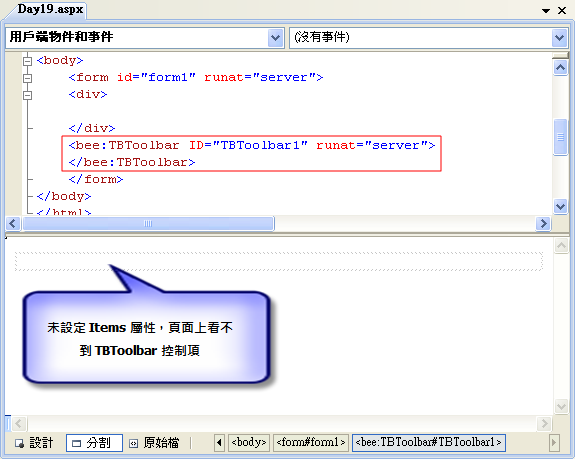
继承 ControlDesigner 命名为 TBToolbarDesigner,这个类别是用来扩充 TBToolbar 控件的设计模式行为。我们可以覆写 GetDesignTimeHtml 方法,处理设计阶段表示控件的 HTML 标记,此方法回传的 HTML 原始码就是控件呈现在设计页面的外观。所以我们可以在 TBToolbar.Items.Count=0 时,输出一段提示的 HTML 码,这样当 TBToolbar 未设定 Items 属性时一样可以在设计页面上呈现控件。
''' <summary>
''' 擴充 TBToolbar 控制項的設計模式行為。
''' </summary>
Public Class TBToolbarDesigner
Inherits System.Web.UI.Design.ControlDesigner
''' <summary>
''' 用來在設計階段表示控制項的 HTML 標記。
''' </summary>
Public Overrides Function GetDesignTimeHtml() As String
Dim sHTML As String
Dim oControl As TBToolbar
oControl = CType(ViewControl, TBToolbar)
If oControl.Items.Count = 0 Then
sHTML = "<div style=""background-color: #C0C0C0; border:solid 1px; width:200px"">請設定 Items 屬性</div>"
Else
sHTML = MyBase.GetDesignTimeHtml()
End If
Return sHTML
End Function
End Class
在 TBToolbar 控件套用 DesignerAttribute 设定自订的 TBToolbarDesigner 类别。
<Designer(GetType(TBToolbarDesigner))> _
Public Class TBToolbar
Inherits WebControl
End Class
重建控件组件,切换到设计页面上的看 TBToolbar 控件未设定 Items 属性时的外观,就是我们在 TBToolbarDesigner.GetDesignTimeHtml 方法回传的 HTML 码。

如果你觉得上述设计阶段的控件有点太阳春,我们也可以输出类似 SqlDataSource 控件的外观,将未设定 Items 属性时输出 HTML 改呼叫 CreatePlaceHolderDesignTimeHtml 方法。
If oControl.Items.Count = 0 Then
sHTML = MyBase.CreatePlaceHolderDesignTimeHtml("請設定 Items 屬性")
Else
sHTML = MyBase.GetDesignTimeHtml()
End If
来看一下这样修改后的结果,是不是比较专业一点了呢。

备注:本文同步发布于「第一届iT邦帮忙铁人赛」,如果你觉得这篇文章对您有帮助,记得连上去推鉴此文增加人气 ^^
http://ithelp.ithome.com.tw/question/10012682
此内容由惯性聚合(RSS阅读器)自动聚合整理,仅供阅读参考。 原文来自 — 版权归原作者所有。