











v-ifv-if用来根据条件渲染块元素。只有v-if结果为真时才会显示该块元素。
<span v-if="awesome">Vue is awesome</span>
同时也可以添加v-else块:
<h1 v-if="awesome">Vue is awesome</h1>
<h1 v-else> Oh no :( </h1>
template中使用v-if进行条件分组因为v-if是一个指令,所以只能应用在一个标签上。在<template>标签上使用v-if可以控制多个标签,就像提供一个隐形包。最终的渲染结果是不包含<template的:
<template v-if="ok">
  <h1>Title</h1>
  <p>Paragraph 1</p>
  <p>Paragraph 2</p>
</template>
以上代码放到一个完整例子里:
<html lang="en-US">
    <head>
      <meta charset="utf-8">
      <meta name="viewport" content="width=device-width,initial-scale=1">
      <title>vue demo1</title>
      <script src="https://unpkg.com/vue@next"></script>
     </head>
     <body>
        <div id="app">
            <div :style="{ display: ['-webkit-box', '-ms-flexbox', 'flex'] }"></div>
            <span v-if="awesome">Vue is awesome</span>
            <h1 v-if="awesome">Vue is awesome</h1>
            <h1 v-else> Oh no :( </h1>
            <template v-if="awesome">
                <h1>标题</h1>
                <p>段落 1</p>
                <p>段落 2</p>
            </template>
        </div>
        <script type="text/javascript">
            Vue.createApp({
                data() {
                    return {
                        awesome: true
                    }
                }
            }).mount('#app')
        </script>
    </body>
</html>
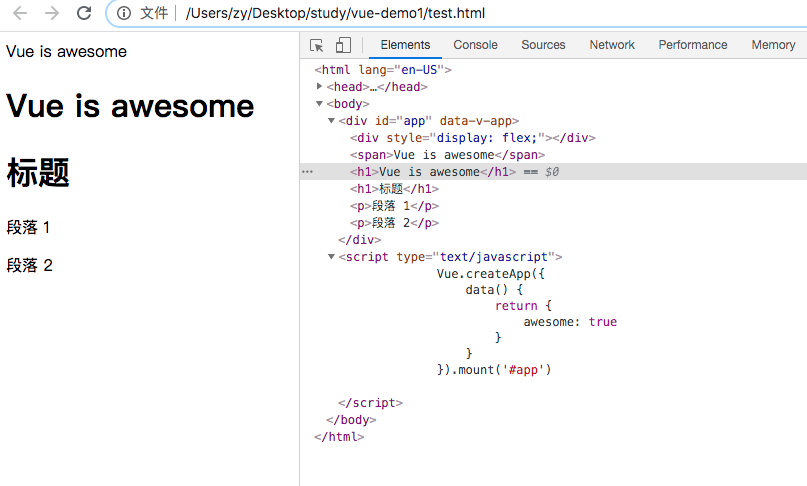
v-else你可以使用v-else为v-if添加一个else块:
<div v-if="Math.random() > 0.5">
  随机数大于0.5你就会看的见我!
</div>
<div v-else>
    随机数小于等于0.5你就会看见我!
</div>
v-else必须紧跟v-if或v-else-if,否则将识别不了。
v-else-if
字如其义,为v-if提供一个else if块,且可以连续使用多个:
<div v-if="type === 'A'">
  A
</div>
<div v-else-if="type === 'B'">
  B
</div>
<div v-else-if="type === 'C'">
  C
</div>
<div v-else>
  Not A/B/C
</div>
同v-else一样,v-else-if必须紧跟v-if或v-else-if标签。
v-showv-show是另一个控制标签显示的指令。使用方法基本上是一样的:
<h1 v-show="ok">你好吗?</h1>
不同点是:v-show的标签是一直存在DOM中,只是添加display属性控制显示或隐藏。
v-show不支持应用在<template>标签上,也不支持v-else一起使用。
v-if是“真正”的条件渲染,它会销毁和重新创建DOM元素及事件监听。
v-if也是懒加载的:如果初始化渲染时条件是假,则不会做任何事情 -- 除非当条件首次更新为真否则条件块(即应用的标签)是不会被渲染的。
相比而言,v-show简单的多 - 无论如何都会渲染标签,通过CSS(display)控制显示或隐藏罢了。
通俗的来说,v-if控制更新时消耗资源多,v-show首次渲染时消耗资源多。所以v-show适用于经常更新状态,v-if适用条件不会在运行时更新场景。
v-if同v-for[warning] 不推荐
v-if和v-for同时使用。参考样式手册获取更多信息。
当v-if和v-for同时应用在一个标签上时,v-if会优先运算。参考列表渲染手册查看详情。
此内容由惯性聚合(RSS阅读器)自动聚合整理,仅供阅读参考。 原文来自 — 版权归原作者所有。