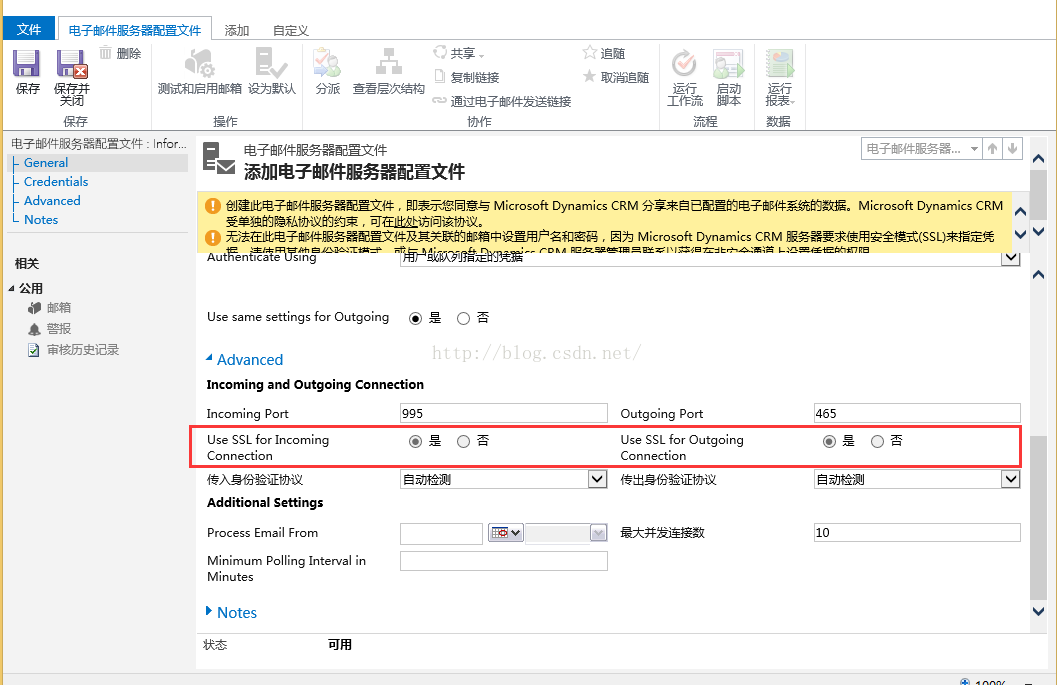
在新建电子邮件服务器配置文件时Advanced中的Use SSL for Incoming/Outgoing Connection默认都是启用的而且无法编辑,启用SSL当然是为了安全的考虑,但当客户的邮件发送仅限内部用户同时架设的邮件服务器不支持SSL时就需要将outgoing port 改为25并设置Use SSL for Outgoing Connection 可编辑。
更改的方式有两种,一种是直接Update配置数据库,一种是通过powershell
- Update DeploymentProperties set BitColumn = 1 where columnname = 'AllowCredentialsEntryViaInsecureChannels'
-
-
- Update DeploymentProperties set BitColumn = 1 where columnname = 'ECAllowNonSSLEmail'
【注意:是UPDATE配置数据库,而不是组织数据库】
Power Shell
- $itemSetting = new-object 'System.Collections.Generic.KeyValuePair[String,Object]' ("AllowCredentialsEntryViaInsecureChannels",1)$configEntity= new-object "Microsoft.Xrm.Sdk.Deployment.ConfigurationEntity"$configEntity.LogicalName = "Deployment"$configEntity.Attributes=new-object "Microsoft.Xrm.Sdk.Deployment.AttributeCollection"$configEntity.Attributes.Add($itemSetting)set-CrmAdvancedSetting -Entity $configEntity
- $itemSetting = new-object 'System.Collections.Generic.KeyValuePair[String,Object]' ("ECAllowNonSSLEmail",1)$configEntity= new-object "Microsoft.Xrm.Sdk.Deployment.ConfigurationEntity"$configEntity.LogicalName = "Deployment"$configEntity.Attributes=new-object "Microsoft.Xrm.Sdk.Deployment.AttributeCollection"$configEntity.Attributes.Add($itemSetting)set-CrmAdvancedSetting -Entity $configEntity
最后重庆IIS



