




现在很多三维项目中,不仅仅要用到三维地形,正射影像和矢量数据,还会融合到各种三维模型,包括传统的3DMax手工建模,BIM,倾斜摄影自动建模,激光点云模型,三维地质体模型等等。
三维平台首先要做的是把这些多源数据承载进来,并且要能够流畅,稳定地运行使用。
接下来就是各种展示,应用,分析。
三维剖切,就是一种较好的展示复杂结构模型的方法,比如应用于BIM,室内精细建模,三维地质体模型等。
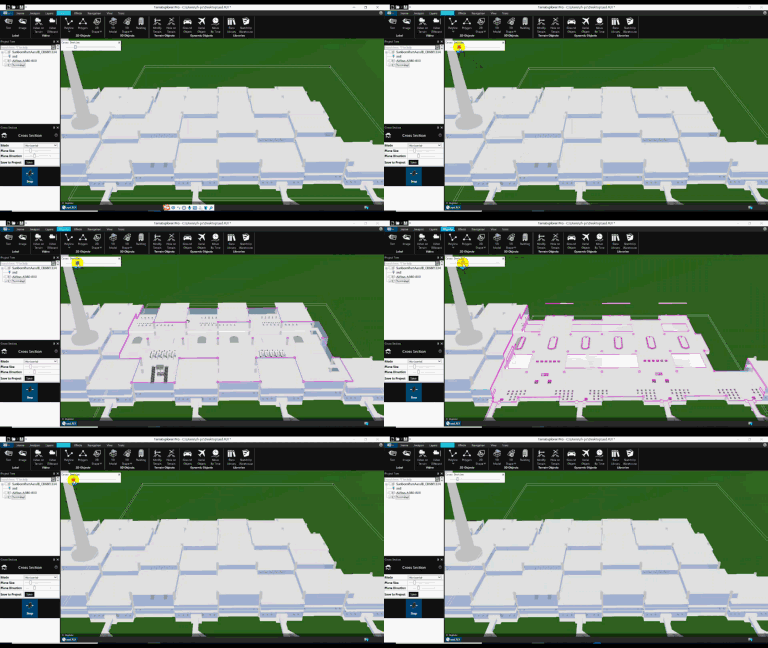
SkylineGlobe提供的核心示例代码如下:
//-------------------
        function showCrossSection(gBoxObj) {
            try {
                var SGWorld = CreateSGObj();
                    var vertices = [];
                    var sectionSize = gBoxObj.Width * 5;
                    gLastPos = gBoxObj.Position.Copy();
                    var pos = gBoxObj.Position;
                    var planeTolarance = 100 / 100;
                    if (gBoxObj.Position.Pitch == 90) {
                        var yaw = gBoxObj.Position.Yaw - 180;
                        pos = pos.Move(planeTolarance, yaw - 180, 0);  // make sure the cut area doesn't include the box
                        pos = pos.Move(gBoxObj.Width / 2, 0, -90);
                        pos = pos.Move(gBoxObj.Width / 2, yaw + 90, 0);
                        vertices[0] = pos;
                        pos = pos.Move(sectionSize, yaw - 180, 0);
                        vertices[1] = pos;
                        pos = pos.Move(gBoxObj.Width, yaw - 90, 0);
                        vertices[2] = pos;
                        pos = pos.Move(sectionSize, yaw, 0);
                        vertices[3] = pos;
                        vertices[4] = vertices[0].Move(gBoxObj.Width, 0, 90);
                        vertices[5] = vertices[1].Move(gBoxObj.Width, 0, 90);
                        vertices[6] = vertices[2].Move(gBoxObj.Width, 0, 90);
                        vertices[7] = vertices[3].Move(gBoxObj.Width, 0, 90);
                    }
                    else {
                        pos = pos.Move(planeTolarance, 0, 90);  // make sure the cut area doesn't include the box
                        pos = pos.Move(gBoxObj.Width / 2, gBoxObj.Position.Yaw, 0);
                        pos = pos.Move(gBoxObj.Width / 2, gBoxObj.Position.Yaw + 90, 0);
                        vertices[0] = pos;
                        pos = pos.Move(gBoxObj.Width, gBoxObj.Position.Yaw - 180, 0);
                        vertices[1] = pos;
                        pos = pos.Move(gBoxObj.Width, gBoxObj.Position.Yaw - 90, 0);
                        vertices[2] = pos;
                        pos = pos.Move(gBoxObj.Width, gBoxObj.Position.Yaw, 0);
                        vertices[3] = pos;
                        vertices[4] = vertices[0].Move(sectionSize, 0, 90);
                        vertices[5] = vertices[1].Move(sectionSize, 0, 90);
                        vertices[6] = vertices[2].Move(sectionSize, 0, 90);
                        vertices[7] = vertices[3].Move(sectionSize, 0, 90);
                    }

                    gGeometry = SGWorld.Creator.GeometryCreator.CreateLineStringGeometry(vertices);
                    SGWorld.Analysis.ShowCrossSectionBox(gGeometry, false, 0xffffffff);
            }
            catch (err) {}
        }

        function HideCrossSectionBox()
        {
            if (syBoxobj != null) {
                var sg = CreateSGObj();
                sg.Analysis.HideCrossSectionBox();
                sg.Creator.DeleteObject(syBoxobj.ID);
                syBoxobj = null;
            }
        }
完整的功能实现代码在C:\Program Files\Skyline\TerraExplorer Pro\Tools\CrossSection这个目录里。
此内容由惯性聚合(RSS阅读器)自动聚合整理,仅供阅读参考。 原文来自 — 版权归原作者所有。