





不知道大家对这个标题有没有想法,反正此前我一直把他们混为了一谈。其实不然,首先需有个“标准”的概念。
对于document.compatMode,很多朋友可能都根我一样很少接触,知道他的存在却不清楚他的用途。其实这个对于我们开发兼容性的web页面还是很有帮助,我们都知道,盒模型的渲染在 Standards Mode和Quirks Mode是有很大差别的,在不声明Doctype的情况下,浏览器默认是Quirks Mode。所以为兼容性考虑,我们可能需要获取当前的文档渲染方式。
document.compatMode正好派上用场,它有两种可能的返回值:BackCompat和CSS1Compat,对其解释如下:
BackCompat Standards-compliant mode is not switched on. (Quirks Mode)
CSS1Compat Standards-compliant mode is switched on. (Standards Mode)
当文档有了标准声明时, document.compatMode 的值就等于 "CSS1compat", 因此, 我们可以根据 document.compatMode 的值来判断文档是否加了标准声明
var height = document.compatMode=="CSS1Compat" ? document.documentElement.clientHeight : document.body.clientHeight;
当文档有了标准声明时火狐的style.top等等的设置必须加上“px”等单位,否则它不会认。既然已经说道了这,再展开一下。对于火狐:
一、offsetTop 返回的是数字,而 style.top 返回的是字符串,除了数字外还带有单位:px。
二、offsetTop 只读,而 style.top 可读写。
三、如果没有给 HTML 元素指定过 top 样式(即使在css中设定也不行),则 style.top 返回的是空字符串。
offsetLeft 与 style.left、offsetWidth 与 style.width、offsetHeight 与 style.height 也是同样道理。
再说说他们的区别吧:
下面这段大家可能都见到过,在网上被转载过很多次,在这我也借用一下:
.Kfk428 { display:none; }
网页可见区域宽: document.body.clientWidth;
网页可见区域高: document.body.clientHeight;
网页可见区域宽: document.body.offsetWidth (包括边线的宽);
网页可见区域高: document.body.offsetHeight (包括边线的宽);
网页正文全文宽: document.body.scrollWidth;
网页正文全文高: document.body.scrollHeight;
网页被卷去的高: document.body.scrollTop;
网页被卷去的左: document.body.scrollLeft;
网页正文部分上: window.screenTop;
网页正文部分左: window.screenLeft;
屏幕分辨率的高: window.screen.height;
屏幕分辨率的宽: window.screen.width;
屏幕可用工作区高度: window.screen.availHeight;
屏幕可用工作区宽度:window.screen.availWidth;
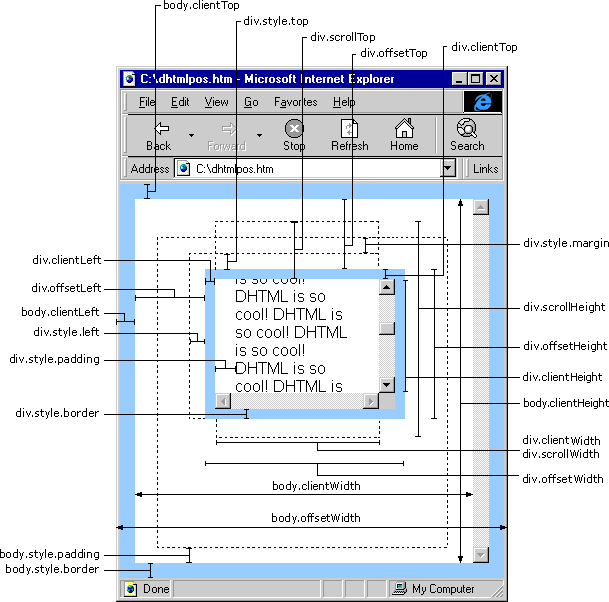 scrollHeight: 获取对象的滚动高度。
scrollLeft:设置或获取位于对象左边界和窗口中目前可见内容的最左端之间的距离
scrollTop:设置或获取位于对象最顶端和窗口中可见内容的最顶端之间的距离
scrollWidth:获取对象的滚动宽度
offsetHeight:获取对象相对于版面或由父坐标 offsetParent 属性指定的父坐标的高度
offsetLeft:获取对象相对于版面或由 offsetParent 属性指定的父坐标的计算左侧位置
offsetTop:获取对象相对于版面或由 offsetTop 属性指定的父坐标的计算顶端位置
event.clientX 相对文档的水平座标
event.clientY 相对文档的垂直座标
event.offsetX 相对容器的水平坐标
event.offsetY 相对容器的垂直坐标
document.documentElement.scrollTop 垂直方向滚动的值
event.clientX+document.documentElement.scrollTop 相对文档的水平座标+垂直方向滚动的量
以上主要指IE之中,FireFox差异如下:
IE6.0、FF1.06+:
clientWidth = width + padding
clientHeight = height + padding
offsetWidth = width + padding + border
offsetHeight = height + padding + border
IE5.0/5.5:
clientWidth = width - border
clientHeight = height - border
offsetWidth = width
offsetHeight = height
(需要提一下:CSS中的margin属性,与clientWidth、offsetWidth、clientHeight、offsetHeight均无关)
此内容由惯性聚合(RSS阅读器)自动聚合整理,仅供阅读参考。 原文来自 — 版权归原作者所有。