


每天抽出一些时间学习 Angular2 ,并准备把手头上的项目移植为 Angular2 , 不过今天又遇到了一些小问题。
准备写一个导航类适于管理后台常见的右边导航,如博客园的这种:
!
使用 g generate component nav-left 建立了一个名为 nav-left 的导航组件。
这里需要检查app,modile.ts中是否已经有你新建的组件。一般会自动添加,如果不存在需要添加引用:
import { NavLeftComponent } from './nav-left/nav-left.component';
模块装饰器需要添加:
@NgModule({
declarations: [
NavLeftComponent,
]
})
并在 nav-left.component.ts 中新建了一个类,Item 用来保存菜单的项,代码如下:
import { Component, OnInit } from '@angular/core';

@Component({
  selector: 'app-nav-left',
  templateUrl: './nav-left.component.html',
  styleUrls: ['./nav-left.component.css'],
})

export class NavLeftItem{
    name:string;
    path:string;
    data:any;
    active?:string="";
}

export class NavLeftComponent implements OnInit {

  constructor() { }
}
开开心心的运行查看报错结果^^~!
报错的信息忘截图了,大致的意思是找不到这个模块,或这个模块没办法解析。
这步骤花了好长时间,最终确定问题竟然有两处,也没继续深研,分别是:
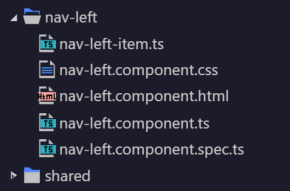
1:需要单独创建数据类。把Item单独提取一个类。 最终结果如图:
2:我在组件中写了一些预定义的数据,如下:
  //这里需要注意变量顺序,我这里是错的,因为titleList中的其他变量引用还未定义。。。。
  public titleList :Array<{"name":string,"list":any}> =[
    {"name":"后台工具","list":this.adminTool},
    {"name":"运维工具","list":this.maintenanceTool},
    {"name":"运营工具","list":this.statisticalTool},
    {"name":"GM工具","list":this.gmlTool}
  ];

  /**
   * 后台工具
   */
  public adminTool:Array<NavLeftItem> = [
    {"name":"账号列表","path":"manage/index","data":null},
    {"name":"账号权限","path":"manage/index","data":null},
    {"name":"账号密码","path":"manage/index","data":null},
    {"name":"账号添加","path":"manage/index","data":null},
    {"name":"游戏列表","path":"manage/index","data":null},
    {"name":"渠道列表","path":"manage/index","data":null},
    {"name":"渠道添加","path":"manage/index","data":null},
    {"name":"操作日志","path":"manage/index","data":null},
    {"name":"操作详情","path":"manage/index","data":null},
  ];
  /**
   * 运维工具
   */
  public maintenanceTool:Array<NavLeftItem> = [
    {"name":"Log服务器列表","path":"manage/index","data":null},
    {"name":"Log服务器添加","path":"manage/index","data":null},
    {"name":"Log入口服务列表","path":"manage/index","data":null},
    {"name":"Log入口服务配置","path":"manage/index","data":null},
    {"name":"Log服务器状态","path":"manage/index","data":null},
    {"name":"Log服务器日志","path":"manage/index","data":null},
    {"name":"Log服务器Qps统计","path":"manage/index","data":null},
    {"name":"Log服务器数据库信息","path":"manage/index","data":null},
    {"name":"Log服务器合并","path":"manage/index","data":null},
  ];
一直编译不通过,最终确定问题是顺序问题。。。很尴尬。修改顺序为:
先定义:titleList 然后定义其他几项。
问题解决。~~~~~~~~
此内容由惯性聚合(RSS阅读器)自动聚合整理,仅供阅读参考。 原文来自 — 版权归原作者所有。