惯性聚合 高效追踪和阅读你感兴趣的博客、新闻、科技资讯
阅读原文 在惯性聚合中打开

推荐订阅源

I
Intezer
V
Vulnerabilities – Threatpost
Google Online Security Blog
T
The Exploit Database - CXSecurity.com
C
CXSECURITY Database RSS Feed - CXSecurity.com
AWS News Blog
AWS News Blog
G
GRAHAM CLULEY
P
Privacy & Cybersecurity Law Blog
www.infosecurity-magazine.com
C
Cybersecurity and Infrastructure Security Agency CISA
N
News | PayPal Newsroom
T
Tenable Blog
Spread Privacy
Spread Privacy
Threat Intelligence Blog | Flashpoint
S
Secure Thoughts
P
Privacy International News Feed
IT之家
IT之家
Project Zero
Project Zero
T
The Blog of Author Tim Ferriss
Engineering at Meta
Engineering at Meta
大猫的无限游戏
大猫的无限游戏
博客园_首页
GbyAI
GbyAI
奇客Solidot–传递最新科技情报
奇客Solidot–传递最新科技情报
量子位
雷峰网
雷峰网
Apple Machine Learning Research
Hacker News: Ask HN
Hacker News: Ask HN
Google DeepMind News
MongoDB | Blog
MongoDB | Blog
N
Netflix TechBlog - Medium
Martin Fowler
Martin Fowler
NISL@THU
NISL@THU
I
InfoQ
D
DataBreaches.Net
有赞技术团队
有赞技术团队
K
Kaspersky official blog
Security Latest
Security Latest
The Register - Security
Hugging Face - Blog
Hugging Face - Blog
S
Security @ Cisco Blogs
P
Proofpoint News Feed
M
MIT News - Artificial intelligence
H
Hackread – Cybersecurity News, Data Breaches, AI and More
让小产品的独立变现更简单 - ezindie.com
AI
AI
Exploit-DB.com RSS Feed
P
Proofpoint News Feed
Security Archives - TechRepublic
N
News and Events Feed by Topic

博客园 - Du大调

发生系统错误 1067 一些有特色的国外电子商务网站 margin在IE6下的问题。 4月4号参加北京俱乐部活动的收获 转化率极高的十个网站 使用aspnet_regsql.exe 创建ASPState数据库,用来保存session会话 (转)获取网购订单的12个技巧 利用委托异步发送邮件 每日词汇 每日英语 词汇 不是可以识别的 内置函数名称 电子商务网站用户体验--根据用户的习惯进行推荐 异常详细信息: System.Data.SqlClient.SqlException:过程或函数 需要参数 但未提供该参数。 不是有效的虚拟路径,未能映射路径 在IIS中设置Gzip页面压缩 刚做项目的时候 silverlight 不可 silverlight error message,ErrorCode:2254 ErrorCode: 1001 响应在此上下文中不可用
mysql 8 忘记密码
Du大调 · 2020-05-20 · via 博客园 - Du大调

闲话少述,直接干货。

第一步,关掉系统服务

net stop mysql

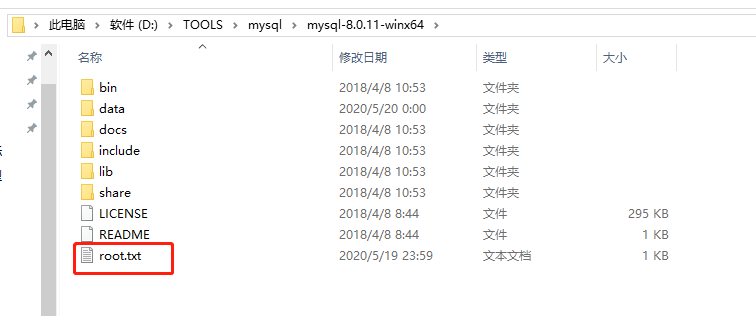
第二步,创建一个文本文件,内含一条密码修改命令

ALTER USER 'root'@'localhost' IDENTIFIED BY '';

第三步:命令行方式启动服务器,指定启动时执行上述的密码修改命令文件

mysqld --init-file=D:\TOOLS\mysql\mysql-8.0.11-winx64\root.txt --console

第四步:启动服务

net start mysql

第五步:

mysql -u root -p

回车,再回车进入

完整操作如下:

本博客内容公供学习研究用,和工作内容无关.