







Many projects now are in need of management of multi-tree level data. There are some ways to do this, but in this article I will introduce a good way to setup and install multi-tree level structures by using an MS SQL Server database. Our result is fully tested in MS SQL Server 2005/2008.
The tree will be shown and managed by the value of a column, I call it by "index-dictionary" term. By seeing this value or ordering this value we can understand the tree's structure.
My article will show you a simple way to work with tree data. This solution can deal with any tree-level you want, I will use a sample tree level = 3.
When you have a requirement which needs a tree data structure, you can use this solution and it will save you time. After installing this solution you don't need to pay attention to learn about CTE queries or other complicated ways to build a tree. Just select all rows and order by "index-dictionary" column, the tree is built up! Really easy.
This solution uses ordinal, alphabets, and Romans to mark the tree level:
You can download the SQL script or full DB restoration in the zip sample file.
Our purpose will be to create a multi-level tree and index the line by using multiple types of sequence numbers, such as ordinal numbers (1, 2, 3..), alphabets (A, B, C..), or Romans (I, II, III...). The result may be shown as:
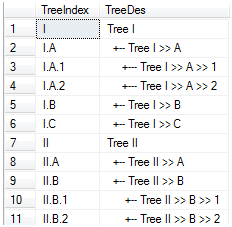
Figure 1
To deploy this solution we will create a tree-data table in MS SQL Server using this structure:
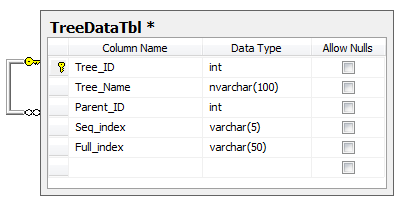
Figure 2
Tree_ID is the auto increasing sequence. It is known as the tree NodeID. Parent_ID is null or 0 when Tree_IDis the root of the tree. When Tree_ID is a child node, Parent_ID is the Tree_ID of the parent node.Seq_Index is an indicator for child-node sequence-number, a valid value is only a single-index: A, B, C or 1, 2, 3...Full_index shows the full-path dictionary to the child node from the root, such as: A.I.1, A.II.1, B.I.2, B.I.3...
We will create a function and a Stored Procedure (SP) and separate them to three-groups. You can find all these functions and the SP in the scripts file or restore the full database.
[count_tree_level]: Function to check level of tree-node.[get_seq_by_level]: Function to calculate the seq_index by tree level.[count_tree_full_index]: Function to calculate the full_index by tree_id.[get_reverse_ascii]: Function to convert ordinal number to ASCII, example 1-> 'A', 2 to 'B'. By using this function, you can convert an ordinal number to upper case characters or lower characters; this can be done by passing the ascii_pattern parameter.[convert_integer_to_roma]: Function to convert ordinal number to Roman (this function I found on the internet).[check_parent]: Function to return value 1 if Node_id is a child, or grand-child of the selectedparent_ID.[remove_node]: SP to delete a tree-node, also re-calculate directory[move_node_up]: SP to move-up a tree node, also re-calculate directory[move_node_down]: SP to move down a tree node, also re-calculate directory[view_tree]: SP to view tree in order by index directory[view_human_tree]: SP to view tree in order by index directory, it's well-known by human and same as Figure 1These actions below will demonstrate how to use the code to implement a multi-level tree structure. First of all, let it clear all data in DataTreeTbl. This code will insert three root nodes named "Tree A", "Tree B", and "Tree C".
go
exec dbo.insert_tree_node 'Tree A',0
go
exec dbo.insert_tree_node 'Tree B',0
go
exec dbo.insert_tree_node 'Tree C',0
go go
From now, after running a code block, we will check again the tree by running the query:
select * from dbo.TreeDataTbl order by Full_index asc
The result after running that code:
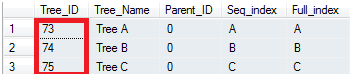
Remember the Node ID, we will add child nodes to the above node.
First of all, we will add a first level child data to the root node (the Tree_id value is dependent on your real Tree_ID after running the code block above).
go
exec dbo.insert_tree_node 'Tree A.I',73
go
exec dbo.insert_tree_node 'Tree A.II',73
go
exec dbo.insert_tree_node 'Tree B.I',74
go
exec dbo.insert_tree_node 'Tree B.II',74
go
exec dbo.insert_tree_node 'Tree C.I',75
go
The result is:
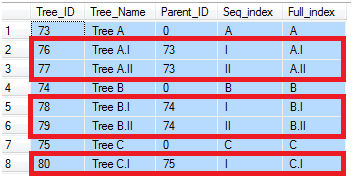
Now, we will add a second child level to the above tree:
go
exec dbo.insert_tree_node 'Tree A.I.1',76
go
exec dbo.insert_tree_node 'Tree A.I.2',76
go
exec dbo.insert_tree_node 'Tree A.I.3',76
go
exec dbo.insert_tree_node 'Tree A.II.1',77
go
exec dbo.insert_tree_node 'Tree B.I.1',78
go
exec dbo.insert_tree_node 'Tree B.I.2',78
go
exec dbo.insert_tree_node 'Tree C.I.1',80
go
exec dbo.insert_tree_node 'Tree C.I.2',80
go
exec dbo.insert_tree_node 'Tree C.I.3',80
go
The result is:
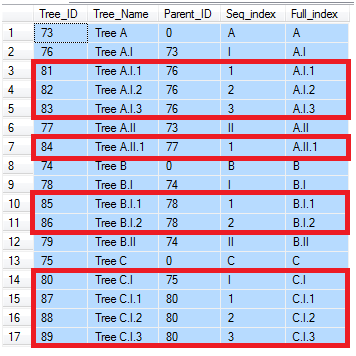
Now we will edit this tree. First of all, we will move up the tree node 82. Let us run this code:
exec dbo.move_node_up 82
The result is Node Id=82 is moved above node ID=81. And full_Index is re-counted!
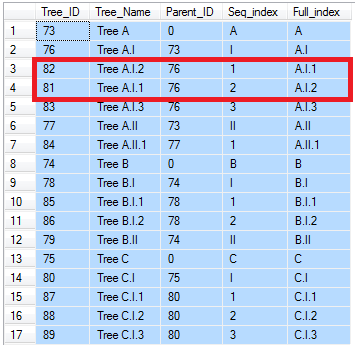
You can move up, move down any node. This time we will move down Tree_ID=74, a root node tree!
exec dbo.move_node_down 74
In result, you can see all nodes in "Tree B" is returned after "Tree C", and the index directory (Full_index) is re-counted also.
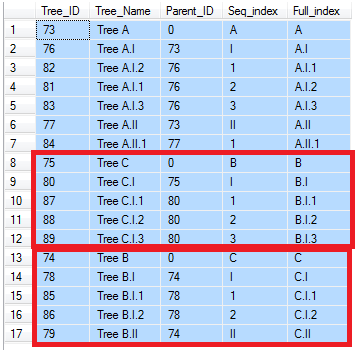
Now we will remove a node from a tree. I will try to remove the root node "Tree C" - Tree_ID=75.
exec dbo.remove_node 75
All Node C and its relationships are removed. "Tree B" is moved up and we re-count seq_Index andFull_index.
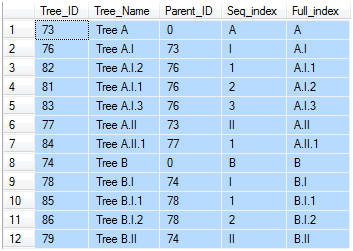
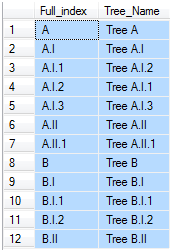
And finally, we will use two Stored Procedures to view the tree. Result when running SP [view_tree]:
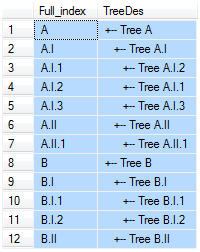
Result when running SP [view_human_tree]:
As I mentioned above, we can use CTE queries to generate a tree. Let us use this CTE query:
WITH Tree_CTE(Tree_ID, Tree_name, Parent_ID, Seq_index, Full_index, Tree_level)
AS
(
    SELECT TreeDataTbl.*, 0  FROM TreeDataTbl WHERE Parent_ID =0
    UNION ALL
    SELECT ChildNode.*, Tree_level+1  FROM TreeDataTbl AS ChildNode
    INNER JOIN Tree_CTE
    ON ChildNode.Parent_ID = Tree_CTE.Tree_ID
)
SELECT * FROM Tree_CTE order by Tree_level
The tree-result is:
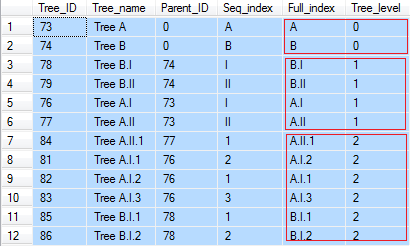
You can see the CTE method can count tree-level, but it cannot do as this solution can. All row levels are show in a sequence. In addition, CTE cannot help order row data in the same level by itself, you can only use fields to order. But by using this solution you can easily order the node position in a parent ID node.
This solution will give a tree-output visually. You can easily understand, see tree-structure, and count tree-level by seeing the output result.
This solution may be more than three levels deep as you can see in the sample picture. If you want to change theseq_index of the tree level, customize it in the [get_seq_by_level] function. There are problems with the tree when using Roman characters: I, II, III, IV, V, VI, VII, VIII, IX, X... Number (9) in Roman = IX will occur before number (5) in Roman = V. You can find an easy way to fix this! This solution can be applied for many cases. A multi-level menu for applications or exporting reports...
Hope this article will help you gain the time when your project needs to be installed as a multi-level tree data.
http://www.codeproject.com/Articles/162368/Implementing-a-Tree-Structure-with-Database
此内容由惯性聚合(RSS阅读器)自动聚合整理,仅供阅读参考。 原文来自 — 版权归原作者所有。