惯性聚合 高效追踪和阅读你感兴趣的博客、新闻、科技资讯
阅读原文 在惯性聚合中打开

推荐订阅源

The GitHub Blog
The GitHub Blog
云风的 BLOG
云风的 BLOG
T
Threatpost
WordPress大学
WordPress大学
CTFtime.org: upcoming CTF events
PCI Perspectives
PCI Perspectives
T
The Exploit Database - CXSecurity.com
Y
Y Combinator Blog
雷峰网
雷峰网
爱范儿
爱范儿
The Hacker News
The Hacker News
Last Week in AI
Last Week in AI
Simon Willison's Weblog
T
Tor Project blog
S
Securelist
宝玉的分享
宝玉的分享
L
LangChain Blog
O
OpenAI News
AI
AI
P
Privacy International News Feed
L
LINUX DO - 最新话题
D
DataBreaches.Net
Exploit-DB.com RSS Feed
Attack and Defense Labs
罗磊的独立博客
M
MIT News - Artificial intelligence
Security Archives - TechRepublic
月光博客
月光博客
博客园 - 【当耐特】
T
Tailwind CSS Blog
C
Cybersecurity and Infrastructure Security Agency CISA
H
Help Net Security
freeCodeCamp Programming Tutorials: Python, JavaScript, Git & More
博客园_首页
K
KPMG report finds enterprise disconnect between AI and its ROI | CIO
Hacker News - Newest:
Hacker News - Newest: "LLM"
腾讯CDC
Jina AI
Jina AI
The Last Watchdog
The Last Watchdog
K
Kaspersky official blog
Webroot Blog
Webroot Blog
奇客Solidot–传递最新科技情报
奇客Solidot–传递最新科技情报
Blog — PlanetScale
Blog — PlanetScale
MyScale Blog
MyScale Blog
MongoDB | Blog
MongoDB | Blog
P
Proofpoint News Feed
Recorded Future
Recorded Future
Threat Intelligence Blog | Flashpoint
博客园 - 三生石上(FineUI控件)
The Cloudflare Blog

VMware Blogs

Diagnostics for VMware Cloud Foundation (VCF) 9.1 with Old Versions of VCF Components Mastering Infrastructure Policies in VMware Cloud Foundation Automation 9.1 Modernizing the Private Cloud: Why VCF 9.1 Lifecycle Management is a Game Changer Announcing the VMware Cloud Foundation 9.1 Upgrade Planning Tool VCF Breakroom Chats Episode 86 – Containers Made Easy: The New “Container-as-a-Service” in VCF 9.1 Securing Your VCF 9.1 Infrastructure with the Symantec Identity Security Platform Virtually Speaking: The AI Reality Check with Dave Linthicum Zero Touch Provisioning: Activating Edge Sites with VMware Cloud Foundation Edge 9.1 VCF Breakroom Chats Episode 85 – Cloning Success at Scale: Inside VCF 9.1’s App Stack Formation VMware Cloud on AWS の使用状況を確認できる API Unlocking the Full Potential of Programmable Infrastructure with VMware Cloud Foundation 9.1 – New Features and Capabilities Smarter Patching at Scale: Vulnerability Assessment and Remediation with VMware Tanzu Platform Encrypted vMotion Offload to Intel QAT in VMware Cloud Foundation 9.1 Deepen Your Expertise: Four Key Benefits of Attending Increase Deployment Flexibility with VCF Edge Automation 1.0.3 Avi Advantage: Automating Certificate Management of VCF Workloads More Memory, Less Effort: Configuring Memory Tiering in VCF 9.1 VCF 9.1 Licensing: Programmatic, Centralized, and Built to Scale Why APJ Networking Professionals Need Private Cloud Expertise VCF 9.1 Networking: Simpler VPC Connectivity Control VCF 9.1 Networking: Exploring Network Services for Virtual Private Clouds VCF Networking 9.1: Seamless DDI Integration with Infoblox The Open Source Advantage: Building from Source for Ultimate Security Expand Shared VMDKs with Clustered Applications in VMware vSAN for VCF 9.1 Monetizing Zero-Trust Security with VCF 9.1 and VMware vDefend VMware vSAN Protection and Recovery Enhancements for VCF 9.1 Deliver Production SQL Server DBaaS with VMware Data Services Manager 9.1 Maximizing Profitability: VCF 9.1 Cost-Focused Approach for VMware Cloud Service Providers Modernizing Your Infrastructure: Introducing VMware Cloud Foundation 9.1 to VCSPs VCF 9.1 is Available: Explore the New Features in Hands-on Labs What’s New with vSphere in VMware Cloud Foundation 9.1? Resizing VMware vCenter in VMware Cloud Foundation 9 Non-Disruptive VMware vCenter Patching in VMware Cloud Foundation 9.1 VMware vCenter Virtual Hardware Gets an Upgrade in vSphere with VCF 9.1 AI Has Changed the Threat Landscape. Is Your Infrastructure Ready? Simplifying Storage with the New Effective Capacity View in VMware vSAN for VCF 9.1 Auto-RAID in VMware vSAN for VCF 9.1 – Comprehensive System-Managed Data Resilience Introducing VMmark 4.1: Enhanced Power Efficiency Benchmarking for Private Cloud Infrastructure Advanced Memory Tiering Enhancements in VMware Cloud Foundation 9.1 VCF 9.1 Is Here. See It in Action. 博通發布 VMware Cloud Foundation 9.1 How Broadcom Is Helping Enterprises Win the AI Security Sprint How to Prepare for the World of AI Driven Exploits Avi Innovations for VCF 9.1: Powering Kubernetes, Agentic AI and VPC Workloads VCF 9.1: The Secure, Cost-Effective Private Cloud Platform for Production AI Announcing VCF 9.1: Modern Private Cloud Built for Efficiency and Resilience Announcing VMware Cloud Foundation Edge 9.1: A Scalable, Autonomous Edge Platform Accelerate, Streamline, and Control Your Self-Service Private Cloud with VMware Cloud Foundation 9.1 Deploy Modern Apps Faster, Scale Smarter, and Lower Your TCO with VMware vSphere Kubernetes Service in VCF 9.1 Scale Smarter, Save More: Redefining Infrastructure Economics with VMware vSphere in VCF 9.1 AI with VCF 9.1 on AMD GPUs: Build with open frameworks and simplify management, at a lower TCO Streamline, Simplify and Protect all your AI workloads with VCF 9.1 Simplify Workload Connectivity and Enhance Network Scale and Performance with VCF 9.1 VMware and CrowdStrike Deliver New Integration for Cyber Recovery Workflows How Many Users Can Your LLM Server Really Handle? From Infrastructure to Agents: A Hands-On Guide to Secure Private AI with Broadcom – Part 2 The New Frontier: Leading the Cloud-Native Evolution Replicating VMware vSphere Configuration Profile Desired State Webinar Recap: Design and Architecture Considerations for VMware vSphere Kubernetes Service on VMware Cloud Foundation Kubernetes 1.36: What Actually Changed for Enterprise Platforms Enhance Lateral Security and Ingress Load Balancing for Kubernetes Workloads Avi Load Balancer Analytics: Root Cause Application Performance Issues in Minutes Analyst Insight Series #3: Policy-Driven Governance and Multi-Tenant Control Post-Quantum Readiness on VMware Cloud Foundation Registration Is Live for Las Vegas | $ave with Early-Bird May 21, 2026: What’s New in VMware Tanzu Data Intelligence 10.4 From Infrastructure to Agents: A Hands-On Guide to Secure Private AI with Broadcom – Part 1 Stop Guessing: Advanced Monitoring and Troubleshooting for Data Services CPU, Disk, Network, and Memory Workload Profiles for DVD Store Database Testing How VMware Salt Automates Compliance Across Private Cloud Analyst Insight Series #2: Operational Scalability and Lifecycle Management MCP vs. APIs: Why You Need Both for AI Applications The Real Constraint on Enterprise AI isn’t GPUs; It’s Power Why Enhanced DirectPath Wins for High-Performance Apps Bridging the (.Local) Gap: A Split-Domain Design for VMware Cloud Foundation Deployment Observability on VMware vSphere Kubernetes Service VMware Cloud on AWS: Introducing the Usage Report APIs Converging VMware vSphere to VMware Cloud Foundation 9.0: The Top 10 Questions Answered May 6, 2026: What’s New in Tanzu Platform 10.4: Powering Agentic Apps at Scale VMware Tanzu RabbitMQ Powers the Modern Data Lakehouse with New Spark Integration and Enterprise Tooling Tanzu Data Intelligence 10.4 Delivers AI-Driven Analytics, Unified Real-Time Operations, and Sovereign Resilience Enterprise-Ready Agents Made Simple & Safe with VMware Tanzu Platform Agent Foundations Introducing Tanzu Platform 10.4: Extending Platform as a Service to Agentic Applications How AI-Assisted Analytics in Tanzu Data Intelligence Can Help Remove the SQL Bottleneck From Prototype to Production: Securing Database MCP at Enterprise Scale The Compelling Case for a Private Cloud Data Intelligence Platform The Unification Dividend: Consolidating Database Operations on VMware Cloud Foundation The Modern Spring Workflow Is Enterprise-Ready and AI-Boosted [TAM Blog] セキュアブート証明書の有効期限切れに関する注意点と対応について Accelerate Lateral Security and Ingress Load Balancing for Kubernetes Workloads From Platform to Data: Building a Cloud-Native Developer Experience On-Prem with VMware Cloud Foundation How VMware Cloud Foundation (VCF) Training Helps Keep Top Tech Talent in APJ Build Your Case for Attending VMware Explore 2026 Spring 開発元が提供する商用サポート「VMware Tanzu® Spring Essentials」とは VMware Cloud on AWS より i7i.metal-24xl インスタンスの提供開始 VMware Advanced Memory Tiering Tips for Success VMware Cloud Foundation Edge 9.0: Two-Host Edge Site Deployment with Brownfield Import Your Database Is About to Become an AI Tool. Is It Ready? Applying GitOps Principles to Maintain Desired State Configuration using VMware vSphere Configuration Profile – Part 3 Webinar Recap: Converging VMware vSphere to VMware Cloud Foundation 9.0
Deploying Harbor Service in Air-Gapped VMware Cloud Foundation 9.0
vmwareblogs · 2026-04-21 · via VMware Blogs

Modern private cloud infrastructure demands enterprise-grade container registry capabilities, particularly in environments where external internet connectivity is restricted or prohibited. Within VMware Cloud Foundation (VCF) 9.0, deploying Supervisor Services in air-gapped environments presents unique technical challenges that require careful planning and precise execution. This guide provides a systematic approach to deploying and managing Harbor as a Supervisor Service in air-gapped VCF deployments, enabling your organization to maintain container image availability while adhering to strict security and compliance requirements.

The critical challenge in air-gapped environments is the “bootstrap problem.” Harbor Supervisor Service requires container images to deploy, but in an air-gapped environment, you have no registry from which to pull those images. This guide addresses this challenge by demonstrating how to establish a bootstrap registry that enables Harbor Supervisor Service deployment, after which Harbor Supervisor Service can become your production container registry.

Understanding Air-Gapped Deployment Challenges

An air-gapped environment is a network security measure that physically or logically isolates a computer network from unsecured networks, including the internet. For organizations operating in regulated industries such as financial services, government agencies, healthcare, and defense, air-gapped infrastructure is not optional; it is a regulatory requirement.

Hence, we provide you here with a solution to deploying the Harbor Supervisor Service in an air-gapped setup that will then become your OCI registry for the air-gapped environment.

Deployment Process

For air-gapped VCF environments, we require a two-phased approach.
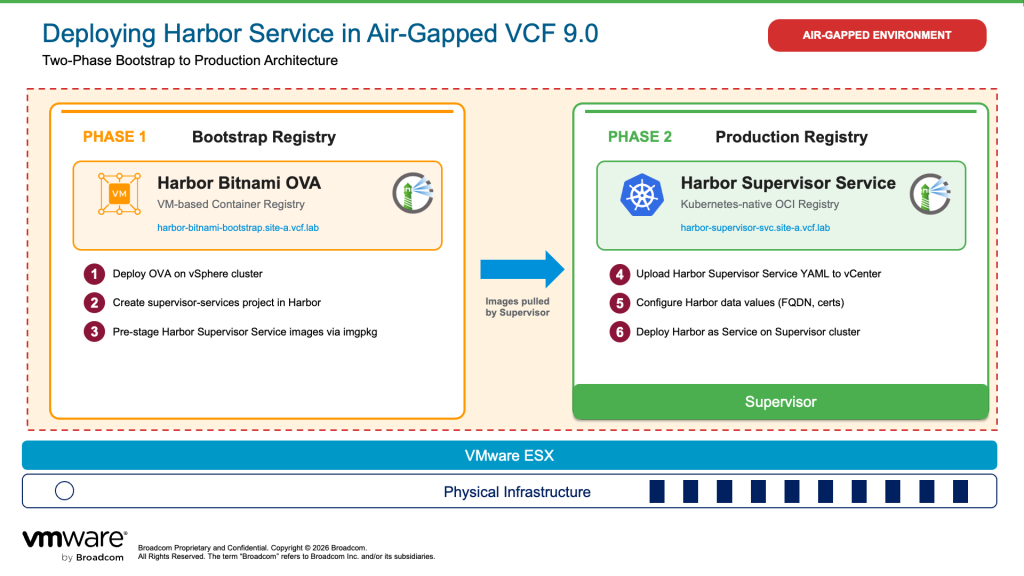
Step 1: Bitnami Harbor OVA Deployment

Deploy the Harbor Open Virtual Appliance (OVA) from Bitnami as a virtual machine as the bootstrap registry for storing the Harbor Supervisor Service images. This approach provides:

  • Quick deployment through a preconfigured appliance
  • Traditional VM-based management
  • Suitable for initial testing or smaller deployments

This bootstrap registry serves a critical purpose: it hosts the Harbor Supervisor Service container images that will be pulled during Harbor Supervisor Service deployment.

Step 2: Harbor Supervisor Service (Production Registry)

Once you have a bootstrap registry operational, you can deploy Harbor as a native Supervisor Service. This becomes your production container registry and provides:

  • Native integration with VCF lifecycle management
  • Scalability with your Supervisor infrastructure
  • Enterprise support through standard Broadcom channels
  • Integration with vSphere Namespaces and VKS clusters

Why This Two-Phase Approach?

Harbor Supervisor Service cannot deploy itself without access to its own container images. In internet-connected environments, these images are pulled from external registries automatically. In air-gapped environments, you must first provide an internal bootstrap registry using the Harbor VM that hosts these images. Once Harbor Supervisor Service is deployed and operational, it becomes the production registry for all your workloads, and the bootstrap registry can be decommissioned or retained as a backup.

This guide covers the complete workflow: setting up a bootstrap Harbor registry, populating it with required images, deploying Harbor Supervisor Service using the bootstrap registry, and using Harbor Supervisor Service as the production registry for workload deployment.

Prerequisites

Before beginning deployment, verify your environment meets these requirements:
Step 1: Bitnami Harbor OVA Deployment

  1. Download the latest Harbor OVA from the Bitnami portal and ensure the OVA is available in a location from where it can be uploaded to the air-gapped vCenter.
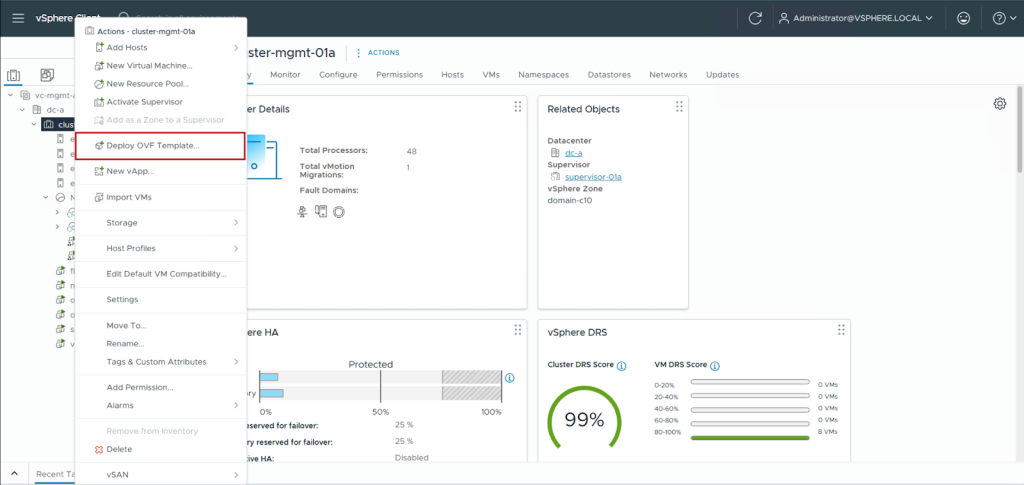
  2. Log in to your air-gapped vCenter, right-click on your cluster, and select Deploy OVF Template.
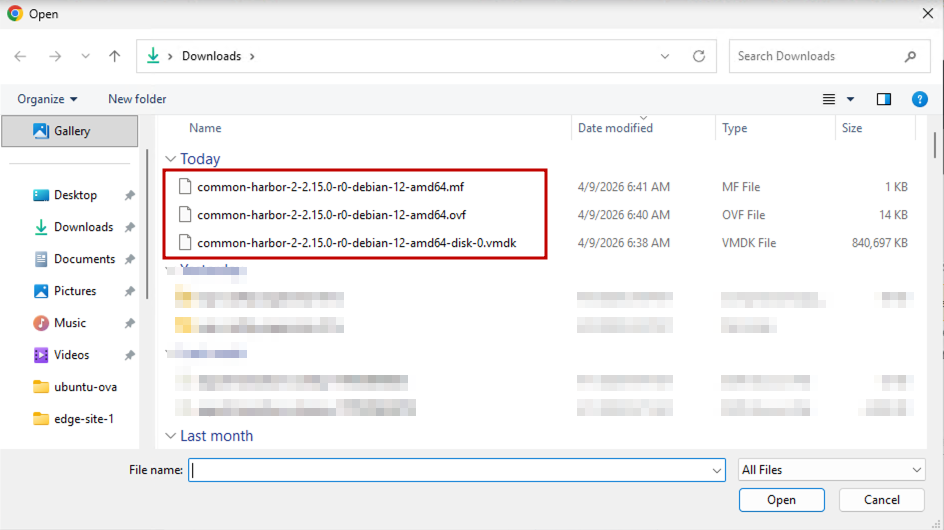
  1. Select the Bitnami Harbor OVF-related files.
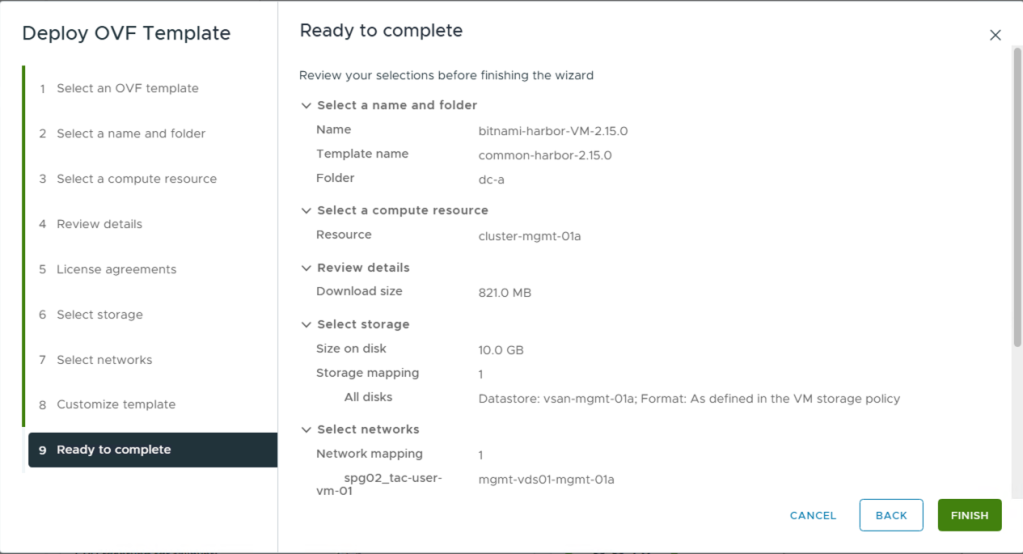
  1. Follow the wizard and deploy the OVF template.
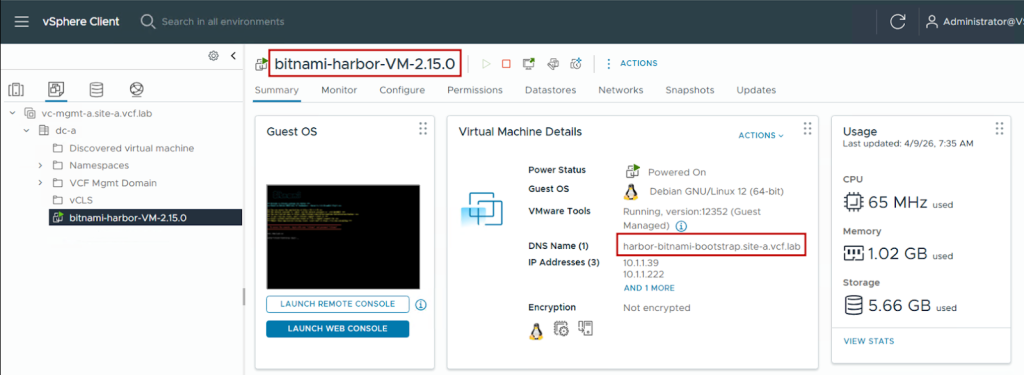
  1. Power on the Harbor VM and let the initial bootstrap of the VM complete and you will be able to see the IP and FQDN provided to it in vCenter.
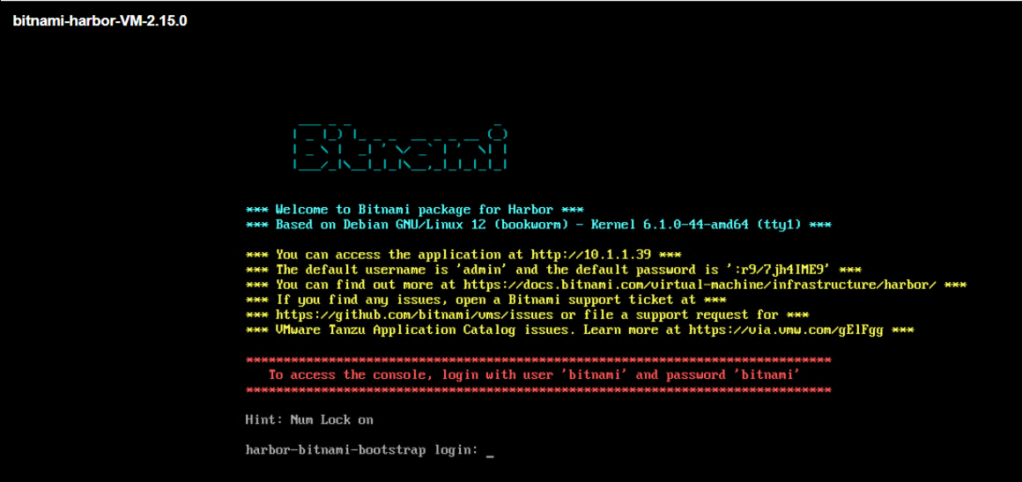
  1. Logging in to the console, we can see the bootstrap of Harbor has been completed and the credentials for logging in to the Harbor UI are available here.
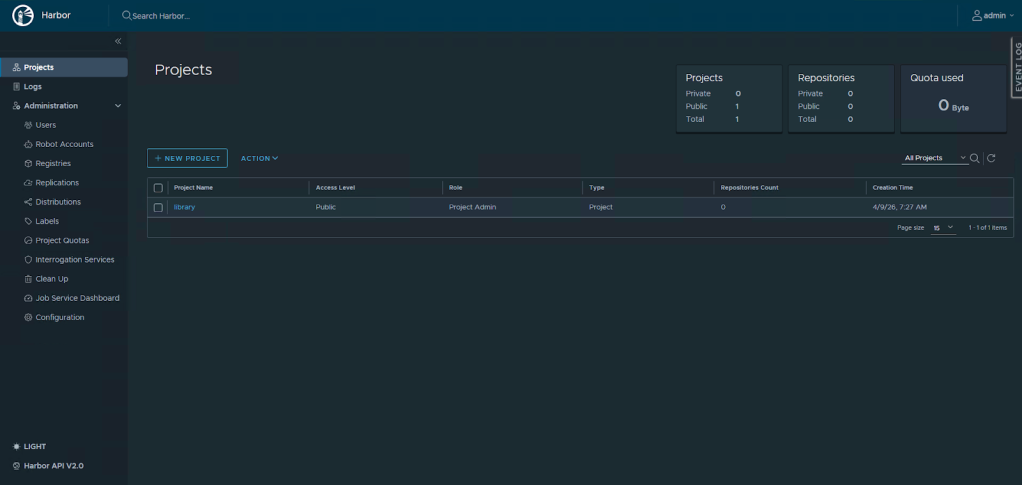
  1. We can now log in to the Bitnami Harbor instance. This will act as our bootstrap registry for storing the Harbor Supervisor Service images.
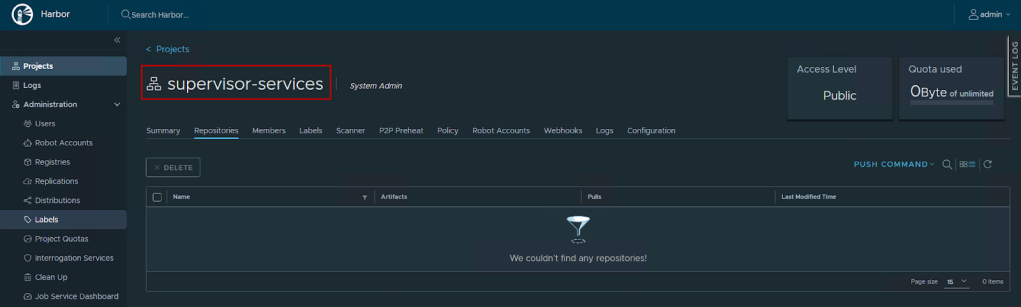
  1. We create a new project called supervisor-services, which will be used to store the Harbor Supervisor Service images.
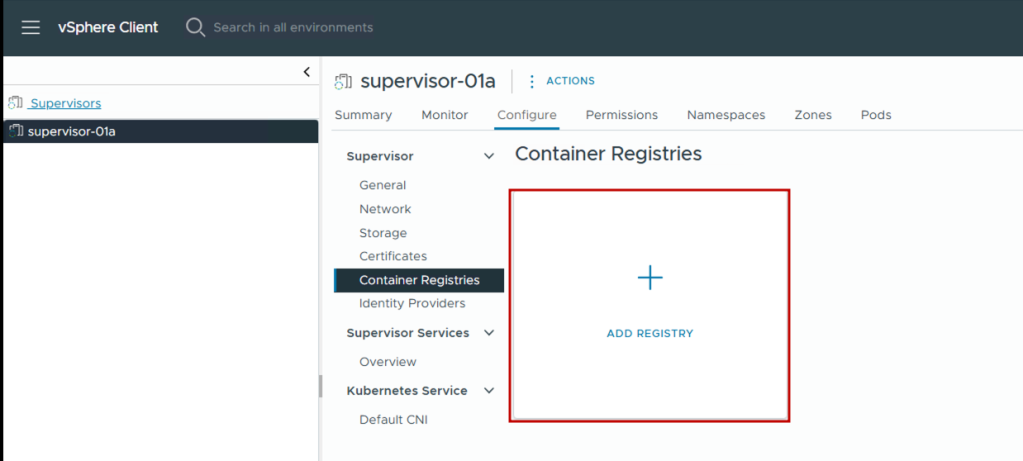
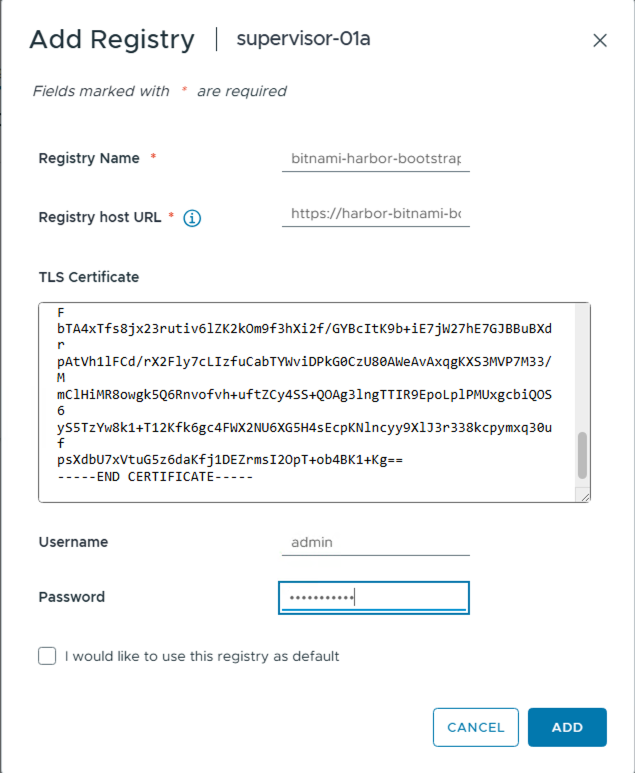
  1. Since we are using an instance of Harbor that is not signed by a trusted CA, we will add it as a container registry in supervisor. For this, we log in to vCenter > Menu > Supervisor Management > <supervisor> > Configure > Container Registries and click on Add Registry.
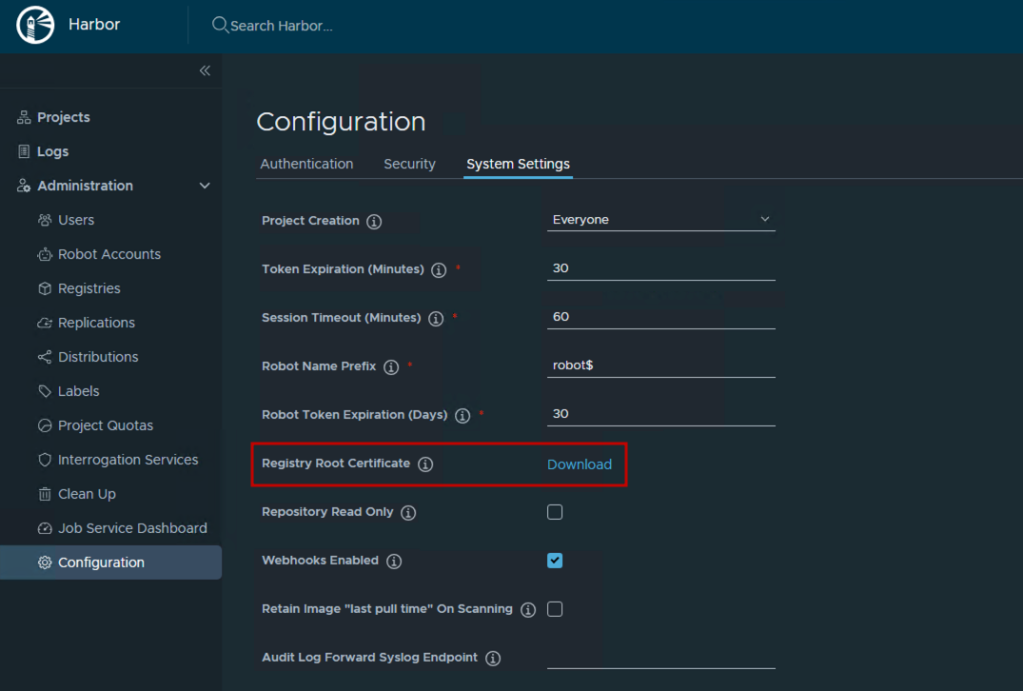
  1. Provide the bootstrap Harbor VM detail. We get the TLS certificate details by logging in to the bootstrap Harbor VM > Administration > Configuration > System Settings, clicking on the Download button next to Registry Root Certificate, and pasting the contents of the file into the input in the UI shown below.
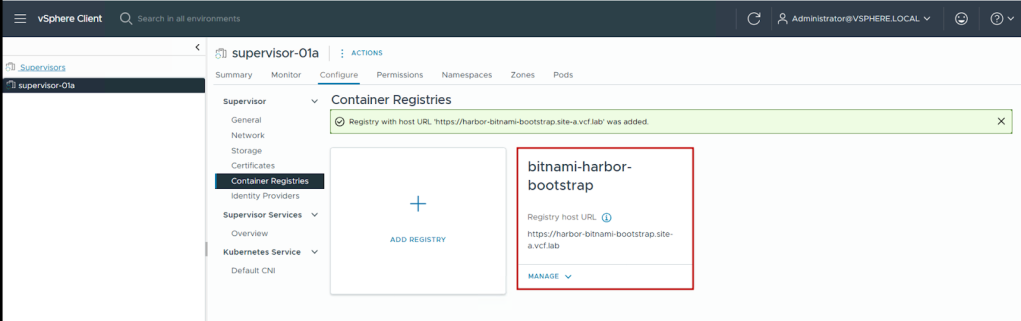
  1. We can see the registry gets added successfully. This will allow Supervisor to use this registry for pulling the Harbor-related Supervisor Service images without additional trust establishment.

Step 2: Image Pre-Staging

Now that the bootstrap registry is available, we must pre-stage all required container images by the Harbor Supervisor Service. This section describes the process.

Pre-requisites:

  • Carvel imgpkg

At the time of writing this blog, the latest Carvel Imgpkg available is 0.47.2. For information on the latest version available, refer to the Carvel imgpkg documentation. Since we are using a Windows jumphost with internet connectivity, we download the imgpkg.exe file from GitHub and add it to the Windows Environment Variables list.
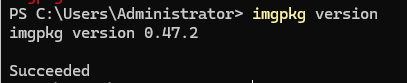
Image Collection and Pre-Staging Process:

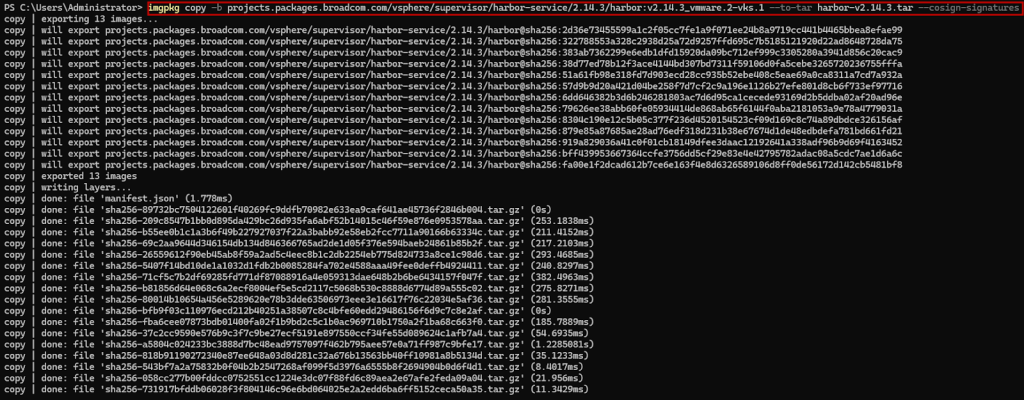
  1. We open the Harbor Supervisor Service yaml file and identify the carvel packages it pulls during installation to pre-stage them. In this case, we are using Harbor 2.14.3.
  1. Now we copy the bundle on to our Windows jumphost using imgpkg:
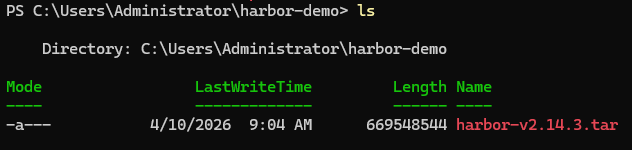
  1. We can see that the Harbor Supervisor Service carvel package is now available as a tar file on our jumphost.
  1. Now we copy the tar file from our jumphost to our bootstrap Harbor registry.
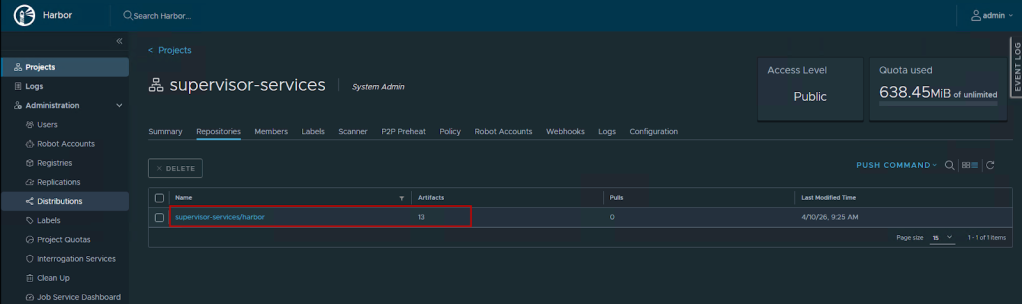
  1. We can now see that the Harbor Supervisor Services-related images are now available in the bootstrap Harbor VM registry.
  1. Finally, we update the image URL in the harbor supervisor service YAML from the internet-based location to point it to the air-gapped bootstrap Harbor VM.

Step 3: Install Harbor Supervisor Service

Add the Harbor Service to vCenter
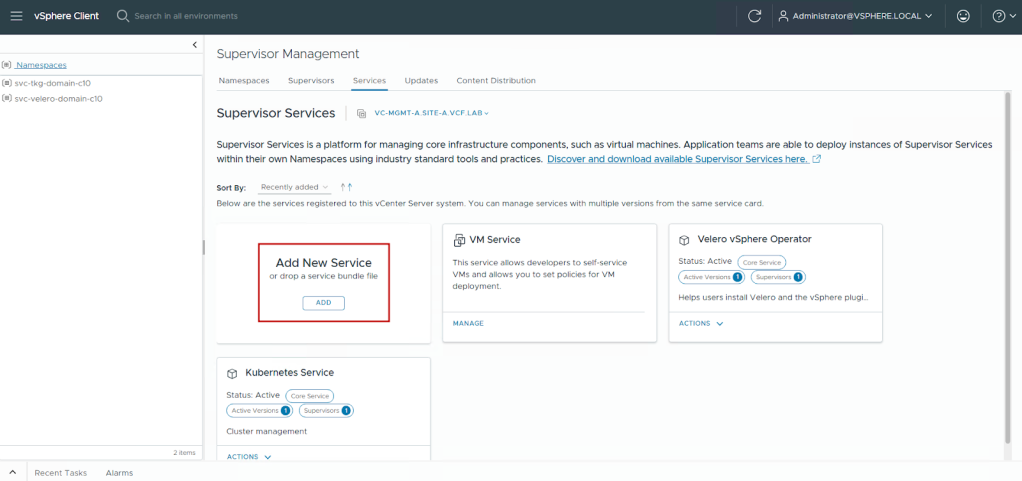
  1. Log in to vSphere Client.
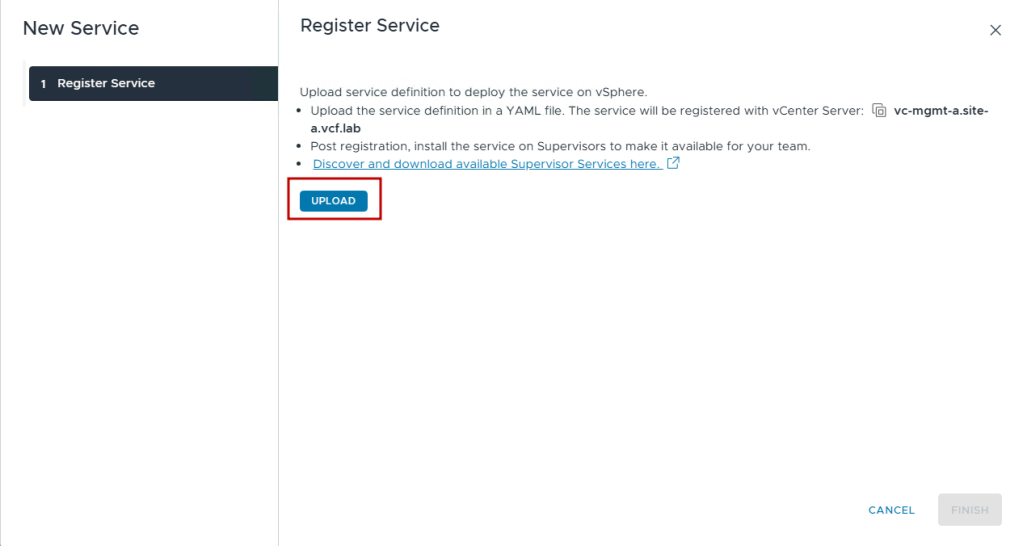
  2. Navigate to Menu > Supervisor Management > Services > Add New Service.
  1. Select Upload.
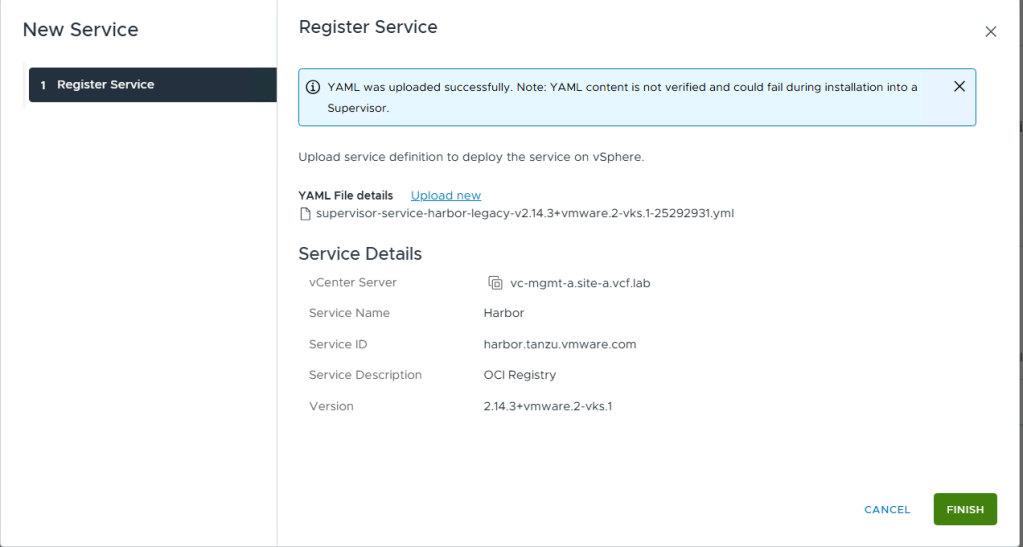
  1. Upload the harbor-service-x.xx.x.yml file.
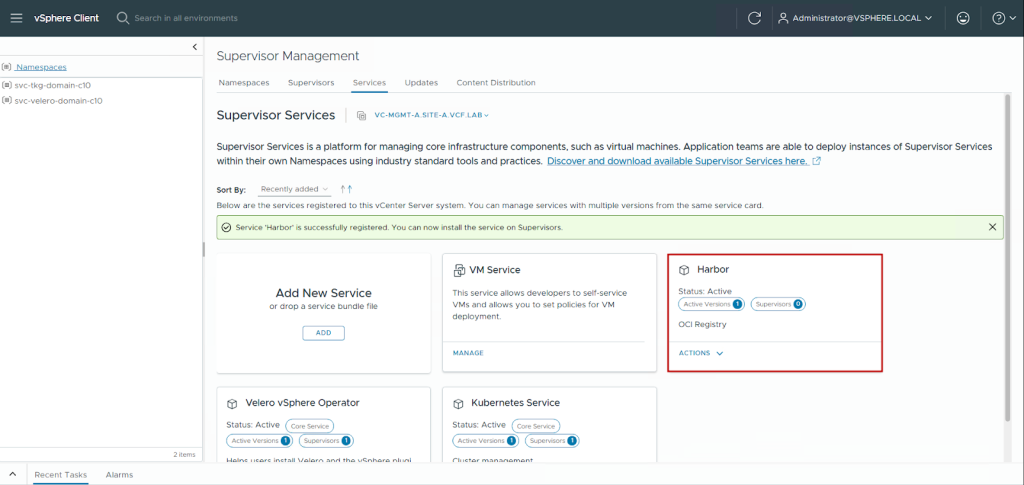
  1. Click on Finish.

Update Harbor Supervisor Service Data Values File

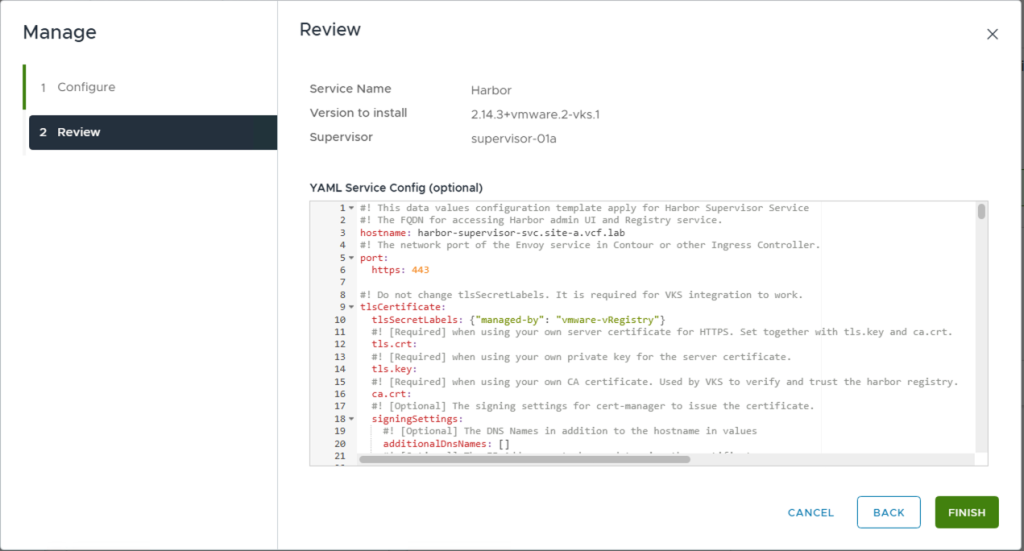
  1. Configure Harbor Data Values: Edit the harbor-data-values-x.xx.x.yml file to configure Harbor for your air-gapped environment. Details on how to set the values can be found in the Reducing Harbor Deployment Complexity on Kubernetes blog and the Making harbor production-ready: Essential considerations for deployment blog.


Deploy Harbor Supervisor Service

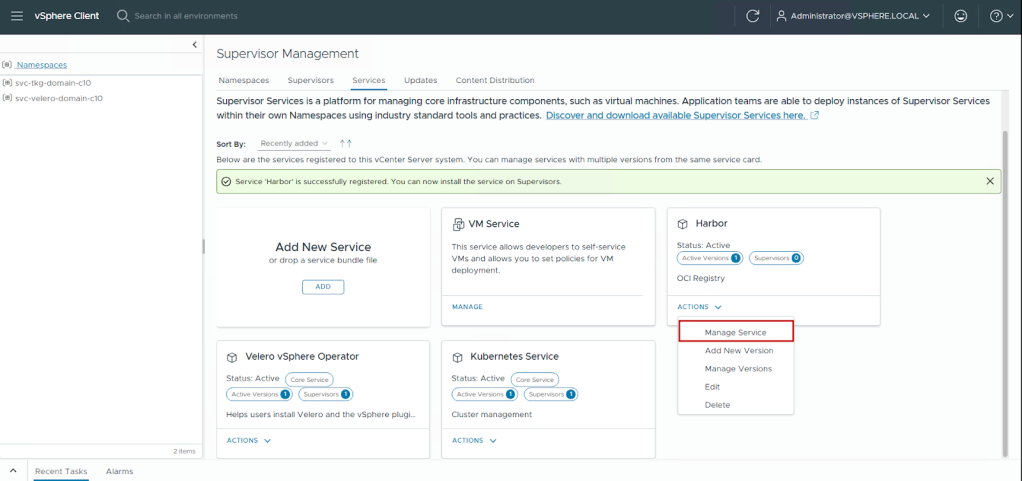
  1. In the vSphere Client, locate the Harbor service card.
  2. Click Actions > Manage Service.
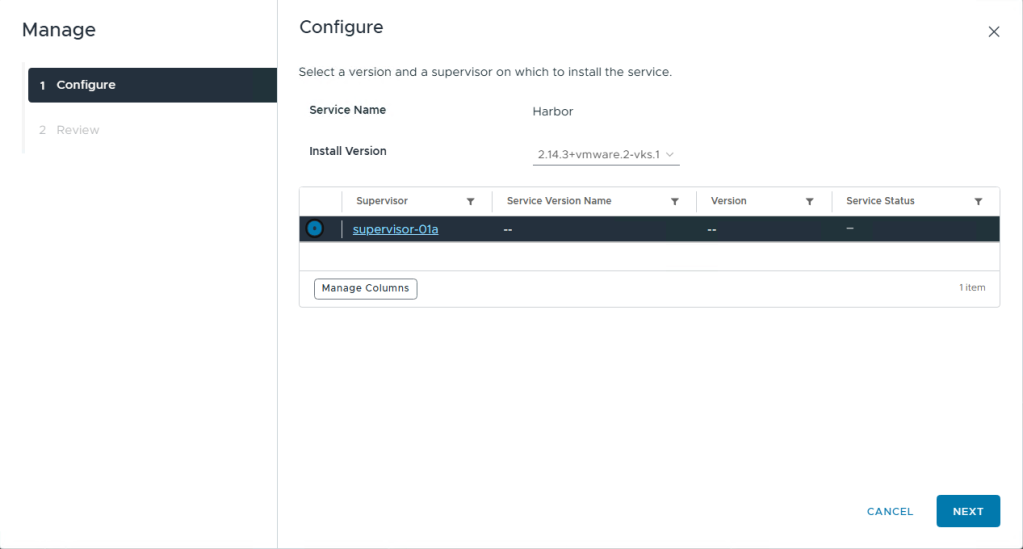
  1. Select your supervisor cluster and click Next.
  1. Paste the modified harbor-data-values-x.xx.x.yml content.
  1. Click Finish.
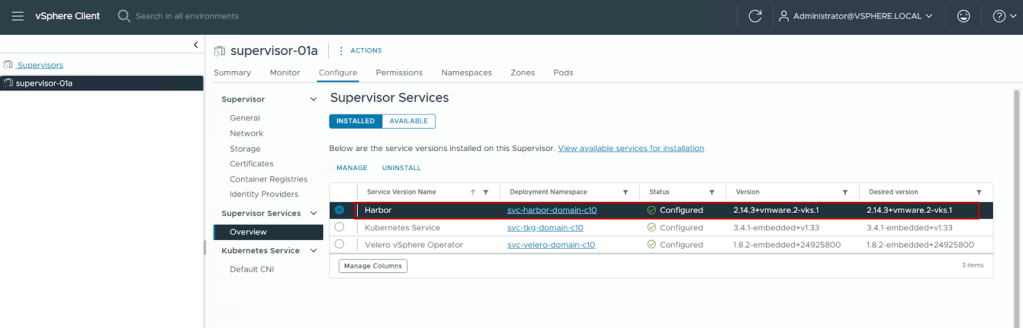
  2. Monitor the installation progress.

The installation creates a namespace (e.g., svc-harbor-<unique-id>) and deploys all Harbor components. Once the deployment completes, we can access the Harbor Supervisor Service UI using the FQDN provided in the data values yaml file.
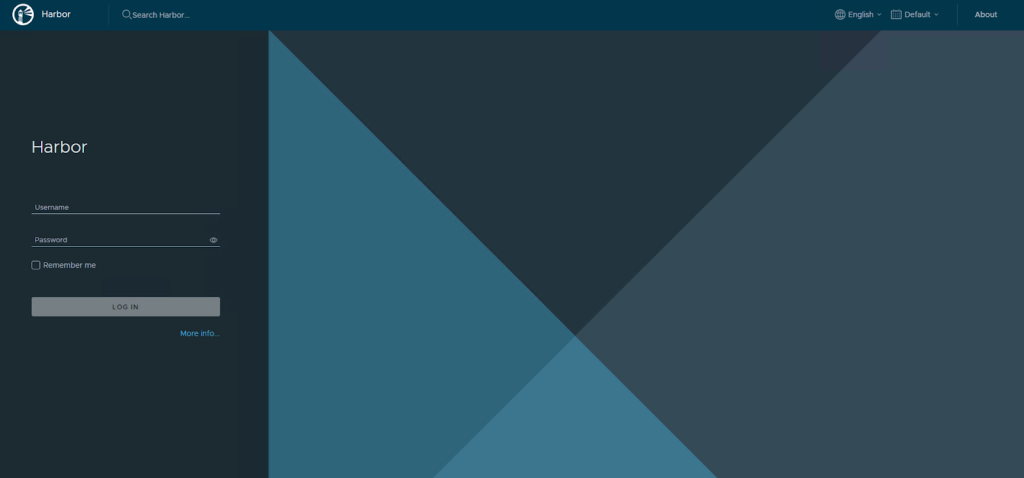
From this point, we have an air-gapped, production-grade enterprise registry that can be used to deploy other Supervisor Services as well as applications.

Conclusion

Deploying Supervisor Services in an air-gapped VCF 9.0 environment requires careful planning, precise execution, and ongoing operational discipline. The Harbor Supervisor Service provides a robust foundation for container registry operations without external internet connectivity.

Key takeaways:

  • Architecture decisions: The Harbor Supervisor Service approach offers superior integration with VCF lifecycle management compared to standalone VM deployments. It scales with your infrastructure and receives enterprise support.
  • Pre-staging is critical: Success in air-gapped environments depends entirely on comprehensive image pre-staging. Maintain detailed image inventories and establish reliable transfer procedures.
  • Certificate management: Internal PKI and certificate trust relationships are fundamental. Implement automated certificate rotation and maintain complete certificate chains.
  • Security first: Air-gapped environments exist for security reasons. Implement content trust, vulnerability scanning, and RBAC from day one.

By following this guide, you establish a production-ready container registry infrastructure that meets the stringent requirements of air-gapped operations while maintaining the flexibility and scalability expected from modern private cloud platforms.

For additional resources and updates, refer to the Broadcom TechDocs for VCF Supervisor Services.

If you are looking for more information on Harbor, follow our Harbor blog series:


Discover more from VMware Cloud Foundation (VCF) Blog

Subscribe to get the latest posts sent to your email.