


As enterprises rush to integrate AI into their workflows, moving from experimentation to production is often stalled by a critical hurdle: risk around security, privacy, and compliance. De-risking the AI enterprise requires more than just deploying a model behind a corporate firewall. It means ensuring strict tenant privacy, rigorously scanning containerized models for vulnerabilities before they are ever deployed, securing those models in production against prompt injections and data poisoning, and applying robust governance to autonomous AI agents. While the industry discusses these security concepts at length, practical, engineering-focused guidance remains scarce.
In this blog series, we are moving past high-level architecture to share our lab notes on securing a complete private AI stack. We aren’t starting from bare metal architecture though. For architecture build, we have deployed VMware Private AI Foundation with NVIDIA, which means VMware Private AI Services, VMware Cloud Foundation (VCF), and VMware vSphere Kubernetes Services (VKS) were deployed.
With the infrastructure already stood up, we shift the deployment into a fortified, enterprise-grade AI environment. Whether you are a network engineer, a security architect, or a platform operator, this series provides a security blueprint for using VMware Private AI Services, vDefend, Avi, Istio, admission controllers, and the Tanzu platform to effectively protect your AI workloads from privacy, security and compliance risks.
To provide a clear, actionable path, we have structured this blog series into four blogs:
Part 1: Setting the infrastructure – Networking and Deep Tenancy Building on our existing VCF, VKS, and a private AI deployment, this post details how we construct a secure AI environment. We cover the configuration of L3 networking and the establishment of deep GPU tenancy to isolate workloads before we even look at a firewall rule.
Part 2: Securing GPU-Accelerated AI Workloads with VMware vDefend on VMware Private AI Foundation with NVIDIA
With the infrastructure deployed, our second post dives into deploying vDefend to enforce L3 firewalling across the VMs and pods alike. We demonstrate how to implement granular micro-segmentation to strictly contain potential threats and limit the blast radius of any compromised AI workload.
Part 3: Shielding the Application Layer – North-South L7 Protection with Avi WAF and Istio
Because private AI models interact with external users and systems, application-layer defense is critical. In part three, we walk through configuring Istio to set up end-to-end mTLS encryption integrated with the Avi Web Application Firewall (WAF) for robust L7 protection. We detail the steps to guard your AI endpoints and APIs against malicious inputs, data exfiltration, and external threat actors.
Part 4: Governing the Agentic Loop – Bringing platform as a service and governed Agentic Coding with Tanzu
Finally, we move up to the developer and application experience. Our final post explores how Tanzu delivers the platform-as-a-service capabilities to enforce governance and establish strict guardrails for autonomous agentic loops. We demonstrate how to create a secure, frictionless environment for next-generation AI app development and “vibe coding,” helping your developers move fast without breaking security protocols.
Before we look at a firewall rule or L7 protections, we have to talk about the infrastructure layer—specifically, network, compute and memory isolation.
When you are building an enterprise-grade AI cloud, you aren’t just dividing resources between two simple applications. You are often acting as an internal service provider slicing up an expensive, monolithic GPU cluster across entirely distinct business units. Your tenants need parallel processing for models, RAG pipelines, and agents, but not all at once, all the time.
We architect deep GPU tenancy, establishing strict logical and physical isolation from the organizational level all the way down to the silicon.
We start at the macro level using VCF and the VMware Private AI Services stack to create distinct Organizational Tenants. By mapping entire business units to dedicated and/or shared GPU VM classes, we can enforce GPU quotas, Role-Based Access Control (RBAC), and chargeback mechanisms on them. This helps ensure that one org has guaranteed access to their slice of the AI infrastructure and cannot overrun another org team’s capacity, while other departments may share GPU resources.
Customers often ask if they could achieve this level of security and resource governance in a non-virtualized, bare-metal environment.
The fundamental difference is that VCF delivers a secure cloud platform that enables secure sharing of your entire GPU estate, while bare metal Kubernetes distributions provide weak governance boundaries for sharing GPUs. This is because bare metal is not designed to securely share GPUs across different clusters or business units, leading to fragmented capacity and lower utilization. Customers must integrate and manage separate third-party software with Kubernetes primitives to carve up and isolate resources.
Multi-tenancy and security on bare metal typically operates as a single, large Kubernetes cluster, which significantly increases the fault impact domain and concentrates risk. Building true multi-tenancy and isolation that rivals VCF’s six levels of isolation requires manual configuration of network policies, dedicated operators for storage, and external security tools.
[Insert Screenshot: VCF Consumption Portal showing Org-level GPU quotas and tenant allocation]
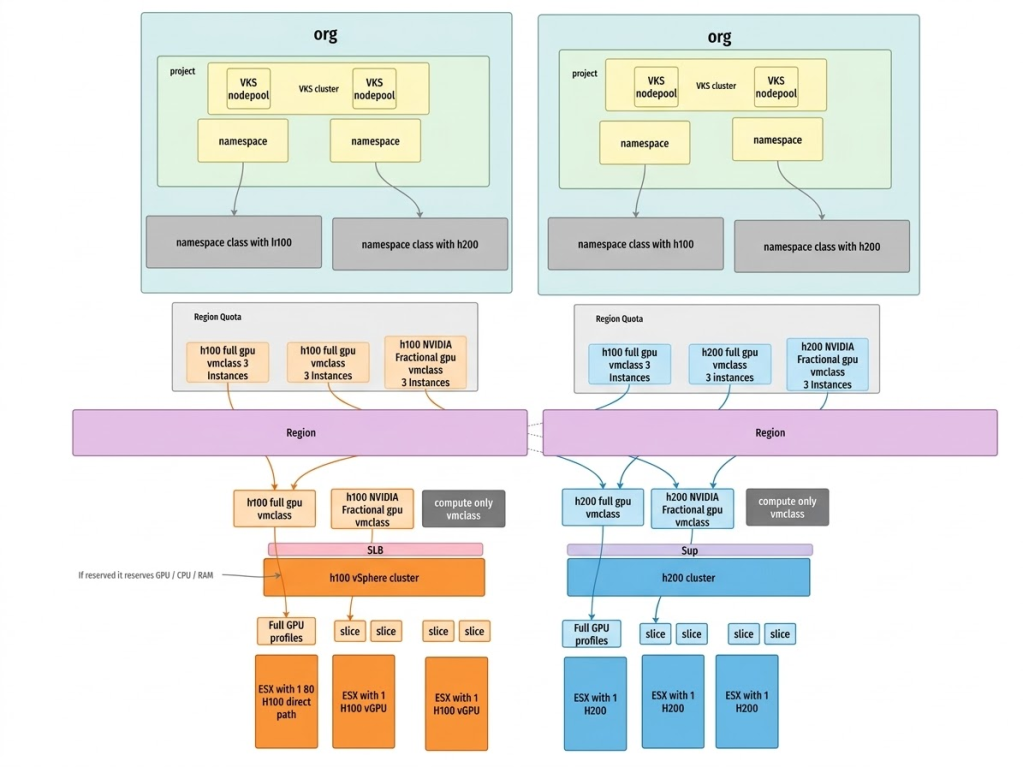
Once the organizational boundaries are set, we move down to the hardware execution layer using VMware Private AI Foundation with NVIDIA. Instead of just passing through entire physical GPUs to a single cluster or relying purely on software-level isolation, we leverage NVIDIA vGPU technology integrated directly into the hypervisor. We take those massive physical GPUs and carve them into dedicated vGPU profiles with strictly allocated memory boundaries and time-shared compute resources.
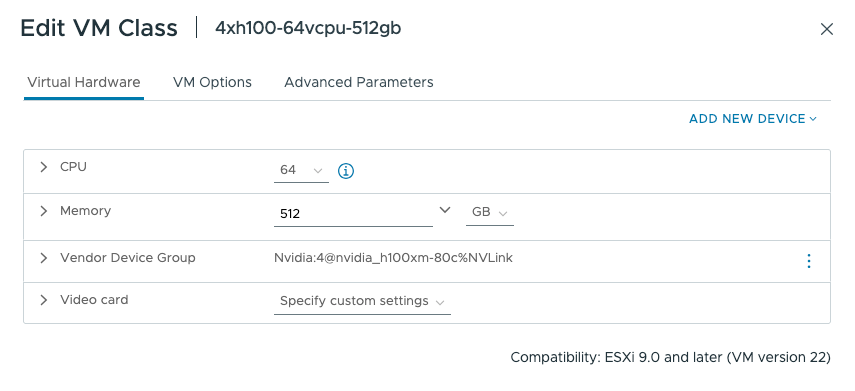
There may be tenants that should not consume GPUs within an organization. We can prevent unauthorized usage of these GPU VM classes through IAAS policy at a project level. Here is an example of a policy that prevents usage of the GPU-based classes:
|
1 2 3 4 5 6 7 8 9 10 11 12 13 14 15 16 17 18 19 20 21 22 23 24 25 26 27 |
failurePolicy: Fail matchConstraints: resourceRules: - apiGroups: ["cluster.x-k8s.io"] apiVersions: ["v1beta1"] operations: ["CREATE", "UPDATE"] resources: ["clusters"] validations: # 1. Check Global Variables - expression: | !object.spec.topology.variables.exists(v, v.name == 'vmClass' && v.value.lowerAscii().contains('gpu') ) message: "GPU VM classes are not allowed." # 2. Check MachineDeployment Overrides - expression: | !object.spec.topology.workers.machineDeployments.exists(md, has(md.variables) && has(md.variables.overrides) && md.variables.overrides.exists(o, o.name == 'vmClass' && o.value.lowerAscii().contains('gpu') ) ) message: "GPU VM classes are not allowed." validationActions: - Deny |
These vGPU profiles are then mapped directly to specific vSphere Namespaces as vmclasses and consumed by the vSphere Kubernetes Service (VKS) on a per-tenant basis.
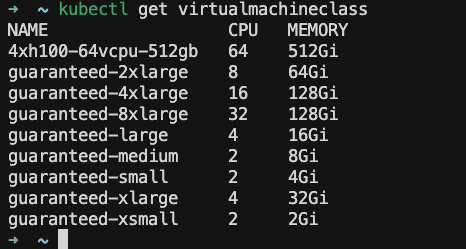
The result? Robust multi-tenant isolation. Memory is strictly partitioned per tenant with zero risk of side-channel data leakage across GPU framebuffer, while time-sliced compute ensures fair scheduling across workloads. The workloads are isolated physically at the host level and logically at the organizational level, delivering predictable model performance.
Furthermore, by strategically blending both reserved resources for mission-critical apps and shared GPU resources for non-mission-critical or experimental workloads, we drastically increase overall hardware utilization. This means you aren’t just securing the environment, you are maximizing the return on a massive infrastructure investment.
But compute isolation is only half the battle. That’s where we move up the stack to lock down the network.
We’ve locked down the silicon and the hypervisor, but in the AI world, the network is the ultimate attack vector. If a model is compromised via a sophisticated prompt injection or data poisoning attack, the immediate question becomes: what else can it reach? To answer that, we need to look at how we design the network topology. With VCF and the underlying VMware NSX architecture, we aren’t just assigning VLANs, we are building highly dynamic, software-defined networking architectures tailored to the exact risk profile of the AI workload.
Let’s start with the strongest option: the airgap. Because we are running VMware Private AI Foundation with NVIDIA entirely on-premises, we enable the native capability to deploy a fully airgapped AI environment. If you are a defense contractor, a healthcare provider, or a highly regulated financial institution, you can isolate your AI stack entirely from the outside world. The models, the RAG pipelines, the data, and the inference endpoints never ping the public internet.
But for most enterprises, AI models need to interact with internal databases and corporate applications. This is where our ability to control the network becomes absolute. Instead of placing all AI workloads on a flat corporate network, we provision dedicated virtual private clouds (VPCs) for each organizational tenant.
Creating a dedicated VPC can be done using code so that this entire process can be easily automated. Here is an example of creating a VPC:
|
1 2 3 4 5 6 7 8 9 10 11 12 |
apiVersion: vpc.nsx.vmware.com/v1alpha1 kind: VPC metadata: name: gpu-vpc spec: description: GPU vpc loadBalancerVPCEndpoint: enabled: true privateIPs: - 192.173.237.0/24 regionName: us-west |
This gives us immense flexibility in how we map logical networks to physical hardware:
Shared Physical Infrastructure: For standard, internal-facing AI tools (like an IT helpdesk bot), multiple tenant VPCs can securely share the same underlying physical network switches and hardware, relying on logical routing isolation.
Dedicated Physical Infrastructure: For highly classified AI projects (like proprietary financial modeling or unreleased product R&D), we can route that specific tenant’s VPC to an entirely separate access network. By deploying dedicated Tier-0 (T0) routers for these specific tenants, we bridge their logical VPCs directly into a physically separate networking stack.
This capability allows you to enforce strict logical and physical network isolation for your most sensitive tenants, while still allowing them to share the exact same underlying pool of highly expensive GPU resources. You get the ultimate network security posture without destroying your compute utilization. In a bare-metal environment, achieving this physical network isolation requires buying completely separate servers and manually cabling them to air-gapped switches, forcing you to dedicate entire GPUs to single projects and fracturing your hardware ROI.
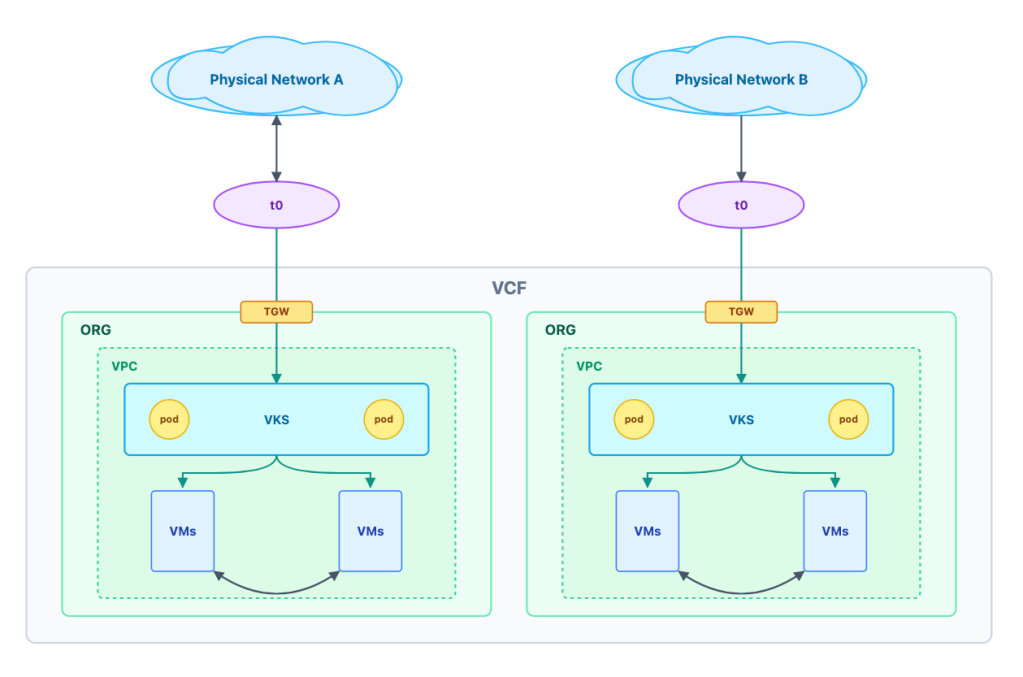
We dictate the routing, the isolation, and the egress points. We can control exactly which data stores an AI agent can query and which APIs it can trigger.
However, controlling the broad network topology is only the first step. To truly de-risk the AI enterprise, we have to adopt a Zero Trust mindset and assume that an attacker might eventually breach a specific VPC or pod. We need to police the traffic inside the network, down to the individual packet.
That sets the stage for our next post in the series: enforcing East-West micro-segmentation with vDefend.
Ready to get started on your AI and ML journey? Check out these helpful resources:
Learn more about VMware Private AI Foundation with NVIDIA.
Subscribe to get the latest posts sent to your email.
此内容由惯性聚合(RSS阅读器)自动聚合整理,仅供阅读参考。 原文来自 — 版权归原作者所有。