

惯性聚合 高效追踪和阅读你感兴趣的博客、新闻、科技资讯
阅读原文 在惯性聚合中打开

推荐订阅源

Forbes - Security
Forbes - Security
L
Lohrmann on Cybersecurity
Simon Willison's Weblog
P
Proofpoint News Feed
P
Privacy International News Feed
The Hacker News
The Hacker News
AWS News Blog
AWS News Blog
S
Securelist
P
Proofpoint News Feed
Recent Announcements
GbyAI
GbyAI
B
Blog RSS Feed
A
About on SuperTechFans
C
CXSECURITY Database RSS Feed - CXSecurity.com
Y
Y Combinator Blog
Microsoft Azure Blog
H
Hackread – Cybersecurity News, Data Breaches, AI and More
Cyberwarzone
Cyberwarzone
I
Intezer
T
Tor Project blog
T
The Blog of Author Tim Ferriss
The GitHub Blog
The GitHub Blog
云风的 BLOG
云风的 BLOG
Recorded Future
Recorded Future
aimingoo的专栏
aimingoo的专栏
Cisco Talos Blog
Cisco Talos Blog
Cyber Security Advisories - MS-ISAC
钛媒体:引领未来商业与生活新知
钛媒体:引领未来商业与生活新知
W
WeLiveSecurity
D
DataBreaches.Net
U
Unit 42
Project Zero
Project Zero
Martin Fowler
Martin Fowler
V
V2EX
The Last Watchdog
The Last Watchdog
Security Archives - TechRepublic
C
Cisco Blogs
Threat Intelligence Blog | Flashpoint
K
KPMG report finds enterprise disconnect between AI and its ROI | CIO
OSCHINA 社区最新新闻
OSCHINA 社区最新新闻
V2EX - 技术
V2EX - 技术
Hacker News - Newest:
Hacker News - Newest: "LLM"
T
Threat Research - Cisco Blogs
cs.CV updates on arXiv.org
T
Tenable Blog
F
Full Disclosure
T
The Exploit Database - CXSecurity.com
H
Heimdal Security Blog
Latest news
Latest news
Webroot Blog
Webroot Blog

VMware Blogs

Mastering Infrastructure Policies in VMware Cloud Foundation Automation 9.1 Modernizing the Private Cloud: Why VCF 9.1 Lifecycle Management is a Game Changer Announcing the VMware Cloud Foundation 9.1 Upgrade Planning Tool VCF Breakroom Chats Episode 86 – Containers Made Easy: The New “Container-as-a-Service” in VCF 9.1 Securing Your VCF 9.1 Infrastructure with the Symantec Identity Security Platform Virtually Speaking: The AI Reality Check with Dave Linthicum Zero Touch Provisioning: Activating Edge Sites with VMware Cloud Foundation Edge 9.1 VCF Breakroom Chats Episode 85 – Cloning Success at Scale: Inside VCF 9.1’s App Stack Formation VMware Cloud on AWS の使用状況を確認できる API Unlocking the Full Potential of Programmable Infrastructure with VMware Cloud Foundation 9.1 – New Features and Capabilities Smarter Patching at Scale: Vulnerability Assessment and Remediation with VMware Tanzu Platform Encrypted vMotion Offload to Intel QAT in VMware Cloud Foundation 9.1 Deepen Your Expertise: Four Key Benefits of Attending Increase Deployment Flexibility with VCF Edge Automation 1.0.3 Avi Advantage: Automating Certificate Management of VCF Workloads More Memory, Less Effort: Configuring Memory Tiering in VCF 9.1 VCF 9.1 Licensing: Programmatic, Centralized, and Built to Scale Why APJ Networking Professionals Need Private Cloud Expertise VCF 9.1 Networking: Simpler VPC Connectivity Control VCF 9.1 Networking: Exploring Network Services for Virtual Private Clouds VCF Networking 9.1: Seamless DDI Integration with Infoblox The Open Source Advantage: Building from Source for Ultimate Security Expand Shared VMDKs with Clustered Applications in VMware vSAN for VCF 9.1 Monetizing Zero-Trust Security with VCF 9.1 and VMware vDefend VMware vSAN Protection and Recovery Enhancements for VCF 9.1 Deliver Production SQL Server DBaaS with VMware Data Services Manager 9.1 Maximizing Profitability: VCF 9.1 Cost-Focused Approach for VMware Cloud Service Providers Modernizing Your Infrastructure: Introducing VMware Cloud Foundation 9.1 to VCSPs VCF 9.1 is Available: Explore the New Features in Hands-on Labs What’s New with vSphere in VMware Cloud Foundation 9.1? Resizing VMware vCenter in VMware Cloud Foundation 9 Non-Disruptive VMware vCenter Patching in VMware Cloud Foundation 9.1 VMware vCenter Virtual Hardware Gets an Upgrade in vSphere with VCF 9.1 AI Has Changed the Threat Landscape. Is Your Infrastructure Ready? Simplifying Storage with the New Effective Capacity View in VMware vSAN for VCF 9.1 Auto-RAID in VMware vSAN for VCF 9.1 – Comprehensive System-Managed Data Resilience Introducing VMmark 4.1: Enhanced Power Efficiency Benchmarking for Private Cloud Infrastructure Advanced Memory Tiering Enhancements in VMware Cloud Foundation 9.1 VCF 9.1 Is Here. See It in Action. 博通發布 VMware Cloud Foundation 9.1 How Broadcom Is Helping Enterprises Win the AI Security Sprint How to Prepare for the World of AI Driven Exploits Avi Innovations for VCF 9.1: Powering Kubernetes, Agentic AI and VPC Workloads VCF 9.1: The Secure, Cost-Effective Private Cloud Platform for Production AI Announcing VCF 9.1: Modern Private Cloud Built for Efficiency and Resilience Announcing VMware Cloud Foundation Edge 9.1: A Scalable, Autonomous Edge Platform Accelerate, Streamline, and Control Your Self-Service Private Cloud with VMware Cloud Foundation 9.1 Deploy Modern Apps Faster, Scale Smarter, and Lower Your TCO with VMware vSphere Kubernetes Service in VCF 9.1 Scale Smarter, Save More: Redefining Infrastructure Economics with VMware vSphere in VCF 9.1 AI with VCF 9.1 on AMD GPUs: Build with open frameworks and simplify management, at a lower TCO Streamline, Simplify and Protect all your AI workloads with VCF 9.1 Simplify Workload Connectivity and Enhance Network Scale and Performance with VCF 9.1 VMware and CrowdStrike Deliver New Integration for Cyber Recovery Workflows How Many Users Can Your LLM Server Really Handle? From Infrastructure to Agents: A Hands-On Guide to Secure Private AI with Broadcom – Part 2 The New Frontier: Leading the Cloud-Native Evolution Replicating VMware vSphere Configuration Profile Desired State Webinar Recap: Design and Architecture Considerations for VMware vSphere Kubernetes Service on VMware Cloud Foundation Kubernetes 1.36: What Actually Changed for Enterprise Platforms Enhance Lateral Security and Ingress Load Balancing for Kubernetes Workloads Avi Load Balancer Analytics: Root Cause Application Performance Issues in Minutes Analyst Insight Series #3: Policy-Driven Governance and Multi-Tenant Control Post-Quantum Readiness on VMware Cloud Foundation Registration Is Live for Las Vegas | $ave with Early-Bird May 21, 2026: What’s New in VMware Tanzu Data Intelligence 10.4 From Infrastructure to Agents: A Hands-On Guide to Secure Private AI with Broadcom – Part 1 Stop Guessing: Advanced Monitoring and Troubleshooting for Data Services CPU, Disk, Network, and Memory Workload Profiles for DVD Store Database Testing How VMware Salt Automates Compliance Across Private Cloud Analyst Insight Series #2: Operational Scalability and Lifecycle Management MCP vs. APIs: Why You Need Both for AI Applications The Real Constraint on Enterprise AI isn’t GPUs; It’s Power Deploying Harbor Service in Air-Gapped VMware Cloud Foundation 9.0 Why Enhanced DirectPath Wins for High-Performance Apps Bridging the (.Local) Gap: A Split-Domain Design for VMware Cloud Foundation Deployment Observability on VMware vSphere Kubernetes Service VMware Cloud on AWS: Introducing the Usage Report APIs Converging VMware vSphere to VMware Cloud Foundation 9.0: The Top 10 Questions Answered May 6, 2026: What’s New in Tanzu Platform 10.4: Powering Agentic Apps at Scale VMware Tanzu RabbitMQ Powers the Modern Data Lakehouse with New Spark Integration and Enterprise Tooling Tanzu Data Intelligence 10.4 Delivers AI-Driven Analytics, Unified Real-Time Operations, and Sovereign Resilience Enterprise-Ready Agents Made Simple & Safe with VMware Tanzu Platform Agent Foundations Introducing Tanzu Platform 10.4: Extending Platform as a Service to Agentic Applications How AI-Assisted Analytics in Tanzu Data Intelligence Can Help Remove the SQL Bottleneck From Prototype to Production: Securing Database MCP at Enterprise Scale The Compelling Case for a Private Cloud Data Intelligence Platform The Unification Dividend: Consolidating Database Operations on VMware Cloud Foundation The Modern Spring Workflow Is Enterprise-Ready and AI-Boosted [TAM Blog] セキュアブート証明書の有効期限切れに関する注意点と対応について Accelerate Lateral Security and Ingress Load Balancing for Kubernetes Workloads From Platform to Data: Building a Cloud-Native Developer Experience On-Prem with VMware Cloud Foundation How VMware Cloud Foundation (VCF) Training Helps Keep Top Tech Talent in APJ Build Your Case for Attending VMware Explore 2026 Spring 開発元が提供する商用サポート「VMware Tanzu® Spring Essentials」とは VMware Cloud on AWS より i7i.metal-24xl インスタンスの提供開始 VMware Advanced Memory Tiering Tips for Success VMware Cloud Foundation Edge 9.0: Two-Host Edge Site Deployment with Brownfield Import Your Database Is About to Become an AI Tool. Is It Ready? Applying GitOps Principles to Maintain Desired State Configuration using VMware vSphere Configuration Profile – Part 3 Webinar Recap: Converging VMware vSphere to VMware Cloud Foundation 9.0
Understanding Large Memory Pages with VMware Advanced Memory Tiering
Dave Morera · 2026-06-18 · via VMware Blogs

If you’ve been setting up VMware Memory Tiering or thinking about it, you’ve probably asked yourself at some point: what happens to Memory Large Pages? It’s a great question, and I’m glad you’ve asked it, because the answer changes how you need to plan your capacity and configure your VMs. Let me walk you through it.

Let’s Set the Stage

Before we get into the tiering-specific behavior, let’s quickly recap what Large Pages are and why they matter. The x86 architecture supports three page sizes: 4 KB (small pages), 2 MB, and 1 GB. The latter two are collectively called “Large Pages”. Think of page size like the denomination of bills in your wallet. Larger denominations are more efficient to carry around, but harder to make change with. Large pages work the same way; they reduce TLB (Translation Lookaside Buffer) pressure and cut the cost of page table walks, which translates to potential performance gains for memory-intensive workloads. ESX uses 2 MB pages to back guest virtual RAM by default, and for good reason: the performance benefit is well established.

So when Memory Tiering enters the picture, you’d naturally assume large pages stay on. Here’s where things get interesting.

Memory Tiering Changes the Equation

When you enable Memory Tiering on a host, VMs are configured with Large Pages disabled from tiering by default. I know, it sounds counterintuitive at first. But let me explain why this actually makes sense.

The tiering algorithm, which lives inside the memory management layer of ESX, works by monitoring every page’s “hotness” and “coldness”. Active pages, your VM’s working set, stay in Tier 0 (DRAM) for maximum performance. Cold pages migrate to Tier 1 (NVMe) when memory pressure builds. This is smart, automatic, and requires no manual intervention. But here’s the catch; it needs fine-grained control to do that job well.

How does that change things for large pages? A 2 MB Large Page is an atomic unit, and you just can’t move half of it to NVMe. The entire 2 MB block moves together, or not at all. That’s like trying to make precise temperature adjustments with a thermostat that only moves in 10-degree increments. It works, but it’s not precise. At 4K granularity, the tiering engine can make surgical decisions about exactly which pages are hot and which are cold. That precision is what makes Memory Tiering perform well, so the default is small pages.

The Three Page Size Scenarios

Let’s compare the three memory page sizes and how they respond to Memory Tiering. Easy enough to understand once you see them laid out. Here’s where each page size lands.
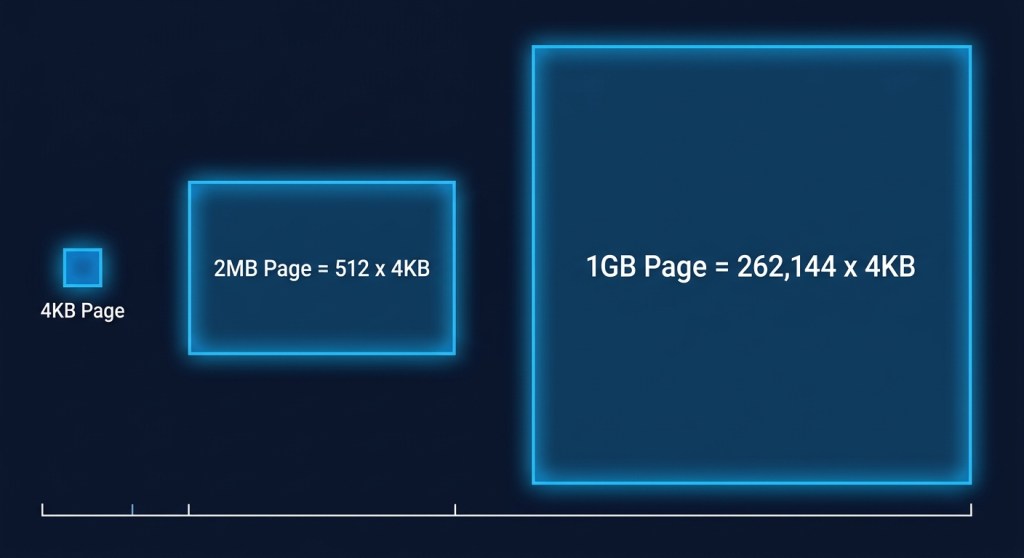
4 KB Small Pages: Fully Optimized

This is your sweet spot. Performance has been specifically optimized for 4K pages when Memory Tiering is active. The tiering algorithm operates at maximum precision, hot pages stay in DRAM, and cold pages gracefully offload to NVMe. ESX intentionally disables host-level large pages when Memory Tiering is configured. To accurately monitor and move memory without incurring massive performance overhead, ESX reverts to backing guest memory with standard 4KB base pages. By working at the 4KB level right out of the gate, ESX’s tiering engine doesn’t have to constantly break down massive pages to figure out what data is actually being used.

2 MB Large Pages: Opt-In, with a Catch

The default configuration in vSphere is to have Large Pages (2MB) enabled (Mem.AllocGuestLargePage set to 1); however, 2 MB large pages are not enabled by default for tiering purposes when Memory Tiering is active.
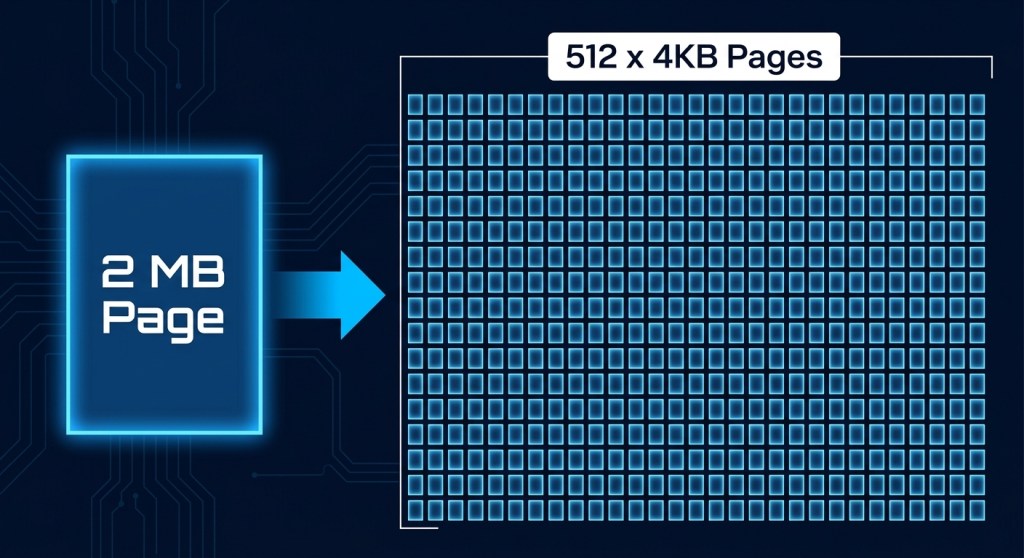
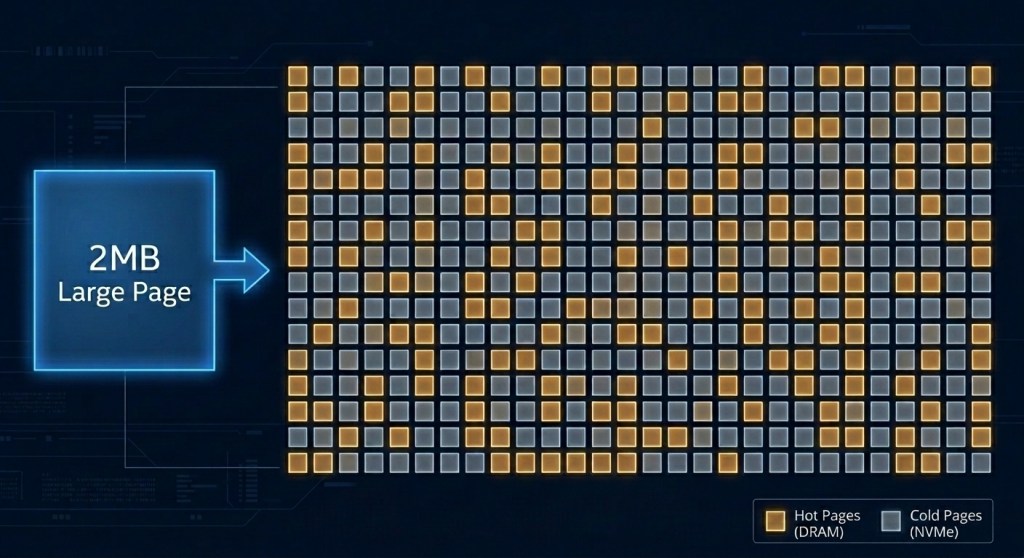
A 2 MB page is made up of 512 individual 4K pages. Let’s say 400 of those are hot and actively being used. Ideally, you want that large page to stay intact in DRAM. But that means the remaining 112 cold pages are also stuck in DRAM, even though they could have been tiered out to NVMe. Those 112 pages represent stranded capacity, and that is just one large page. Multiply that by any number and you will quickly realize that thousands of cold pages could be left in DRAM rather than being tiered out to NVMe. At 4K granularity, the tiering engine would have reclaimed them. At 2 MB granularity, it cannot, because moving half a large page is not an option.

To use 2MB Large Pages with Memory Tiering, you need to explicitly set a VMX option on the VM (monitor_control.disable_mmu_largepages = “FALSE”). Once set, the VM falls into the general tiered memory pool, but here is where it gets interesting. When large pages are enabled, the tiering algorithm proactively breaks a subset of large pages based on certain heuristics and will either tier out the cold pages in the 2M region or convert it back to large.

This is the core tension: large pages and tiering pull in opposite directions. Tiering is most effective when it can reclaim at the finest granularity possible, which is 4K. Large pages deliberately reduce that granularity to improve TLB efficiency. The two are fundamentally at odds, and that tradeoff is worth understanding before you opt in.
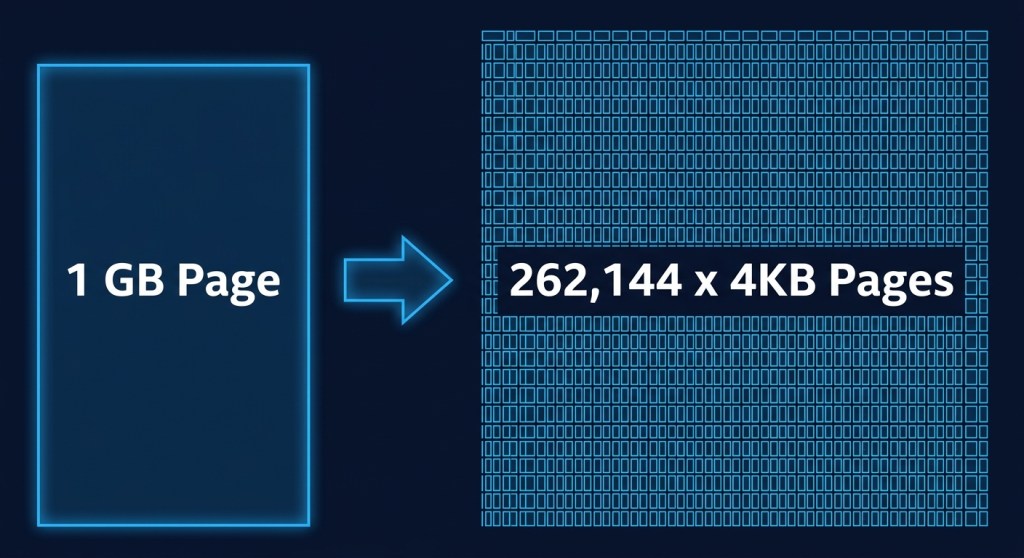
1 GB Pages: DRAM Only, No Exceptions

This is the hard line. VMs configured to use 1 GB pages are automatically locked to Tier 0 (DRAM) and will never use NVMe Tier 1 capacity. Memory Tiering enforces this automatically, so you don’t need to configure anything special. But you do need to account for it in your capacity planning. These VMs need to be sized against your available DRAM, not your total tiered memory capacity. Flag them early.
The TPS Angle

Here’s a secondary effect worth understanding, especially if you rely on Transparent Page Sharing (TPS) for memory efficiency. How does enabling large pages in a tiered environment affect TPS? Not well, as it turns out.

TPS doesn’t share large pages directly. On modern hardware with Intel EPT or AMD RVI, which use 2 MB pages, TPS is largely ineffective anyway, because the probability of finding two identical 2 MB regions is very low and comparing them carries significant overhead. Large pages have to be broken down into 4K small pages before TPS can share them, and that only happens under specific memory pressure states.

What this means practically enabling large pages in a tiered environment reduces both the effectiveness of the tiering algorithm and any TPS savings you might have been counting on. The two techniques point in opposite directions when it comes to page size. So, think about some workloads such as VDI or dense VM environments where TPS historically helped you, and consider whether you want to trade that away.

The Bottom Line

Memory Tiering makes a deliberate trade; it gives up the TLB efficiency of large pages in exchange for the operational precision needed to make intelligent tier placement decisions. For most workloads, that’s a worthwhile trade, especially as Tier 1 NVMe latency continues to improve.

Here’s how to think about it when planning your tiered environment:

  • Default to 4K pages for VMs you want to benefit from tiering
  • Flag your 1 GB page VMs early in capacity planning, as they are DRAM-only consumers
  • Evaluate 2 MB large page VMs carefully: test first, and don’t assume the same performance characteristics you’d see in a non-tiered environment

Getting ahead of the large page question before you enable Memory Tiering will save you a lot of head-scratching later. And don’t worry, the system handles most of this automatically once you understand the rules.


Discover more from VMware Cloud Foundation (VCF) Blog

Subscribe to get the latest posts sent to your email.