



惯性聚合 高效追踪和阅读你感兴趣的博客、新闻、科技资讯
阅读原文 在惯性聚合中打开

推荐订阅源

V
Vulnerabilities – Threatpost
U
Unit 42
F
Fortinet All Blogs
aimingoo的专栏
aimingoo的专栏
P
Proofpoint News Feed
F
Full Disclosure
月光博客
月光博客
Engineering at Meta
Engineering at Meta
博客园_首页
The Register - Security
G
Google Developers Blog
The Cloudflare Blog
博客园 - Franky
K
Kaspersky official blog
A
Arctic Wolf
Scott Helme
Scott Helme
C
Cisco Blogs
Hugging Face - Blog
Hugging Face - Blog
C
Check Point Blog
NISL@THU
NISL@THU
AI
AI
D
DataBreaches.Net
Cyber Security Advisories - MS-ISAC
Stack Overflow Blog
Stack Overflow Blog
Project Zero
Project Zero
The GitHub Blog
The GitHub Blog
H
Hackread – Cybersecurity News, Data Breaches, AI and More
量子位
Vercel News
Vercel News
T
Tor Project blog
P
Privacy International News Feed
D
Docker
I
Intezer
L
LangChain Blog
P
Proofpoint News Feed
Security Latest
Security Latest
C
CXSECURITY Database RSS Feed - CXSecurity.com
T
Threatpost
博客园 - 聂微东
AWS News Blog
AWS News Blog
Martin Fowler
Martin Fowler
P
Privacy & Cybersecurity Law Blog
V
V2EX
Last Week in AI
Last Week in AI
C
Cybersecurity and Infrastructure Security Agency CISA
The Hacker News
The Hacker News
T
Tenable Blog
Blog — PlanetScale
Blog — PlanetScale
钛媒体:引领未来商业与生活新知
钛媒体:引领未来商业与生活新知
T
Tailwind CSS Blog

博客园 - 风雨行者

使用 Qjx.CustomCache 在接口进行AOP 数据缓存 asp.net core 基于autofac 实现AOP 拦截 之 第三种方式 -基于class asp.net core 基于autofac 实现AOP 拦截 之 第二种方式 -基于class asp.net core 3.1 应用Aufac 进行AOP 的三种方式1 基于接口AOP linux之 tomcat 安装配置入门 linux 系统管理 linux 服务管理 redis主从复制 读写分离 Redis 集群部署之Redis 安装(1) hbuilder 运行在 android 模拟器中 asp.net digest 摘要认证过程 转载:Spring Boot 不使用默认的 parent,改用自己的项目的 paren .NET Core CLI 的性能诊断介绍 转载学习:windows下将ES和kibana作为服务启动 转(以作记录):cmd命令行---进行Windows服务操作 在 .NET Core 中使用 Diagnostics MyEclipse 使用外部tomcat 调试springboot Git与GitHub 学习笔记 dropdownlist 支持键盘拼音定位选择
linux的nginx的安装以及负载均衡
风雨行者 · 2021-03-11 · via 博客园 - 风雨行者

Linux nginx的使用

(1)安装 wget 工具

yum install wget -y

(2)下载nginx

     wget https://nginx.org/download/nginx-1.9.9.tar.gz

(3)解压

     tar -zxvf nginx-1.9.9.tar.gz 

(4)安装c环境

yum -y install gcc pcre-devel zlib-devel openssl openssl-devel

(5)进入nginx目录

cd nginx-1.9.9

(6) 配置

./configure --prefix=/usr/local/nginx 

(7) Make编译

make
make install

(8dd到刚才配置的安装目录

测试是否安装成功

./sbin/nginx -t

(8)下面我们开启80端口

firewall-cmd --add-port=80/tcp --permanent
#重启防火墙
systemctl restart firewalld

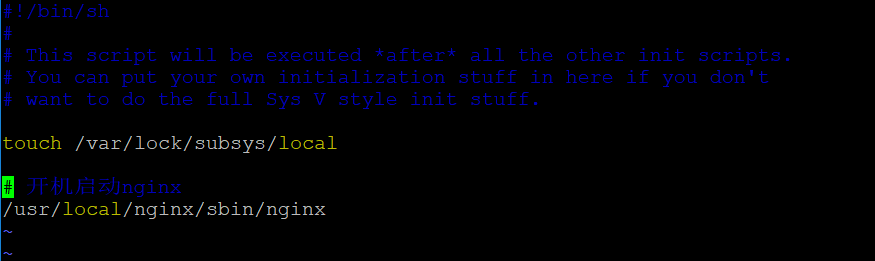
(9)配置nginx开机自启动

    vim /etc/rc.d/rc.local
 

 负载均衡配置

(1)配置 nginx.conf

server节点上面增加如下配置

upstream fuzaitest{

server 172.25.25.1:80;

server 172.25.25.3:80;

}

Server{

location / {

proxy_pass http://fuzaitest; #添加反向代理,代理地址填写 upstream 声明的名字

proxy_set_header Host $host;

#重写请求头部,保证网站所有页面都可访问成功