惯性聚合 高效追踪和阅读你感兴趣的博客、新闻、科技资讯
阅读原文 在惯性聚合中打开

推荐订阅源

Simon Willison's Weblog
Help Net Security
Help Net Security
P
Privacy International News Feed
T
Threat Research - Cisco Blogs
C
Cisco Blogs
C
CERT Recently Published Vulnerability Notes
NISL@THU
NISL@THU
L
LINUX DO - 热门话题
Security Latest
Security Latest
A
Arctic Wolf
G
GRAHAM CLULEY
月光博客
月光博客
S
Securelist
D
Docker
J
Java Code Geeks
T
Troy Hunt's Blog
T
Tenable Blog
让小产品的独立变现更简单 - ezindie.com
SecWiki News
SecWiki News
S
Security @ Cisco Blogs
量子位
freeCodeCamp Programming Tutorials: Python, JavaScript, Git & More
L
LINUX DO - 最新话题
Recent Commits to openclaw:main
aimingoo的专栏
aimingoo的专栏
博客园 - 【当耐特】
H
Heimdal Security Blog
The Hacker News
The Hacker News
博客园 - 三生石上(FineUI控件)
Application and Cybersecurity Blog
N
Netflix TechBlog - Medium
Vercel News
Vercel News
Forbes - Security
Forbes - Security
B
Blog RSS Feed
H
Hackread – Cybersecurity News, Data Breaches, AI and More
IT之家
IT之家
B
Blog
MongoDB | Blog
MongoDB | Blog
博客园 - 聂微东
Google DeepMind News
S
Secure Thoughts
Threat Intelligence Blog | Flashpoint
C
Check Point Blog
云风的 BLOG
云风的 BLOG
CTFtime.org: upcoming CTF events
T
The Blog of Author Tim Ferriss
L
Lohrmann on Cybersecurity
F
Full Disclosure
D
Darknet – Hacking Tools, Hacker News & Cyber Security
P
Proofpoint News Feed

博客园 - 秋忆

跑在Docker下的RHEL7编译Java8源码包 利用pyinotify监控文件内容,像tailf命令但比它更强 AWS SDK for C++调用第三方S3 API Windows 10恢复Shift+右键打开命令提示符窗口 TP-LINK WR841N V8刷OpenWRT Build subversion 1.8 with SSL on OS X Yosemite OpenWrt自定义和官方一样的固件 Windows 10下通过蓝牙连接iPhone个人热点进行共享上网 Broadcom有线网卡在Windows 8/8.1/10下使用系统自带驱动会断网的解决办法 BCM94352HMB蓝牙BCM20702A0在Ubuntu 14.04下的驱动方法 C语言实现GPT头和分区表的读取(gcc) C/C++用OpenSSL库进行Base64编码 把Windows CA根证书安装到iPhone 编程实现设置“启动与故障恢复”的“在需要时显示恢复选项的时间” Windows x64与x86混合编程需要注意的API 查看.NET程序集编译类型命令corflags 开启Windows7多用户远程桌面 Windows优化大师已经成为“流氓大师” C#打开目录并选中文件(夹)的实现
笔记本电脑键盘状态助手KeyboardState
秋忆 · 2011-10-09 · via 博客园 - 秋忆

用途

目前许多笔记本电脑的键盘越来越省工,不但数字键盘锁灯去除了,连大小写状态灯也去掉了。对于平时的使用造成非常的不便。KeyboardState小工具就是为了解决此问题而诞生的。

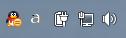
当键盘处于平常状态(小写、数字键盘关)时,显示小写a


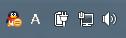
当键盘处于大写、数字键盘关时,显示大写A


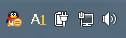
当键盘处于大写、数字键盘开时,显示大写A和数字1


简单直观。

安装

无需安装,绿色环保!直接运行KeyboardState.exe即可使用。如果安全软件提示拦截,请允许执行。

建议加入每次开机启动,以管理员身份运行“KeyboardState.exe --install”可设置开机启动。

卸载

以管理员身份运行“KeyboardState.exe --uninstall”可移除开机启动。

不足

如果操作系统是Vista及以上版本且开启了UAC,而KeyboardState.exe没有以管理员身份运行,那么当在其它属于管理员身份运行的程序下按键盘大小写开关和数字键盘开关时,KeyboardState状态显示不能改变。

解决办法:以管理员身份运行KeyboardState.exe。

下载地址:

程序:/Files/qiuyi21/KeyboardState.7z

源代码: /Files/qiuyi21/KeyboardState_src.7z

2011年10月8日   秋忆