





TomatoLog 是一个基于 .NETCore 平台的产品。
The TomatoLog 是一个中间件,包含客户端、服务端,非常容易使用和部署。
客户端实现了ILoggerFactory,使用服务注入成功后即可使用,对业务入侵非常小,也支持通过客户端调用写入日志流。
TomatoLog 的客户端和服务端目前都是基于 .NETCore 版本,客户端提供了三种日志流传输方式,目前实现了 Redis/RabbitMQ/Kafka 流。如果希望使用非 .NETCore 平台的客户端,你可以自己开放其它第三方语言的客户端,通过实现 TomatoLog 传输协议,将数据传送到管道(Redis/RabbitMQ/Kafka)中即可。
TomatoLog 服务端还提供了三种存储日志的方式,分别是 File、MongoDB、Elasticsearch,存储方式可以通过配置文件指定。在 TomatoLog 服务端,我们还提供了一个Web 控制台,通过该控制台,可以对日志进行查询、搜索,对服务过滤器进行配置,警报配置、通知发送等等,其中,可使用的警报通知方式有:SMS 和 Email 两种方式,但是,SMS 其本质是一个 Http 请求,通过 SMS 的配置,可以实现向所有提供了 Http 接口的网关发送通知。

选择安装以下客户端中的任意一项
Install-Package TomatoLog.Client.Redis
Install-Package TomatoLog.Client.RabbitMQ
Install-Package TomatoLog.Client.Kafka
{
  "TomatoLog": {
    "LogLevel": "Information",
    "ProjectLabel": "Example",
    "ProjectName": "Example",
    "SysOptions": {
      "EventId": true,
      "IP": true,
      "IPList": true,
      "MachineName": true,
      "ProcessId": true,
      "ProcessName": true,
      "ThreadId": true,
      "Timestamp": true,
      "UserName": true
    },
    "Tags": null,
    "Version": "1.0.0",
    "Exchange": "TomatoLog-Exchange",
    "ExchangeType": "direct",
    "Host": "127.0.0.1",
    "Password": "123456",
    "Port": 5672,
    "QueueName": "TomatoLog-Queue",
    "RouteKey": "All",
    "UserName": "lgx",
    "vHost": "TomatoLog"
  }
}
public void ConfigureServices(IServiceCollection services)
{
    services.AddSingleton<ITomatoLogClient>(factory =>
    {
        var options = this.Configuration.GetSection("TomatoLog").Get<EventRabbitMQOptions>();
        var client = new TomatoLogClientRabbitMQ(options);

        return client;
    });
    ...
}
public void Configure(IApplicationBuilder app, IHostingEnvironment env, ILoggerFactory factory, ITomatoLogClient logClient)
{
    factory.UseTomatoLogger(logClient);
	...
}
[Route("api/[controller]")]
[ApiController]
public class HomeController : ControllerBase
{
    private readonly ITomatoLogClient logClient;
    private readonly ILogger logger;
    public HomeController(ILogger<HomeController> logger, ITomatoLogClient logClient)
    {
        this.logger = logger;
        this.logClient = logClient;
    }

    [HttpGet]
    public async Task<ActionResult<IEnumerable<string>>> Get()
    {
        // Used by ILogger
        this.logger.LogError("测试出错了");

        // Used By ITomatoLogClient
        try
        {
            await this.logClient.WriteLogAsync(1029, LogLevel.Warning, "Warning Infomation", "Warning Content", new { LastTime = DateTime.Now, Tips = "Warning" });
            throw new NotSupportedException("NotSupported Media Type");
        }
        catch (Exception ex)
        {
            await ex.AddTomatoLogAsync();
        }

        return new string[] { "value1", "value2" };
    }
}
首先,下载服务端压缩包文件 版本预览 ,该压缩包仅包含项目运行必需文件,托管该服务端的服务器上必须按照 DotNET Core SDK 2.2+
接下来,解压文件,修改 appsetting.Environment.json 文件将服务器进行配置,将配置好的服务端部署到你的服务器上,可以为 TomatoLog 选择 IIS 或者其它托管方式,服务端默认运行端口为:20272.
{
  "Logging": {
    "IncludeScopes": false,
    "LogLevel": {
      "Default": "Debug",
      "System": "Information",
      "Microsoft": "Information"
    }
  },
  "TomatoLog": {
    "Cache-Redis": null, // 过滤器会使用该分布式缓存进行策略考量,如果有配置
    "Config": {
      "SysConfig": "Config/SysConfig.json" // 系统配置文件,可通过Web控制台进行配置
    },
    "Storage": {
      "Type": "ToFile", //ToFile/ToES/ToMongoDB 可以选择的存储方式
      "File": "D:\\TomatoLog\\Storage", // 如果Type选择了 ToFile ,则这里必须指定绝对路径
      "ES": "http://127.0.0.1:9200/", // 如果Type选择了ToES,这里必须配置 Elasticsearch 服务地址
      "MongoDB": "mongodb://root:root@127.0.0.1:27017/admin" //如果Type选择了ToMongoDB,这里必须配置 ToMongoDB 数据库链接
    },
    "Flow": {
      "Type": "RabbitMQ", // Redis/RabbitMQ/Kafaka 这里指定客户端和服务器的传输管道类型,两端配置必须一致
      "Redis": {
        "Connection": null,
        "Channel": "TomatoLogChannel"
      },
      "RabbitMQ": { // 如果使用了 RabbitMQ,则必须配置该节点
        "Host": "127.0.0.1",
        "Port": 5672,
        "UserName": "root",
        "Password": "123456",
        "vHost": "TomatoLog",
        "Exchange": "TomatoLog-Exchange",
        "ExchangeType": "direct",
        "QueueName": "TomatoLog-Queue",
        "RouteKey": "All",
        "Channels": 1 // 运行的消息队列实例数量
      },
      "Kafka": {
        "Group": "TomatoLogServer",
        "BootstrapServers": "127.0.0.1:9092",
        "Topic": "TomatoLog"
      }
    }
  }
}
在浏览器中打开地址:http://localhost:20272/

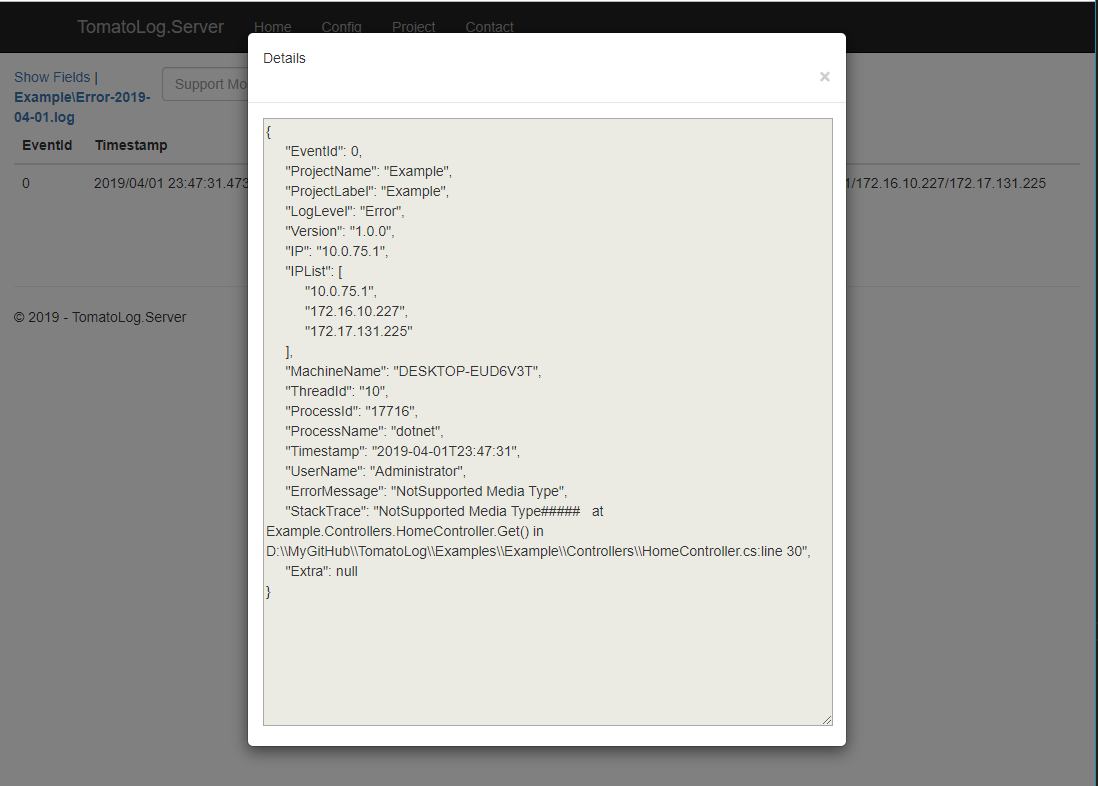

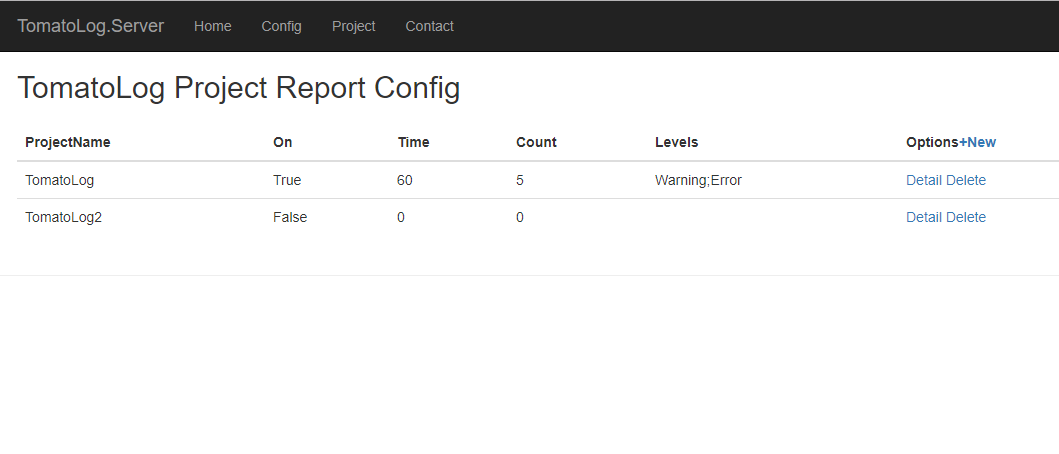
不管是从项目结构还是解决方案,我都强调简单就是最美的根本要求,解决方案的内容虽然看起来很多,但是你也只需要按需引用其中一个客户端就可以了,服务端更是如此,全站都打包在一个 .NETCore 的应用程序中,程序的警报配置都是存储在配置文件中的,无需数据库支持。
此内容由惯性聚合(RSS阅读器)自动聚合整理,仅供阅读参考。 原文来自 — 版权归原作者所有。