


去年的时候,曾经简单对比了一下golang和nodejs的http模块的性能,见: golang与node.js的http对比测试
那时golang还没发布go1,http模块比nodejs差得很远。
go1出来已经有一段时间了,我知道go的http模块性能已经有比较大的提升,但是最近依然见到有人提起去年写的那篇文章,为避免产生对golang的误解,对于go1的最新测试结果如下。
测试是在Ubuntu 12.04 64位系统下进行的:
qleelulu@nb:~$ uname -a
Linux nb 3.2.0-25-generic #40-Ubuntu SMP Wed May 23 20:30:51 UTC 2012 x86_64 x86_64 x86_64 GNU/Linux

qleelulu@nb:~$ sudo dmidecode | grep CPU
Socket Designation: CPU
Version: Intel(R) Core(TM) i5 CPU M 480 @ 2.67GHz (注:双核4线程)
go的版本:
qleelulu@nb:~$ go version
go version go1
nodejs的版本:
qleelulu@nb:~$ node -v
v0.8.6
nodejs是单进程,只使用一个CPU,所以这里golang在代码中需要限制为只使用一个CPU。
package main

import (
    "fmt"
    "log"
    "net/http"
    "runtime"
)

func main() {
    // 限制为1个CPU
    runtime.GOMAXPROCS(1)

    http.HandleFunc("/", func(w http.ResponseWriter, r  *http.Request) {
        fmt.Fprint(w, "Hello, world.")
    })

    log.Fatal(http.ListenAndServe(":8080", nil))
}
golang请求结果:
qleelulu@nb:~/sources/test$ curl -i http://127.0.0.1:8080/
HTTP/1.1 200 OK
Date: Sun, 12 Aug 2012 07:21:00 GMT
Transfer-Encoding: chunked
Content-Type: text/plain; charset=utf-8

Hello, world.
golang单cpu的ab测试结果:
qleelulu@nb:~$ ab -c 100 -n 5000 http://127.0.0.1:8080/
This is ApacheBench, Version 2.3 <$Revision: 655654 $>

Server Software:

Server Hostname: 127.0.0.1
Server Port: 8080

Document Path: /
Document Length: 13 bytes

Concurrency Level: 100
Time taken for tests: 0.593 seconds
Complete requests: 5000
Failed requests: 0
Write errors: 0
Total transferred: 550000 bytes
HTML transferred: 65000 bytes
Requests per second: 8427.78 [#/sec] (mean)
Time per request: 11.866 [ms] (mean)
Time per request: 0.119 [ms] (mean, across all concurrent requests)
Transfer rate: 905.33 [Kbytes/sec] received
...
共测试五次,五次结果分别如下:
Requests per second: 8427.78 [#/sec] (mean)
Requests per second: 7980.73 [#/sec] (mean)
Requests per second: 7509.63 [#/sec] (mean)
Requests per second: 8242.47 [#/sec] (mean)
Requests per second: 8898.19 [#/sec] (mean)
golang单cpu的webbench测试结果:
qleelulu@nb:~$ webbench -t 30 -c 200 http://127.0.0.1:8080/
Webbench - Simple Web Benchmark 1.5
Copyright (c) Radim Kolar 1997-2004, GPL Open Source Software.

Benchmarking: GET http://127.0.0.1:8080/
200 clients, running 30 sec.

Speed=463124 pages/min, 849060 bytes/sec.
Requests: 231562 susceed, 0 failed.
共测试五次,结果如下:
Speed=463124 pages/min, 849060 bytes/sec.
Speed=455322 pages/min, 834757 bytes/sec.
Speed=461536 pages/min, 846149 bytes/sec.
Speed=454798 pages/min, 833803 bytes/sec.
Speed=468592 pages/min, 859085 bytes/sec.
golang单CPU webbench测试时,CPU使用率如下:

nodejs 单CPU测试代码:
var http = require('http');
http.createServer(function (req, res) {
    res.end('Hello, World.');
}).listen(8080, '127.0.0.1');
console.log('Server running at http://127.0.0.1:8080/');
nodejs请求结果:
qleelulu@nb:~/$ curl -i http://127.0.0.1:8080/
HTTP/1.1 200 OK
Date: Sun, 12 Aug 2012 07:45:23 GMT
Connection: keep-alive
Transfer-Encoding: chunked

Hello, World.
为方便对比golang的返回结果,再贴一次golang的返回结果:
golang请求结果:
qleelulu@nb:~/sources/test$ curl -i http://127.0.0.1:8080/
HTTP/1.1 200 OK
Date: Sun, 12 Aug 2012 07:21:00 GMT
Transfer-Encoding: chunked
Content-Type: text/plain; charset=utf-8

Hello, world.
nodejs的单cpu ab测试结果:
qleelulu@nb:~$ ab -c 100 -n 5000 http://127.0.0.1:8080/
This is ApacheBench, Version 2.3 <$Revision: 655654 $>

Server Software:
Server Hostname: 127.0.0.1
Server Port: 8080

Document Path: /
Document Length: 13 bytes

Concurrency Level: 100
Time taken for tests: 0.696 seconds
Complete requests: 5000
Failed requests: 0
Write errors: 0
Total transferred: 440000 bytes
HTML transferred: 65000 bytes
Requests per second: 7185.91 [#/sec] (mean)
Time per request: 13.916 [ms] (mean)
Time per request: 0.139 [ms] (mean, across all concurrent requests)
Transfer rate: 617.54 [Kbytes/sec] received
共测试5次,结果如下
Requests per second: 7185.91 [#/sec] (mean)
Requests per second: 7484.97 [#/sec] (mean)
Requests per second: 7388.25 [#/sec] (mean)
Requests per second: 7411.80 [#/sec] (mean)
Requests per second: 7571.10 [#/sec] (mean)
nodejs单cpu的webbench测试结果:
qleelulu@nb:~$ webbench -t 30 -c 200 http://127.0.0.1:8080/
Webbench - Simple Web Benchmark 1.5
Copyright (c) Radim Kolar 1997-2004, GPL Open Source Software.

Benchmarking: GET http://127.0.0.1:8080/
200 clients, running 30 sec.

Speed=432582 pages/min, 634453 bytes/sec.
Requests: 216291 susceed, 0 failed.
共测试5次,结果如下
Speed=432582 pages/min, 634453 bytes/sec.
Speed=434868 pages/min, 637803 bytes/sec.
Speed=435608 pages/min, 638891 bytes/sec.
Speed=434466 pages/min, 637216 bytes/sec.
Speed=431816 pages/min, 633330 bytes/sec.
nodejs单CPU webbench测试时,CPU使用率如下:

单CPU测试go和nodes的ab测试对比结果:
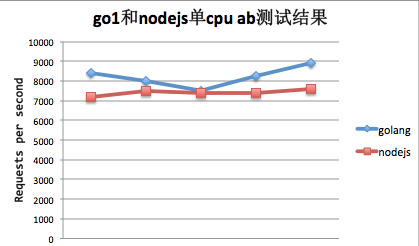
从单CPU的测试结果来看,golang和nodejs的性能差不多,golang要稍微比nodejs的性能好一点。
但是从CPU的使用率来看,特别是在webbench测试的时候,测golang的时候,我笔记本上4个CPU的使用率都在50%左右,而测nodejs的时候,则明显是有一个CPU的使用率是在100%,其他的在30%左右。
对于nodejs, 一个CPU占用去到100%是很正常的,V8引擎也从来都是非常吃CPU的。对于golang为什么限制为仅使用1个CPU,而测试时4个CPU的使用率都去到50%,可能和go对于goroutine的调度方式有关系。
go测试代码:
因为是在同一台机器上测试的,所以限制使用的CPU数为机器的CPU数减一。
package main

import (
    "fmt"
    "log"
    "net/http"
    "runtime"
)

func main() {
    // 限制为CPU的数量减一
    runtime.GOMAXPROCS( runtime.NumCPU() - 1 )

    http.HandleFunc("/", func(w http.ResponseWriter, r *http.Request) {
        fmt.Fprint(w, "Hello, world.")
    })

    log.Fatal(http.ListenAndServe(":8080", nil))
}
golang的多CPU ab测试结果,共测试5次,结果如下:
$ ab -c 100 -n 5000 http://127.0.0.1:8080/

Requests per second:    14391.80 [#/sec] (mean)
Requests per second:    14307.09 [#/sec] (mean)
Requests per second:    14285.31 [#/sec] (mean)
Requests per second:    15182.34 [#/sec] (mean)
Requests per second:    14020.53 [#/sec] (mean)
golang的多CPU webbench测试结果,共测试5次,结果如下:
$ webbench -t 30 -c 200 http://127.0.0.1:8080/

Speed=750418 pages/min, 1375982 bytes/sec.
Speed=750492 pages/min, 1375909 bytes/sec.
Speed=749128 pages/min, 1373408 bytes/sec.
Speed=749720 pages/min, 1374486 bytes/sec.
Speed=753080 pages/min, 1380698 bytes/sec.
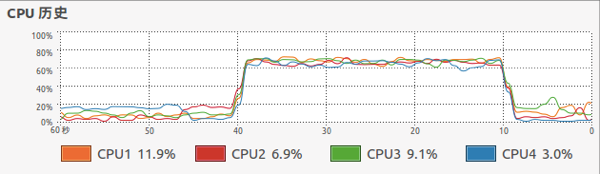
golang多CPU webbench测试时,CPU使用率如下:
nodejs测试代码
使用cluster,使用CPU数量减一个CPU
var cluster = require('cluster');
var http = require('http');
var numCPUs = require('os').cpus().length;

if (cluster.isMaster) {
    // Fork workers. fock num of CPUS - 1 works
    for (var i = 1; i < numCPUs; i++) {
        cluster.fork();
    }

    cluster.on('exit', function(worker, code, signal) {
        console.log('worker ' + worker.process.pid + ' died');
    });
    cluster.on('fork', function(worker, code, signal) {
        console.log('worker ' + worker.process.pid + ' is online');
    });
} else {
    // Workers can share any TCP connection
    // In this case its a HTTP server
    http.createServer(function(req, res) {
        res.writeHead(200);
        res.end("hello world.");
    }).listen(8080);
}
nodejs的多CPU ab测试结果,共测试5次,结果如下:
$ ab -c 100 -n 5000 http://127.0.0.1:8080/

Requests per second:    12694.96 [#/sec] (mean)
Requests per second:    12606.68 [#/sec] (mean)
Requests per second:    12712.68 [#/sec] (mean)
Requests per second:    12851.16 [#/sec] (mean)
Requests per second:    13005.08 [#/sec] (mean)
nodejs的多CPU webbench测试结果,共测试5次,结果如下:
$ webbench -t 30 -c 200 http://127.0.0.1:8080/

Speed=791932 pages/min, 1148301 bytes/sec.
Speed=786516 pages/min, 1140448 bytes/sec.
Speed=797336 pages/min, 1156140 bytes/sec.
Speed=783182 pages/min, 1135619 bytes/sec.
Speed=785206 pages/min, 1138551 bytes/sec.
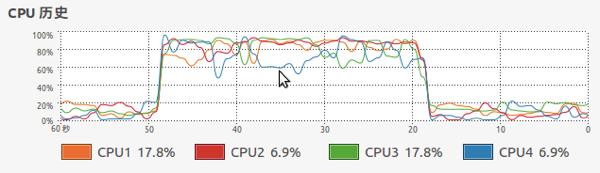
nodejs多CPU webbench测试时,CPU使用率如下:
多CPU测试结果来看,总体上来说go和nodejs的性能也还是差不多。
但从ab测试的结果来看,go的QPS要比nodejs高一点,
而从webbench测试结果来看,nodejs的QPS要比go高,但是go的bytes/sec又要比nodes高,可能是go的http返回头比nodes要稍微大一点的原因。
多CPU测试时的CPU使用情况和单cpu测试时的情况差不多,
golang对4个cpu的占用率都在70%左右,
而node则是对3个CPU的占用在90%以上,还有一个CPU的占用率则要稍微低点。
从整体来看,golang和nodejs的http模块性能不相上下。
go1的性能还是比较喜人的,加上go语音的简洁,是个不错的选择(目前可能go的一些第三方模块都不是很成熟)。
此内容由惯性聚合(RSS阅读器)自动聚合整理,仅供阅读参考。 原文来自 — 版权归原作者所有。