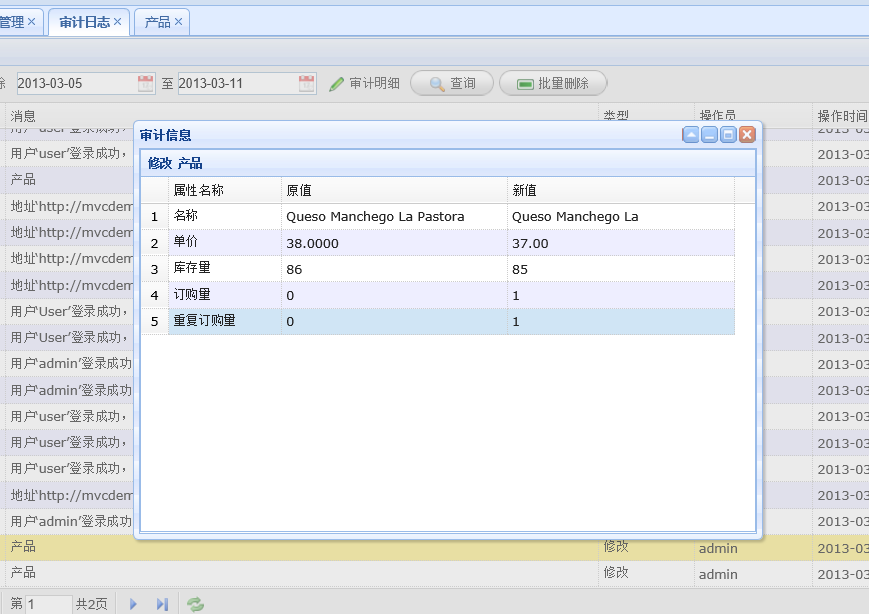
YbSoftwareFactory 的 ASP.NET MVC 插件所生成的项目目前支持缓存、审计日志和导出功能。
1、缓存功能:
缓存的目的是提高性能,缓存的设计也有一定的规范性可言,主要需要注意的是缓存不是完全可靠的,可能会被系统自动移除,同时易变的数据也不适合缓存。因此考虑到具体的场景,仅对审计日志、数据字典等不经常变化的数据进行了缓存,同时,即使这些数据被修改或删除也要及时把对应的缓存内容清除,以确保数据的准确。
缓存的实现借鉴了NopCommerce的实现方式,采用扩展方法加回调函数的做法,这样在任何需要缓存的地方都能进行缓存的处理,扩展方法的核心代码如下:
/// <summary>
/// Extensions
/// </summary>
public static class CacheExtensions
{
public static T Get<T>(this ICacheManager cacheManager, string key, Func<T> acquire)
{
return Get(cacheManager, key, 60, acquire);
}
public static T Get<T>(this ICacheManager cacheManager, string key, int cacheTime, Func<T> acquire)
{
if (cacheManager.IsSet(key))
{
return cacheManager.Get<T>(key);
}
else
{
var result = acquire();
//if (result != null)
cacheManager.Set(key, result, cacheTime);
return result;
}
}
}
具体的缓存调用可以这样,是不是很灵活:-)
string key = string.Format(CacheKeyList.CONCRETEDATA_BY_TYPE_KEY, concreteType);
var items = _cacheManager.Get(key, () =>
{
var list = ConcreteDataApi.FindAllByType(concreteType).Where(c => c.Status == 0);
return list;
});
2、审计日志功能:
审计的概念涉及到系统安全,数据审计的目的之一是解决“授权侵犯”的问题(特指已授权用户执行非法操作的情况)。本系统的审计日志功能和log4net相兼容,可以通过配置log4net组件进行日志记录的读写,同时增强的数据审计功能还可自动记录业务数据添加、修改、删除的详细变化情况,是不是很强大:-)
3、数据导出功能:
在ASP.NET MVC下数据导出比较简单,但本系统需实现的是在 web api下实现数据的导出和下载,目前这方面的资料较少。经过测试,目前下面的代码可行,感兴趣的朋友可以测试和了解一下,有了数据导出功能是不是很方便:-)
1 public static HttpResponseMessage Download(Stream stream,string headerValue, string fileName)
2 {
3 var response = new HttpResponseMessage { Content = new StreamContent(stream) };
4 response.Content.Headers.ContentDisposition = new ContentDispositionHeaderValue("attachment")
5 {
6 FileName = fileName
7 };
8 response.Content.Headers.ContentType = new MediaTypeHeaderValue(headerValue);
9 response.Content.Headers.ContentLength = stream.Length;
10 return response;
11 }
4、数据字典等数据访问层的实现:
数据字典、审计日志等功能需要支持多种数据库环境,同时还要方便部署,这里通过Provider模式实现,其中连接字符串可以在配置文件中用标准方法进行配置,也能在程序中设置、并自定义加减密,而这无需在任何业务系统中编写代码,只需配置好数据库相关表就能进行调用,很是方便,如下是Provider的初始化代码:
#region Initialize
public override void Initialize(string name, System.Collections.Specialized.NameValueCollection config)
{
// Validate arguments
if (config == null) throw new ArgumentNullException("config");
if (string.IsNullOrEmpty(name)) name = "YbHierarchyDataProvider";
if (String.IsNullOrEmpty(config["description"]))
{
config.Remove("description");
config.Add("description", "Yb hierarchy data provider");
}
if (String.IsNullOrEmpty(config["tableName"]))
{
config.Remove("tableName");
config.Add("tableName", "HierarchyData");
}
// Initialize base class
base.Initialize(name, config);
// Read connection string
this.ConnectionStringName = config.GetConfigValue("connectionStringName", null);
if (string.IsNullOrWhiteSpace(this.ConnectionStringName)) throw new ConfigurationErrorsException(Resources.Required_connectionStringName_attribute_not_specified);
this.connectionStringSetting = ConfigurationManager.ConnectionStrings[this.ConnectionStringName];
if (this.connectionStringSetting == null) throw new ConfigurationErrorsException(string.Format(Resources.Format_connection_string_was_not_found, this.ConnectionStringName));
if (string.IsNullOrEmpty(this.connectionStringSetting.ProviderName)) throw new ConfigurationErrorsException(string.Format(Resources.Format_connection_string_does_not_have_specified_the_providerName_attribute, this.ConnectionStringName));
//激发设置连接字符串前的事件处理程序,主要目的是解密连接字符串
ConnectionStringChangingEventArgs args = RaiseConnectionStringChangingEvent(connectionStringSetting.ConnectionString);
if (args == null) throw new ProviderException(Resources.Connection_string_cannot_be_blank);
if (!this.connectionStringSetting.ConnectionString.Equals(args.ConnectionString))
{
this.connectionStringSetting =
new ConnectionStringSettings(this.ConnectionStringName, args.ConnectionString, this.connectionStringSetting.ProviderName);
}
if (string.IsNullOrEmpty(this.connectionStringSetting.ConnectionString)) throw new ProviderException(Resources.Connection_string_cannot_be_blank);
this.applicationName = config["applicationName"];
this.tableName = config["tableName"];
SecUtility.CheckParameter(ref tableName, true, true, true, 256, "tableName");
}
#endregion
要兼容各类数据库,需要注意的是创建连接时需使用DbConnection而不是SqlConnection,需使用DbCommand而不是SqlCommand等,如下是创建数据库连接的代码,是不是很规范:-)
using (DbConnection db = this.connectionStringSetting.CreateDbConnection())
最后附上Demo地址:http://mvcdemo.yellbuy.com/。
注:当前版本V1.1,已有V1.0版本及源码并需要升级的请及时联系。
此内容由惯性聚合(RSS阅读器)自动聚合整理,仅供阅读参考。 原文来自 — 版权归原作者所有。