



Fine-tuning large language models (LLMs) is where experimentation meets real-world impact. It’s the moment you can teach a model your company’s domain knowledge, calibrate it for specific use cases, or even adjust the tone and format of its responses to better suit your audience.
But none of this magic happens without the right hardware. The right GPU setup speeds up training, enables advanced precision modes, and simplifies scaling across datasets. Whether you’re testing a 7 billion parameter (like Phi-4-mini-instruct) model on a gaming-class GPU in your workstation or orchestrating multi-GPU clusters in the cloud, choosing wisely can help you build efficient, and productive workflows. In this article, we’ll walk through GPU options for finetuning, their trade-offs, and help you match choices to your development goals.
💡Key takeaways:
Fine-tuning large models is highly memory- and compute-intensive. Factors such as VRAM capacity, compute throughput, interconnect bandwidth, and precision support determine whether you can train at all, how fast jobs run, and the total cost.
While full fine-tuning of large models (13B–400B+) typically requires multi-GPU clusters with MI300X/H200 or bare-metal GPUs, techniques like LoRA, QLoRA, mixed precision, and gradient checkpointing allow smaller 7B–13B models to run even on consumer cards like the RTX 5090 (24 GB) or mid-tier GPUs like the L40S.
Developers can start with DigitalOcean Gradient™ AI Droplets (e.g., RTX 4000 Ada, RTX 6000 Ada, L40S) for prototyping and parameter-efficient fine-tuning, or scale to H200 or bare-metal GPU clusters for large-scale training.
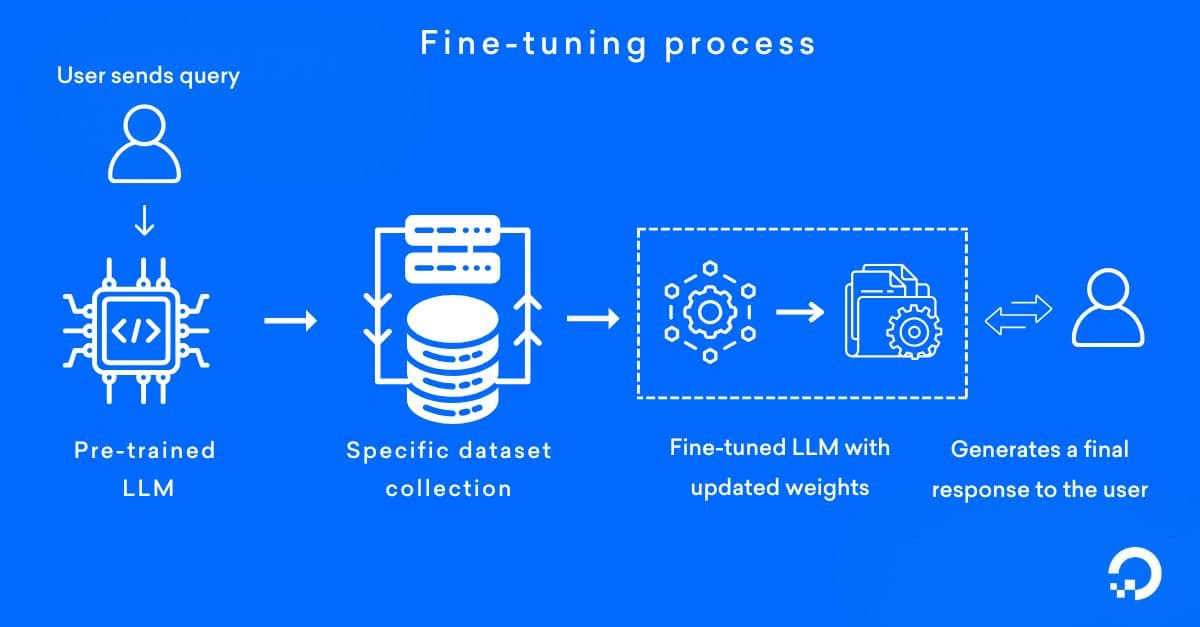
Fine-tuning is the process of taking pre-trained models like LLMs or computer vision transformers and adapting it to a specific task, dataset, or domain. Instead of training from scratch, fine-tuning uses the model’s existing knowledge and adjusts its weights with new data, making it more accurate and efficient for specialized use cases like sentiment analysis, medical imaging used in healthcare, or customer support chatbots.
💡 Confused between RAG and fine-tuning? Read this article to understand how they differ and how you can integrate them in your AI/ML workflow.
The right GPU setup plays an important role in fine-tuning LLMs and neural networks, since the process is both highly memory-intensive and computationally demanding. GPU selection impacts performance, feasibility, cost, and scalability of your training workflow.
| Factor | Description | Example |
|---|---|---|
| Memory capacity (VRAM) | Determines the maximum model size that can fit into GPU memory. | A 13B model may need 200+ GB VRAM for full fine-tuning, and requires multi-GPU A100/H100. With QLoRA, the same model can run on a 24 GB RTX 4090. |
| Compute throughput | The number of CUDA cores, Tensor Cores, and the clock frequency of a GPU affect how fast matrix multiplications and gradient updates can be executed. | An H100 can train up to 4× faster than an A100 using FP8 precision. |
| Interconnect bandwidth | Affects synchronization speed in distributed multi-GPU training. | Eight A100s with NVLink sync faster than the same GPUs communicating over PCIe. |
| Optimizations | Influences efficiency and accuracy trade-offs (FP32, FP16, BF16, FP8). | Training in BF16 uses ~½ the memory of FP32, while FP8 on H100s saves even more. |
Want to fine-tune LLMs affordably? Use DigitalOcean GPU Droplets to fine-tune powerful language models using PEFT techniques like LoRA/QLoRA, quantization, and cost-saving strategies.
7 Strategies for effective GPU cost optimization: Actionable tactics for reducing GPU expenses through smart usage patterns and infrastructure choices.
Fine-tuning large models with the perfect GPU setup involves evaluating your model’s size, the fine-tuning approach you intend to use, and the infrastructure you have access to. The following setup steps will help you to align hardware, optimization techniques, and deployment environments to achieve efficient fine-tuning.
The first step is to estimate the VRAM needed for your target model. A commonly cited guideline is that full fine-tuning requires about 16 GB of VRAM per billion parameters, which means a 7B parameter model may need over 100 GB of GPU memory if trained without optimization. With parameter-efficient methods like LoRA and QLoRA, these requirements might drop drastically, to less than 24 GB.
For instance, a LLaMA-2 7B model can be fine-tuned on a single NVIDIA RTX 4090 (24 GB) when using QLoRA.
After sizing your workload, the next step is to map it to the right class of GPU. Consumer GPUs like the RTX 4000 Ada, RTX 6000 Ada, and L40S are suitable for parameter-efficient fine-tuning methods (such as LoRA and QLoRA), training smaller models up to 7B parameters, and running inference or prototyping workloads. Models like NVIDIA H100 (80 GB) are required for large-scale ML projects, performing full-parameter training or reinforcement learning from human feedback (RLHF).
For example, you can start with DigitalOcean GPU Droplets like NVIDIA L40S GPUs for experimentation and parameter-efficient fine-tuning. As workloads grow, you can scale horizontally by adding multiple GPU Droplets connected via VPC networking, or integrate with external MI300X/H100 GPU providers through hybrid cloud networking.
💡Working on an innovative AI or ML project? DigitalOcean GPU Droplets offer scalable computing power on demand, perfect for training models, processing large datasets, and handling complex neural networks.
Spin up a GPU Droplet today and experience the future of AI infrastructure without the complexity or large upfront investments.
Efficiency in fine-tuning depends not only on GPU hardware but also on how training is executed. Mixed precision training (FP16 or BF16) helps reduce memory usage while retaining accuracy. Gradient checkpointing allows large models to fit into limited VRAM by recomputing activations during backpropagation, while regular training checkpoints protect progress against crashes or preempted cloud instances.
For example, a 13B parameter model that would normally require multiple A100 GPUs can be trained on a single 24 GB GPU with QLoRA and gradient checkpointing. On DigitalOcean GPU Droplets, these checkpoints can be persisted to Block Storage or Spaces, for fault tolerance across runs.
For models in the 30B to 70B parameter range, a single GPU setup is not feasible, and distributed training becomes necessary. Frameworks such as PyTorch Fully Sharded Data Parallel (FSDP) split model parameters, gradients, and optimizer states across multiple GPUs to balance memory consumption. High-bandwidth interconnects like NVLink or NVSwitch help minimize communication bottlenecks in these setups. For instance, fine-tuning a 70B parameter model typically requires eight A100 80 GB GPUs interconnected via NVLink. On the AMD side, Instinct MI300X GPUs use Infinity FabricTM and Infinity Links, which provide comparable high-throughput interconnects.
DigitalOcean simplifies multi-node and multi-GPU workflows,by supporting MLOps, and integrating with frameworks like Hugging Face and DeepSpeed.
💡Fine-tuning workload exceeds single-GPU limits? Check out the tutorial on splitting LLMs across multiple GPUs for a practical guide to model, tensor, and pipeline parallelism.
Renting cloud GPUs is a good option for research teams experimenting with models. For digital native companies and startups, cloud-first approaches offer the advantage of predictable operational expenses and the ability to scale GPU resources up or down based on immediate needs. As workloads scale or become more frequent, larger enterprises may find value in investing in dedicated bare-metal GPU servers for repeated fine-tuning tasks.
While some steps are mandatory for successful fine-tuning, several additional best practices help improve efficiency, reduce costs, and ensure smoother scaling.
Frameworks like DeepSpeed ZeRO or AdamW help reduce the overhead of optimizer states and improve scaling in multi-GPU setups. For smaller LoRA fine-tuning jobs, they are optional, and highly beneficial at larger scales.
💡Learn how to use data/model parallelism and avoid out-of-memory errors in PyTorch. Optimize PyTorch with multi-GPU memory management.
Enable FP16 or BF16 whenever possible to cut memory usage and accelerate throughput compared to FP32. While not strictly required on GPUs with very large VRAM, it is widely used for efficiency.
For example, using FP8 precision on NVIDIA H100s with TensorRT‑LLM for the Mixtral 8×7B model boosts throughput and reduces latency compared to FP16.
Tools such as nvidia-smi or PyTorch profiler help detect under-utilization caused by data loading bottlenecks. Ensuring GPUs stay fully utilized avoids wasting expensive training hours.
💡Once you’ve optimized your fine-tuning jobs at the GPU level, productivity tools help simplify deployment, orchestration, and model management. Watch how LangChain integrates with DigitalOcean Gradient to simplify fine-tuning and inferencing workflows ⬇️
While GPUs help fine-tuning large models, they also have many challenges that might impact feasibility, cost, and efficiency.
Full fine-tuning demands ~16 GB VRAM per 1B parameters, meaning a 13B model may need over 200 GB. Fine-tuning a Falcon-13B model in FP16 might require over 200 GB of VRAM. On a single GPU like the RTX 4090 (24 GB), training might not be possible.
Optimizers like AdamW store multiple copies of model parameters (weights, gradients, momentum, variance). This triples memory usage. For a 13B model (~26 GB weights in FP16), optimizer states can push memory needs beyond 78 GB, requiring multi-GPU setups or ZeRO optimizers.
High-end GPUs like the A100 or H100 are scarce and might be restricted to certain cloud regions. Developers in other geographies may be forced to rely on less powerful GPUs which might limit model size or force multi-GPU configurations.
Fine-tuning requires not just GPU rental costs, but also storage, networking, and electricity for long-running jobs. For instance, a week-long run on eight A100 80 GB GPUs might exceed the budget depending upon cloud providers which makes experiments expensive without careful optimization. Control costs through careful resource sizing, automated job scheduling during off-peak hours, and using parameter-efficient fine-tuning methods that require significantly less compute.
How much VRAM do I need for finetuning a 7B model?
Full fine-tuning of a 7B model in FP16 typically requires 100–120 GB of VRAM (around 16 GB per billion parameters, including weights, gradients, and optimizer states). That means you’d need multiple A100 or H100 GPUs to make it feasible. However, with LoRA or QLoRA, the same 7B model can fit into as little as 12–24 GB VRAM, for training on GPUs like the NVIDIA RTX 4090 or L40S.
Can I finetune LLMs on a consumer GPU?
Yes. Consumer GPUs like the RTX 4000 Ada, RTX 6000 Ada, and L40S can handle parameter-efficient fine-tuning of 7B–13B models using LoRA/QLoRA and mixed precision. You won’t be able to perform full fine-tuning of larger models, but you can still achieve strong results by updating only low-rank adapters while keeping the base model frozen. This is a common approach for startups and researchers who don’t have access to A100/H100 clusters.
What’s the minimum GPU for LLM finetuning?
The absolute minimum is around 12–16 GB VRAM if you’re using QLoRA or other quantization methods. For example, you can fine-tune a 7B model on a single RTX 3060 (12 GB), although training will be slower and batch sizes very limited. For smoother performance, 24 GB VRAM is considered a realistic minimum for most parameter-efficient fine-tuning setups.
How much does it cost to finetune a model?
Costs vary widely based on the GPU provider, model size, GPU type, and whether you’re renting cloud GPUs or running on owned hardware. DigitalOcean GPU pricing: With a 12-month commitment, H100 × 8 priced at $1.99/GPU/hour. MI325X × 8 costs $1.69/GPU/hour, and MI300X × 8 to $1.49/GPU/hour. On-demand pricing starts at $0.76/hour for RTX 4000 Ada, $1.57/hour for RTX 6000 Ada and L40S, $1.99/hour for AMD MI300X (single GPU), and $3.39/hour for a single H100.
How long does finetuning take on different GPUs?
Training time depends on GPU throughput, model size, and fine-tuning method:
A 7B model with QLoRA on an RTX 4090 may take 2–4 days for a full fine-tune run.
The same model on a single A100 80 GB could finish in less than a day.
For a 13B model, full fine-tuning on a single A100 might take 3–5 days, while distributed across 4–8 A100s it can drop to under 2 days.
Fine-tuning very large models (30B–70B) can take a week or more even on multi-GPU clusters, unless highly optimized with frameworks like DeepSpeed ZeRO or PyTorch FSDP.
Unlock the power of GPUs for your AI and machine learning projects. DigitalOcean GPU Droplets offer on-demand access to high-performance computing resources, enabling developers, startups, and innovators to train models, process large datasets, and scale AI projects without complexity or upfront investments.
Key features:
Flexible configurations from single-GPU to 8-GPU setups
Pre-installed Python and Deep Learning software packages
High-performance local boot and scratch disks included
Sign up today and unlock the possibilities of GPU Droplets. For custom solutions, larger GPU allocations, or reserved instances, contact our sales team to learn how DigitalOcean can power your most demanding AI/ML workloads.
此内容由惯性聚合(RSS阅读器)自动聚合整理,仅供阅读参考。 原文来自 — 版权归原作者所有。